WordPress now has a documented path for AI agents. Since WordPress 6.9, plugins can register “abilities” with typed inputs, outputs and permission checks, and the official MCP Adapter publishes those abilities to any client that speaks the Model Context Protocol. In September 2026 three events showed that layer in use: Elementor opened an MCP beta built on WordPress abilities, WordPress 7.1.1 shipped security fixes credited in part to Anthropic and pwn.ai, and the Portuguese community scheduled a full day on AI in Faro. Human Made’s Block Runner, on npm since June 2026, covers the opposite direction: turning agent-written HTML into native blocks.
This article covers what each of those pieces does, according to its own documentation, and what a site owner can configure today.
How AI agents choose a CMS platform
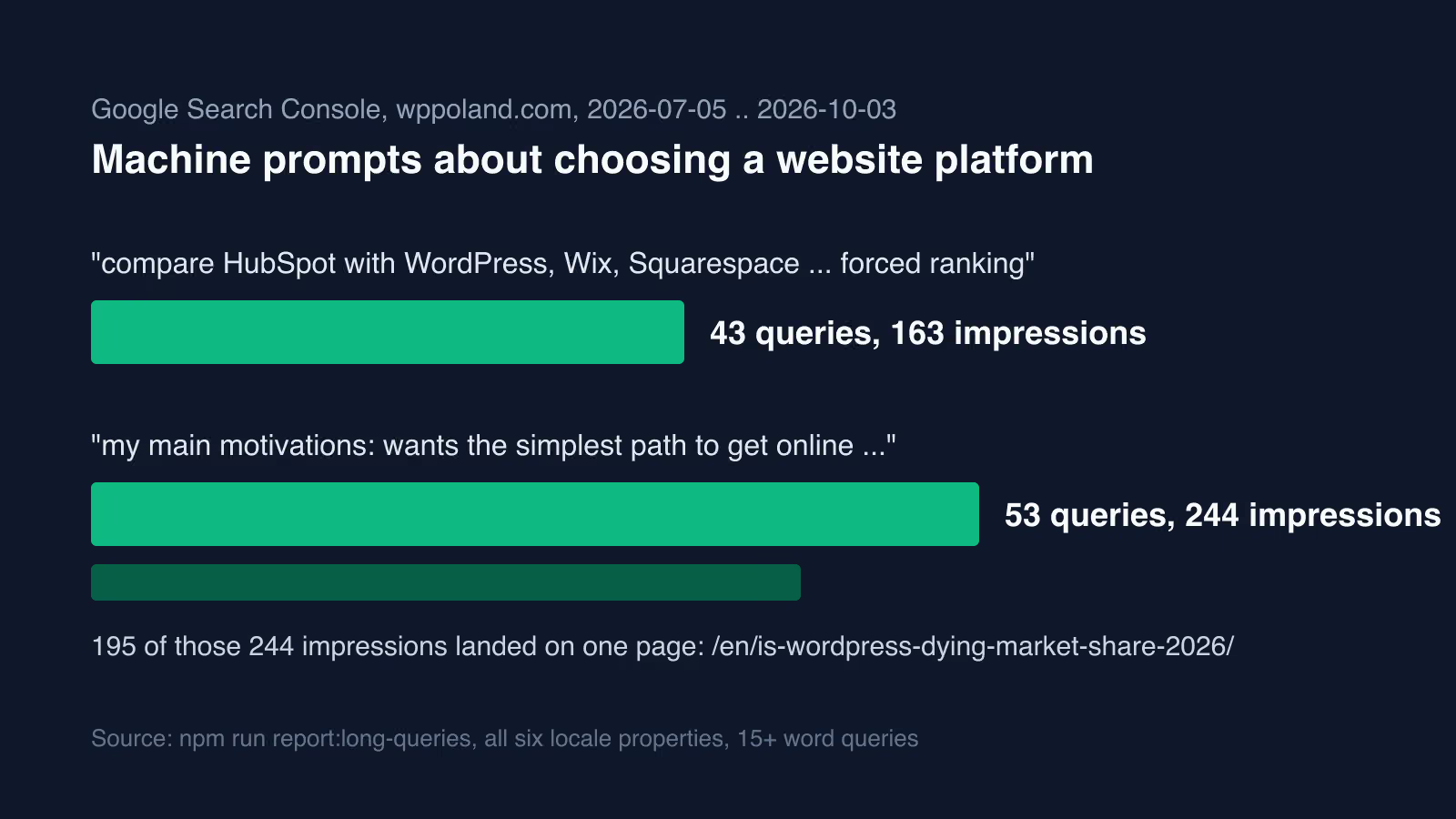
Platform choice used to be a human decision made by owners, agencies and CTOs. Andy Peatling, who spent 17 years at Automattic and now builds Miles, an AI design agent for WordPress, argues that this path is closing. In Ideas for WordPress in an agentic world (14 September 2026) he writes that an agent picks a platform from its training data or a web search, and can set up a simple site in about 30 seconds. His conclusion is blunt: “If WordPress is not being chosen, the project is not going to grow.”
He makes three concrete proposals:
- Two committed agent journeys. WordPress should define and publicly commit to two complete journeys an agent can run end to end, for example a site built entirely by a coding agent, from creation through publishing and hosting. He names Abilities, MCP, Agent Skills, theme metadata and plugin metadata as the plumbing those journeys should connect, with defined permissions, approvals, rollback checkpoints and audit trails.
- Public benchmarks. Track agent success on those journeys, record when and why agents include or exclude WordPress during platform selection, and measure native agent abilities with tools such as WP-bench.
- One agent resource on WordPress.org. Explain where WordPress is the right choice and where it is not, mark current APIs clearly and deprioritise older ones, and structure documentation so agents can ingest it.
The same question ran through a WP Minute episode with Alex Panagis, Brian Coords, Andy Peatling and Mike McAlister, How do we get agents to use WordPress. The show notes record that agents asked to build a website do not always recommend WordPress, that WordPress needs stronger opinions about how agents should use it, and that the Abilities API could become the foundation for agentic WordPress.
What the Elementor MCP server beta does in WordPress
Elementor opened its MCP beta on 15 September 2026. It exposes website-building capabilities through WordPress abilities, so an MCP client can build and edit pages as native Elementor structures instead of returning raw HTML that someone has to paste into a template. Elementor names Claude Code, Claude Desktop, Codex and Cursor as clients, plus any other tool that speaks MCP.
The announcement lists nine capabilities:
- build atomic pages and layouts in one step,
- edit or redesign existing atomic pages and layouts,
- create, apply and reorder classes and variables, set hover states and adjust responsive breakpoints,
- create and manage theme parts such as headers, footers, archives and popups, with display conditions,
- place, fill or create components,
- connect dynamic data such as post fields, custom fields and taxonomies,
- create custom widgets and admin experiences,
- bulk update content, debug errors and fix SEO gaps,
- access every ability registered with the WordPress Abilities API, including those from plugins such as WooCommerce, Yoast, WPForms, Jetpack and ACF.
The last three require Angie, a separate Elementor plugin. The beta has firm limits. Access is restricted to site administrators, the connection is per site, and everything the MCP generates is saved as a draft, not published. Setup requires the beta tester channel and the Atomic Editor. Elementor generates an application password and puts it into a setup prompt for the AI tool, with a manual configuration option. Pro elements still need a Pro plan, and the standard editor stays unchanged for anyone who does not connect.
How Human Made Block Runner validates Gutenberg blocks
Block Runner is an open-source CLI and JavaScript library from Human Made, licensed GPL-2.0-or-later. Its README describes it as a tool that “converts supported HTML into native Gutenberg blocks and checks the generated markup with the Gutenberg packages used by the WordPress editor”. The package was first published to npm on 24 June 2026; version 0.9.10 appeared on 4 October 2026.
The problem it addresses is familiar to anyone who has pasted generated markup into the editor: markup the editor does not recognise ends up as a Custom HTML block or a block that asks for recovery. Block Runner offers four routes, documented in the README:
convertturns HTML into block markup with built-in rules,assemblebuilds page content from a block tree that an agent has planned,authorgenerates the source of a reusable registered block, such as a notice block, for a plugin,validateandfixcheck or canonicalise existing block markup.
The package makes no AI model calls. An external agent can interpret a design and hand Block Runner a structured plan, and deterministic code then assembles and validates the result. A bundled skill for coding agents installs with npx --no-install block-runner skill --install, which writes it to .agents/skills/block-runner and .claude/skills/block-runner. Basic conversion needs Node.js (20.19+, 22.13+ or 24+) and no WordPress site, Docker or agent.
The README is explicit about limits. Unsupported structures can stay as Custom HTML with warnings, and --strict fails the run on fallback blocks and unresolved media. Its own wording: “Valid markup does not prove visual fidelity or compatibility with every site.” The result still has to be checked in the target WordPress install. For background on how blocks, patterns and templates fit together, see our Gutenberg blocks and full site editing guide.
Which flaws WordPress 7.1.1 fixed and who reported them
WordPress 7.1.1 was released on 17 September 2026 as a maintenance and security release: 17 core bug fixes, 19 block editor bug fixes and 11 security fixes. The announcement says to update immediately and that the security fixes are being backported, where necessary, to every branch still eligible for security fixes. The full list with credits, as published:
| Issue | Credited to |
|---|---|
Stored XSS in wpautop() lets an unauthenticated visitor inject script, subject to comment approval | Rafie Muhammad (Awesome Motive) |
HTML API: set_modifiable_text() allows breaking out of a comment via abrupt-closing sequences | Jeremy Felt, WordPress Security Team |
| Stored XSS in some themes that support custom headers | Jeremy Felt, WordPress Security Team |
| Crafted URLs can install and preview an inactive theme from WordPress.org | Paulos Yibelo and pwn.ai |
| Site administrator can network-activate an installed network-only plugin | Jesse McNeil |
| Authenticated path traversal in the REST templates controller | Anthropic |
XML-RPC can publish customize_changeset posts that bypass edit_css checks | Ben Bidner, WordPress Security Team |
| Contributor+ arbitrary post overwrite | Anthropic |
Missing read_post check in attachment_submitbox_metadata() leaks a private parent post title | HDWSec |
| Missing authorisation discloses draft and pending post slugs to Contributor+ | Jakub Herman |
| Comments, including notes, can be reparented by any authenticated user | Justin Hart, Viridis Security |
Anthropic is credited for two of the eleven issues, and pwn.ai shares one credit with Paulos Yibelo. Both Anthropic issues need an authenticated account, one of them only Contributor level. That matters for agent setups: an agent connected to a site acts as a WordPress user, so the role you give it decides which of these bug classes it could reach on an unpatched install. Our WordPress security hardening guide covers roles, updates and monitoring.
WordPress AI event in Faro, October 2026
The Portuguese WordPress community (Comunidade Portuguesa de WordPress) runs WordPress Day for AI Faro 2026 on 24 October 2026 at the AP Eva Senses hotel in Faro. According to the event site it runs from 09:00 to 18:00 with 100 places, and talks are in Portuguese and English.
There are two tracks. The development track covers AI-assisted development, programming tools, APIs, automation, LLM integrations, MCP and WordPress development workflows. The business track is for owners, agencies and professionals and covers productivity, workflow automation and customer experience.
What the WordPress Abilities API is and how an ability is registered
The Abilities API is the layer Elementor builds on. Its server-side part shipped in WordPress 6.9. An ability is a named unit of functionality in the form namespace/ability-name, registered with wp_register_ability() inside a callback on the wp_abilities_api_init hook. Every ability belongs to exactly one category, registered with wp_register_ability_category() on wp_abilities_api_categories_init.
The required arguments are label, description, category, output_schema, execute_callback and permission_callback. input_schema is optional and only needed when the ability takes input. Both schemas are JSON Schema, and input that fails validation never reaches the permission callback. The meta array carries behaviour hints in annotations: readonly, destructive and idempotent.
add_action( 'wp_abilities_api_init', function () {
	wp_register_ability( 'my-plugin/get-site-title', array(
		'label'               => __( 'Get site title', 'my-plugin' ),
		'description'         => __( 'Returns the title of this site.', 'my-plugin' ),
		'category'            => 'site',
		'output_schema'       => array( 'type' => 'string' ),
		'execute_callback'    => fn() => get_bloginfo( 'name' ),
		'permission_callback' => fn() => current_user_can( 'read' ),
		'meta'                => array(
			'annotations'  => array( 'readonly' => true ),
			'show_in_rest' => true,
		),
	) );
} );
Two defaults are worth knowing. Abilities are not exposed over REST unless show_in_rest is set to true, and the REST endpoints under /wp-json/wp-abilities/v1 require an authenticated user and respect each ability’s permission callback. Core itself registers three abilities in 6.9: core/get-site-info, core/get-user-info and core/get-environment-info. The standalone GitHub repository was archived after the merge into core. For worked examples of abilities in editorial workflows, see WordPress AI workflows with the Abilities API.
How the WordPress MCP Adapter exposes abilities to MCP clients
The MCP Adapter is the official WordPress package that turns abilities into MCP tools, resources and prompts. Version 0.7.0, released on 2 October 2026, makes it a canonical plugin. Plugins should declare Requires Plugins: mcp-adapter in their header instead of bundling a copy; bundled copies still work but log a deprecation notice.
Update, . The current version is 0.7.1, released on 16 October 2026. It adds a step-by-step setup guide for site owners: connecting an AI client, creating an application password, testing the connection and troubleshooting common problems. When a client asks for an ability name that does not exist, the adapter answers with matching available abilities or points the client to discovery.
Abilities are private by default. An ability reaches MCP only when meta.public (or meta.mcp.public) is true. The default server, at /wp-json/mcp/mcp-adapter-default-server, exposes three meta-tools instead of one tool per ability: mcp-adapter-discover-abilities, mcp-adapter-get-ability-info and mcp-adapter-execute-ability. The agent lists what is available, fetches the schema it needs, then executes. This keeps the tools/list response at three schemas however many plugins register abilities. A custom server created on the mcp_adapter_init hook does the opposite and lists each chosen ability as its own tool.
There are two ways to connect a client:
- STDIO through WP-CLI:
wp mcp-adapter serve --server=mcp-adapter-default-server --user=admin. The--userflag decides which WordPress user the permission checks run as; without it, the session is unauthenticated. - HTTP through the
@automattic/mcp-wordpress-remoteproxy, which authenticates with an application password.
Security works in two layers. A transport permission callback guards the whole server and defaults to is_user_logged_in(), and each ability still runs its own permission_callback. The adapter supports MCP protocol revisions 2025-11-25 and 2026-07-28; older clients are served through the 2025-11-25 schema.
What the MCP specification requires from tools and hosts
The Model Context Protocol specification defines JSON-RPC 2.0 messages between hosts (the LLM applications), clients (connectors inside the host) and servers (services that provide context and capabilities). Servers can offer resources, prompts and tools. The current revision, 2026-07-28, defines two standard transports: stdio for a subprocess launched by the client, and Streamable HTTP, where each message is a POST to a single endpoint.
The tools chapter sets the rules that matter when an agent writes to WordPress. There should always be a human in the loop able to deny tool invocations. Servers must validate all tool inputs, implement access controls, rate limit invocations and sanitise outputs. Clients should ask for confirmation on sensitive operations, show tool inputs before calling, set timeouts and log tool usage. Tool annotations must be treated as untrusted unless they come from a trusted server.
The WordPress pieces map onto these rules. JSON Schema validation in the Abilities API covers input checking, permission_callback covers access control, the readonly and destructive annotations tell the client which calls need confirmation, and Elementor’s drafts-only behaviour keeps a person between the agent and the published page. The adapter ships no rate limiter (its observability guide only lists an ability_rate_limit error code an ability can return), so rate limiting stays with the hosting layer or the ability itself.
How MCP server cards work for discovery
Agents also need to find a server before they can connect. SEP-2127, which reached Final status as an extension, defines MCP Server Cards: static metadata documents that describe a remote server’s identity, transport endpoints and supported protocol versions. A card can live at any unreserved URI, with streamable-http-url/server-card reserved as the recommended location. For domain-level discovery, an AI Catalog published at /.well-known/ai-catalog.json can link to or embed the cards.
Cards deliberately leave out tools, resources and prompts. The SEP explains that what a server exposes can vary by user, session and configuration, so clients must use the live tools/list call. Cards must not contain credentials or user-specific data, and they are optional: servers without one keep working. On WordPress, the adapter’s endpoint URL is the natural base for a card. Our WPPoland MCP live server guide shows a public read-only server in practice.
How to build WordPress sites for AI agents and GEO
wppoland.com runs on Astro 7 on Cloudflare Pages, with Schema.org data generated from frontmatter on every page. Our working rule is that a page should be as easy for a machine to read as for a person. For WordPress sites the documented route is short: register abilities with honest schemas and annotations, publish only the ones you want public through the MCP Adapter, give the agent a WordPress user with the narrowest role that does the job, and keep content changes as drafts until a person approves them. The same structured data also serves Generative Engine Optimization (GEO). When the hosted WordPress.com Agent and MCP write path is enough versus a self-hosted adapter, see WordPress.com Agent and MCP write.
If you want help with that, see our MCP server development service or ask for an audit.