Short answer: a simple brochure site with a few pages, a contact form and one person in charge of content can be built in an AI site builder or from generated code. A CMS (content management system) such as WordPress is needed when you have a team and content approval, several languages, a shop, integrations with other systems, regular security updates, or a requirement that the site is yours and can be moved. Go through the questions below. A single “yes” on team, shop or integrations usually settles it.
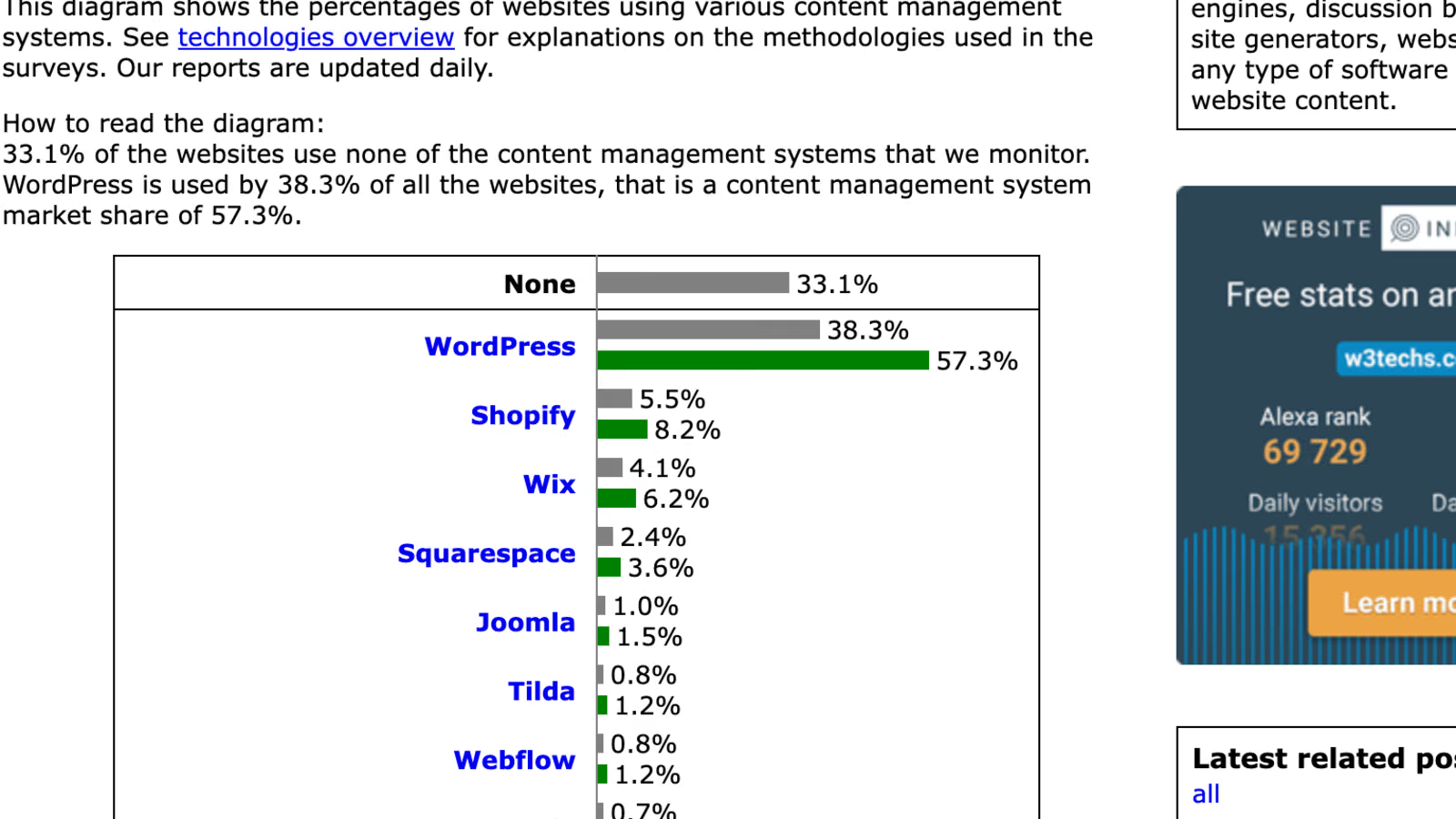 Content management system usage according to W3Techs, as of 28 November 2026. Source: w3techs.com, screenshot taken the same day.
This post is for a business owner who hears “just build it with AI over a weekend” from one side and “only WordPress will do” from the other. I do not compare tools feature by feature. I break the decision into questions you can answer yourself before you pay anyone. The market has its own post, linked below.
Is an AI site builder enough for a business website?
It is enough when the site is small, stable and has one content owner. A typical case is a sole trader, a small practice or a clinic that needs a description of services, contact details, a few photos and a form. Little on such a site changes during the year, and only the owner touches it.
For that case a builder has real advantages. A first draft appears quickly, hosting is included, and running it needs no technical knowledge. There is no reason to set up a CMS, plugins and backups for five pages that change twice a year.
My rule of thumb: if the answer to every question below is “no”, start with a builder. One “yes” on team, shop or integrations is a signal to look at a CMS straight away.
What is the difference between an AI builder, generated code and a CMS?
Clients tend to merge these three things into one “AI site”.
Site builder. A platform where you assemble a site from ready-made blocks and AI suggests layout and copy. The site runs on the provider’s infrastructure, and the provider looks after the server and the platform. Examples are Wix and Squarespace.
Code generator. A tool that writes an application or a website as code from a description. The Lovable documentation describes it as a platform for building, developing and deploying web applications with code that stays editable, and the list of what it creates includes websites and landing pages (Lovable, documentation). The result is a software project with no editing panel.
CMS. Software that separates content from presentation and gives you a panel for managing content, users and permissions. WordPress is the biggest example. The site runs on your hosting or with a hosting provider, and the code and database belong to you.
For a business owner the difference comes down to one thing: who will make changes after launch, and what it costs when that person leaves. A builder and a CMS answer with a panel. Generated code answers with a repository that a developer edits. I wrote about where such sites tend to fall apart in the post on vibecoding vs WordPress.
Who will edit the content and who approves it?
This is the first question that separates a brochure site from a company website. One person who writes and publishes needs nothing beyond a decent editor. When marketing writes the copy, a lawyer checks it and the owner publishes, you need a split of roles.
WordPress has it in the core. The WordPress.org documentation describes five default roles: Administrator, Editor, Author, Contributor and Subscriber. An Editor is “somebody who can publish and manage posts including the posts of other users”, an Author publishes their own posts, and a Contributor is “somebody who can write and manage their own posts but cannot publish them” (WordPress.org, Roles and Capabilities). That is enough for an intern to prepare a text and someone else to approve it.
Builders have roles too. Wix describes collaborator roles, including Content Writer and Site Manager, and apps add their own roles, for example for a blog or a shop (Wix, Roles & Permissions). So what counts is whether the set of roles fits your process. Write down who writes, who reviews, who publishes and who can roll a change back. Then check whether the tool offers separate permissions for that, without giving everyone full access.
The second element is change history. WordPress saves a revision of every saved draft and published update, shows what changed and lets you restore any version with a button (WordPress.org, Revisions). On a site edited by several people, that is the difference between “I will undo it in a minute” and “someone overwrote the offer and we do not know what it said”.
Will the site be in more than one language?
One language is easy in any tool. Several languages change the nature of the site: each language has its own URL, its own title and description, its own navigation, and you have to maintain the links between versions so that a search engine knows it is the same page in another language.
Ask yourself three things. Who translates, and does the translation go through approval like the original? Can each version carry local differences, for example a different offer for Ireland than for the UK? And in a year, with twenty new subpages, will you still know which version is missing?
With two languages and ten pages you can manage by hand in any tool. With four languages and content added regularly you need a place that shows the status of each version and lets you assign a translation to a person. That is an editorial workflow question, and workflow is a strong side of a CMS. With builders and generators alone, expect part of the process to move into a spreadsheet and email.
A language version is not a word-for-word translation: rules, authorities and customer habits differ by market. A tool that bulk-translates one text into every language will not reflect that.
Do you need a shop or integrations with other systems?
This is where the “let us do it over a weekend” story usually ends.
A shop is not just a product list with a button. It is a basket, payments, tax, invoices, shipping, order statuses, returns, transactional emails and, in the EU, information duties towards consumers. Each of these has to be maintained when the payment provider or the rules change. In the WordPress ecosystem a shop is usually run on WooCommerce.
Integrations are the second threshold: accounting, stock, CRM, a booking system, a wholesaler, a courier. If the site has to send orders to an ERP or pull stock levels, you are dealing with code that has to be tested, logged and fixed when the external system changes its API. A builder usually offers ready-made integrations with popular services. When your system is unusual, you hit a missing connector, and the workaround means code and someone who knows it.
Control questions: how many orders a day, how many product variants, how many systems exchange data with the site, and what happens to an order when the external system does not respond. If the answers are “a few, a few, three, I do not know”, you need a project rather than a template. I build shops and integrations on WooCommerce; more on the WooCommerce developer page.
Who will update the site and patch vulnerabilities?
Someone is responsible for the site’s software. The question is who, and on what terms.
In a builder, the provider updates the platform. That is a real advantage, because you never touch the server, the PHP version or the database. You pay for it with dependence on the provider and no say over when changes land.
In WordPress, responsibility is split. The documentation explains that WordPress developers deliberately enabled automatic updates by default for minor releases, which cover bug and security fixes, and for translation files. Plugins and themes update automatically only in special cases, determined by the WordPress.org API response (paraphrased from WordPress.org, Updating WordPress). The same page recommends a backup before updating and warns that without a backup of the whole site and database, rolling back is “almost impossible”. So the core partly patches itself, and everything else needs someone to run it.
In generated code, responsibility is yours. The project has dependencies, meaning libraries, and those have vulnerabilities too. Nobody updates them unless there is a person who knows the project. It can still be organised, but it has to be done deliberately.
Ask yourself: a year from now, is there someone who knows this site and is responsible for its updates? If not, that someone can be ongoing care. I describe it on the WordPress website maintenance page: updates tested before release, backups, monitoring and a report. The same work has to be done on an all-in-one platform too. There the provider does it, and you do not see its scope.
Who owns the site and can you move it?
Check this before you buy, because after a year the answer is expensive.
Ask the tool four questions:
- Can I export content, images and URL structure in a usable format?
- Can the code or template run outside the platform?
- What happens to my domain and URLs if I cancel?
- Who holds the administrator account, and which company is it registered to?
In code generators the answer can be favourable. The Lovable documentation describes two-way synchronisation of a project with a GitHub repository and notes that repositories created by Lovable are private by default. It also says the project code is stored and managed in the platform, and it does not describe rights to the code, so read the terms (Lovable, GitHub integration). A repository, though, is code in which your employee cannot fix the price list. That takes a panel built on top of the repository, or hand-edited code.
In WordPress the code and database sit on a hosting account you choose. You can change the company that runs your site and change hosting without rebuilding everything. Moving is not free: it takes work and testing. But the route exists and is well known.
What about search engines and AI answers?
Neither Google nor AI assistants can find content a crawler cannot see. What matters is the form in which the server returns the content. Generated applications are sometimes rendered in the browser, so the page source is an almost empty document plus a large script. There is a simple test: open the page source in your browser and search for your own text. If it is not there, a search engine may not see it, or may see it late. The test is described in detail in the post on vibecoding vs WordPress.
Builders and WordPress usually return ready HTML. Editorial work remains: titles, descriptions, URLs, internal links, structured data that matches the visible content. That work has to be done in every tool.
How do I decide: a comparison table
| Question | A builder or AI-generated code is enough | You need a CMS |
|---|---|---|
| Who edits content | One person | Several people with different roles |
| Approval of texts | None | Author writes, editor approves |
| Change history | Not needed | Rollback and version comparison needed |
| Languages | One, maybe two | Several, with a separate workflow |
| Shop | None or a few products | Catalogue, payments, invoices, returns |
| Integrations | Standard, ready-made | Own systems, ERP, CRM, API |
| Updates | The platform provider | Someone is responsible for the whole |
| Ownership and moving | Does not matter | Code, database and domain should be yours |
| Lifespan of the site | Up to a year, then a change | Many years, ongoing development |
The first column fits a site you replace every year or so, the second a site that is part of the business.
Checklist for a business owner
Go through it before you order or generate anything.
- Write down how many people will edit content and who approves it.
- List the languages the site should work in a year from now, not only today.
- Write down what a visitor should do on the site: write, call, buy, book.
- If they buy, list the payments, invoices, shipping and returns you must handle.
- List the systems the site has to exchange data with.
- Decide who will update the software and make backups a year from now.
- Check how to export the content and whether the code can run outside the platform.
- Check in the account who owns the domain, the hosting and the admin panel.
- Open the page source of a test site and find your own text in it.
- Decide what happens to the site if its author stops answering messages.
If most answers are “one person, one language, no shop, no integrations”, a builder makes sense. If several answers need more than one sentence, the site is part of how the business runs, not a poster.
Can I start with an AI-built site and move to WordPress later?
Yes, and it can be reasonable if you do it deliberately. A simple site is a good way to test an offer and collect the first enquiries. The risk is that the “temporary” site stays for years, and the cost of moving grows with every new text.
To keep a later move cheap, hold to a few rules from day one:
- Keep your texts and photos in one place outside the tool that builds the site.
- Keep the same URLs, and where they change, set up 301 redirects.
- Do not lock the form and the emails into an inbox only the site’s author can reach.
- Write down which analytics scripts and which consents the site uses.
In a migration from a builder to WordPress, most of the work is content, URLs and redirects, not installing the system.
What does WordPress market share mean for my choice?
According to W3Techs on 28 November 2026, WordPress ran on 38.3% of all websites, and 33.1% of websites used none of the content management systems it monitors (W3Techs, content management systems). A wider discussion of the W3Techs data, and why market share is not an argument for or against, is in the post WordPress stopped being the default.
Jake Goldman, founder of the agency 10up, wrote on X on 27 November 2026 that WordPress is losing the site builder segment, while the content management market for teams stays large (paraphrase, post on X, no link). That matches the logic of this list: a builder wins where the site is simple and has one owner. A CMS wins where a team manages the content. A builder and a CMS do two different jobs.
How I work and when to get in touch
I design and build websites, shops and mobile apps. When the conversation is about a simple brochure site that does not need a CMS, I say so and do not push WordPress on you. When the answers on the list point to a team, several languages, a shop or integrations, I set up a WordPress site with a role split, an approval process and an update plan. The technical details are on the WordPress developer page.
If you have your checklist answers ready and want to see which way they point, write through the contact form or by email. I reply within 24 hours on working days. The price depends on scope, so I set it after reading your answers.