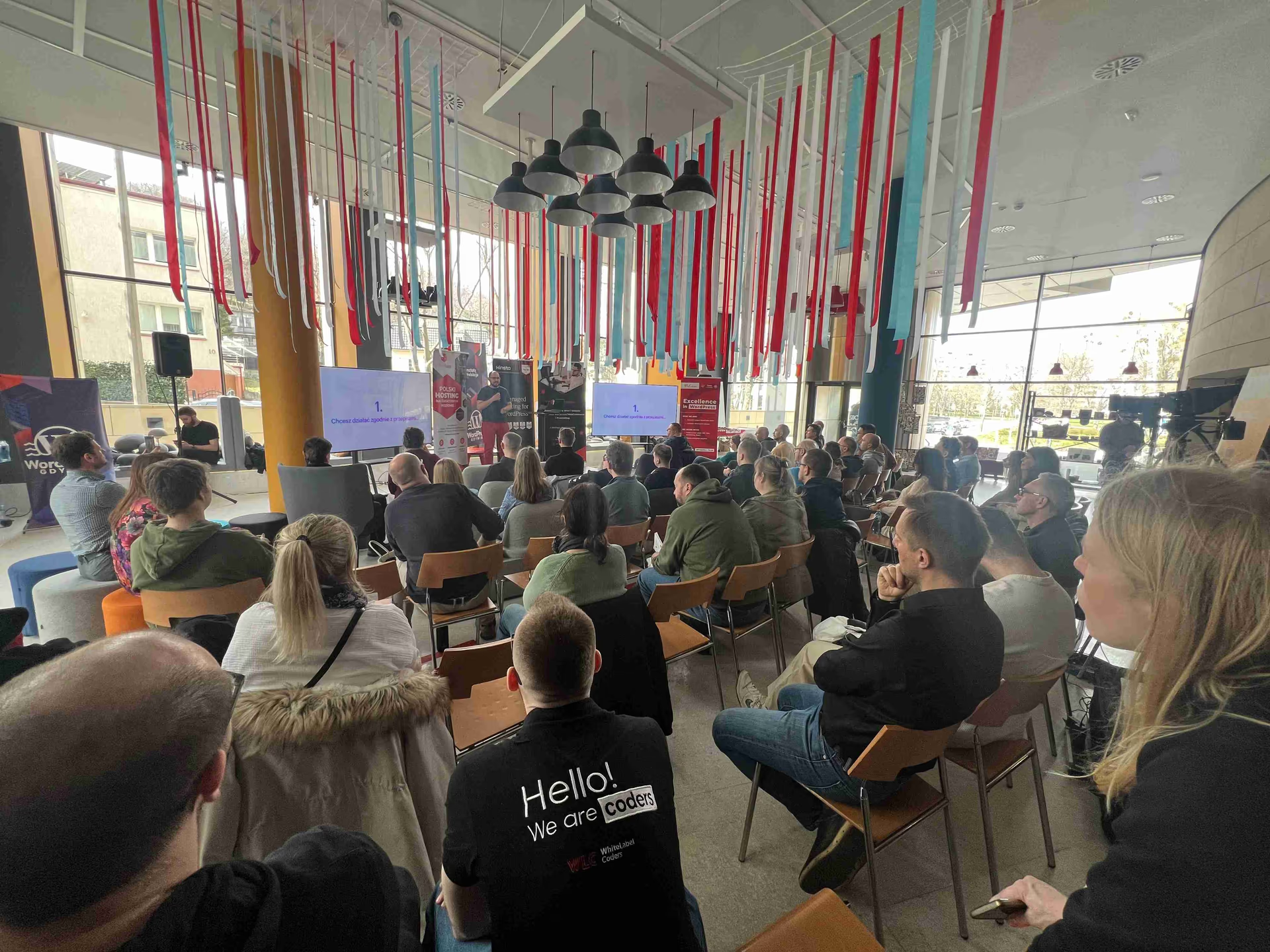
At a WordUp Trójmiasto meetup in Gdynia I gave a talk about AMP (Accelerated Mobile Pages). At the time it was one of the hottest topics in mobile SEO. In 2026 AMP is still maintained, but it is a niche format, and Google Search has removed almost every advantage that made it attractive back then. This recap keeps the theses from the talk and adds what changed afterwards, with dates and official sources for each change.
WordUp Trojmiasto 12 AMP talk programme
The archive of the Tricity WordPress community on wpgdynia.pl lists the talk Przyspieszone strony mobilne AMP (accelerated mobile pages AMP) in the programme of WordUp Trójmiasto #12, in the 17:30 to 18:00 slot. The event post was published on 18 March 2018 and invites attendees to a Saturday afternoon session from 17:00 to 20:00 at Pomorski Park Naukowo-Technologiczny in Gdynia, building III, cinema room A. Entry was free with registration.
The AMP talk shared the evening with four other sessions, which shows what the local WordPress crowd cared about in spring 2018:
| Slot | Topic |
|---|---|
| 17:00 | Czar metalowych czcionek (the magic of metal type), a talk on the Gutenberg editor |
| 17:30 | Accelerated mobile pages (AMP) |
| 18:00 | Notifications in WordPress, built on the Notification plugin |
| 19:00 | A professional development environment for WordPress with roots.io |
| 19:30 | Sage 9: structure, workflow and integration with ACF Pro |
The same archive goes back to WordUp Gdańsk #1 on 17 December 2012 and numbers the Tricity editions from #1 to #22. Later editions run under the WordUp Gdynia name, for example WordUp Gdynia #24. The audience at #12 was a mix of WordPress developers, agency people and site owners, and most questions after the talk were about one thing: whether AMP can work in a WooCommerce store.
The three theses of the AMP talk
The talk was built around three claims. Each one was true in 2018. The sections after this one show which of them still hold.
What AMP is: a restricted HTML framework
AMP is a slimmed-down HTML framework that Google pushed to make pages load instantly on phones. Google announced the project on 7 October 2015 as an open source initiative for faster mobile pages. A page built with it has three parts:
- AMP HTML: a subset of HTML with its own custom elements, such as
amp-imgandamp-form. - AMP JS: the runtime that loads resources and controls layout.
- AMP Cache: a CDN that stores validated AMP documents and serves them from Google’s infrastructure.
The rules are strict. The AMP styling guide bans !important and external stylesheets (custom fonts are the only exception), and all author CSS goes into a single <style amp-custom> block. At the time of the talk that block was limited to 50 KB. Custom JavaScript was not allowed at all, only the project’s own components.
Why publishers adopted it: cache speed and Top Stories
The talk named two reasons to adopt AMP:
- Speed. Google could preload an AMP result from its cache before the user tapped it, so the article appeared almost instantly.
- Visibility. The mobile Top Stories carousel in Google Search showed AMP results. Google itself described the feature in May 2020 as one that “currently emphasizes AMP results” (Sowmya Subramanian, Google Search Central).
For a news publisher the second point decided everything. Without AMP there was no realistic way into the carousel.
The dark side of AMP: google.com/amp URLs and design limits
The third part of the talk covered the costs:
- URL confusion. A visitor who opened an AMP result saw an address starting with
google.com/amp/instead of the publisher’s domain. Signed exchanges (SXG) partly fixed this, because a browser could show the original URL for content served from Google’s cache. - Design limits. With capped CSS and no custom scripts, keeping a consistent brand across the AMP and regular versions of a site was hard work.
AMP timeline from the talk to 2026
Almost every point above moved after 2018. The table lists the changes in order, each with its primary source.
| Date | Change | Source |
|---|---|---|
| 10 October 2019 | AMP joins the OpenJS Foundation incubation program | AMP blog |
| 13 March 2020 | CSS limit raised from 50 KB to 75 KB | AMP blog |
| 26 June 2020 | AMP graduates from the incubation program | same post, update note |
| May 2020 | Google announces that AMP will stop being a Top Stories requirement | Search Central blog |
| mid-June to end of August 2021 | Page experience rollout: Top Stories open to any page, AMP badge removed | Search Central blog |
| March 2024 | INP replaces FID as a Core Web Vital | web.dev |
| 10 April 2025 | Latest release of the official AMP plugin for WordPress, 2.5.5 | WordPress.org |
| 1 July 2026 | Google Search links straight to the publisher’s AMP pages, without the AMP viewer, the AMP Cache or SXG | Search Central documentation updates |
The current AMP HTML specification puts it this way: “It is a validation error if the author stylesheet or inline styles together are larger than 75,000 bytes.” Custom JavaScript is also possible now, through the amp-script component, which runs code in a Web Worker. Each inline script can hold up to 10,000 bytes and all scripts on a page together up to 150,000 bytes.
Is AMP required for Google Top Stories
No, and it has not been since mid-2021. In the original announcement Google wrote: “AMP will no longer be necessary for stories to be featured in Top Stories on mobile; it will be open to any page” (Sowmya Subramanian, Google Search Central).
The April 2021 follow-up went further and decoupled the carousel from performance scores as well: “This means that using the AMP format is no longer required and that any page, irrespective of its Core Web Vitals score or page experience status, will be eligible to appear in the Top Stories carousel” (Jeffrey Jose, Google Search Central). The same post announced that Google “will no longer show the AMP badge icon to indicate AMP content”. The rollout started on 15 June 2021 and finished at the end of August 2021.
So the strongest argument from the talk, the Top Stories carousel, no longer applies. A regular WordPress article has the same access to the carousel as an AMP article.
How Google Search handles AMP pages in 2026
Google’s AMP documentation now treats AMP as one more way to build a page: “Google Search indexes AMP pages just like other web pages.” AMP pages can still appear as rich results or as Web Stories, but they must be valid AMP HTML, and the AMP URL should be clearly related to the main site. AMP on desktop does not get any search-specific features.
The biggest change came on 1 July 2026. Google’s documentation update note says that Search “will now take users directly to the publisher’s AMP host pages”, and that publishers “no longer need to update the AMP cache or configure signed exchanges”. The note ends with: “AMP content will continue to rank just like any other web page” (Google Search Central, documentation updates).
This rewrites two theses from the talk:
- The google.com/amp URL problem is gone for Search traffic. Users land on the publisher’s own AMP URL, so the branding argument against AMP no longer applies.
- The server offloading argument is gone for Search traffic too. In 2018 Google served AMP articles from its own cache, so a busy news site paid for fewer requests. Since July 2026 those visits hit the publisher’s own servers, exactly like a regular page.
The framework itself is not abandoned. AMP is listed as an at-large project of the OpenJS Foundation, and the ampproject/amphtml repository on GitHub published a new release on 18 August 2026.
How the official AMP plugin for WordPress works
On WordPress, AMP is almost always delivered through the official AMP plugin. Its contributors include Google, XWP, rtCamp and Automattic. Current figures from the WordPress.org plugin directory:
| Field | Value |
|---|---|
| Added to the directory | 8 October 2015 |
| Latest version | 2.5.5, released 10 April 2025 |
| Active installations | 300,000+ |
| Requires | WordPress 6.5, PHP 7.4 |
| Tested up to | WordPress 6.8 |
Installation with WP-CLI takes one line:
wp plugin install amp --activateThe plugin offers three template modes. The plugin’s own description:
- Standard: “This template mode is the ideal, as there is only one theme for serving requests and a single version of your site”. Every URL is an AMP page.
- Transitional: “In this mode there is also a single theme used, but there can be two versions of each page: AMP and non-AMP.” The active theme renders both versions.
- Reader: “In this mode there are two different themes, one for AMP pages and another for non-AMP pages”. The AMP version uses a separate, simpler theme.
Standard mode only makes sense when the theme and every active plugin output valid AMP. Transitional and Reader keep a non-AMP canonical page, which means two versions of every URL to test after each theme or plugin update. The release date is also worth checking: no new version has shipped since April 2025, while WordPress itself moves on.
Why WooCommerce was the hardest question at the talk
The questions after the talk were mostly about WooCommerce, and that was no accident. A store depends on interactions that AMP restricted most: variable product forms, the mini cart, coupon fields and above all the checkout, where payment gateways inject their own scripts.
In 2018 each of these needed either an AMP component such as amp-form, or a fallback to the regular page. The answer from the talk still holds in principle: AMP fits content pages, while the cart and checkout should stay on regular pages. amp-script relaxed the JavaScript ban a little, but its size limits and the Web Worker model do not cover the scripts that payment providers ship. Since a fast store is possible without AMP, the practical route is the one described in our guide to WooCommerce performance: caching, image formats and fewer blocking scripts on the regular theme.
How to validate AMP pages
Google Search expects AMP pages to be valid AMP HTML, so validation belongs in any AMP workflow. The AMP validation guide lists the methods:
- In the browser: append
#development=1to the page URL and read the validation messages in the DevTools console. - Web interface: paste the HTML or the URL into validator.ampproject.org, which shows errors inline next to the source.
- Browser extension: the AMP Validator extension for Chrome and Opera flags invalid pages while browsing.
- In CI: the
amphtml-validatornpm package (or its gulp wrapper) fails a build when a template produces invalid AMP.
On a WordPress site with the plugin in Transitional or Reader mode, validation matters after every plugin update, because a new plugin can inject markup that breaks AMP while the non-AMP page keeps working.
How to remove AMP from a WordPress site without losing URLs
Many WordPress sites still carry AMP versions that nobody has looked at for years. Google’s guide to removing AMP pages describes the safe path when the regular page should stay:
- Remove the
rel="amphtml"link from the canonical non-AMP page. - Make the removed AMP URL return a 301 or 302 redirect to the canonical page.
- Watch the AMP status report in Search Console, where the “indexed AMP pages” graph should trend down.
The guide also warns against a shortcut: do not empty the AMP document. “When Google Search recognizes that a document is invalid, Google Search continues to serve the oldest valid version that’s available.” For a WordPress site with the official plugin, deactivating it stops the amphtml links, but the old AMP URLs still need to redirect to the canonical pages, either through a redirect rule or in the server configuration.
Before switching AMP off, look at the analytics first. AMP pages are often measured separately through the amp-analytics component, so their share of traffic is easy to miss in standard reports. If only a small number of visits still arrive on AMP URLs, the plugin is a candidate for removal. In both cases the decision should start from a measured baseline, so that afterwards it is possible to show whether the site became faster or slower without AMP.
Core Web Vitals instead of AMP
The performance goal that AMP enforced through restrictions is now measured directly. The Core Web Vitals and their “good” thresholds:
| Metric | Measures | Good |
|---|---|---|
| LCP (Largest Contentful Paint) | loading | 2.5 seconds or less |
| INP (Interaction to Next Paint) | responsiveness | 200 milliseconds or less |
| CLS (Cumulative Layout Shift) | visual stability | 0.1 or less |
Google recommends measuring them at the 75th percentile of page loads, separately for mobile and desktop. INP replaced First Input Delay in March 2024, so any guide that still lists FID under 100 ms is out of date. A regular WordPress theme can meet these thresholds without AMP, and our Core Web Vitals and INP guide and the overview of how to speed up WordPress cover the methods.
Should a WordPress site still use AMP in 2026
AMP is no longer the default choice for a WordPress site. The reasons from the talk have lapsed one by one: Top Stories opened to every page in 2021, the AMP badge disappeared, and since July 2026 Google Search no longer serves AMP pages from its cache. What remains is a valid, still maintained HTML framework with strict rules that some teams use as a performance discipline.
For a new site, build a fast regular page and measure Core Web Vitals. For a site that already runs AMP, there is no ranking penalty either way, because AMP content ranks like any other page. The deciding factor is cost: a second template set, validation after each update, and a WordPress plugin with no release since April 2025. If nobody on the team maintains the AMP version, removing it with redirects is usually the cleaner option.
AMP talk slides and resources
The slides from WordUp Trójmiasto #12 are not attached to this recap, so the links below point to the official sources for every fact in it. Thank you to everyone who came to the talk and asked difficult questions about AMP in WooCommerce. Those questions shaped the parts of this article about stores.
- WordUp Trójmiasto #12 programme on wpgdynia.pl
- Official AMP plugin for WordPress
- AMP project documentation
- Google Search Central: AMP on Google Search
- Google Search Central: removing AMP pages