I run a six-language site on my own, and most of its text starts as a draft written with an AI model. Before anything ships, every file goes through the humanizer skill, Polish files also go through miodkuj, and then a set of deterministic gates in the repository decides whether the build passes. This guide is for teams that publish documentation, READMEs, release notes or a company blog with Claude Code, Codex or Cursor and want the same setup: which skill does what, what each one's evaluations show, how to wire a scanner into CI without blocking every pull request, how to check that a rewrite kept the facts, and how to keep one copy of a skill for several agents.
What are anti-slop skills, and which ones are worth installing?
An agent skill is a folder with a SKILL.md file that the agent loads when the task matches. Anti-slop skills hold rules for spotting and rewriting the patterns that make model-written prose recognisable: staged openers, inflated claims, forced lists of three, bold labels, closing lines that restate the paragraph. Three of them are worth a close look because they take different approaches and publish different kinds of evidence.
| Skill | What it does | Evidence it publishes | When I would use it |
|---|---|---|---|
| humanizer 3.1.0, MIT | Rewrite pass against 26 patterns in six sections (staging, rhythm, inflation, formatting, chat leftovers, wrong reader) | No evaluation suite in the repository. A blind test in issue #229, run by a user with language-model judges, 16 of 16 preferences | Final pass on any English prose a person will read |
| unslop 2.3.0, licence unclear | Four commands (teach, cleanup, rewrite, mimic) plus Python scanners that return JSON | A frozen holdout with a blinded adjudicator; the latest public result is a no-ship | As a CI signal on English text, after the licence question is settled |
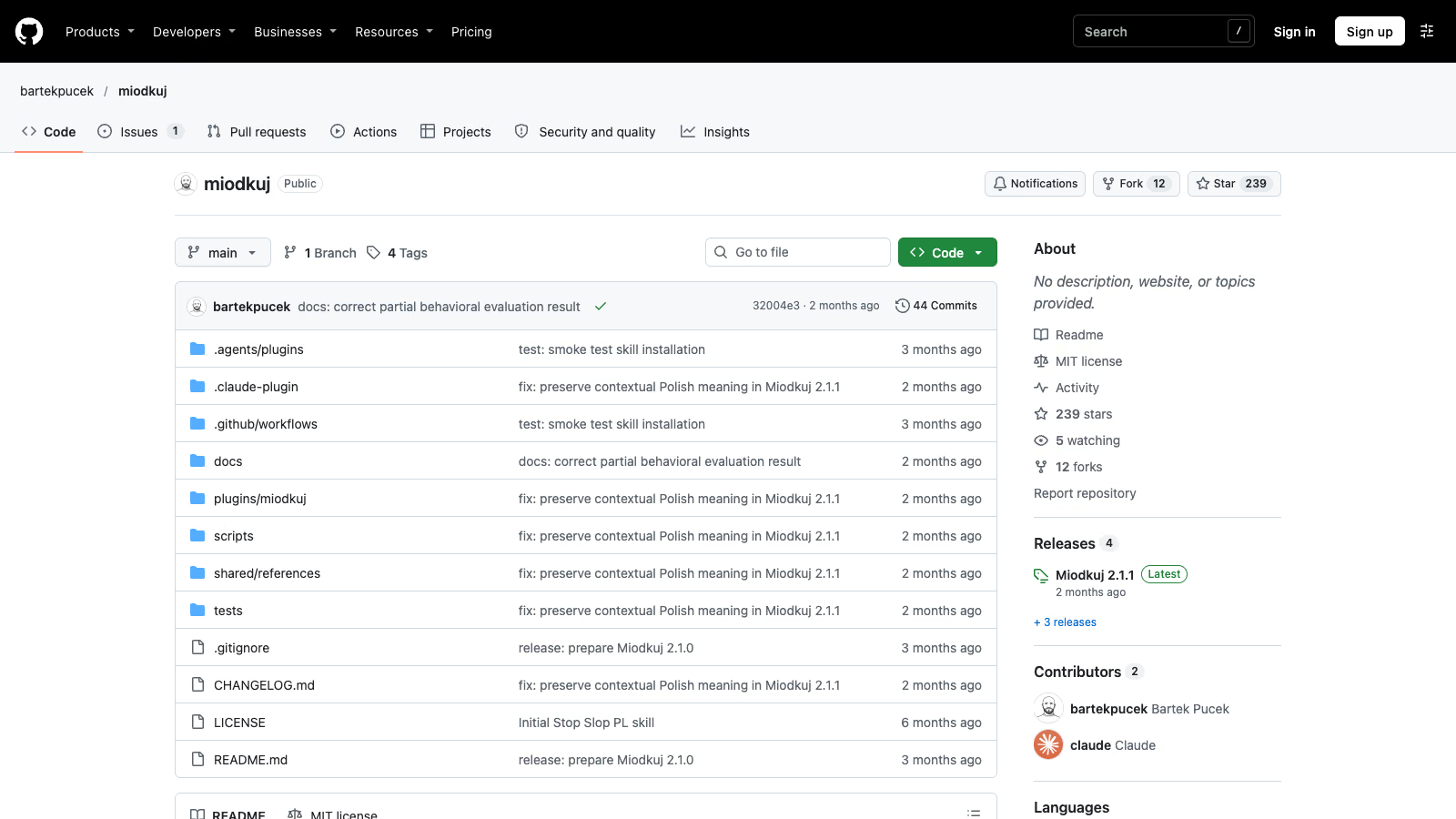
| miodkuj 2.1.1, MIT | Minimal edit for Polish: officialese, nominal chains, unsupported claims | Own behavioural test: 12 of 13 cases passed, 1 partial | Every Polish text; irrelevant for English |
The sizes matter because a skill’s text is loaded into the model’s context when it fires. humanizer’s SKILL.md is 32,348 bytes. miodkuj’s is 6,793 bytes and unslop’s is 6,767 bytes.
What does humanizer check, and what has been measured?
humanizer’s README says it “checks for 26 patterns in all”. Version 3.0.0 consolidated 35 patterns into 25, and 3.1.0 added number 26. The patterns sit in six groups: staging, rhythm, inflation, formatting, chat leftovers and text aimed at the wrong reader.
The repository has no evaluation directory. Its only script, scripts/validate-package.py, checks the package files (manifests, README, changelog). There is no scanner and no command-line tool, so every judgement comes from the model running the skill.
The README cites one test: “In a blind test, judges preferred Humanizer’s rewrite over the original AI text 16 times out of 16 (#229).” Issue #229 was opened on 19 August 2026 by a user, not the maintainer, and it lists its own limits. “Every judge is a language model from one family,” and “The quality study ran 77 of 144 planned pairwise trials after infrastructure failures.” The same issue measured AI detection before and after the rewrite: 100%, then 98.6%, then 97.8%. The README states the consequence plainly: “Getting past AI detectors is not a goal, and detectors still flag most of its output.”
In one partial study, language-model judges preferred the rewritten text, and detectors barely moved. If your goal is prose that a colleague reads without wincing, that is a reasonable trade. If your goal is passing a detector, humanizer does not claim to help.
Installation, from the README:
# Claude Code 2.1.142 or newer, invoked as /humanizer:humanizer
/plugin marketplace add blader/humanizer
/plugin install humanizer@humanizer

# Older Claude Code
npx skills add blader/humanizer --global --agent claude-code

# Codex
npx skills add blader/humanizer --global --agent codex

# Every supported agent
npx skills add blader/humanizer --global --agent '*'
On Claude.ai and the desktop app you download the ZIP and upload it as a skill. I installed mine by hand into ~/.claude/skills/humanizer/, which gives the short /humanizer name with no plugin prefix.
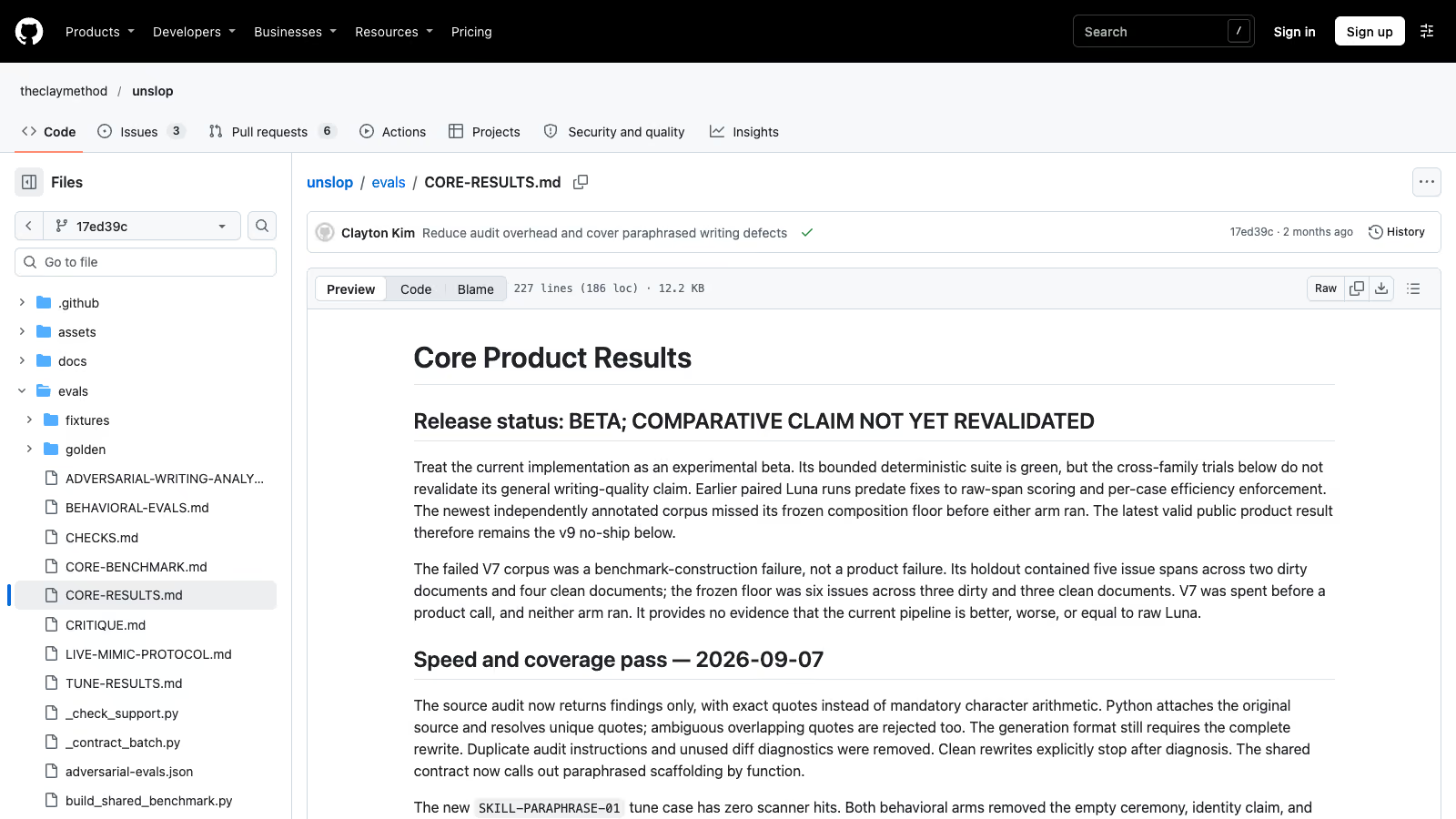 The unslop eval page at commit 17ed39c: beta, comparative claim not yet revalidated (screenshot 6 November 2026).
What does unslop add, and what did its own evaluation find?
unslop has four commands. /unslop teach builds a reusable voice from your own writing samples. /unslop cleanup flags AI tells as suggestions and changes nothing on its own. /unslop rewrite diagnoses a draft and rebuilds it, and it is the default for a bare /unslop <text>. /unslop mimic drafts or rewrites in a taught voice.
Its distinguishing feature is a set of Python scripts that need only the standard library and Python 3.8 or newer; the project’s CI tests on 3.8 and 3.11. The README sentence that frames them is worth keeping in front of any team that wires them into a pipeline: “Scanners suggest candidates; the agent checks each use in context.” It continues: “Neither a clean scan nor a familiar phrase proves who wrote the text, and the checks cannot guarantee that every defect is gone.”
The project reports results on three scoreboards (core product, voice, engineering) and states that “Only the core scoreboard can show that the specification improves writing.” On that scoreboard, the README says: “The latest independent public result is a no-ship.” The file evals/CORE-RESULTS.md is headed “Release status: BETA; COMPARATIVE CLAIM NOT YET REVALIDATED”. The v9 holdout used the same model in both arms and a separate blinded adjudicator, with 3 dirty documents, 1 clean one and 31 annotated issues.
| Metric | Model with unslop | Plain model | Required to ship |
|---|---|---|---|
| Detection precision | 81.25% | 83.33% | 90% or more |
| Detection recall | 83.87% | 32.26% | 90% or more |
| Repair success | 87.10% | 58.06% | 90% or more |
| Preservation | 100% | 100% | 100% |
| Damage rate | 11.11% | 0% | 0% |
| Dirty documents safely improved | 0 of 3 | 0 of 3 | 80% or more |
Source: CORE-RESULTS.md at commit 17ed39c.
The skill found far more issues than the plain model and repaired more of them. It also damaged text the plain model left alone, and neither arm safely improved a single dirty document. The maintainers drew the same conclusion: “The current beta therefore does not claim a validated comparative lift.” A project that prints its own failing result in the README earns some trust, and the result itself says how to use the scanners: as a signal, with a person making the final call.
Can I use unslop in a commercial repository?
The SKILL.md frontmatter says license: MIT, but the repository has no LICENSE file, and the GitHub API returns no licence for it. A licence named in a metadata field without the licence text is a question for whoever signs off on dependencies in your organisation. Until it is answered, I would not copy unslop’s scripts into a company repository. Checking it out at a pinned commit inside a CI job, as in the workflow below, keeps the code out of your history, but it does not settle the licence either.
What does miodkuj do, and does it matter for English text?
miodkuj is written in English and targets Polish. It fixes officialese, chains of nouns where a verb belongs, and claims with nothing behind them. For an English-language team it is not a tool to install. Two of its rules are still worth borrowing as review questions for any language.
The first is its “Specificity Ladder”. A rewrite may use a fact already present in the source, may recombine source information “without increasing certainty”, may make an unsupported claim smaller or remove it, and if a missing detail blocks the rewrite, it should “flag the gap or ask for the information”. The ladder ends with a hard rule: “Never invent a number, example, customer, source, mechanism, consequence, affected workflow, performance claim, comparison, or opinion to make prose sound human.”
The second is a portability test: “If a sentence could move unchanged to another company, ministry, product, project, or person, it is probably filler.” I apply that one to English drafts by hand. A sentence that would fit any company’s release notes usually says nothing about this release.
miodkuj publishes its own behavioural test: version 2.1.1 passed 12 of 13 cases with 1 partial, while 2.1.0 failed 3 of 12 shared cases. Each case ran once. The partial was first recorded as a pass and corrected the same day, and the limits section says the runs “establish no general reliability rate or cross-model improvement”. It has no text scanner: its scripts check packaging, so detection is model judgement only.
Why can a scanner not certify that a text is clean?
The Wikipedia page that most of these skills draw on, Signs of AI writing (WP:AISIGNS), warns against the exact use a CI gate invites: “Please do not merely treat these signs as the problems to be fixed; that could just make detection harder.” It also says: “The patterns listed here are also only potential signs of a problem, not the problem itself.”
My own repository shows what that means in practice. On 6 November 2026 I ran its three copy gates. The voice-rules gate scanned three English posts against 42 rules and reported OK: 0 voice-rule violations. The sentence-shape gate scanned 8,681 files and found 0 hits. The calque gate reported No high-risk copy calques found. All three came back green, which proves only that the deny-lists are clean. It says nothing about whether a paragraph answers the reader’s question, whether a number is right, or whether two sections repeat each other. A regular expression sees words and sentence shapes; the humanizer pass and a human read judge whether the text does its job. I treat a scanner hit as a place to look and a clean scan as the absence of known patterns.
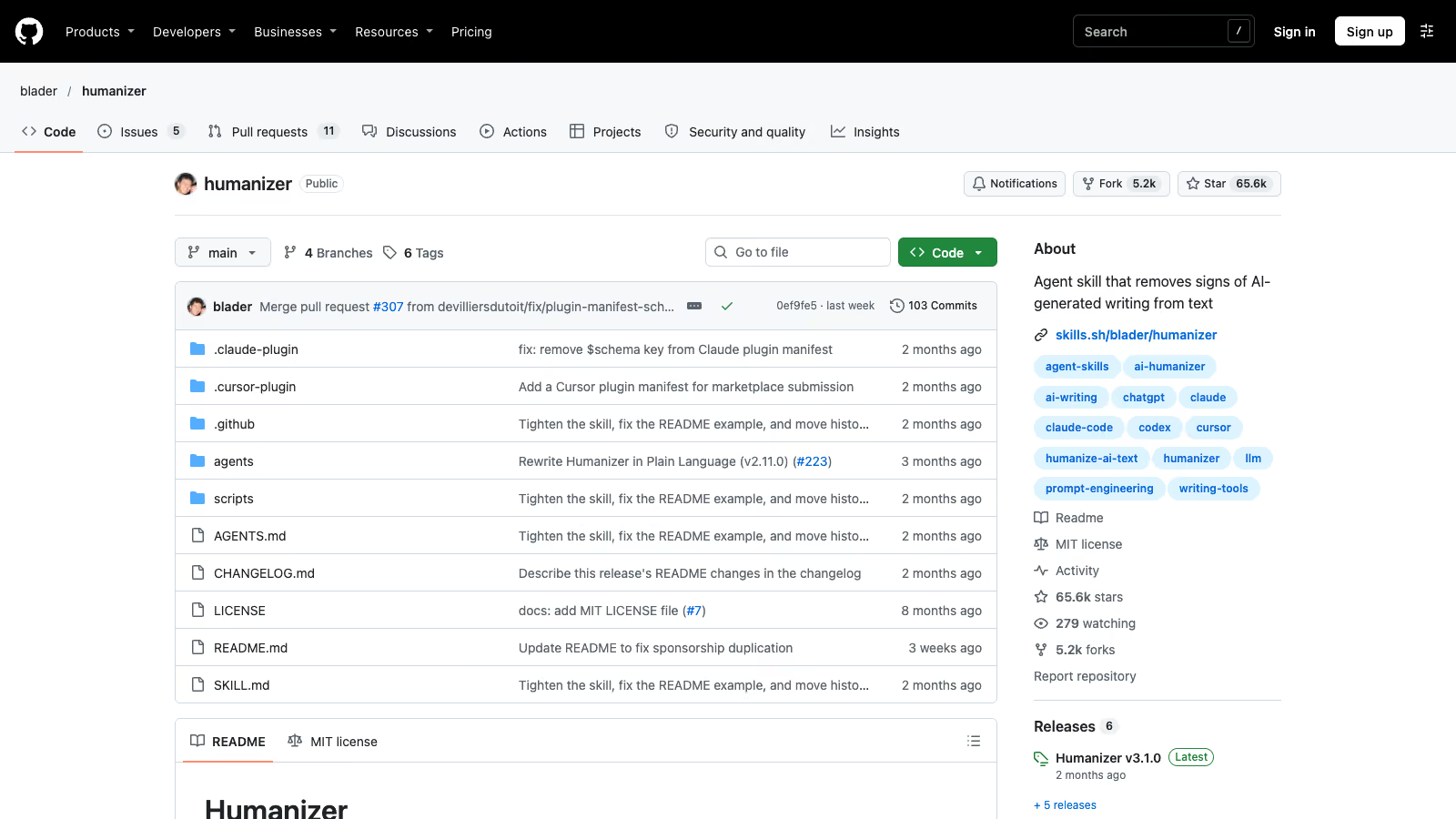 The blader/humanizer repository: MIT licence, release v3.1.0 (screenshot 6 November 2026).
How do I gate docs in CI without blocking every pull request?
Three facts in unslop’s source shape the workflow.
- Every scanner exits 1 on any finding.
banned_phrase_scan.pyholds 38 hard and 14 soft entries and exits 1 on either. Every flag fromstructure_scan.pyandsilhouette_scan.pyis hard-coded as soft, and both still exit 1. The exit code cannot tell you whether a finding is serious, so the job has to read the JSON. - Exit code 2 means the file could not be read. That should fail the job, because nothing was checked.
- Non-English text gets a green light. All three scanners run an English check (English function words at least 10% of tokens; inputs under 15 tokens always count as English). When the text fails it and produced no hits, the scanner prints
{"non_english": true, ...}, writes a note to stderr and exits 0. The README says it outright: “English only.”
For an English documentation repository, the third point is mostly a trap for the odd German or Spanish page. Log it as “not checked” so nobody reads the green job as a pass.
The workflow below blocks on hard phrase findings, reports soft ones as warnings, and runs the structure scanner in report-only mode with --genre docs, which the README says “allows the bold-label lists that reference docs really use”. banned_phrase_scan.py has no --genre flag. Adjust the paths to your repository.
name: prose-gate
on:
  pull_request:
    paths: ['docs/**/*.md', 'README.md', 'CHANGELOG.md']

jobs:
  unslop-scan:
    runs-on: ubuntu-latest
    steps:
      - uses: actions/checkout@v4
        with:
          fetch-depth: 0
      - uses: actions/checkout@v4
        with:
          repository: theclaymethod/unslop
          ref: 17ed39c9d0b522f44190ff0c6233867eadee192a
          path: .unslop
      - uses: actions/setup-python@v5
        with:
          python-version: '3.11'
      - name: Scan changed Markdown, block on hard findings only
        run: |
          set +e  # scanners exit 1 on any finding; decide from the JSON
          fail=0
          count='if type == "array" then length elif type == "number" then . else 0 end'
          files=$(git diff --name-only --diff-filter=AM \
            "origin/${{ github.base_ref }}...HEAD" -- '*.md')
          for f in $files; do
            python .unslop/scripts/banned_phrase_scan.py "$f" > phrase.json
            code=$?
            if [ "$code" -eq 2 ]; then
              echo "::error file=$f::unreadable, not checked"; fail=1; continue
            fi
            if ! jq -e . phrase.json > /dev/null 2>&1; then
              echo "::error file=$f::scanner gave no JSON (exit $code)"; fail=1; continue
            fi
            if jq -e '.non_english == true' phrase.json > /dev/null; then
              echo "::warning file=$f::non-English, NOT checked"; continue
            fi
            hard=$(jq ".by_severity.hard | $count" phrase.json)
            soft=$(jq ".by_severity.soft | $count" phrase.json)
            [ "$soft" -gt 0 ] && echo "::warning file=$f::$soft soft phrase finding(s)"
            if [ "$hard" -gt 0 ]; then
              echo "::error file=$f::$hard hard phrase finding(s)"
              jq -r '.violations[] | select(.severity == "hard")
                | "  line \(.line_number): \(.phrase), try: \(.suggestion)"' phrase.json
              fail=1
            fi
            python .unslop/scripts/structure_scan.py "$f" --genre docs > structure.json || true
            jq -r '.flags[]? | "::notice file='"$f"'::\(.metric) \(.detail)"' structure.json
          done
          exit $fail
The scanner is checked out at a pinned commit, so an upstream change cannot alter your gate overnight, and the code never enters your history. Empty input also exits 1 and may print no JSON, which is why the job checks for valid JSON before trusting the exit code. And the structure scanner never blocks, because all its flags are soft by design.
Do not run this on non-English content and count it as coverage. For those languages you need your own gates, as described further down.
How do I check that a rewrite kept the facts?
A rewrite pass can drop a version number, a negation or a condition, and the result still reads well. unslop ships validate_preservation.py for that case. It compares the original and the rewritten file, optionally against a JSON file of constraints, and reports passed, preserved, missing and warnings.
python .unslop/scripts/validate_preservation.py --strict original.md rewritten.md--strict turns semantic-drift warnings (negations, scope, conditionals) into a failure. The source recognises it only as the first argument. Anywhere else it is read as a file name, so validate_preservation.py original.md rewritten.md --strict does not do what it looks like. The script exits 0 on a pass, 1 on a failure or on a strict warning, and 2 on an unreadable file.
A cheaper check works without any scanner. Run git diff --word-diff on the rewritten file and read every changed number, name and date before merging.
Update, . A rewrite pass compares the new text with the draft, so it keeps a wrong number as faithfully as a right one. If an AI assistant supplied the figure, open its citation and follow it to the study that measured it. Trakkr, which sells monitoring of brand visibility in AI search, published Zombie stats on 28 October 2026. It asked ChatGPT, Perplexity, Gemini, Claude and Google AI Overviews 200 questions that call for a number and followed 1,285 cited statistics up to five pages deep. 40% reached a study that says the same thing, 8% reached the study with the number or context changed, 40% stopped at a source Trakkr could not check, and 11% led nowhere. The line “44% of salespeople give up after one follow-up”, quoted by all five assistants, traces back to a freelance writer’s sample article that was online by 2017 and cites no research. When the trail ends at a page you cannot check, drop the number or say in the text that you could not verify it.
How do I share one skill across Claude Code, Codex and Cursor?
Copied skill folders drift apart as soon as someone edits one of them. Keep one folder per skill and point every agent at it with a relative symbolic link.
The Claude Code skills documentation lists three locations. Personal skills in ~/.claude/skills/<skill-name>/SKILL.md apply to “All your projects on this machine, but not Cowork or cloud sessions”. Project skills in .claude/skills/<skill-name>/SKILL.md are meant to be committed: “Commit it so your team gets it too”. Plugin skills live in <plugin>/skills/<skill-name>/SKILL.md and are invoked as /plugin-name:skill-name. The same page confirms that “a <skill-name> entry in the enterprise, personal, or project location can be a symlink to a directory elsewhere on disk”, and that Claude Code “loads the skill once even if several locations point at the same target”.
My repository does this for Cursor. .cursor/skills/ holds six relative links into ../../.claude/skills/<name>, so Claude Code and Cursor read the same files:
mkdir -p .cursor/skills
cd .cursor/skills
ln -s ../../.claude/skills/wppoland-project wppoland-project
cd ../..
git add .cursor/skills/wppoland-project
git ls-files --stage .cursor/skills/wppoland-project
# 120000 <hash> 0  .cursor/skills/wppoland-project
Kris Geusebroek’s Xebia post on sharing skills across plugins (3 April 2026) gives the same three rules. Put the shared skills in a top-level skills directory. “Use a relative path as the symlink target, not an absolute path.” And check the result: “You should see the mode 120000, which is git’s way of saying the file is a symlink.” An absolute link works on your laptop and breaks on every other checkout.
Windows needs one line in your README. Per Xebia, creating symlinks requires Developer Mode or elevated permissions; Anthropic’s plugin documentation says to “use mklink /D from an elevated Command Prompt or enable Developer Mode”.
Plugins are stricter. The marketplace documentation says a symlink inside the plugin’s own directory is kept as a relative link, one pointing elsewhere in the same marketplace “is dereferenced” (the content is copied into the cache), and one pointing outside the marketplace “is skipped for security”. If you package a shared skill as a plugin, keep the target inside the marketplace repository.
Which prompts work for the rewrite pass?
Three prompts to copy for documentation work. Each keeps the model inside the source file and makes every change reviewable.
Run the humanizer skill in file mode on docs/release-notes/2026-11.md.
Keep frontmatter, code blocks, URLs, version numbers and command names
unchanged. Do not add facts, examples or numbers that are not in the file.
If a sentence makes a claim the file does not support, shorten it or
remove it, and list it at the end under "claims cut".
Review README.md for sentences that could move unchanged into another
project's README. Quote each one, say what project-specific detail the
file already contains that could replace it, and change nothing yet.Compare the original and rewritten versions of docs/install.md. List every
changed number, flag, path, negation and condition. Report only; do not edit.The second prompt is miodkuj’s portability test applied to English. The third is the manual twin of validate_preservation.py, useful when the scanner cannot run.
What do I run for English in my own repository?
English is the one language on my site where unslop’s scanners would actually read the text. My own gates cover it less than they cover the other five languages, and the reasons are in the scripts.
| Gate | What it checks | Rules | Applies to English |
|---|---|---|---|
check-voice-rules.mjs | Long dashes, filler verbs, fluff, placeholder names, CJK leaks, fake round statistics, Title Case headings, locale calques | 42 | Yes; --fail-on-findings blocks on src/content and on data, components and pages |
check-slop-rhetoric.mjs | Sentence shapes such as throat-clearing, faux insight, weasel attribution, summary recaps, binary contrasts; partly taken from the no-ai-slop skill | 12, one opt-in, so 11 by default | Yes; --check --budget=0 in npm run check |
check-ai-slop-copy.mjs | English agency calques such as “AI plumbing” on templates and pages | 9 patterns | Only on hard-coded targets; it does not read src/content |
check-reader-address.mjs | Wrong register: German du, Spanish usted, European Portuguese tu | 3 locales | No English entry |
check-loanword-density.mjs | English jargon density in non-English files | n/a | Non-English by design |
check-diacritic-wordlist.mjs | Known stripped-accent spellings | es, pt-pt, pl, de, nb | No English list |
For the other locales those last three gates carry real weight; the German budget in the reader-address gate still allows 13 known informal pronouns, and I ratchet it down as I fix pages. English has no equivalent, because English has no register split to enforce and no accents to lose. The English pass rests on the 42 voice rules, the 11 default rhetoric patterns and the humanizer pass, which is why I would add unslop’s phrase scanner on English content once its licence is clear.
The order of passes is written down in .claude/rules/prose-skills.md: draft, then humanizer in file mode, then miodkuj for Polish files. The rule ends with “Do not ship a new or expanded blog post without both passes.” The gates run after that. The loanword gate exists because a news post from 17 October 2026 passed a fact audit and every copy gate, and still read as model output: its Polish body carried 68 English jargon hits. The AI slop cleanup guide for WordPress covers the other half of the problem: invented statistics, citations and bios that no style pass can catch.
How should a team roll this out?
For a team publishing English docs and posts with Claude Code, Codex or Cursor, I would go in this order.
- Install humanizer as a project skill under
.claude/skills/and link it into the other agents’ folders with relative symlinks. Confirm mode120000withgit ls-files --stage. - Write the rule down where every agent reads it: draft, humanizer pass in file mode, human review of the diff.
- Settle unslop’s licence with whoever approves dependencies. If it clears, add the CI job above, blocking on hard findings only.
- Run
validate_preservation.py --stricton rewrites of reference documentation, where a lost negation can break someone’s install. - Log non-English files as “not checked” and build language-specific gates for them, starting with the defects you have already seen.
I track which of these tools I adopt or hold on the tech radar. If you want this pipeline built into your own repositories, with the gates tuned to your languages and your documentation, the AI implementation service page describes how I scope that work.