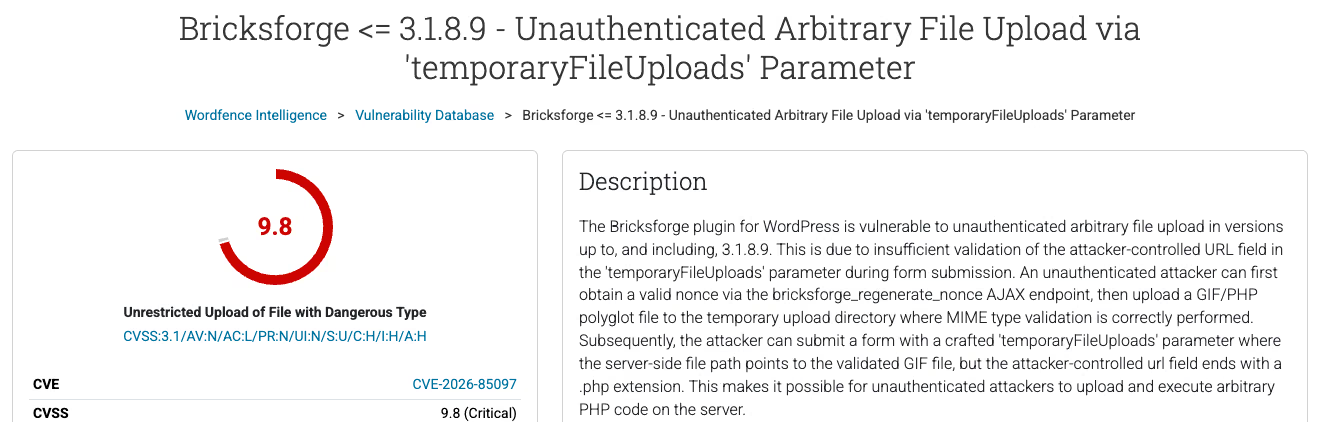
Bricksforge, the Bricks Builder add-on, lets anyone without an account upload a PHP file and run it, in every version up to 3.1.8.9. The flaw is CVE-2026-85097. Patchstack has logged exploitation attempts since 7 October 2026, 21:47 UTC. Update today to 3.1.8.10 or 4.0.1. If the site sat on an older version, work through the server checks below.
Is my Bricksforge site vulnerable to CVE-2026-85097
Every Bricksforge install at 3.1.8.9 or lower is. That is the range in the NVD record and the Wordfence entry. The attacker needs no login and no click from anyone on your side.
An upload field on the form is not a precondition. The vendor changelog entry for 4.0.1 says the issue affects every site with Pro Forms active, including sites whose forms use no upload fields. “We only have a contact form” does not get you out of this one.
Severity depends on who you ask. Patchstack rates it 10.0 and flags it as known to be exploited (KEV). Wordfence and NVD give 9.8 with CVSS:3.1/AV:N/AC:L/PR:N/UI:N/S:U/C:H/I:H/A:H. For a site owner the difference changes nothing: network attack, no privileges, full impact.
Bricksforge is a commercial plugin. The WordPress.org plugin API answers “Plugin not found” for it. That matters twice below: updates come through your vendor licence, not the repository, and wp plugin verify-checksums has nothing to compare against.
How the Bricksforge Pro Forms upload flaw works
The CVE description and the Patchstack write-up describe three steps:
- Fetch a valid nonce from the
bricksforge_regenerate_nonceAJAX action, which answers anonymous requests. - Upload a file that is both a valid GIF and valid PHP, a polyglot. The MIME check on the first upload passes because the file really does look like an image. It lands in a temporary directory.
- Submit a form with a crafted
temporaryFileUploadsparameter. The server-side path points at the validated GIF, while theurlfield ends in.php. The plugin trusts the metadata the client sent and writes the content to a PHP path.
Patchstack names two entry points: POST /wp-json/bricksforge/v1/form_submit and /wp-admin/admin-ajax.php with action bricksforge_form_submit. The affected code lives in includes/elements/pro-forms/actions/init.php and base.php. Per the CVE record, the vendor was notified on 3 September 2026 and disclosure followed on 7 October. The finder is credited as d.v4n_s3c.
How to check the Bricksforge version in wp-admin and WP-CLI
In the dashboard: Plugins, Installed Plugins, the Bricksforge row, version under the description. If the licence has lapsed, the dashboard may not offer an update that does exist. No update notice is not proof you are current.
Over SSH, for one site:
wp plugin list --name=bricksforge --fields=name,status,version,update_versionIf you look after a fleet of client sites on one server, a loop gives you an inventory in seconds:
for d in /var/www/*/public_html; do
  printf '%s ' "$d"
  wp --path="$d" plugin get bricksforge --field=version 2>/dev/null || echo "not installed"
done
Adjust the glob to your layout. On cPanel boxes it is usually /home/*/public_html. Anything at 3.1.8.9 or below goes on the update and review list.
Should I update Bricksforge to 3.1.8.10 or 4.0.1
The sources disagree, and you should know that before you press Update.
- Patchstack and Wordfence both give 3.1.8.10 as the patched release.
- The vendor changelog, as of 10 October 2026, has no 3.1.8.10 entry. It lists 3.1.8.9 (28 August), 4.0.0 (17 September) and 4.0.1 (8 October), the last one titled “Security fix for the Pro Forms file upload”.
The working rule: after updating, the version must read 3.1.8.10, or 4.0.1 or higher. If you are on 4.0.0, move to 4.0.1. None of the sources above says outright whether 4.0.0 is vulnerable, but the vendor shipped its upload fix in 4.0.1, so there is no reason to stay put.
wp plugin update bricksforge
wp plugin get bricksforge --field=version
If WP-CLI sees no update, download the zip from your vendor account and install it from file: wp plugin install /tmp/bricksforge.zip --force. The jump to 4.x is a major version, so on a site with complex forms run it on staging first, today, not next sprint.
Cannot update yet? Deactivate the plugin (wp plugin deactivate bricksforge) or block both endpoints at the WAF. Patchstack has pushed a RapidMitigate rule for this CVE to its customers. Patchstack itself calls that a stopgap, not a replacement for the update.
What to check if the site ran Bricksforge 3.1.8.9 or older
The update closes the door. It does not remove anyone who already walked through it. 7 October is the first sighting in Patchstack telemetry, not proof that nobody tried earlier, so review a wider window, for example from 3 September, when the vendor was notified.
New administrator accounts
wp user list --role=administrator --fields=ID,user_login,user_email,user_registeredCompare against the people you know. An account created in the last few weeks, with an address on an unfamiliar domain or a login like wp-support, is the trigger for a full investigation. Check application passwords as well: wp user application-password list <ID> for each admin.
PHP files in the uploads directory
Nothing executable belongs in wp-content/uploads. Patchstack found files named login_admin_*.php in /wp-content/uploads/bricksforge/tmp/ and /wp-content/uploads/2026/10/.
find wp-content/uploads -type f \( -iname '*.php*' -o -iname '*.phtml' -o -iname '*.phar' \) -ls
find wp-content/uploads -type f -name 'login_admin_*' -ls
ls -la wp-content/uploads/bricksforge/tmp/
The *.php* pattern with -iname also catches .php5 and .PHP. Patchstack reports extension variants, case changes and encodings in the payloads, so do not search for the exact .php only. Look for stray .htaccess files in uploads too, since they can map other extensions to PHP.
Modified core, theme and plugin files
wp core verify-checksums
find wp-content -type f -name '*.php' -newermt '2026-09-03' ! -path '*/cache/*' -ls
Core can be checked against checksums. Bricksforge and Bricks are not on WordPress.org, so download clean copies from the vendor and diff -r them against the server. Pay particular attention to wp-content/mu-plugins, where code always loads and never appears in the plugin list, and to wp-config.php.
Scheduled tasks
wp cron event list --fields=hook,next_run_relative,recurrence
crontab -l
Unknown hooks in WP-Cron, or a user crontab line that fetches something from a remote URL, is the classic way back in after a web shell gets deleted.
Server logs
Search for the endpoints in the Patchstack report:
grep -E 'bricksforge/v1/form_submit|bricksforge_regenerate_nonce|bricksforge_form_submit' access.log*
zgrep -E 'bricksforge/v1/form_submit' access.log*.gz
grep -E '^(177\.75\.57\.20|23\.97\.62\.146|84\.247\.60\.125|38\.154\.185\.97|150\.109\.16\.166|153\.75\.90\.146) ' access.log*
grep -E 'GET /wp-content/uploads/.*\.php' access.log*
Those six addresses are the most active of the 63 unique IPs Patchstack counted in the campaign. One limitation: a standard access log records the URL only, and the AJAX action name often travels in the POST body. A request to admin-ajax.php may not contain “bricksforge” in the log at all. Correlate by IP and time instead. The strongest signal is a successful GET to a .php file under uploads with status 200.
When should I restore WordPress from a backup
One PHP file in uploads that you cannot explain, or one unknown admin account, means you treat the site as compromised. Code that ran on the server had access to the database, the files and wp-config.php. Deleting one file by hand does not tell you it was the only one.
The order that works:
- Snapshot the current state, files and database, as evidence before you delete anything.
- Restore files from a backup taken before the first suspicious log entry. If logs do not go back that far, pick a backup from before 3 September and re-add later content by hand.
- Update Bricksforge to 3.1.8.10 or 4.0.1 before the site goes back online. The restored copy carries the old, vulnerable version.
- Rotate database, SFTP and every admin password, regenerate the keys in
wp-config.php(wp config shuffle-salts) and revoke application passwords.
Pro Forms usually collects names, email addresses and messages. If the attacker reached the database and the site serves people in the EU, that can be a personal data breach under Article 33 GDPR, reportable to the supervisory authority within 72 hours of becoming aware of it, unless the breach is unlikely to result in a risk to the people concerned. Document what you found even if you end up not having to report.
If the review finds nothing, there is no need to restore. Keep a note of what you checked and when.
Fourth Bricksforge vulnerability in 2026
The Wordfence listing shows earlier entries from the same year: CVE-2026-14956 (up to 3.1.8.6, unauthenticated privilege escalation through Pro Forms, 9.8), CVE-2026-18030 (up to 3.1.8.7, unauthenticated privilege escalation through password reset, 9.8) and CVE-2026-84814 (up to 3.1.8.8, privilege escalation from subscriber, 6.3). Three of the four touch forms or login logic.
That is not a reason to rip the plugin out in a panic. It is a reason for Bricksforge to be a line item someone checks every week on client sites, not once a quarter.
How a maintenance contract catches this kind of flaw
An unauthenticated exploit in the wild gives you days, sometimes hours. A WordPress maintenance contract should cover the three things that decide the outcome here:
- a per-site inventory of plugins and versions, commercial ones included, because the repository update notice does not reach plugins outside WordPress.org,
- vulnerability feeds (Patchstack, Wordfence, NVD) matched against that inventory, so the Bricksforge alert reaches someone who knows you run it,
- access logs kept for longer than a few days, because without them “did anyone get in before the update” has no answer.
If you are not sure your site came through this week clean, a WordPress security audit covers exactly the steps on this list: uploads, accounts, cron, checksums and logs.
Last updated 10 October 2026. Sources: Patchstack article and database entry (7 and 8 October 2026), Wordfence Intelligence record, NVD record for CVE-2026-85097, Bricksforge changelog, GDPR Article 33.