No, Cloudflare does not block Googlebot by default. Since 15 September 2026, though, one option in the AI bot settings does something many people do not expect: “Block” stops Googlebot at the door, search included, not just AI training. If your WordPress site sits behind Cloudflare and someone “turned off AI” in the last few weeks, check it today.
On 7 October 2026 the daily recap on Search Engine Roundtable quoted a post from X: “Cloudflare switched to blocking Google by default on 9/15” (Search Engine Roundtable, 7 October 2026). The X post itself could not be opened without logging in, so everything below relies only on Cloudflare’s own sources. I checked every quote on 8 October 2026.
What did Cloudflare change on 15 September 2026
Until now there was a single “Block AI bots” toggle. Now there are three categories, each with its own setting. Cloudflare defines them like this:
- Search: “crawling to build a search index.”
- Training: “crawling to train or fine-tune a model.”
- Agent: “user-directed agents visiting a page on behalf of a human, such as chat fetch bots and browser-use agents.”
Source of the definitions: Cloudflare Blog, 15 September 2026.
There are four options to choose from: Allow, Disallow AI Training, Block on pages with ads and Block. Disallow AI Training exists only in the Training category. Cloudflare says the new settings are available “to all customers, on all plans”, so the free plan is included.
Why does the Block option stop Googlebot
Because Googlebot is a mixed-use crawler. That is Cloudflare’s term for a bot that handles both search and training under one user agent:
“A mixed-use crawler is a single crawler doing both Search and Training.”
Cloudflare names three such crawlers: Applebot, Bingbot and Googlebot. Since there is no way to stop only “the part of Googlebot that trains”, a block hits the whole bot. Cloudflare says so directly:
“It will stop Applebot, Bingbot, and Googlebot from reaching your site […] search included.”
The same applies to Block on pages with ads, only in a narrower scope: according to Cloudflare, crawlers, mixed-use ones included, are then blocked on pages where an ad was detected. For a WordPress blog running AdSense, that can mean Google stops seeing exactly the posts that earn money.
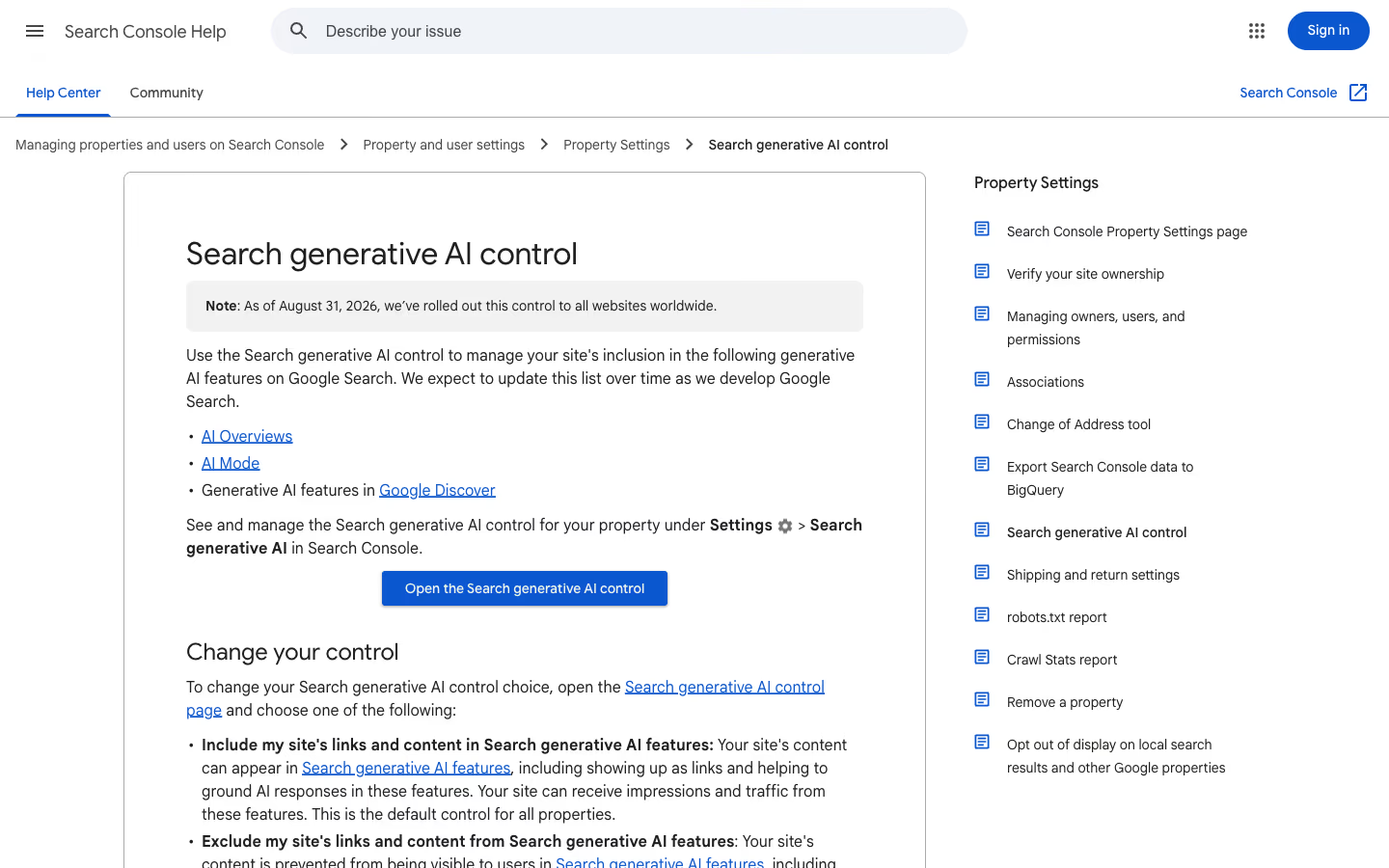
The search-safe option is Disallow AI Training. It only publishes a preference in robots.txt, and Cloudflare notes that Googlebot “can keep crawling your site for search”. Opting out of Google’s model training is handled by a separate token, Google-Extended, which I covered in the post on Google’s three AI controls.
What happened to the old Block AI bots toggle
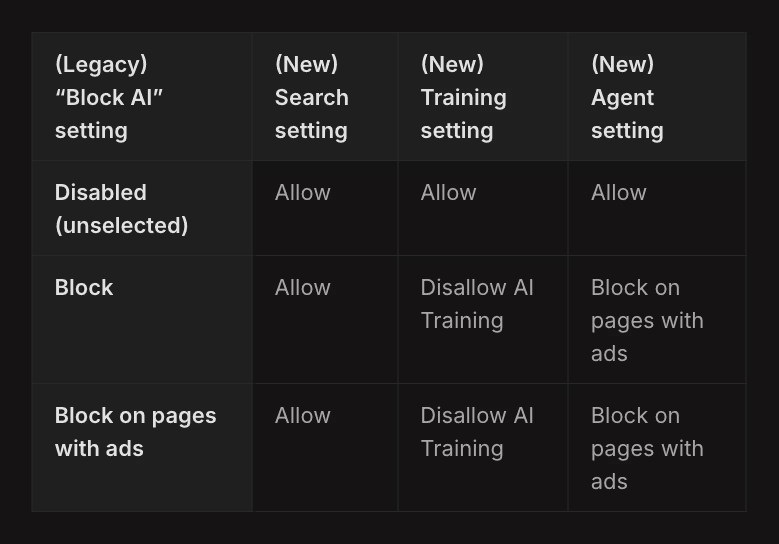
Cloudflare is deprecating it and moving existing zones to the new settings. The migration table from the blog post looks like this:
| Old “Block AI” | Search | Training | Agent |
|---|---|---|---|
| Off | Allow | Allow | Allow |
| Block | Allow | Disallow AI Training | Block on pages with ads |
| Block on pages with ads | Allow | Disallow AI Training | Block on pages with ads |
According to this table, nobody who had the old toggle got a Googlebot block automatically. Search always moves to Allow, and Training to Disallow AI Training, which is the robots.txt-based option.
New domains, added from 15 September, get one of two sets during onboarding. A site without ads: everything on Allow. A site with ads: Search Allow, Training Disallow AI Training, Agent Block on pages with ads. Both sets have Preference Sync turned on, which according to Cloudflare “publishes the applicable no-training preference in robots.txt” and replaces the previous Managed Robots.txt.
Does blocking AI training in Cloudflare also block Googlebot
The documentation page on blocking AI bots contains a sentence that does not match the table:
“Mixed-purpose crawlers that combine Search and Training will also be blocked by all configurations to block AI training”
Read literally, every configuration that blocks training, the old toggle included, also blocks Googlebot. The migration table says the opposite. Which version describes what Cloudflare’s servers actually do with your traffic is settled only by your own zone and your own logs, not by either of these two texts.
The documentation also states that the old toggle is “Deprecating on September 15, 2026”, and that for new domains “Search will remain allowed”. Neither the post nor the documentation mentions Cloudflare Pages.
Why Cloudflare can block GPTBot without touching search, but not Googlebot
The same post explains why Google, Apple and Microsoft get different treatment from other AI companies. Cloudflare introduced an “Accountable” designation for crawler operators. To get it, an operator has to meet, or commit to meeting, four requirements: a way to opt out of AI training (through robots.txt or a similar standard), a way to opt out of AI summaries, URL-level visibility into which pages were made available for training, and an assurance that opting out of training will not affect traditional search results (Cloudflare Blog, 15 September 2026).
Cloudflare lists Applebot, Googlebot and Bingbot as Accountable mixed-use crawlers. The training crawlers of Amazon, Anthropic, Meta and OpenAI are classified differently: those companies run separate crawlers for search and for training, so Cloudflare can block the training bot and leave the search bot alone. That is the whole reason Disallow AI Training behaves the way it does. Training-only crawlers get blocked, while Accountable mixed-use crawlers stay allowed for search and receive the no-training preference through robots.txt.
The preference only works if the operator reads it. Google honours a Disallow for the Google-Extended token and Apple honours one for Applebot-Extended. Microsoft is different: according to the same post, Bing is still building support for a domain-level no-training preference in robots.txt, targeted for early 2027, and until then Disallow AI Training does not automatically pass that preference to Bing. In the meantime Cloudflare points to the NOARCHIVE meta tag and Bing’s Block URLs tool.
How to check if Googlebot can crawl your WordPress site
Three steps, about three minutes, if you have access to Search Console and your Cloudflare account.
- URL Inspection in Search Console. Paste your home page URL and click Test live URL. You are looking for a successful page fetch and a last crawl date after 15 September. Repeat for one post with ads, if you show them, because that is where the Block on pages with ads option applies.
- Crawl stats. In Search Console, go to Settings > Crawl stats and open the breakdown by response. A sudden rise in 403 responses from mid-September is a sign that something at the edge is stopping Googlebot.
- Zone settings in Cloudflare. Cloudflare writes that the new controls “can be configured at the domain (zone) Security Settings”. Check what is set for Search, Training and Agent. If you see Block in Training or Search and you want to stay in Google, change it to Disallow AI Training or Allow.
While you are at it, look at robots.txt. If Preference Sync is active, Cloudflare adds its preference there. On WordPress, robots.txt is often generated by an SEO plugin as well, so check the served file at /robots.txt, not the plugin settings. Our own Content-Signal line shows how easily robots.txt drifts from what we assume.
Does Google-Extended in robots.txt remove a site from Google Search
No. Google’s documentation of its common crawlers says Google-Extended has no separate HTTP user agent string. Crawling is done by the existing Google user agents, and the token works only as a control in robots.txt. Google states that it does not affect a site’s inclusion in Google Search and is not used as a ranking signal. What it controls is whether crawled content may be used to train future Gemini models and for grounding in Gemini Apps and Vertex AI (Google Search Central, Google’s common crawlers).
The same page explains one detail that matters for testing. The Test live URL button in Search Console and the Rich Results Test fetch the page as Google-InspectionTool, a crawler used by Google’s search testing tools that has no effect on Google Search. A successful live test therefore tells you the zone lets a Google crawler through right now. The Crawl stats report is what shows how Googlebot itself has been treated over the past weeks, which is why the check above uses both.
What happens to indexed pages when Googlebot gets a 403
A Cloudflare block answers Googlebot with an error page instead of your content, and the check above looks for 403 responses for that reason. Google describes how its crawlers react. All 4xx status codes except 429 are treated the same way, they have no effect on crawl rate, and for Google Search the indexing pipeline removes a URL from the index if it was previously indexed (Google Search Central, HTTP status codes and network errors).
So a block does not just pause new crawling. Pages that already rank can drop out of the index while the block lasts. The same page warns against using 401 and 403 to limit crawl rate. If the real goal is to reduce load on a WordPress server, the codes Google treats as a slowdown signal are 429 and 5xx: they make Google’s crawlers temporarily crawl more slowly instead of removing URLs.
How to verify that a request in your logs really is Googlebot
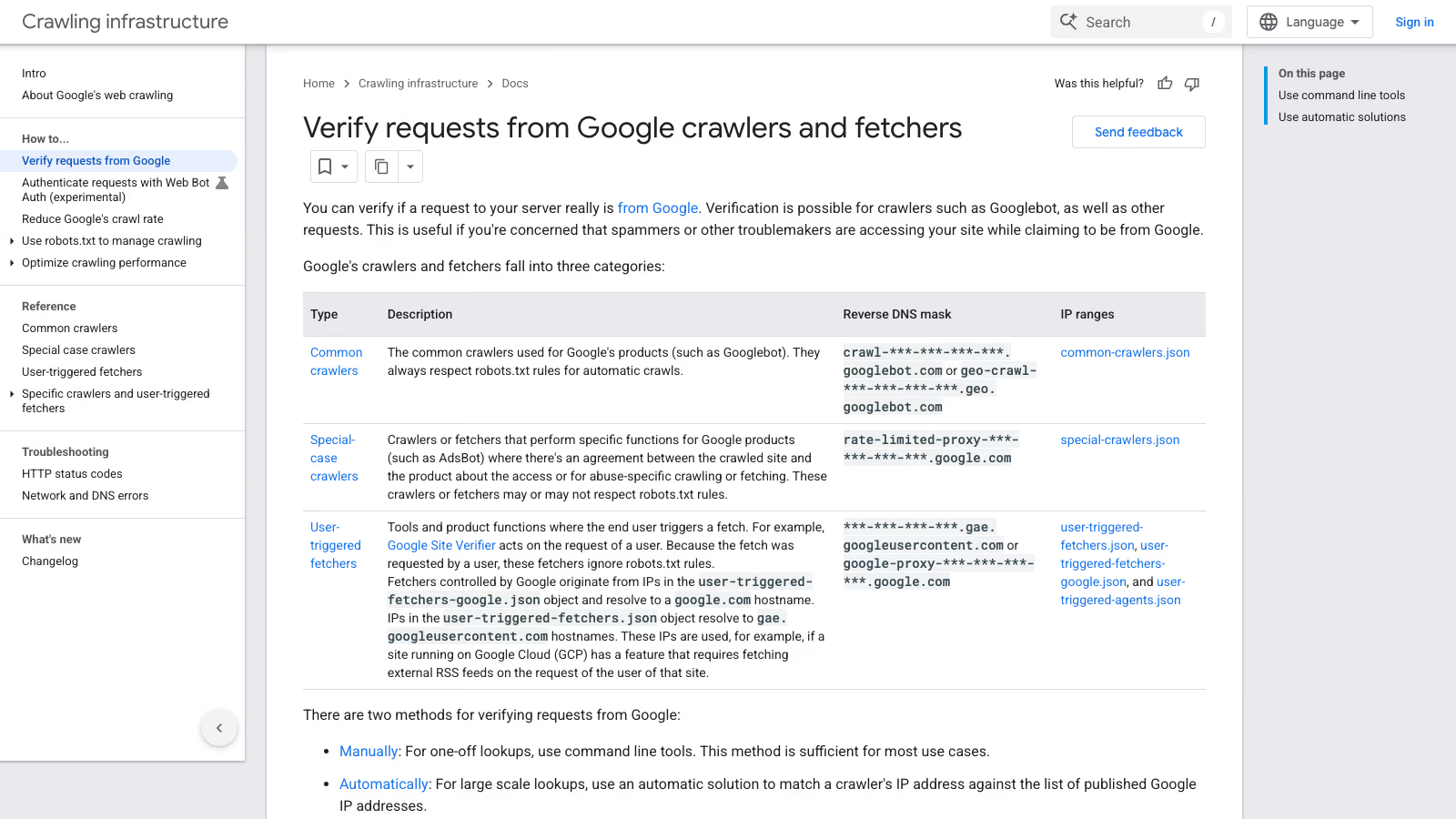
Anyone can send a request with “Googlebot” in the user agent, so a log line alone proves nothing. Google’s method is a two-way DNS check: run a reverse DNS lookup on the IP address from your logs with the host command, confirm the hostname ends in googlebot.com, google.com or googleusercontent.com, then run a forward lookup on that hostname and check that it returns the same IP. Google also publishes its crawler IP ranges as JSON files, split into common crawlers, special-case crawlers, user-triggered fetchers and user-triggered agents (Google Search Central, Verifying Googlebot).
The hostname also tells you which kind of crawler you are looking at. Googlebot and other common crawlers resolve to crawl-***-***-***-***.googlebot.com (or a geo.googlebot.com variant) and always respect robots.txt for automatic crawls. User-triggered fetchers resolve under gae.googleusercontent.com or google-proxy-***.google.com and ignore robots.txt, because a person asked for the fetch.
Cloudflare runs a similar check on its side. Its verified bots are bots that Cloudflare has confirmed through a cryptographic Web Bot Auth signature, a published IP list with a stable user agent, or reverse DNS, and according to its documentation they have historically been excluded in default bot configurations on all plans (Cloudflare Docs, Verified bots). In a WAF custom rule, the cf.client.bot field indicates whether a request came from a known good bot or crawler (Cloudflare Docs, cf.client.bot). One trap on the free plan: Bot Fight Mode runs in a separate pipeline, and Cloudflare states that it cannot be bypassed or skipped with WAF custom rules or Page Rules (Cloudflare Docs, Bot Fight Mode). A skip rule written “to protect Googlebot” will not change what Bot Fight Mode does.
Which Cloudflare AI bot setting to choose for a WordPress business site
For a site that lives on Google search traffic, a sensible setup looks like this:
| Category | Setting | Why |
|---|---|---|
| Search | Allow | This is the search traffic you want |
| Training | Allow or Disallow AI Training | Disallow AI Training states your objection through robots.txt without blocking Googlebot |
| Agent | Allow | AI agents visit the site on behalf of a specific person, often a potential client |
Keep Block for cases where you really want to disappear from search engines, for example a staging site or an admin panel that should not be indexed. For that, noindex and password protection work better anyway.
If you would rather keep your content out of AI answers, that is a separate decision. Google has separate tools for it, and I cover them as part of GEO and LLMO optimization. An edge block in Cloudflare is not the tool for that, because it cuts out search along with AI.
Before you block any crawler, count how many requests it makes per visitor it refers. Nick Gray described his 1.5 million-page site PatronView on 7 August 2026: one day brought 3.6 million requests from Chinese bots, Google ran 46 crawls per visitor it sent, and Bingbot made 158,610 requests for 680 visitors. He placed the verified-bot skip rule, (cf.client.bot), after his block rules and before his challenge rules, so a blocked bot stays blocked but Googlebot never sees a challenge. Only 0.24% of his challenges get solved, which he reads as a sign that they hit almost nothing but bots.
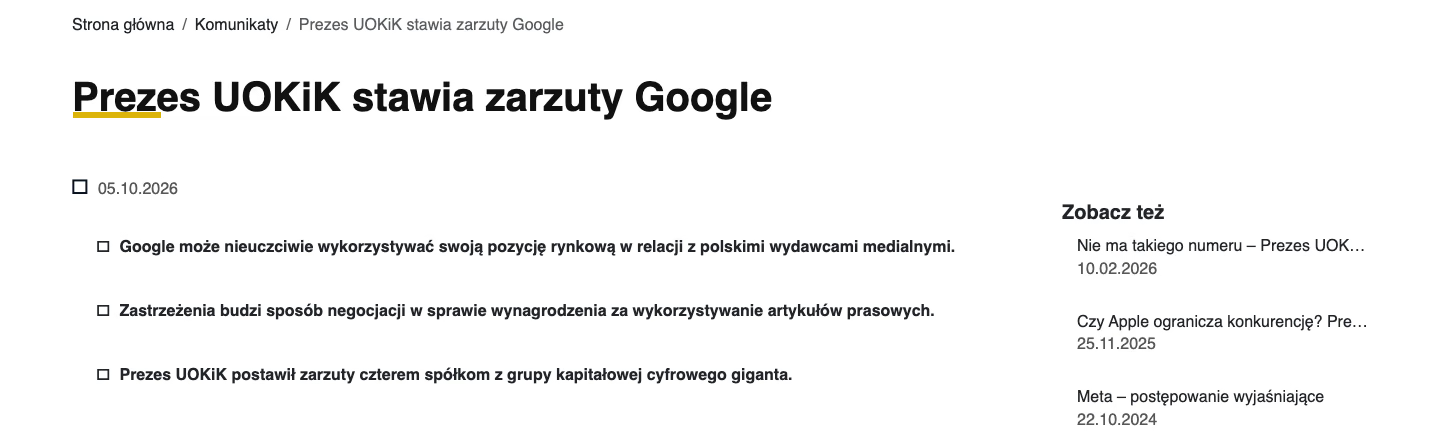
The legal side is still open. In June 2025 Brian Williamson of Communications Chambers published AI, Copyright and the Public Good, a report its own disclaimer describes as independent and funded by Google. It proposes treating AI training on copyrighted works as fair use, calls opt-outs and transparency requirements costly, and wants copyright to focus on whether AI outputs infringe. That is a policy proposal, not law. For now the control you actually hold is the bot setting at your network edge, so set it in a way that does not take Googlebot down with the AI crawlers.
Example of Cloudflare AI bot settings on a live site
wppoland.com runs on Cloudflare, so I checked this on our own site on 8 October 2026. The Cloudflare API returns ai_training, ai_search and ai_user with the value disabled for our zone, and the old ai_bots_protection toggle is disabled too. No AI bot block is turned on.
Search Console confirms it from the other side: URL Inspection for /pl/ shows the last crawl on 8 October 2026 at 12:12, a successful page fetch and robots.txt allowing access. This is one zone with one setting, and the whole problem is that settings differ between zones.
Cloudflare AI bot settings checklist
- Run Test live URL in Search Console for the home page and one post with ads.
- Review Crawl stats for 403 responses since 15 September 2026.
- Open your zone’s Security Settings in Cloudflare and check Search, Training and Agent.
- Do not use Block if you want to stay in Google. Disallow AI Training is the option for objecting to training.
- Check the served
/robots.txtfile, because both Cloudflare and your SEO plugin write to it. - If your domain was added to Cloudflare after 15 September, check which default set was chosen during onboarding.