Drupal 10 reaches end of life on 9 December 2026, six weeks after this article was published. Drupal 12 ships the same week. If your site runs on Drupal 10 you have three realistic options: upgrade to Drupal 11 now and plan for 12 later, buy a little time with a minimal upgrade, or move to another platform. I build and maintain sites on Drupal and on WordPress, so this guide covers both directions. Staying on Drupal is often the right answer; the exceptions are mostly small sites run by small teams.
This article reflects drupal.org and the legislation pages as they stood on 28 October 2026. Dates in the Drupal schedule can move, so check the linked sources before you sign off a budget.
When does Drupal 10 support end?
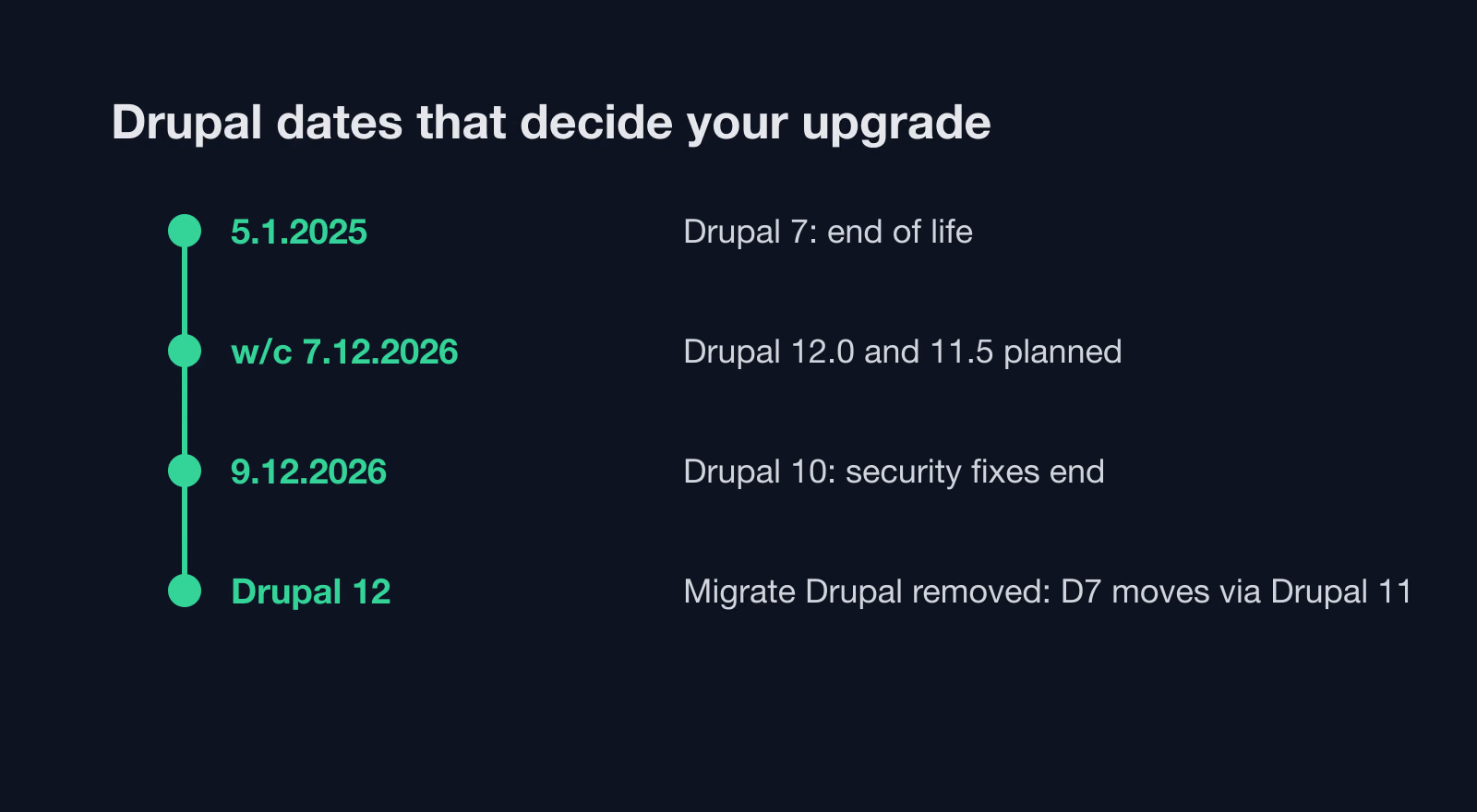
Drupal.org’s release schedule states it plainly: “Drupal 10 will reach end of life on December 9, 2026” and “No new releases of Drupal 10 will be made after this date.” Drupal 10.6.0 is the last minor release of the 10 line. Drupal 12 is due in the week of 7 December 2026, the same week.
The security window is already narrowing. When Drupal 11.4.0 came out in the week of 29 June 2026, security support ended for 11.2.x and 10.5.x. At the time of writing the supported branches are 11.4.x, 11.3.x and 10.6.x. The last patch releases in each, according to the core release feed, came out on 21 October 2026: Drupal 10.6.20, 11.4.11 and 11.3.20.
| Date | What happens | Source |
|---|---|---|
| 2 August 2024 | Drupal 11.0.0 released | drupal.org release notes |
| 5 January 2025 | Drupal 7 security support ends | Drupal 7 end of life |
| Week of 29 June 2026 | Drupal 11.4.0; security support ends for 11.2.x and 10.5.x | schedule |
| 14 October 2026 | Drupal 12.0.0-beta2 | 12.0.0-beta2 release |
| 21 October 2026 | Drupal 10.6.20, 11.4.11 and 11.3.20 | core release feed |
| Week of 7 December 2026 | Drupal 12.0.0 and 11.5.0; security support ends for 11.3.x and 10.6.x | schedule |
| 9 December 2026 | Drupal 10 end of life | schedule |
The general policy explains why the dates line up like this. According to the release process overview, major versions arrive every two years, minor versions in June and December, and each major is supported “for a minimum of 4 years, until the release of two further major versions.” Drupal.org has not published a fixed end date for Drupal 11, so I do not quote one to clients.
What happens to a Drupal 10 site after 9 December 2026?
The site keeps working after 9 December, but core stops getting security and bug fixes. The Drupal Security Team’s general information page says “Only supported versions of Drupal receive Security Team support” and advises: “Upgrade if you are using an unsupported version of Drupal.”
In practice that means three things for a site owner:
- When a core vulnerability is disclosed after December, the advisory will name the fixed Drupal 11 and 12 releases. There will be no Drupal 10 release to install.
- Contributed module maintainers follow core. As their next releases drop Drupal 10 from the version constraint, your site gets stuck on older module versions, including older security fixes.
- Auditors, cyber insurance questionnaires and supplier checklists often ask whether the CMS is supported. “No” becomes the honest answer.
If your site sits behind a login, takes payments or holds personal data, I treat December as a hard deadline. A static brochure site with no forms carries less risk, but the module problem in point 2 still grows every month.
Should I upgrade to Drupal 11 or move to WordPress?
Most Drupal sites I see should upgrade. Drupal is good at things WordPress needs plugins and custom code for: fine-grained roles and permissions, editorial workflows with content moderation, structured content with entity references, multisite setups and multilingual content in core. Rebuilding all of that elsewhere usually costs more than the upgrade.
Moving makes sense when the site has outgrown the reason it was built on Drupal, or never had one. Here is the table I use in a first conversation.
| Site profile | My usual advice | Why |
|---|---|---|
| Many editors, roles and approval workflows | Upgrade to Drupal 11 | Permissions and moderation are core Drupal features; rebuilding them is the expensive part of any migration |
| Multilingual site with translated content and interface | Upgrade to Drupal 11 | Content translation is in Drupal core; on WordPress it depends on a plugin choice |
| Several sites on one codebase | Upgrade to Drupal 11 | One upgrade covers every site in the setup |
| Custom modules wired into other systems (CRM, ERP, SSO) | Upgrade, after a code audit | Custom code is fixable with Rector; a rewrite for another CMS is a new project |
| Small team, a blog and a handful of pages | Consider WordPress | Editors get a simpler admin and a large pool of developers |
| Site built on Drupal 10 with almost no contributed modules | Upgrade first, decide later | The jump to 11 is often small; migrating under deadline pressure is riskier |
| Still on Drupal 7 | Plan a migration now | Security support ended in January 2025; see the Drupal 7 section below |
If you want a broader view before deciding, my comparison of CMS platforms for large corporate websites sets Drupal against WordPress, TYPO3 and headless options. For sites that need to stay on Drupal, my Drupal developer page describes how I take on an upgrade: an audit of the copy first, then a fixed plan.
How do I upgrade Drupal 10 to Drupal 11?
The official guide, How to upgrade from Drupal 10 to Drupal 11, lists the prerequisites: the site must run Drupal 10.3.0 or later, the server needs PHP 8.3.0 or later, and you need command-line access with Composer and Drush. Below is the order I work in. I never do any of this on production.
1. Make a working copy
I clone the code, the database and the files directory to a staging server that runs the same web server and database as production. Every later step happens on that copy. If the site has configuration management set up, I check that the exported configuration matches the database before I start, because drift found halfway through an upgrade is hard to separate from upgrade problems.
2. Update to the latest Drupal 10 release
I bring core to the latest 10.6 patch release and update every contributed module to its newest Drupal 10 compatible version. Many modules ship a release that supports both 10 and 11; installing it on Drupal 10 first removes a large part of the later work.
3. Check the server against Drupal 11 requirements
Drupal 11 needs more than PHP 8.3. The database requirements page sets MySQL 8.0+, MariaDB 10.6+, PostgreSQL 16+ or SQLite 3.45+. For the web server, the web server requirements say Apache 2.4.7 or later or Nginx 1.1 or later, and “As of Drupal 11.0.0 Drupal does not support the use of Microsoft IIS.” I find old shared hosting and Windows servers in local authority infrastructure more often than people expect, so this check goes first.
4. Run Upgrade Status
Upgrade Status is a contributed module that reviews “major upgrade readiness of the environment and components of the site.” I install it on the Drupal 10 copy, scan all contributed and custom projects, and export the report. It tells me which modules have a Drupal 11 release, which need an update, and which custom code uses deprecated APIs.
5. Fix custom code with Drupal Rector and drupal-check
Drupal Rector automates “fixing deprecated Drupal code”, and its README states coverage of deprecations from Drupal 10.0 through 11.4. I run it on custom modules and themes, review the diff line by line, and commit in small steps. Then I run drupal-check, a static analysis tool built on PHPStan, to find what Rector cannot rewrite on its own. The drupal.org upgrade guide names Rector and Upgrade Status; drupal-check is my own addition.
6. Replace modules removed from core
The guide lists six modules removed in Drupal 11: “Actions UI, Activity Tracker, Book, Forum, Statistics, and Tour.” Each has a contributed replacement, according to drupal.org’s deprecated and obsolete modules page. If the site uses any of them, I require the contributed project with Composer while still on Drupal 10, so the switch of core does not remove a module that holds data.
7. Unblock contributed modules that only lack a version constraint
Sometimes a contributed module works on Drupal 11 but its maintainer has not tagged a release. The Composer Drupal Lenient plugin “allows installing Drupal extensions even if not compatible with installed drupal/core package”. It rewrites the core constraint for packages you list in extra.drupal-lenient.allowed-list. I add one package at a time, apply the compatibility patch from the module’s issue queue, and keep a note in the repository of why each entry is there. The official guide mentions this route for modules requiring patches.
8. Switch core and test
With everything green in Upgrade Status, I require Drupal 11 core with Composer, run database updates with Drush, export configuration and run the tests. Then the editors test the copy: creating and editing content, media uploads, menus, forms, search and every workflow state. Only after they sign off do I schedule the production release.
Which Drupal 10 modules were removed in Drupal 11?
Six core modules left with Drupal 11.0. Each one continues as a contributed project, according to the deprecated and obsolete modules page.
| Removed from core in 11.0 | Deprecated in | What to do |
|---|---|---|
| Actions UI | Drupal 10.3.0 | Install the contributed Actions UI module |
| Activity Tracker | Drupal 10.1.0 | Install the contributed module; it works with 10 and 11 |
| Book | Drupal 10 | Install the contributed Book project |
| Forum | Drupal 10 | Install the contributed Forum module |
| Statistics | Drupal 10 | Install the contributed Statistics project |
| Tour | Drupal 10 | Install the contributed Tour module |
The same page also notes that the CKEditor 4 integration was already removed from core in Drupal 10 and that “CKEditor 4 is end-of-life.” A site that still holds old CKEditor 4 configuration should finish the move to CKEditor 5 before going further.
Should I plan for Drupal 12 now?
Yes, in two ways. First, Drupal 12.0 raises the server floor sharply. Drupal.org’s PHP requirements table lists PHP 8.5 as the only supported version for Drupal 12.0, and adds that from 12.0 PHP “should be compiled with the argon2 support for password hashing.” The database minimums rise to MariaDB 10.11+, MySQL 8.0+ or PostgreSQL 18+. Drupal 11.3 and later already run on PHP 8.5, so the practical move is to land on Drupal 11, then switch the server to PHP 8.5 while still on 11.
Second, the next wave of removals is already announced. Ban, Contact, Field Layout, History, Telephone, Search, Settings Tray and Shortcut are deprecated in the 11.x line and removed in 12.0. The Toolbar is removed from core in 12.0.0. The Claro admin theme and the Olivero front-end theme are deprecated in 11.5.0 and removed from 12.0.0; drupal.org says sites “should plan to use the added Default Admin theme.” Both themes continue as contributed themes. If your front-end theme is a sub-theme of Olivero, I would put that on the list for 2027 now.
You cannot skip a major version. Upgrade Status runs on Drupal 10 to prepare for 11 and on Drupal 11 to prepare for 12, so a Drupal 10 site goes to 11 first in every scenario.
I am still on Drupal 7: what now?
Drupal 7 is in a worse position than Drupal 10. Drupal.org’s Drupal 7 end of life page says “Drupal 7 security support has ended as of 5 January 2025.” The only route to security fixes since then is a paid extended support partner; drupal.org’s partner list names HeroDevs and Tag1 Consulting.
The bigger issue is the migration path. A Drupal 7 site does not upgrade in place to modern Drupal; it migrates into a fresh install using the Migrate Drupal module. According to the deprecated and obsolete modules page, Migrate Drupal UI was deprecated in Drupal 11.3.0 and Migrate Drupal is deprecated in the 11.x line. Both are removed in Drupal 12.0, and drupal.org says neither “is being moved to a contributed project.” The meta issue for removing Migrate Drupal is closed as fixed.
The consequence, as I read these pages: if you want the core Drupal 7 migration tooling, you run the migration on Drupal 11. Once Drupal 12 is the only option, the Drupal 6 and 7 source plugins are gone from core and you would need custom migration code. For a Drupal 7 site the decision between modern Drupal and WordPress is real, because both mean a rebuild of the theme and a content migration either way.
Can I get extended support for Drupal 10?
I could not confirm any. As of 28 October 2026, drupal.org lists extended support partners only for Drupal 7. The HeroDevs page for Drupal describes drop-in replacements for Drupal 7.x and does not mention Drupal 10. Tag1’s Drupal page returned an access error when I checked it, so I cannot say what it offers.
So “buying time” for a Drupal 10 site means something else in practice. I run the smallest upgrade that gets the site onto supported Drupal 11: required core module replacements, contributed modules on their Drupal 11 releases, the Lenient plugin for the few modules waiting on a tagged release, and Rector fixes for custom code. Redesigns, new features and the Drupal 12 preparation wait until after December. That keeps security fixes flowing and moves the bigger decisions into the next budget year.
Drupal 10 to 11 upgrade problems and how I fix them
These are the problems that come up most often on Drupal 10 sites I audit, with the fix I apply.
| Problem | Typical cause | What I do |
|---|---|---|
Composer cannot resolve the dependency tree when requiring drupal/core-recommended:^11 | One contributed module has no release that allows Drupal 11 | Check the module’s issue queue for a compatibility patch; add it to the Lenient allow-list with the patch, or replace the module |
| Upgrade Status lists dozens of deprecations in a custom module | Code written for Drupal 8 or 9 that still uses removed APIs | Run Drupal Rector, review the diff, then drupal-check for the rest |
| Hosting offers PHP 8.1 or 8.2 only | Old shared hosting plan or an unmaintained server image | Move to a server with PHP 8.3 or newer before the upgrade; PHP 8.1 and 8.2 are not supported on Drupal 11 |
| Database too old | MySQL 5.7 or MariaDB below 10.6 | Upgrade the database server on staging first, then production, before switching Drupal core |
| A removed core module is still enabled | Book, Forum, Statistics, Tour, Actions UI or Activity Tracker in use | Require the contributed version on Drupal 10, then upgrade core |
| Site runs on Microsoft IIS | Windows hosting inherited from an older contract | Plan a move to Apache or Nginx; Drupal 11 does not support IIS |
| Front-end theme breaks after the upgrade | Sub-theme of a core theme or Twig code using deprecated functions | Run Upgrade Status on the theme, fix Twig and libraries, test every content type |
| Patches stop applying | Patches pinned to Drupal 10 versions of a module | Check whether the fix landed upstream; drop or reroll each patch |
Migrating Drupal to WordPress: what transfers and what you rebuild
When a move to WordPress is the right call, the content transfer is the easy part. The usual tool is the FG Drupal to WordPress plugin. Its wordpress.org page says it “has been tested with Drupal 4 to 11 and the latest version of WordPress,” and at the time of writing it is at version 3.95.7 with 700+ active installs.
The free version, per its plugin page, migrates articles, basic pages, categories, tags and images, modifies the internal links, and works with MySQL, PostgreSQL and SQLite Drupal databases. The premium version adds comments, users, custom post types, custom taxonomies, custom fields, navigation menus, Drupal media, redirects from Drupal URLs to the new WordPress URLs, and the ability to run the import from WP-CLI. WP-CLI itself has no Drupal importer; its wp import command only reads WXR files.
What no importer moves for you, in my experience:
- Views. Listings, filters, exposed search forms and RSS feeds built in Views become WordPress templates, queries or block patterns, rebuilt by hand.
- Roles and permissions. Drupal’s permission matrix has no one-to-one counterpart; I map each role to WordPress roles and capabilities and test with real editor accounts.
- Editorial workflows. Content moderation states and transitions need a plugin or custom code on WordPress.
- Multilingual content. Drupal stores translations in core; on WordPress the structure depends on the multilingual plugin you choose, and the import has to be planned around it.
- Paragraphs and layouts. Structured page sections usually become blocks, and the block design is new work.
On the WordPress side, the recommended hosting requirements are PHP 8.3 or greater, MariaDB 10.11 or MySQL 8.0 or greater, and HTTPS. I wrote a separate guide on migrating TYPO3 to WordPress, and most of its points about content models and editor training apply to Drupal too. For a structured look at your own site, the WordPress migration assessment asks the questions I would ask in a first call.
For scale: according to W3Techs, as of 28 October 2026, WordPress runs 39.5% of all websites (58.3% of the CMS market) and Drupal runs 0.6% (0.9% of the CMS market). That gap mainly affects how many developers and agencies you can choose from when you hire.
UK and Irish public bodies: accessibility rules and procurement
Councils, universities, NHS bodies and Irish local authorities are typical Drupal users, and they carry a legal duty that private sites mostly do not. In the UK, The Public Sector Bodies (Websites and Mobile Applications) (No. 2) Accessibility Regulations 2018, SI 2018 No. 952, came into force on 23 September 2018. They define the accessibility requirement through the four WCAG principles and require a public sector body to publish an accessibility statement on how its site complies. In Ireland, S.I. No. 358/2020, the European Union (Accessibility of Websites and Mobile Applications of Public Sector Bodies) Regulations 2020, sets the same kind of duty, and Regulation 7 requires public sector bodies to “prepare and regularly update” a detailed accessibility statement.
Both trace back to Directive (EU) 2016/2102 on the accessibility of public sector websites. For private businesses in Ireland, the European Accessibility Act, Directive (EU) 2019/882, applies to certain consumer services provided after 28 June 2025, including e-commerce and consumer banking. As an EU directive it does not bind UK businesses directly.
An unsupported CMS version and an outdated accessibility statement tend to turn up in the same audit. The upgrade is also a good moment to re-test. Drupal 12 replaces Claro with a new Default Admin theme and removes Olivero from core, so any accessibility work done on those themes needs checking again after the move. My page on websites for government offices covers how I handle accessibility testing for public sector sites.
On procurement: a public body usually cannot buy an upgrade over the phone. If your framework agreement or contract needs a new call-off or a tender, the six weeks before 9 December are short. I would put the minimal Drupal 11 upgrade through the quickest route available under your existing maintenance contract and scope the larger work, Drupal 12 or a migration, as a separate procurement for the next financial year.
What to do this week and this month
This week:
- Note the exact Drupal core version from the status report page or
composer show drupal/core. - Ask your hosting provider in writing which PHP and database versions your plan supports, and whether PHP 8.3 is available today.
- List contributed modules and themes, and mark any custom code.
- Check whether Book, Forum, Statistics, Tour, Actions UI or Activity Tracker are enabled.
- Find out who signs off spending and whether an upgrade fits your existing maintenance contract.
This month:
- Build a staging copy and run Upgrade Status on it.
- Update to the latest Drupal 10.6 release and the newest Drupal 10 compatible contributed modules.
- Run Drupal Rector and drupal-check on custom code.
- Decide on the path: upgrade, minimal upgrade now with more work later, or migration.
- Book editor testing time on the staging copy before 9 December.
- For public bodies: schedule an accessibility re-test and update the accessibility statement after the release.
If you would rather hand this over, send me the output of the first checklist through the Drupal developer page and I will reply with an upgrade plan for your site. For a WordPress move, the WordPress developer page explains how I take on migrations.