A request whose user agent says Googlebot proves only that someone typed the word Googlebot. The test that counts is the IP address: it has to sit in the list Google publishes, or survive a reverse DNS lookup followed by a forward one. This guide goes from a one-line grep on your access log to a WAF rule that blocks impostors without touching the real crawler.
The reason to look now: on 30 October 2026 Search Engine Roundtable reported an interview with Gary Illyes of Google on the Odys Podcast, in which he linked the rise in bot impersonation to AI. If your WordPress site sits behind Cloudflare, read my earlier post on whether Cloudflare blocks Googlebot as well. It covers the AI bot settings, Bot Fight Mode and what a 403 does to indexed pages. This post is about the step before any of that: knowing who is actually knocking.
Every command and config below was run on 30 October 2026 against Google’s live files, with nginx 1.27.2 and Apache 2.4.63 on a test machine. Where I could not test something on a live server, I say so.
Why are fake Googlebots more common now?
Search Engine Roundtable’s Barry Schwartz summarised the conversation between Illyes and the podcast host, Aneta Samkoff. Asked why impersonation has become such an issue, Illyes answered:
“I think it is AI”
Gary Illyes, quoted by Search Engine Roundtable, 30 October 2026; episode on YouTube, Odys Podcast
His reasoning, as Search Engine Roundtable quotes it: companies want content to train models, firewalls and CDNs have become better at spotting crawlers but are not perfect, and a small AI engine or scraper that says it is Googlebot often gets let in where it would otherwise be blocked. According to the same report, Illyes runs honeypots that attract crawlers and has seen requests claiming to be Googlebot from IP addresses that have nothing to do with Google. The episode title puts the effort involved at about 30 seconds, which matches anyone’s experience: the user agent is a header the client sets itself.
I have not found a transcript of the episode, so everything attributed to Illyes here comes through Search Engine Roundtable’s write-up.
The logic of the impostor is simple. Site owners who block scrapers almost always make an exception for Googlebot, because nobody wants to fall out of Google. Any rule written as “let Googlebot through” without checking the IP is therefore an open door with a sign on it. Google’s own Search Console help says the same in a different context: allowing entry for Googlebot without a login “effectively removes the security of the page”, because “Googlebot can be spoofed” (Search Console Help, Crawl Stats report).
How do I find requests claiming to be Googlebot in my access log?
Start with numbers. On a typical nginx server with the default combined log format, this lists the IPs that sent a Googlebot user agent, most active first:
grep -i 'googlebot' /var/log/nginx/access.log | awk '{print $1}' | sort | uniq -c | sort -rn | head -20On Apache the file is usually /var/log/apache2/access.log (Debian, Ubuntu) or /var/log/httpd/access_log (RHEL family). On shared hosting, download the raw access log from the panel; the format is almost always the same combined format.
To see what each of them asked for, print the IP next to the request line:
awk -F'"' 'tolower($6) ~ /googlebot/ {split($1,a," "); print a[1], $2}' /var/log/nginx/access.log | head -50A constructed example, using documentation addresses from RFC 5737 rather than real traffic, shows the pattern you are looking for:
66.249.66.1 GET / HTTP/1.1
203.0.113.7 GET /wp-login.php HTTP/1.1
203.0.113.7 GET /?s=test HTTP/1.1
Real Googlebot rarely has a reason to hit wp-login.php, xmlrpc.php or an endless string of internal search URLs. A “Googlebot” that does is worth checking first. The URL pattern only tells you where to look first; the IP decides.
Zach Chahalis makes the same point in Moz’s guide to log analysis for AI search, published on 29 October 2026: a user agent is “a name the requester gives itself”, scrapers can inflate your numbers, and “security rules intended to block fake bots can accidentally block real ones too” (Moz, How To Analyze Server Logs for AI Search). He recommends switching on bot verification when importing logs, for example “Verify Bots When Importing Logs” in Screaming Frog’s Log File Analyser, so impostors never reach your charts.
How do I verify a Googlebot IP with host or dig?
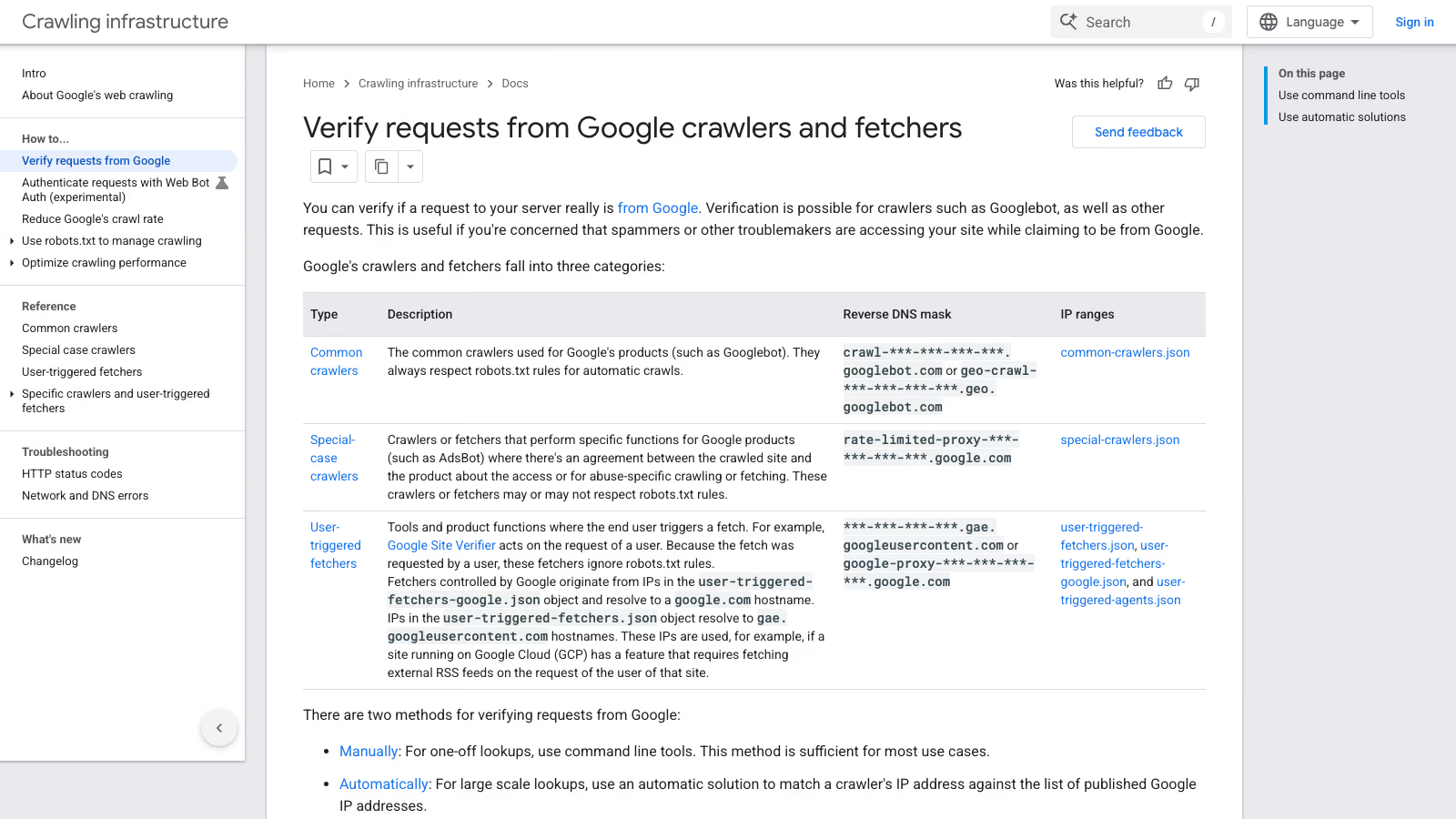
Google documents a four-step manual check (Google Crawling Infrastructure, Verify requests from Google crawlers and fetchers):
- Run a reverse DNS lookup on the IP from your log with
host. - Check that the hostname ends in
googlebot.com,google.comorgoogleusercontent.com. - Run a forward DNS lookup on that hostname.
- Check that it returns the original IP.
This is what it looked like on 30 October 2026 for one of Google’s own example addresses:
$ host 66.249.66.1
1.66.249.66.in-addr.arpa domain name pointer crawl-66-249-66-1.googlebot.com.
$ host crawl-66-249-66-1.googlebot.com
crawl-66-249-66-1.googlebot.com has address 66.249.66.1
The forward step is not optional. Whoever controls an IP block can set its reverse DNS to any name, crawl-1-2-3-4.googlebot.com included. They cannot make Google’s DNS servers answer the forward query with their address. dig +short -x 66.249.66.1 and dig +short crawl-66-249-66-1.googlebot.com give the same answers in a shorter form.
For more than a handful of IPs, wrap it in a loop. This script accepts Google and Bing hostnames, and I ran it on 30 October 2026 against Google, Bing and two non-crawler addresses:
#!/usr/bin/env bash
# Two-way DNS check for an IP that claims to be Googlebot or Bingbot.
# Usage: ./verify_dns.sh 66.249.66.1 [more IPs]
for ip in "$@"; do
  name=$(host "$ip" | awk '/domain name pointer/ {print $NF; exit}')
  name=${name%.}
  case "$name" in
    *.googlebot.com|*.google.com|*.googleusercontent.com|*.search.msn.com) ;;
    *) echo "$ip FAKE: PTR is '${name:-none}'"; continue ;;
  esac
  if host "$name" | grep -qwF -- "$ip"; then
    echo "$ip OK: $name"
  else
    echo "$ip FAKE: $name does not resolve back to $ip"
  fi
done
Output on that day: 66.249.66.1 OK: crawl-66-249-66-1.googlebot.com, 157.55.39.1 OK: msnbot-157-55-39-1.search.msn.com, 8.8.8.8 FAKE: PTR is 'dns.google'. Three limits apply. host comes from the dnsutils package on Debian and Ubuntu and from bind-utils on the RHEL family. “FAKE” only means “not Google or Bing”, so run the script on IPs that claimed to be a crawler, not on your whole log. And IPv6 addresses can be written in several valid forms, so the textual comparison may miss a match; use the IP list method below for IPv6.
Which hostname belongs to which kind of Google crawler?
Google sorts its traffic into three groups, each with its own hostname pattern and its own IP file (Google, Verify requests):
| Group | Examples | robots.txt | Reverse DNS | IP file |
|---|---|---|---|---|
| Common crawlers | Googlebot, Googlebot-Image, Google-InspectionTool | Always respected for automatic crawls | crawl-***-***-***-***.googlebot.com or geo-crawl-***-***-***-***.geo.googlebot.com | common-crawlers.json |
| Special-case crawlers | AdsBot | May or may not be respected | rate-limited-proxy-***-***-***-***.google.com | special-crawlers.json |
| User-triggered fetchers | Google Site Verifier, Feedfetcher, Google-Agent | Ignored, a person asked for the fetch | ***-***-***-***.gae.googleusercontent.com or google-proxy-***-***-***-***.google.com | user-triggered-fetchers.json, user-triggered-fetchers-google.json, user-triggered-agents.json |
The table matters for one practical reason: a request with a Googlebot user agent should come from the first row. If it resolves to gae.googleusercontent.com, it passed step 2 of the manual check, yet it is not Googlebot. Google explains that IPs in user-triggered-fetchers.json resolve to gae.googleusercontent.com and are used, for example, when a site running on Google Cloud fetches an external RSS feed for one of its own users. That is a legitimate fetch, just not the search crawler.
Which Google IP list should I check against, and what happened to googlebot.json?
Google publishes five JSON files in CIDR format under https://developers.google.com/static/crawling/ipranges/. On 30 October 2026 they held these numbers of prefixes (they change, so treat the counts as a snapshot):
| File | Prefixes on 30.10.2026 | Use it for |
|---|---|---|
common-crawlers.json | 317 | Googlebot and the other common crawlers |
special-crawlers.json | 272 | AdsBot and other special-case crawlers |
user-triggered-fetchers.json | 1068 | Fetches requested by users of Google Cloud sites |
user-triggered-fetchers-google.json | 504 | Google-owned user-triggered fetchers |
user-triggered-agents.json | 20 | Google-Agent and similar agents |
If you wrote a script a few years ago, it probably downloads googlebot.json. On 30 October 2026 the old address https://developers.google.com/search/apis/ipranges/googlebot.json returned a 301 redirect to common-crawlers.json, while https://developers.google.com/static/crawling/ipranges/googlebot.json returned a 404. A script that follows redirects keeps working; one that was pinned to the newer path, or that treats any non-200 answer as an empty list, does not. Check yours. An empty allow list turns “block fake Googlebot” into “block Googlebot”.
For any other Google service that might call your site (Apps Script, for example), Google points to the general list at https://www.gstatic.com/ipranges/goog.json.
Bing and OpenAI publish files in the same shape, with a creationTime and a prefixes array of ipv4Prefix or ipv6Prefix entries. One script can therefore check all of them. This one uses only the Python standard library:
#!/usr/bin/env python3
"""Check IPs against the crawler IP lists Google, Bing and OpenAI publish.

Usage: python3 verify_bot_ip.py 66.249.66.1 157.55.39.1 1.2.3.4
       awk '{print $1}' access.log | sort -u | python3 verify_bot_ip.py -
"""
import ipaddress
import json
import sys
import urllib.request

LISTS = {
    "google-common": "https://developers.google.com/static/crawling/ipranges/common-crawlers.json",
    "google-special": "https://developers.google.com/static/crawling/ipranges/special-crawlers.json",
    "google-user-fetchers": "https://developers.google.com/static/crawling/ipranges/user-triggered-fetchers.json",
    "google-user-fetchers-google": "https://developers.google.com/static/crawling/ipranges/user-triggered-fetchers-google.json",
    "google-user-agents": "https://developers.google.com/static/crawling/ipranges/user-triggered-agents.json",
    "bingbot": "https://www.bing.com/toolbox/bingbot.json",
    "openai-gptbot": "https://openai.com/gptbot.json",
    "openai-searchbot": "https://openai.com/searchbot.json",
    "openai-chatgpt-user": "https://openai.com/chatgpt-user.json",
}


def load(url):
    with urllib.request.urlopen(url, timeout=20) as r:
        data = json.load(r)
    return [
        ipaddress.ip_network(p.get("ipv4Prefix") or p.get("ipv6Prefix"))
        for p in data["prefixes"]
    ]


def main(args):
    ips = [l.strip() for l in sys.stdin] if args == ["-"] else args
    nets = {name: load(url) for name, url in LISTS.items()}
    for raw in filter(None, ips):
        try:
            ip = ipaddress.ip_address(raw)
        except ValueError:
            print(f"{raw}\tnot an IP")
            continue
        hits = [n for n, ranges in nets.items() if any(ip in net for net in ranges)]
        print(f"{ip}\t{', '.join(hits) or 'NOT IN ANY LIST'}")


if __name__ == "__main__":
    main(sys.argv[1:])
Feed it every IP that claimed to be Googlebot:
grep -i 'googlebot' /var/log/nginx/access.log | awk '{print $1}' | sort -u | python3 verify_bot_ip.py -On 30 October 2026 it answered 66.249.66.1 google-common, 66.249.90.77 google-special, 157.55.39.1 bingbot and 8.8.8.8 NOT IN ANY LIST, and it handled IPv6 (2001:4860:4801:10::1 google-common). It downloads nine files per run, so run it by hand or from cron. Never call it per request.
Why does a real Googlebot IP sometimes fail the hostname check?
While testing I ran Google’s own second example, 35.247.243.240. Google’s page says it resolves to geo-crawl-35-247-243-240.geo.googlebot.com. On 30 October 2026, both my system resolver and Google’s public 8.8.8.8 returned 240.243.247.35.bc.googleusercontent.com instead. The neighbouring address 35.247.243.241 returned the documented geo-crawl-35-247-243-241.geo.googlebot.com, and 35.247.243.240 sits inside 35.247.243.240/28 in common-crawlers.json.
I do not know why that one address has a different PTR record, and it is a single observation. A rule that accepts only *.googlebot.com hostnames would have rejected an IP that Google lists as a common crawler. A rule that accepts any googleusercontent.com hostname would let through user-triggered fetchers that are not Googlebot. For a request with a Googlebot user agent, membership in common-crawlers.json is the decisive test. Keep the DNS method for one-off checks, which is how Google itself describes it: “sufficient for most use cases” for single lookups, with the IP lists recommended for large-scale verification.
How do I block fake Googlebot in nginx?
The approach: generate an include file from common-crawlers.json, mark requests whose user agent contains “googlebot”, and return 403 only when the user agent claims Googlebot and the IP is not on the list. First, the generator:
#!/usr/bin/env python3
# Builds allow lists from Google's common-crawlers.json (Googlebot and friends).
# Usage: python3 make_googlebot_ranges.py nginx  > /etc/nginx/googlebot-ranges.conf
#        python3 make_googlebot_ranges.py apache > /etc/apache2/googlebot-ranges.conf
import json, sys, urllib.request

URL = "https://developers.google.com/static/crawling/ipranges/common-crawlers.json"
with urllib.request.urlopen(URL, timeout=20) as r:
    nets = [p.get("ipv4Prefix") or p.get("ipv6Prefix") for p in json.load(r)["prefixes"]]
if not nets:
    sys.exit("empty list from Google, refusing to write")

if sys.argv[1:] == ["nginx"]:
    print("\n".join(f"{n} 1;" for n in nets))
elif sys.argv[1:] == ["apache"]:
    for i in range(0, len(nets), 20):
        print("Require ip " + " ".join(nets[i:i + 20]))
else:
    sys.exit("usage: make_googlebot_ranges.py nginx|apache")
Then the nginx part. The geo and map blocks go in the http context, the if goes in the server block of your WordPress site:
# http { ... }
geo $googlebot_ip {
    default 0;
    include /etc/nginx/googlebot-ranges.conf;
}
map $http_user_agent $claims_googlebot {
    default 0;
    ~*googlebot 1;
}
map "$claims_googlebot:$googlebot_ip" $fake_googlebot {
    default 0;
    "1:0"   1;
}

# server { ... }
if ($fake_googlebot) {
    return 403;
}
I tested this exact block: a normal browser request got 200, a request with a Googlebot user agent from a non-Google IP got 403, and after I added the test machine’s address to the include file, the same Googlebot request got 200. That last step is worth repeating on your own server with a real Googlebot IP from your logs before you trust the rule.
Refresh the list from cron, writing to a temporary file first so that a failed download never leaves nginx with an empty include:
python3 make_googlebot_ranges.py nginx > /tmp/googlebot-ranges.conf \
  && mv /tmp/googlebot-ranges.conf /etc/nginx/googlebot-ranges.conf \
  && nginx -t && systemctl reload nginx
The trap that turns this rule against you: a reverse proxy in front of nginx. Behind Cloudflare, a load balancer or a hosting company’s proxy, $remote_addr is the proxy’s address, never Google’s, and every real Googlebot request gets 403. Configure the realip module first (set_real_ip_from for each proxy range and real_ip_header CF-Connecting-IP; for Cloudflare), then check in the access log that you see visitor IPs, not proxy IPs, before you enable the block.
How do I block fake Googlebot in Apache or .htaccess?
Apache 2.4 can do the same with mod_setenvif and mod_authz_host. In the virtual host or a <Directory> block:
SetEnvIfNoCase User-Agent "googlebot" claims_googlebot
<RequireAny>
    <RequireAll>
        Require all granted
        Require not env claims_googlebot
    </RequireAll>
    Include /etc/apache2/googlebot-ranges.conf
</RequireAny>
The logic reads: let everyone in who does not claim to be Googlebot, plus anyone from a listed IP. My test gave the same results as nginx: 200 for a browser, 403 for a fake Googlebot, 200 for a Googlebot user agent from an address added to the include file.
On shared hosting the rule goes into .htaccess, where Include is not allowed. Paste the Require ip lines printed by the generator from the nginx section above (16 lines on 30 October 2026) directly into the block:
SetEnvIfNoCase User-Agent "googlebot" claims_googlebot
<RequireAny>
    <RequireAll>
        Require all granted
        Require not env claims_googlebot
    </RequireAll>
    # Paste the "Require ip ..." lines printed by
    # python3 make_googlebot_ranges.py apache
    # Without them every real Googlebot gets 403.
</RequireAny>
I tested this .htaccess variant as well, with the same three results. It needs the host to allow both AuthConfig and FileInfo overrides: with AuthConfig alone, my test server answered every request with a 500 error and logged “SetEnvIfNoCase not allowed here”. Check the home page in a browser straight after uploading the file. The same proxy trap applies: behind Cloudflare, mod_remoteip with RemoteIPHeader CF-Connecting-IP and the Cloudflare ranges as trusted proxies has to be in place, or the rule blocks the real crawler. Many shared hosts run LiteSpeed rather than Apache. LiteSpeed reads most .htaccess directives, but I have not tested this block on it, so check the result with a fake user agent from your own machine before you rely on it.
How do I block fake Googlebot in Cloudflare?
If the site is behind Cloudflare, the edge is the better place, because Cloudflare already verifies bots for you. Its cf.client.bot field “indicates whether the request originated from a known good bot or crawler” (Cloudflare Docs, cf.client.bot). Cloudflare counts a bot as verified when it identifies itself through a Web Bot Auth signature, a published IP list with a stable user agent, or reverse DNS, and behaves within limits (Cloudflare Docs, Verified bots).
A custom rule for fake Googlebots:
(lower(http.user_agent) contains "googlebot" and not cf.client.bot)lower() is there because string comparison in Cloudflare’s rules language is case-sensitive (Cloudflare Docs, Functions). Cloudflare’s own example of the pattern combines a country filter with not cf.client.bot and a Managed Challenge (Cloudflare Docs, Allow traffic from search engine bots).
I have not deployed this expression on a production zone, so treat it as a starting point. Before you choose Block, run the expression as a filter in Security Analytics or start with Managed Challenge, then confirm that nothing from a common-crawlers.json IP matches. If Cloudflare ever fails to recognise a real Googlebot request and your rule says Block, Google gets a 403, and Google states that URLs returning 4xx codes other than 429 “are removed from the index” if they were indexed (Google, HTTP status codes).
Cloudflare also exposes cf.verified_bot_category, a string with the purpose of a verified bot. Legacy values such as “Search Engine Crawler” and “AI Crawler” still work in custom rules. The field reference does not say which plans get it, so check whether your rule builder offers it before you design around it. Custom rules run before Super Bot Fight Mode (Cloudflare Docs, Challenge bad bots). How the free Bot Fight Mode and the AI bot categories interact with Googlebot is covered in the Cloudflare post.
Do WordPress security plugins block fake Googlebot correctly?
Some do, if the right setting is selected. Wordfence is a clear example because its documentation spells out both sides. In its rate limiting options, “Verified Google crawlers have unlimited access to this site” uses a reverse DNS lookup, and a visitor faking a Googlebot header “will fail the reverse lookup (PTR) test”. The alternative, “Anyone claiming to be Google has unlimited access”, does what it says: a fake Googlebot gets unlimited access too (Wordfence Help, Rate limiting). If you use Wordfence’s rate limiting, check which of the two is selected.
For any plugin or custom rule, three questions sort the good from the risky:
- Does it check the IP, or only the user agent? A rule that blocks or whitelists by user agent alone is exactly what impostors count on.
- Does it use a current list or a live DNS check? A hardcoded IP list copied from a forum in 2019 will miss Google’s newer ranges and block the real crawler.
- Does it run before or after the page cache? A PHP plugin only sees requests that reach PHP. If your host or a cache plugin serves cached HTML directly, a fake Googlebot reading cached pages never meets the plugin at all. For scraping protection that layer matters; for brute force on
wp-login.phpit matters less, because that URL is not cached.
Rules that “block bots” by matching a list of user agents in .htaccess have the opposite problem: they stop honest crawlers that announce themselves and let every liar through. If a site I look after during WordPress maintenance has one of those lists, I replace it with an IP-based rule or move the decision to the edge. When the blocking logic has to live in the application instead, for example in a custom plugin behind a host without server access, that is WordPress development work and gets the same IP list as its source.
How do I verify Bingbot and OpenAI’s crawlers?
Bingbot. Microsoft’s method is the same two-way DNS check: the reverse lookup must end in search.msn.com, and the forward lookup of that name must return the same IP (Bing Webmaster Blog, How to Verify that Bingbot is Bingbot). On 30 October 2026:
$ host 157.55.39.1
1.39.55.157.in-addr.arpa domain name pointer msnbot-157-55-39-1.search.msn.com.
$ host msnbot-157-55-39-1.search.msn.com
msnbot-157-55-39-1.search.msn.com has address 157.55.39.1
Bing also offers a public Verify Bingbot tool at bing.com/toolbox/verify-bingbot and the same tool inside Bing Webmaster Tools. Its IP list, bing.com/toolbox/bingbot.json, carried a creationTime of 3 January 2024 when I fetched it. A list that has not been regenerated for almost three years may still be correct, but I would not build a hard block on it. That is why the nginx and Apache rules above only cover Googlebot. For Bing, check the IPs from your own log with the DNS script first, and only then decide.
OpenAI. OpenAI documents four crawlers, each with its own IP file (OpenAI, Overview of OpenAI crawlers):
| User agent | Purpose | IP list |
|---|---|---|
OAI-SearchBot | Shows sites in ChatGPT search answers | openai.com/searchbot.json |
GPTBot | Crawls content that may be used to train models | openai.com/gptbot.json |
ChatGPT-User | Fetches a page when a user asks; OpenAI says robots.txt rules may not apply | openai.com/chatgpt-user.json |
OAI-AdsBot | Checks landing pages submitted as ads on ChatGPT | openai.com/adsbot.json |
The Python script above already checks the first three lists. The same nginx pattern works for them if you want it: a separate geo include generated from the right file and a user agent match for the right name.
What should I never block when cleaning up bot traffic?
An overzealous cleanup can cost more than the fakes did, because the real crawlers lose access. Keep these out of any block rule:
- Google-Extended. It is a robots.txt token, not a crawler. Google says it has no separate user agent string; crawling happens with the existing Google user agents, and the token only controls whether content may be used for Gemini training and grounding. It “does not impact a site’s inclusion in Google Search” (Google, common crawlers). A server rule that matches “Google-Extended” in the user agent can only ever catch impostors. If you want out of Gemini training, the tool is a Disallow line in robots.txt, which I compared with Google’s other switches in Google’s AI controls compared.
- User-triggered fetchers. Google Site Verifier fetches your Search Console verification token, Feedfetcher reads your RSS feed, Google Read Aloud reads pages to users, GoogleMessages builds link previews. They ignore robots.txt by design because a person asked for them (Google, user-triggered fetchers). Block them and you break verification and previews, not crawling.
- Google-InspectionTool. Search Console’s URL Inspection and the Rich Results Test use it. Its IPs sit in the common crawlers list; its user agent does not contain “Googlebot”, so the rules above leave it alone.
- Google-Agent. Google’s agents that act on a user’s request use it, with IPs from
user-triggered-agents.json. Google is experimenting with Web Bot Auth for some of these requests under the identityhttps://agent.bot.goog. Its own documentation says it does not sign every request, and verification should fall back to IP addresses, reverse DNS and user agent strings (Google, Web Bot Auth). Signed requests carry aSignature-Agent: g="https://agent.bot.goog"header and are verified against the keys atagent.bot.goog/.well-known/http-message-signatures-directoryunder RFC 9421. For a WordPress site, the practical answer is to let your CDN do that verification if it supports it, and not to block what it cannot yet verify.
robots.txt does not belong on this list of tools at all for impostors. Illyes, in Search Engine Roundtable’s summary, called it a suggestion rather than an enforceable restriction. Honest crawlers read it; a fake Googlebot ignores it or reads the Googlebot section and takes that as permission.
Will blocking fake Googlebots change Crawl Stats in Search Console?
It should not, which makes the report a useful control. The Crawl Stats report “shows you statistics about Google’s crawling history on your website” (Search Console Help, Crawl Stats report). Requests from impostors never appear in it, because Google never made them. Google adds that the report “currently reports most crawl requests, but some requests might not be counted”, so small differences against your logs are normal.
That gives you a rough check. If your log shows far more “Googlebot” requests than Crawl Stats for the same days, the surplus is a candidate for impersonation, and the IP script tells you for sure. The inverse case has an official explanation: if Crawl Stats shows much more than your logs, Google says this can happen when robots.txt was unavailable for too long and Google counted crawls it would have made.
After you enable a block, watch two things in Crawl Stats for a week or two. Total crawl requests should stay where they were, and the breakdown by response should show no new 403s. A rise in 403 responses right after a rule change means the rule is hitting the real Googlebot, and Google says 403 is not a crawl rate signal: “Don’t use 401 and 403 status codes for limiting the crawl rate” (Google, HTTP status codes). If real crawling is the load problem, 429 or 503 make Google slow down temporarily without dropping URLs.
Troubleshooting: what does each result mean?
| What you see | What it means | What to do |
|---|---|---|
| Googlebot user agent, IP not in any list, PTR missing or foreign | Impostor | Block it at the edge or server; no SEO risk |
PTR ends in googlebot.com, forward lookup returns a different IP | Someone set a fake PTR record | Treat as fake; the forward step exists for this |
Googlebot user agent, PTR under gae.googleusercontent.com | A user-triggered fetch, not the search crawler | Check user-triggered-fetchers.json; do not count it as Googlebot |
IP in common-crawlers.json, PTR outside the documented mask | Real Google crawler with an odd PTR (I saw one on 30.10.2026) | Trust the list |
| Log shows many more Googlebot hits than Crawl Stats | Likely impostors in the log | Run the IP script on those addresses |
| Crawl Stats shows many more requests than the log | Per Google, robots.txt was unavailable for too long | Check robots.txt fetch status in Search Console |
| 403 responses in Crawl Stats rise after a new rule | The rule hits the real Googlebot | Check proxy IP handling, list freshness, rule order |
| Your own SEO crawler (set to a Googlebot user agent) gets 403 | The rule works: your IP is not Google’s | Use a different user agent for audits, or allow your own IP explicitly |
| Rule blocks nothing even for an obvious fake | Proxy IP seen instead of visitor IP, or the page cache answered first | Fix realip or remoteip, or move the rule to the CDN |
Checklist for a WordPress site
- Count the IPs that claim to be Googlebot in the last week of access logs.
- Run the IP script on them; note how many are
NOT IN ANY LIST. - Compare the log total with Crawl Stats for the same days.
- If you block, block on IP plus user agent, never user agent alone.
- Behind a proxy or CDN, confirm the server logs visitor IPs before enabling any IP rule.
- Generate allow lists from
common-crawlers.jsonand refresh them from cron with a guard against empty downloads. - Leave Google-Extended, user-triggered fetchers, Google-InspectionTool and Google-Agent out of block rules.
- Watch 403 responses in Crawl Stats for two weeks after any change.
If your logs show heavy impostor traffic hitting wp-login.php and xmlrpc.php, the fake Googlebot is usually the smallest problem on the server. A WordPress security audit starts from the same access logs and looks at what those requests were trying to do.