Three settings get mixed up when a site owner says “I want out of AI”. One sits in Search Console, one in robots.txt under the token Google-Extended, one in robots.txt as a Content-Signal line. They answer different questions, and none of them is a general AI off switch.
Google’s pages draw the lines clearly enough. The trouble is that the lines are spread over four pages. This post puts them side by side, quotes each page where it matters, and ends with a table for picking one. Every quote was read on 6 October 2026.
wppoland.com is a useful test case because it is awkward: six locale subfolders, each verified as its own URL-prefix property under one domain property, and a robots.txt that already carries a Content-Signal line. We have not measured any traffic effect of these switches, and nothing below claims one.
Which Google switch removes my site from AI Overviews and AI Mode
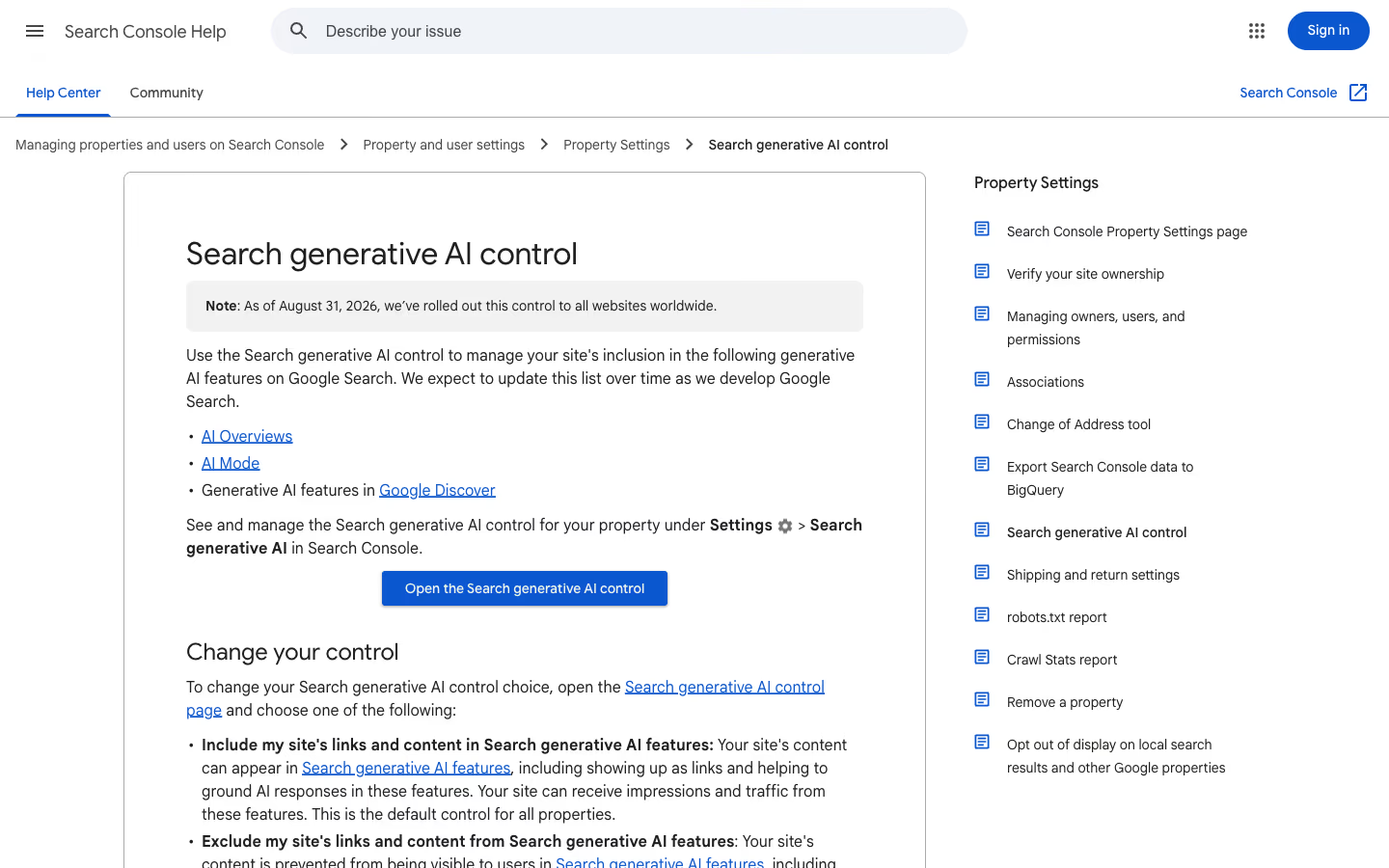
The Search generative AI control in Search Console. In the English interface it sits under Settings, then Search generative AI. Google’s help page lists what it manages: AI Overviews, AI Mode and generative AI features in Google Discover, and says it expects to update that list over time. On the rollout:
“As of August 31, 2026, we’ve rolled out this control to all websites worldwide.”
You choose between include, exclude and inherit from parent. Include is the default control for all properties, and inherit is the default for a property that has a parent. What exclude does:
“If you exclude your site, links to your site and your site’s content won’t appear in Search generative AI features. Content from other sites will still be available in those features, and it may appear similar to yours. Content crawled from your site won’t be eligible to be used as an input to generate an AI response or preview in Search generative AI features.”
Two details matter. The links go too, not only the text, so this is not a way to be mentioned without being clicked. And grounding input is covered, so excluded content is not used to build an answer in these features.
Google also spells out what the control is not:
“This control only affects whether your content can appear in certain Search generative AI features; this control isn’t used as a ranking or inclusion signal affecting other parts of Search.”
“This control doesn’t affect AI training; to limit training of the models used to generate responses in Search generative AI features, use Google-Extended. To block your content from appearing in Google Search completely, use noindex.”
On timing, the page says a change generally takes a few days, with content excluded within 1-2 days after the control goes live and some of it later because of caching and propagation.
Since 21 October 2026 Google’s Control what you share with Google Search page also lists the Search generative AI control, as a site-wide option for managing your site’s inclusion in AI Overviews and AI Mode. The Search Central documentation updates log dates that edit 21 October and describes it as adding existing options to the page, so the control itself did not change.
Does Google-Extended remove my site from AI Overviews
No. Google-Extended is documented on the crawler overview page, and the product areas it names are Gemini and Vertex AI, not Search:
“Google-Extended is a standalone product token that web publishers can use to manage whether content Google crawls from their sites may be used for training future generations of Gemini models that power Gemini Apps and Vertex AI API for Gemini and for grounding (providing content from the Google Search index to the model at prompt time to improve factuality and relevancy) in Gemini Apps and Grounding with Google Search on Vertex AI.”
“Google-Extended does not impact a site’s inclusion in Google Search nor is it used as a ranking signal in Google Search.”
Read together with the previous section, the two pages split the work. The Search control manages grounding and display inside Search features. Google-Extended manages training and the grounding done by Gemini Apps and Vertex AI. Neither page claims to cover the other’s area, and the Search control page points to Google-Extended for training.
One practical consequence follows from how the token works:
“Google-Extended doesn’t have a separate HTTP request user agent string. Crawling is done with existing Google user agent strings; the robots.txt user-agent token is used in a control capacity.”
Our reading: there is no Google-Extended line in your access logs to look for, so the robots.txt group is the only place the choice exists.
What does Content-Signal in robots.txt do for Google
Content-Signal is a different kind of thing. It is a robots.txt directive published by Cloudflare, with three signals. The site defines ai-input like this:
“Inputting content into one or more AI models (e.g., retrieval augmented generation, grounding, or other real-time taking of content for generative AI search answers).”
And ai-train in one line:
“Training or fine-tuning AI models.”
The third signal, search, covers building a search index and returning links and short excerpts, and the site notes that it “does not include providing AI-generated search summaries”. The same site is blunt about the limits:
“The Content-Signal directive works by signaling your preference of either allowing (yes) or disallowing (no) certain categories of AI actions. Not all automated systems honor robots.txt files, and some may ignore these Content-Signal directives.”
“robots.txt files express your preferences. They do not, however, prevent crawler operators from taking your content at a technical level.”
Neither the Search Console help page nor the Google crawler documentation quoted here mentions Content-Signal. We searched the text of both pages and found no occurrence. That is a statement about those two pages, not about what any Google system does. For planning, it means a Content-Signal line is a declaration addressed to every crawler, and it is not a Google control. How the line behaves inside robots.txt groups is covered in our post on the Content-Signal scope bug.
If your site sits behind Cloudflare, there is a fourth switch that works at the network edge instead of in robots.txt. Since 15 September 2026 its Block option also stops Googlebot, covered in does Cloudflare block Googlebot.
Do noindex and nosnippet block AI Overviews
Both work, both are blunt, and they are not the same kind of blunt.
noindex takes the page out of Google Search, which the Search control page itself names as the way to do that. The cost is the obvious one: the page loses its organic results as well.
nosnippet is narrower, and Google’s robots meta documentation says it reaches the AI features:
“Do not show a text snippet or video preview in the search results for this page. A static image thumbnail (if available) may still be visible, when it results in a better user experience. This applies to all forms of search results (at Google: web search, Google Images, Discover, AI Overviews, AI Mode) and will also prevent the content from being used as a direct input for AI Overviews and AI Mode.”
The catch is in the first sentence. nosnippet strips the snippet from ordinary blue-link results too, and it is set per page, so it can cost clicks that the Search control would not. That second part is our inference from the two pages, not a measurement.
There is one more trap, and it bites sites that combine tools. Google writes:
“Keep in mind that these settings can be read and followed only if crawlers are allowed to access the pages that include these settings.”
A Disallow in robots.txt on a page that carries noindex or nosnippet cancels the tag. Our own robots.txt has a comment about exactly this for taxonomy archives, which is why we do not disallow them.
Which Google AI setting to use for each goal
| Goal | Switch | What it blocks | What it does not block |
|---|---|---|---|
| Out of AI Overviews, AI Mode and Discover generative features, still in Search | Search generative AI control set to exclude | Links and content in those features, grounding input for them, traffic and impressions from them | AI training, the rest of Search, ranking, Merchant Center and Google Ads participation |
| Out of Gemini training and Gemini grounding, still in Search and in AI Overviews | Google-Extended with a Disallow in robots.txt | Use of crawled content for training future Gemini models and for grounding in Gemini Apps and Vertex AI | Inclusion in Google Search, ranking, and what the Search control manages |
| Tell every crawler your policy in one place | Content-Signal line in each robots.txt group | Nothing technically | Anything. It is a declaration, and Google’s pages do not mention it |
| No AI text from specific pages, page still listed | nosnippet | Text snippet and video preview everywhere, including AI Overviews and AI Mode as direct input | The page listing itself, possibly a static thumbnail; it also trims ordinary snippets |
| Out of Google Search entirely | noindex | The page in Google Search results | Not applicable, the page leaves the results; the crawler must still be able to fetch the page to see the tag |
The two goals from the start of this post map like this. Out of AI Overviews but not out of Search: the Search control, or nosnippet on single pages. Out of training but not out of AI answers: Google-Extended for Google, a Content-Signal line for the rest, and the Search control left on include.
What happens when a locale subfolder overrides the domain property
Inheritance is where a multi-property site gets a surprise. Google’s rule:
“By default, a property inherits its Search generative AI control from its closest parent that has changed its control to stop inheriting.”
For wppoland.com that means the domain property sits at the top, and each of /pl/, /en/, /de/, /nb/, /pt-pt/ and /es/ is a child. Set the domain property once and all six follow. Because each folder is its own property, one locale can also be excluded while the other five stay included. Google says so for child properties:
“Owners of a child property can choose to follow its parent property’s Search generative AI control or change it for the specific child property and its subpages.”
The new part is the notification. Barry Schwartz reported on 6 October 2026 that Google had added a line to the help page, and the line reads:
“Owners of the top-level domain property will see a notification on the Search generative AI control page when one of their child properties overrides the parent setting.”
Google Search Console Help, reported in Search Engine Roundtable
That is useful here, because it is how the person who owns the domain property would learn that someone changed the setting for one folder, without opening six pages. We have not seen the notification fire. Schwartz writes that he does not have a screenshot of it either, so treat it as documented, not as observed.
Example robots.txt with Content-Signal and Google-Extended
The star group and the Google-Extended group in public/robots.txt read, exactly:
User-agent: *
Content-Signal: search=yes, ai-input=yes, ai-train=no
Allow: /
Disallow: /cdn-cgi/
# Google-Extended - Gemini grounding + training corpus
User-agent: Google-Extended
Content-Signal: search=yes, ai-input=yes, ai-train=no
Allow: /Two readings. First, the set matches what we want: in search, in AI answers, out of training. It also means the Search control and the file have to move together. A robots.txt that says ai-input=yes and a Search Console setting of exclude would contradict each other.
Second, the Google-Extended group is the weaker half. Google documents that token through allow and disallow lines, and its own example uses both. Our group says Allow: /. Read literally against Google’s page, the token is open for Gemini training and grounding on our site, and ai-train=no beside it is a statement that neither Google page quoted here mentions. So for Google specifically, our training preference is declared but not carried by a mechanism Google documents.
Closing that is a separate decision. A Disallow: / in that group would also give up the grounding use in Gemini Apps, because the token covers both. The comment at the top of the file also calls any restriction expressed through content signals an express reservation of rights under Article 4 of the EU copyright directive 2019/790. Whether that holds is a question for a lawyer, not for the person editing robots.txt.
How to measure the effect before changing a setting
We have no result to report, and the order matters. Google points to a report for this:
“To measure how your content is performing in Search generative AI features, use the Generative AI performance report. This can help you get an idea of how changing your control may impact traffic to your site.”
The plan is short. Record the report for the domain property first. Change one property and nothing else. Wait out the days Google names. Compare against the baseline. Changing the Search control, Google-Extended and a nosnippet rollout in the same week would leave a number nobody can attribute. The same discipline applies to the zero-click pattern covered in our post on expanded AI Overviews, and the reasons we want to be cited in answers at all are in the LLMO strategic summary.
Update, . The first public opt-out data I have seen cuts against the usual worry. Cyrus Shepard posted on LinkedIn what he calls an “admittedly small case study”: one site taken out of Google’s AI features. The post does not name the mechanism; to Barry Schwartz he described it as the Search generative AI opt-out controls (Search Engine Roundtable). AI impressions went to zero. He estimates that those AI impressions had a click-through rate of about 0.9%, worked out from overall site CTR and impressions minus the known AI impressions in the test period, and he told Schwartz they were about 8% of all impressions. The surprise: ordinary organic clicks also fell while the AI features were off. He reads this as a halo effect of being visible in more places on the results page, and adds that results are not guaranteed and that everyone should test their own data. The limits are his and stay attached to the numbers: one site, no dates or test length in the post, and AI Overviews kept showing on those queries throughout, only without his site.
What I take from it for a WordPress site: one site does not prove a halo effect, but it removes the assumption that excluding AI features can only protect clicks. On a multi-language site the inheritance rules above give you a rough test: exclude one locale property, leave the others on include, and compare each against its own baseline. Rough, because each language serves a different market. A single-language site has no such split, so the decision applies to the whole site at once.
Does Bing have its own switches for AI training and AI answers
Update, . Yes, since today. Krishna Madhavan of Microsoft Bing announced preferences that separate AI training from AI grounding, meaning the use of a page to build a generated answer (Bing blog, Your content, your choice). Microsoft says neither preference changes eligibility for ordinary Bing search results.
AI training is set in robots.txt, for the whole site or a path, through a dedicated user-agent token. Allow is the default, so staying in needs no change. To opt out:
User-Agent: __usage_ai-training
Disallow: /
Per page, a meta tag or an HTTP header overrides robots.txt for that page:
<meta name="Bingbot" content="ai-training:disallow">
X-Robots-Tag: Bingbot: ai-training:disallow
AI grounding exists only per page, with no robots.txt form. It takes three values: allow (the default), ai-grounding:disallow, which keeps the page out of generated answers, and ai-grounding:disallowextended, which keeps grounding inside experiences Microsoft runs itself, Copilot and Microsoft 365 among them, and excludes grounding services Microsoft provides to third parties, such as Web IQ and Foundry API grounding. Both go into the same Bingbot meta tag or X-Robots-Tag header as above.
The dates matter more than the syntax. The new preferences replace the older NoArchive and NoCache directives. From 15 December 2026, Bing Webmaster Tools offers temporary grounding preferences to sites that use NoArchive or NoCache on that date. From 1 February 2027, Bing honours the new preferences as it crawls. 1 March 2027 is the deadline to publish page-level grounding preferences or record the temporary ones; pages without either default to allow for grounding until recrawled, and NoArchive and NoCache stop counting for training or grounding. Temporary preferences expire on 30 September 2027, or earlier when a recrawl finds the new tag.
| Goal | Bing | |
|---|---|---|
| Out of AI training, whole site | Google-Extended with Disallow in robots.txt, which also removes Gemini Apps and Vertex AI grounding | __usage_ai-training with Disallow in robots.txt, training only |
| Out of AI answers in search | Search generative AI control per Search Console property, or nosnippet per page | ai-grounding:disallow per page, meta tag or header |
| Out of third-party grounding only | No equivalent | ai-grounding:disallowextended per page |
| Ordinary search listing | Not affected by the Search control or Google-Extended | Not affected by either preference |
The useful difference: Google ties training to Gemini grounding in one token, Bing splits them. The combination our robots.txt declares (in answers, out of training) can be expressed to Bing with one group; for Google it costs Gemini grounding as well. Bing’s grounding switch, on the other hand, is per page, while Google’s main one is per property.
What to decide on a WordPress site now:
- Check whether your pages send
noarchiveornocache. Some SEO plugins, Rank Math among them, offer noarchive as an advanced robots meta option. If you relied on it to limit Bing’s AI use, it stops working on 1 March 2027 unless you replace it. - Training: add the
__usage_ai-traininggroup to robots.txt. WordPress serves a virtual robots.txt; edit it in your SEO plugin’s robots.txt editor (Yoast and Rank Math both have one) or through therobots_txtfilter. A physical robots.txt in the web root replaces the virtual one entirely. - Grounding: Bing reads
<meta name="Bingbot">, notname="robots", so the corewp_robotsfilter will not print it. Output it from awp_headhook in a small plugin, or send the header from the server. If you want to be cited in Copilot, do nothing: allow is the default. - Given Shepard’s numbers, decide on blocking grounding section by section, for example only for paid content.
I have added the Bing training group to wppoland.com’s robots.txt, in line with its ai-train=no signal. Setting these preferences per template across a WordPress site is part of my GEO and LLMO optimization work.
Checklist
- Decide the goal first: out of Search features, out of training, or both.
- Pick the switch from the table. One goal, one switch.
- Set the Search control at the domain property, then check each locale property for an override.
- Keep robots.txt and Search Console consistent:
ai-input=yesand an excluded property contradict each other. - Do not combine a robots.txt
Disallowwithnoindexornosnippeton the same page. - Use Google-Extended only if you accept that it also covers Gemini grounding.
- Baseline the Generative AI performance report before the change, and change one thing at a time.
- If the site uses
noarchiveornocacheto limit Bing, replace them with the new Bing preferences before 1 March 2027.