Short answer: an MCP integration with WordPress is as safe as the account you hand it. The Model Context Protocol polices nothing by itself, and its specification says so in plain words. WordPress does the policing: the official MCP Adapter checks permissions twice and keeps every ability hidden until you expose it. The risk starts when the agent gets an administrator’s Application Password, write abilities with no human approval, or a third-party MCP plugin that skipped its permission checks. All three situations already have CVE numbers. The better approach for a production site is a review layer: read-only first, drafts instead of publishing, and a human who approves each write.
This post is for the owner of a shop or a content site who wants to connect Claude, ChatGPT or Cursor to WordPress and wants to know what can go wrong before it does. I covered general attack vectors against AI agents in the 20 OWASP attack vectors write-up, and OAuth and tokens in the MCP authentication patterns guide. Here I stick to what the official WordPress and WooCommerce stack does in November 2026, how to build access on top of it that you do not have to worry about, and what UK and Irish data protection law expects when an agent touches customer data.
What does MCP do in WordPress, and who checks permissions?
The Model Context Protocol is a standard through which an application running an AI model (the host, for example Claude Desktop or Cursor) calls tools that a server exposes. In WordPress that server is the MCP Adapter, which turns abilities registered through the Abilities API into MCP tools.
The MCP specification admits that the protocol cannot enforce its own security principles and that tools amount to arbitrary code execution (MCP specification 2026-07-28). The same document says the host must get explicit user consent before it invokes a tool, and that descriptions of tool behaviour, annotations included, count as untrusted unless they come from a trusted server. So when a server labels a tool as read-only, the client receives a hint and the call can still go through.
Authentication is not mandatory either. The authorization chapter opens by saying authorization is optional for MCP implementations (MCP authorization). HTTP transports should conform to it, and STDIO transports should take credentials from the environment instead. That is why, on WordPress, the real barrier is the role and capability system you have known for years. The protocol only carries the request to it.
How does the MCP Adapter check permissions?
The official adapter (version 0.7.1 from 16 October 2026, available as a plugin in the WordPress.org directory since 0.7.0) has two layers of control. The documentation names them directly: a transport permission that guards the whole server, and an ability permission that guards each individual tool (MCP Adapter on GitHub).
Here is how the default server behaves:
| Element | What it does | Where you change it |
|---|---|---|
| Endpoint | /wp-json/mcp/mcp-adapter-default-server | the mcp_adapter_create_default_server filter turns the default server off |
| Required capability | a logged-in user with the read capability | capability filters per meta-tool, e.g. mcp_adapter_execute_ability_capability |
| Tools | three meta-tools: discover abilities, get ability info, execute ability | ability visibility in meta.public or meta.mcp.public |
| Execution | checks the user, MCP exposure and that the ability exists, then calls its permission_callback | the callback in the ability registration |
| HTTP sessions | up to 32 sessions per user, expiring after 24 hours of inactivity | adapter filters |
Two rows matter most for security. First, abilities are private by default: the agent sees nothing you have not deliberately marked public. Second, the default entry threshold is the read capability, which every Subscriber has. If your store lets customers register, logging in is enough to reach the server. After that, the only thing standing in the way is the permission_callback of each ability. I raise that threshold with a filter on every site I connect, because the alternative is trusting that every ability in every installed plugin was written without a mistake.
The Abilities API that the adapter builds on is in WordPress core (since 6.9, and WooCommerce now requires WordPress 7.0). Its permission_callback field is optional (Abilities API), so an ability registered without one runs for anyone who reaches it.
What does WooCommerce MCP expose after the 11.3 update?
WooCommerce describes its MCP implementation as a developer preview. The documentation warns that future updates may introduce breaking changes and that you should test thoroughly before deploying to production (WooCommerce MCP documentation).
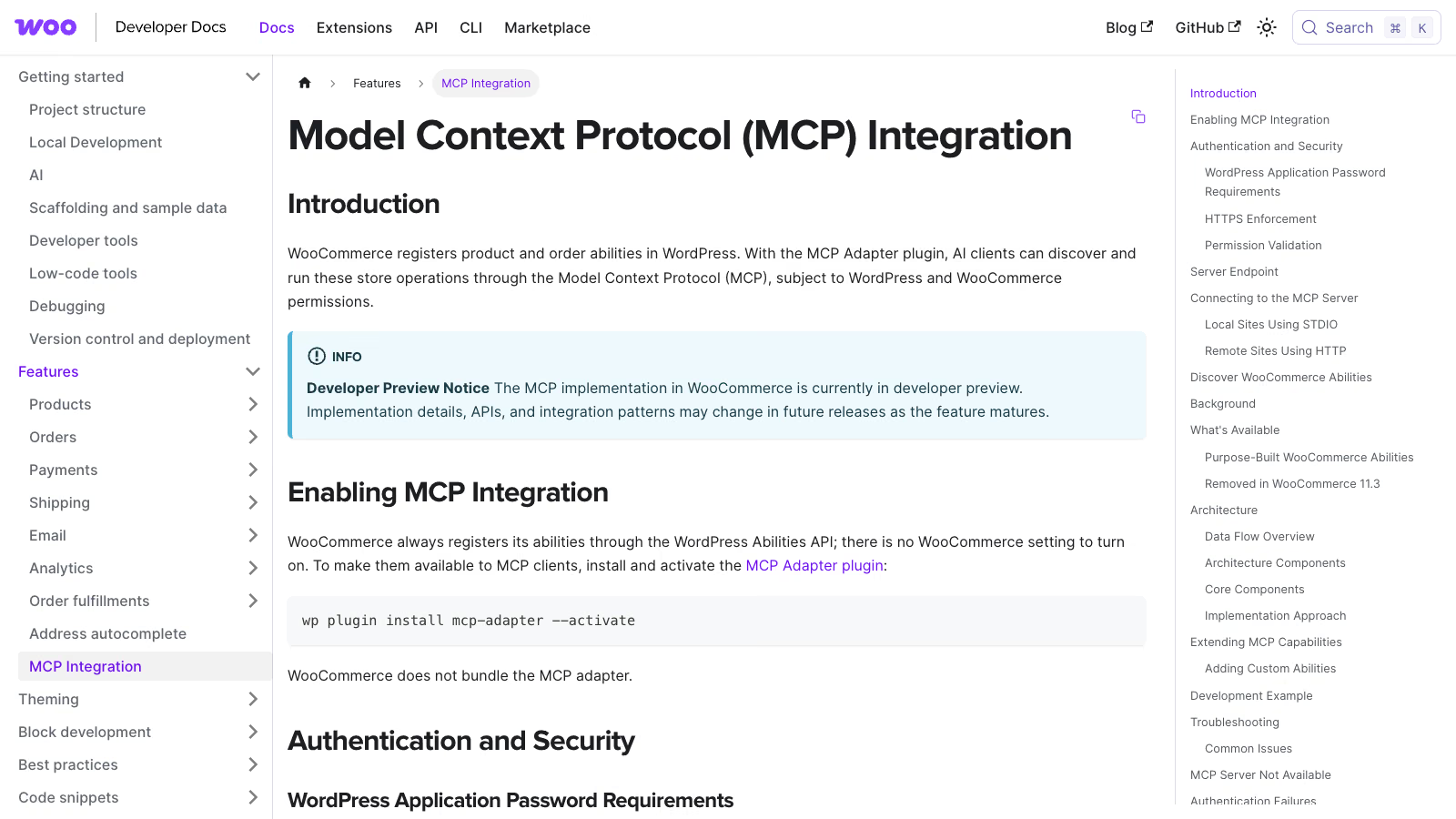 WooCommerce MCP documentation as of 18 November 2026. Source: developer.woocommerce.com.
The WooCommerce abilities available over MCP are:
- products: query, create, update and delete,
- orders: query, query notes, update status and add notes.
Write and delete come in the box. The same documentation carries a privacy notice: order and customer operations may expose personally identifiable information, including names, email addresses, postal addresses and payment details.
WooCommerce 11.3, released on 21 October 2026, changed how clients connect (WooCommerce 11.3 and MCP):
- the old
/wp-json/woocommerce/mcpendpoint is gone and now returns HTTP 410, - REST API key authentication (the
X-MCP-API-Keyheader) was removed, - the filter that allowed connections without HTTPS was removed,
- WooCommerce abilities are enabled by default, but connecting requires the MCP Adapter plugin.
If you have an agent configuration from before October that used a REST key, it no longer works. Resist the urge to “fix” it with a key that carries broader permissions. The documentation tells you to connect with a WordPress username and an Application Password over HTTPS, and it explicitly rules out the account password and WooCommerce REST API keys.
The default server requires an authenticated user with the read capability, and each WooCommerce ability also enforces its own permission callback. WooCommerce recommends a dedicated WordPress user with only the capabilities the MCP client needs. The client’s configuration file holds the Application Password in plain text, and the documentation says not to commit it to version control. Over a local STDIO connection, authentication goes through WP-CLI with the --user parameter, so again it runs as a specific user with a specific role.
What security vulnerabilities have WordPress MCP plugins had?
The most serious issue in the official stack so far is GHSA-7x77-5r4r-q4rf, published on 23 October 2026 and rated high (CVSS 8.1). MCP Adapter before 0.5.0 treated an error returned by a transport permission callback as if it were not a denial. The result: any logged-in user, a Subscriber included, could reach MCP servers meant for administrators only. The fix shipped in 0.5.0. If your project pulls the adapter in as a Composer library at an older version, that is the first thing to check.
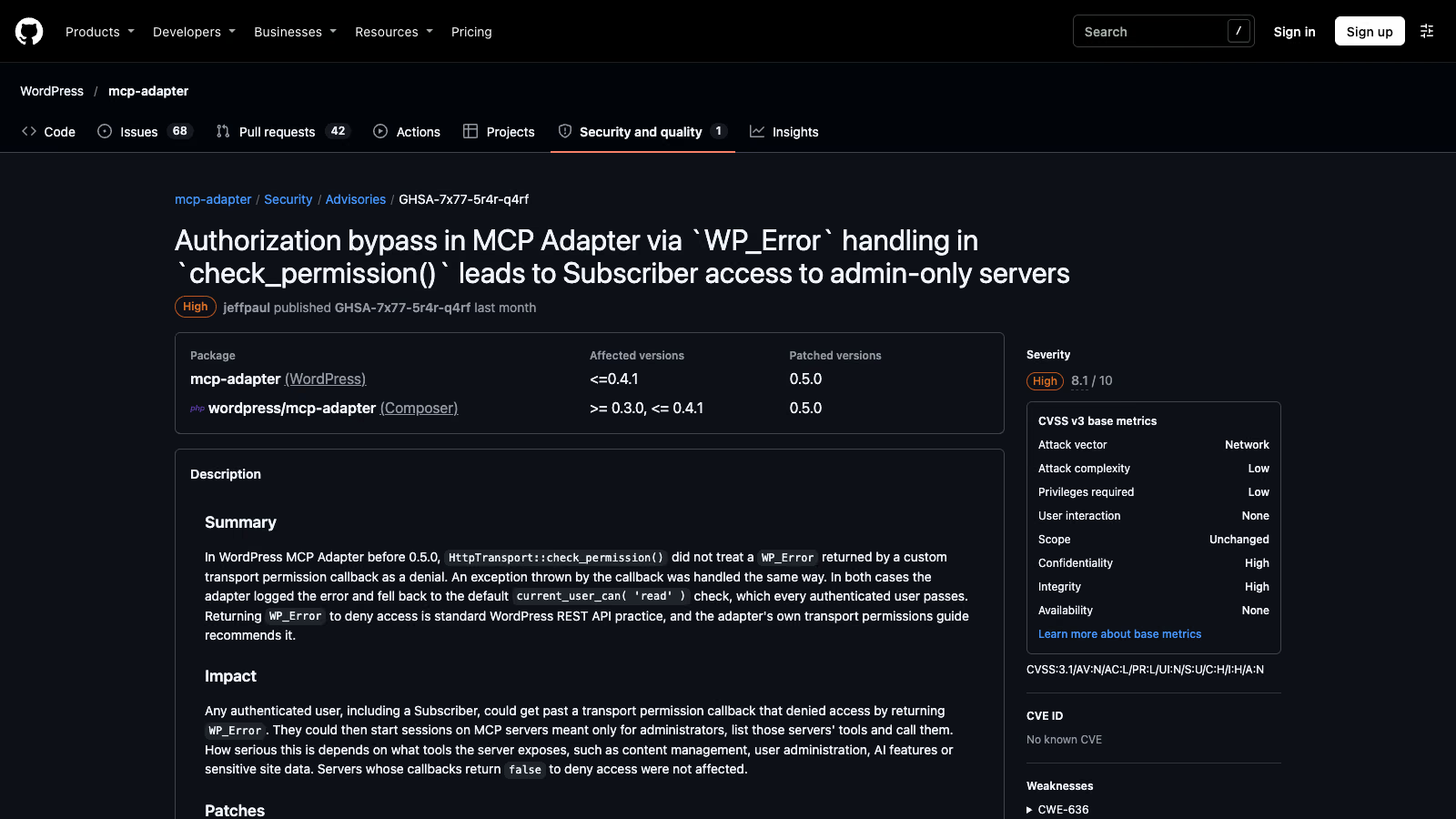 MCP Adapter security advisory of 23 October 2026. Source: github.com/WordPress/mcp-adapter.
Third-party plugins that add MCP to WordPress have a longer record. These are the ones I checked in the NVD:
| Vulnerability | Plugin and versions | CVSS | What happened |
|---|---|---|---|
| CVE-2025-5071 | AI Engine 2.8.0 to 2.8.3 | 8.8 | missing capability check on MCP access, a Subscriber could call administrative tools such as creating users |
| CVE-2025-11749 | AI Engine up to 3.1.3 | 9.8 | the /mcp/v1/ endpoint exposed the bearer token when the No-Auth URL option was on |
| CVE-2026-19807 | ByteCoreStack MCP Connector up to 1.2.3 | 8.8 | a Subscriber could set their own role to administrator through an MCP tool |
| CVE-2026-109382 | WSP MCP AI Agents Connector up to 2.9.5 | 6.5 | a tool registered with no required capability, Subscribers could read all drafts |
| CVE-2026-9810 | AI Copilot before 1.5.4 | 9.8 | OAuth tokens not bound to a WordPress user, any valid token acted as administrator |
| CVE-2026-130121 | AI Puffer up to 2.5.28 | 7.2 | stored XSS in AI-generated comment replies, when auto-replies were set to approve automatically |
The pattern repeats: a missing or overly broad permission_callback, a token not tied to a user, and model output saved without sanitisation. Outside WordPress, two more vulnerabilities hit tools that developers install locally: CVE-2025-6514 in mcp-remote (OS command injection, CVSS 9.6) and CVE-2025-49596 in MCP Inspector below 0.14.1 (remote code execution, CVSS 9.4).
As of 18 November 2026 I found no public report of a WooCommerce store breached via MCP. The list above is vulnerabilities, not confirmed break-ins. I would not read that as a reason to relax. Several of these plugins have large install bases, and WordPress flaws of this class tend to reach automated scanners quickly.
What are the biggest risks of connecting an AI agent to a store?
Here are the risks for a typical WordPress shop, with the control that limits each one:
| Risk | How it happens | What to do |
|---|---|---|
| Over-privileged agent | an administrator’s Application Password, so the agent inherits every capability | a dedicated user with the lowest role that works, a higher threshold in the adapter filters |
| Indirect prompt injection | the agent reads product reviews, order notes or posts that carry hidden instructions | no deleting abilities exposed, human approval for writes |
| Destructive writes | deleting products and changing order status are available out of the box | keep them private or require approval before execution |
| Missing permission check in your own ability | an empty or overly broad permission_callback | object-level checks, e.g. current_user_can( 'edit_post', $id ) |
| Bugs in third-party MCP plugins | skipped capability checks, leaked tokens | the official adapter at 0.5.0 or later, a review of the vendor’s CVE history |
| Token misuse in OAuth setups | the server accepts tokens issued for another resource | audience validation, no token passthrough, minimal scopes |
| Personal data leak | order queries return addresses and payment details | restrict order abilities, set a retention policy for logs |
| Credential leak | the Application Password sits in a committed config file | HTTPS, config kept out of Git, revoke unused passwords |
| Unsanitised AI output | model text saved without wp_kses | sanitise tool output, hold for moderation before publishing |
| Rubber-stamp approvals | so many consent prompts that the human approves everything | ask for consent on writes only, let reads through |
Indirect prompt injection happens when the model takes instructions from the data it reads rather than from you: a web page, a file or, in a shop, the text of a review (OWASP LLM01:2025). OWASP recommends restricting the model’s privileges to the minimum necessary and adding human-in-the-loop controls for privileged operations. The second relevant entry is excessive agency, with three root causes: excessive functionality, excessive permissions and excessive autonomy (OWASP LLM06:2025). OWASP advises enforcing authorisation in the downstream system rather than relying on the model to decide whether an action is allowed. Anyone who has written WordPress plugins knows that rule as current_user_can().
The last row of the table comes from the OWASP document on threats to agentic AI (version 1.1, December 2025): an attacker can flood the human reviewer with approval requests until approvals become rushed and scrutiny drops. Approval only works when it covers a small number of operations that actually change something.
What do the UK NCSC and its partners recommend for agentic AI?
On 1 May 2026 six agencies published joint guidance called “Careful Adoption of Agentic AI Services”: Australia’s ASD’s ACSC, the US CISA and NSA, the Canadian Centre for Cyber Security, NCSC-NZ and NCSC-UK (joint guidance on the NCSC-NZ site). It is general guidance for LLM-based agents, not a WordPress document, but its recommendations map onto the MCP Adapter almost line for line:
- Least privilege for each agent, limited to the minimum its task needs. In WordPress terms: a dedicated user, the lowest role, and only the abilities that task requires.
- No high-impact actions without prior human approval, with review checkpoints where errors are expensive, such as deleting records. In WooCommerce terms: product deletion and order status changes go through a person.
- Incremental deployment limited to clearly defined low-risk tasks, with access and autonomy growing in phases. That is the read-only first step below.
- Short-lived credentials instead of static, long-lived secrets. WordPress core Application Passwords do not expire on their own, so the practical equivalent is one password per client and revoking it as soon as it sits idle.
- Treating data from external tools and sources as untrusted, with input validation and sanitisation. That covers review text and order notes the agent reads.
For a UK business it is also a citable, government-backed reference when a client or an auditor asks why the agent cannot publish on its own.
Is there a better approach than letting the agent write directly to production?
Yes. The layout below can be built from what WordPress and the adapter already provide. It needs no extra service.
1. Read-only first. Start by exposing only query abilities, for example product search and reading order notes. Write abilities stay private (meta.mcp.public set to false) until you know what the agent needs them for. The MCP security best practices recommend the same thing for scopes: a minimal initial set with low-risk read operations, raised step by step, and no wildcard or “full access” scopes (MCP security best practices).
2. Drafts instead of publishing, for content. The agent’s account gets the Contributor role. According to the WordPress documentation, a Contributor can write and manage their own posts but cannot publish them (roles and capabilities). A post from the agent lands as a draft for an Editor, who reviews it in wp-admin and publishes it. This pattern is documented for posts. WooCommerce products have their own capabilities, so for products you need a custom ability.
3. A custom ability instead of the generic one, for products. If the agent should prepare products, register an ability that saves them in a state that needs review and whose permission_callback checks the permission on that specific object. WooCommerce has no ready-made “create draft product” ability. Before you assume what the product creation ability does, read its input schema through the get-ability-info meta-tool.
4. Two gates, both in WordPress. The transport gate for the whole server and the permission_callback of each ability. The access decision happens in PHP, never in the model.
5. Consent in the client before every write. The MCP tools specification says there should always be a human in the loop who can deny tool invocations, and that clients should prompt for confirmation on sensitive operations (MCP tools). Claude Desktop, Cursor and other clients have such confirmations. Keep them on for every tool that writes.
6. Separate credentials for each client. One Application Password per tool (Claude, Cursor, an automation). WordPress records the date and IP of each password’s last use and lets you revoke each one separately (Application Passwords integration guide). A password has 24 characters and more than 142 bits of entropy, so its strength is not the weak point. The weak point is that it acts with the full permissions of its owner. Core has no per-password scopes, which leaves the user’s role as the limit.
How do I raise the access threshold for the MCP server in WordPress?
One change closes the door to Subscribers and shop customers: require a higher capability to execute abilities. An example for a must-use plugin:
<?php
// wp-content/mu-plugins/mcp-hardening.php
add_filter( 'mcp_adapter_execute_ability_capability', function () {
    return 'edit_posts'; // Subscribers and shop customers do not have this capability
} );
You can confirm the filter name and the default read capability in the adapter’s default server documentation. The choice of edit_posts is an example: match the capability to the role of the agent’s account. If you run your own MCP server instead of the default one, switch the default off with the mcp_adapter_create_default_server filter.
The second change concerns your own abilities. The callback should check the object, not just the role:
<?php
wp_register_ability( 'my-shop/update-excerpt', array(
    'label'               => 'Update post excerpt',
    'description'         => 'Changes the excerpt of a post and leaves it as a draft.',
    'input_schema'        => array(
        'type'       => 'object',
        'properties' => array(
            'post_id' => array( 'type' => 'integer' ),
            'excerpt' => array( 'type' => 'string' ),
        ),
        'required'   => array( 'post_id', 'excerpt' ),
    ),
    'execute_callback'    => function ( $input ) {
        return wp_update_post( array(
            'ID'           => (int) $input['post_id'],
            'post_excerpt' => wp_kses_post( $input['excerpt'] ),
            'post_status'  => 'draft',
        ), true );
    },
    'permission_callback' => function ( $input ) {
        return current_user_can( 'edit_post', (int) $input['post_id'] );
    },
    'meta'                => array( 'mcp' => array( 'public' => true ) ),
) );
This example shows the principle, so treat it as a sketch: a permission check on the specific post, sanitisation of model output, and saving as a draft. Registration details (ability categories, readonly and destructive annotations) are in the Abilities API documentation. Those annotations become readOnlyHint and destructiveHint in MCP, which a client may use to decide when to ask for consent. Access itself is still enforced by the permission_callback.
Do I have to report an AI agent data leak to the ICO or the DPC?
If the agent reads orders, it processes your customers’ personal data, and you are the controller. Article 32 of the GDPR (and of the UK GDPR) requires security appropriate to the risk, and Article 33 sets the clock for a breach that is likely to put people at risk: notify the supervisory authority without undue delay and, where feasible, within 72 hours of becoming aware of it.
United Kingdom. The 72 hours sit in Article 33 of the UK GDPR. Since 30 September 2026 that article names the Information Commission instead of the Information Commissioner. The Data (Use and Access) Act 2025 created the Commission and abolished the office of Information Commissioner on that date (Data (Use and Access) Act 2025, Part 6), so older guidance that says “report to the ICO” now means the Commission. The breach reporting route is on the regulator’s site at ico.org.uk. If you notify late, Article 33 requires you to give reasons for the delay.
Ireland. The Data Protection Commission takes every breach notification through its Breach Notification Form, and a breach affecting people in other member states has to be marked as cross-border on that form. The DPC’s automated reply now carries a case reference starting with “DPC”, which you quote in any follow-up. If you decide a breach carries no risk and do not notify, the DPC still expects an internal record of the details, how you reached that decision and who made it. Where the risk to individuals is high, you also have to tell the affected customers without undue delay.
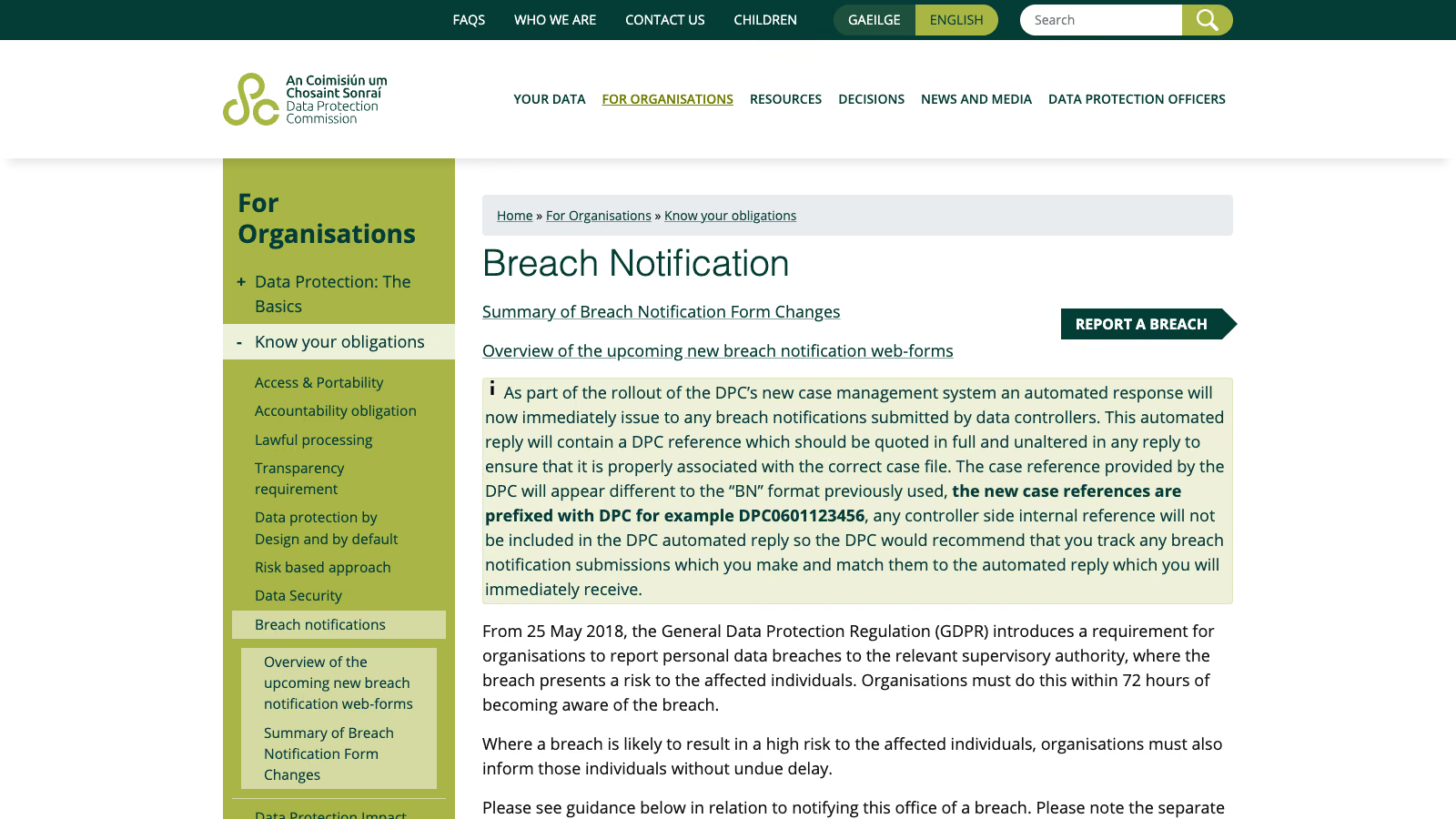 Breach notification page of the Irish Data Protection Commission, as of 18 November 2026. Source: dataprotection.ie.
The practical consequence for a shop: if the agent does not need customer data, do not expose the order abilities. If it does, record that processing in your records of processing activities and check where the model provider stores conversation content. Tool responses go into the model’s context, so a customer’s address from an order leaves your server the moment the agent reads it. For an Irish or UK store, that also means checking whether the provider processes the data outside the UK or the EEA and on what transfer basis.
An MCP incident also has a concrete first hour. Revoke the agent’s Application Password in the user’s profile, which cuts the client off immediately. Then export the password’s last-used date and IP before you change anything else, because that is your evidence of when the access happened. Only then start assessing whether the breach needs notifying, with the 72 hours counted from when you became aware of it.
How do I check whether MCP is running on my site and who can reach it?
Check the current state before you change anything. On many sites MCP arrived as a side effect of an AI plugin, not as a deliberate decision. A few WP-CLI commands and one HTTP request are enough:
# 1. Is the MCP Adapter installed, which version, and any other plugins with MCP features
wp plugin list --fields=name,status,version | grep -i -E "mcp|ai-engine|copilot"

# 2. Who has Application Passwords and when they were last used
wp user application-password list admin --fields=name,created,last_used,last_ip

# 3. Is the old WooCommerce MCP endpoint gone (expected status: 410)
curl -s -o /dev/null -w "%{http_code}\n" https://your-shop.co.uk/wp-json/woocommerce/mcp

# 4. Does the adapter's default server answer without credentials (expected: a refusal)
curl -s -o /dev/null -w "%{http_code}\n" -X POST https://your-shop.co.uk/wp-json/mcp/mcp-adapter-default-server
Repeat the second command for every user with the Administrator or Shop Manager role. Revoke at once any Application Password nobody recognises, and any whose last use was months ago. If the first command lists a plugin from the vulnerability table above, compare its version with the fixed version in the NVD.
A result other than 410 from the third command means WooCommerce is older than 11.3 and still uses the old REST key login. Update first, then do everything else. A 200 from the fourth command without credentials means something in front of WordPress (a plugin, a server rule) has changed how authentication works, and you need to find out what before you connect an agent.
Checklist before switching MCP on in production
- MCP Adapter 0.5.0 or later, ideally the WordPress.org plugin, and WooCommerce 11.3 or later.
- A dedicated user for the agent with the lowest role that works, and a separate Application Password for each client.
- The ability execution threshold raised above
readwith the adapter filter. - Only the abilities the agent needs are exposed, read-only first.
- Abilities that delete products or change order status stay private or need human approval.
- Your own abilities have a
permission_callbackthat checks the specific object, and they sanitise input. - Confirmation prompts for writing tools are on in the client.
- The configuration holding the Application Password stays out of the repository, and connections use HTTPS only.
- A test on a copy of the shop before production, because WooCommerce MCP is a developer preview.
- A written decision on whether the agent needs customer data at all, recorded in your UK GDPR or GDPR documentation.
- A note of where you would report a breach (the Information Commission in the UK, the DPC in Ireland) and who on your side makes that call.
When should I bring in someone to build the MCP integration?
If all you want is an AI assistant that answers questions about the catalogue, read access to products and an account with a minimal role are enough: about an hour of work. Custom abilities with object-level checks, a draft-and-approve workflow, and an MCP server that links WooCommerce to an ERP or CRM are a development project. I build these through my MCP server development service, and I described the server architecture for a shop in the guide to building an MCP server for WooCommerce. For safe agent testing away from production, see WordPress Playground with MCP.