Every announced price reduction in an EU online shop has to carry the prior price: the lowest price the shop applied to that product in at least the 30 days before the reduction. The rule is Article 6a of Directive 98/6/EC, added by the Omnibus Directive, and in Ireland it is regulation 5A of the price indication regulations. WooCommerce keeps no price history, so a plugin or custom code has to calculate that figure. This guide covers what the law says, how a price history in WooCommerce should work, the traps a typical implementation falls into and how to check in about an hour whether your shop shows the right number.
This article describes the legal texts and the software as they stand on the date of publication. It is not individual legal advice for your shop.
What does the Omnibus Directive require for price reductions?
Directive (EU) 2019/2161, known as the Omnibus Directive (EUR-Lex), inserted a new Article 6a into Directive 98/6/EC on price indication (EUR-Lex, consolidated text). The article has five paragraphs:
- Any announcement of a price reduction shall indicate the prior price applied by the trader for a determined period of time prior to the application of the price reduction.
- The prior price means the lowest price applied by the trader during a period of time not shorter than 30 days prior to the application of the price reduction.
- Member States may provide different rules for goods liable to deteriorate or expire rapidly.
- Where the product has been on the market for less than 30 days, Member States may provide a shorter period.
- Member States may provide that, when the price reduction is progressively increased, the prior price is the price without the reduction before the first application of the reduction.
Paragraphs 1 and 2 bind every shop. Paragraphs 3 to 5 are options, and each country decided for itself which to take. That is why the same WooCommerce shop can need slightly different logic depending on where its customers live.
What does Irish regulation 5A say?
Ireland transposed Article 6a through the European Union (Requirements to Indicate Product Prices) (Amendment) Regulations 2022, S.I. No. 597 of 2022, made on 28 November 2022. They insert regulation 5A into the European Communities (Requirements to Indicate Product Prices) Regulations 2002 (S.I. No. 639 of 2002). The core of the obligation:
(1) Where a trader announces a reduction in the selling price or unit price, as the case may be, of a product offered for sale to consumers, the trader shall indicate, in that announcement, the prior price of that product.
(2) A person who contravenes paragraph (1) is guilty of an offence.
(3) In this Regulation, “prior price”, in relation to a product in respect of which a reduction in selling price or unit price is announced, means: (a) subject to paragraph (b), the lowest selling price or unit price, as the case may be, applied by the trader to the product during a period of not less than 30 days before the application of the reduction in the selling price or unit price of the product, or (b) in a case where there are consecutive reductions in the selling price or unit price of the product, the lowest selling price or unit price, as the case may be, applied by the trader to the product during a period of not less than 30 days before the initial application of a reduction in the selling price or unit price of the product.
Source: regulation 5A of S.I. No. 639 of 2002, inserted by regulation 4 of S.I. No. 597 of 2022 (Irish Statute Book).
Four technical requirements follow from that text. The prior price goes in the announcement itself, so hiding it in a description tab does not work. The window runs before the application of the reduction, which means back from the day the sale starts. The rule speaks of the price applied by the trader, so only a price a customer could actually buy at counts, and a price typed into the admin for next month has not been applied yet. And it covers both the selling price and the unit price, so a shop that shows a price per kilogram or per litre beside a reduced price needs the prior unit price as well.
The same amending regulations add two more points that matter for implementation. They define “announcement” as “a promotional statement by a trader”, which reaches beyond the product page to a home page banner with a reduced price or a newsletter quoting a sale price. And they insert regulation 6(2A): the announcement of a reduction must be “unambiguous and easily identifiable as referring to that product” and “clearly visible and legible to prospective consumers”. For an online shop the simplest reading is this: wherever a struck-through price and a sale price appear, the prior price appears too, next to them and readable.
Under regulation 5A(2), a person who contravenes regulation 5A(1) is guilty of an offence. The Competition and Consumer Protection Commission (CCPC) is the Irish consumer protection authority.
Does a UK shop selling to Ireland or the EU have to follow this?
This article does not cover UK domestic price rules. What matters for a UK shop is the cross-border case. Article 6 of the Rome I Regulation (EC) No 593/2008 (EUR-Lex) says that a consumer contract with a trader who pursues activities in, or “by any means” directs them to, the consumer’s country of habitual residence is governed by the law of that country. A choice of English law in the terms cannot take away the protection the consumer’s own law gives.
A UK shop with euro prices and delivery to Dublin, Cork or Galway is very likely directing its activity to Ireland, so it should plan to follow regulation 5A for its Irish customers. The same logic applies to any EU country it sells to, since Article 6a binds every member state. In practice one price history and one notice for all EU markets is simpler than switching logic per country, as long as the shop knows where national rules differ: mainly consecutive reductions, perishable goods and products new to the market.
When does the 30-day window count differently in Ireland?
Regulation 5A(3)(a) describes the usual case. Three other situations change the calculation or call for a decision by the shop.
Consecutive reductions
Ireland took up the option in Article 6a(5). Under regulation 5A(3)(b), where there are consecutive reductions, the prior price is the lowest price in the 30 days before the initial reduction.
An illustrative example: a product costs 100. On Monday it drops to 90, a week later to 80. At the second step the prior price is still 100, because the reference window is anchored to the Monday of the first cut. A “cheaper every week” campaign can therefore keep its original reference price and a consistent percentage message.
This is also where a plugin built for another country can go wrong. In a country that did not take up Article 6a(5), each step is a new reduction with its own 30-day window, and the prior price at the second step is 90. Software written for that reading will show 90 to an Irish customer. Regulation 5A does not define how close two steps must be to count as consecutive, so a shop running staircase sales should check what its plugin shows at the second step and decide with its adviser where one campaign ends and the next begins.
Products on sale for fewer than 30 days
Article 6a(4) lets countries set a shorter period for products on the market for less than 30 days. Regulation 5A contains no such provision: it only has paragraphs (1) to (3). The text gives no special rule for a product listed last week, so the safest course is not to announce a reduction until the product has a price history that covers a full 30 days.
The same trap catches shops that only now install a price history plugin. A product sold for two years has a history in the new plugin that starts today. The plugin does not know the product is old and has no record from before installation. A sensible plugin therefore has a “no history” setting, and you have to decide deliberately what the shop shows during the first 30 days after installation. The safest options are to start no new reductions until the history covers a full window, or to import the history from the previous plugin if there was one.
Perishable goods
Article 6a(3) allows separate rules for goods that deteriorate or expire rapidly. Regulation 5A does not use that option either. An Irish shop selling food, flowers or short-dated products applies the same 30-day rule to them. A shop that also sells into other EU countries may meet different perishable rules there, so a plugin that lets you flag perishable products per category or per product is worth having even if Ireland does not need the flag.
Does WooCommerce have a built-in lowest price of the last 30 days?
No. We checked the WooCommerce code on the trunk branch of its GitHub repository on 27 October 2026: searching for “omnibus” and “lowest price” returns nothing, and core has no table or field holding price history.
A WooCommerce product stores its current state:
| Data | Method in WC_Product | What it says about the past |
|---|---|---|
| Regular price | get_regular_price() | Current value only |
| Sale price | get_sale_price() | Current value only, even before the sale has started |
| Sale start | get_date_on_sale_from() | Planned date, no trace of earlier sales |
| Sale end | get_date_on_sale_to() | Same as above |
| Active price | get_price() | The price that applies now |
When you change a price, the previous value is gone. A scheduled sale is switched on by a background job (woocommerce_scheduled_sales) that sets the active price at the start time. After the sale ends, the regular price returns and the shop keeps no record that the sale ever happened.
One conclusion follows: the lowest price of the last 30 days cannot be calculated from WooCommerce data or rebuilt after the fact. It needs a separate history, kept from the day of installation, by a plugin or custom code. If you commission it from a developer, the specification has to describe how the history is recorded and how the minimum is calculated. A label takes half an hour to add; a correct history is a separate module with tests. If you need such a module or an audit of an existing one, see our WooCommerce developer page.
How does a correct price history work in a shop?
A price history is a table of records: product (or variation), price, currency and the date from which that price applies. You calculate the minimum in the window from it. It sounds simple, but each of the rules below exists because someone already got it wrong.
A record is created when the price starts to apply
You add a record when the active price changes, which is the price a customer can buy at. Saving the product in the admin is not enough, because in that same save you can set up a sale for next month. If the plugin records the sale price at that moment, it enters the history before anyone could buy at it and, once the sale starts, becomes “the lowest price of the last 30 days”. For a scheduled sale the record should be created when WooCommerce starts it.
The second rule covers changes within one day. If you cut the price in the morning and restore it in the afternoon, a customer could buy cheaper for a few hours. A history that stores only one price per day loses that change, even though the price was applied.
The window is counted from the start of the reduction
The 30-day window ends when the reduction is applied and does not move with today’s date. An illustrative example: a sale started on 1 November and runs for three weeks. On 15 November the prior price is still the minimum from 2 October to 31 October. If the plugin counts “the last 30 days from today”, after a few days the sale price itself falls into the window and the shop shows “lowest price in 30 days: 80” next to a price of 80. Such a notice tells the customer nothing and contradicts the rule.
The price in force when the window opens
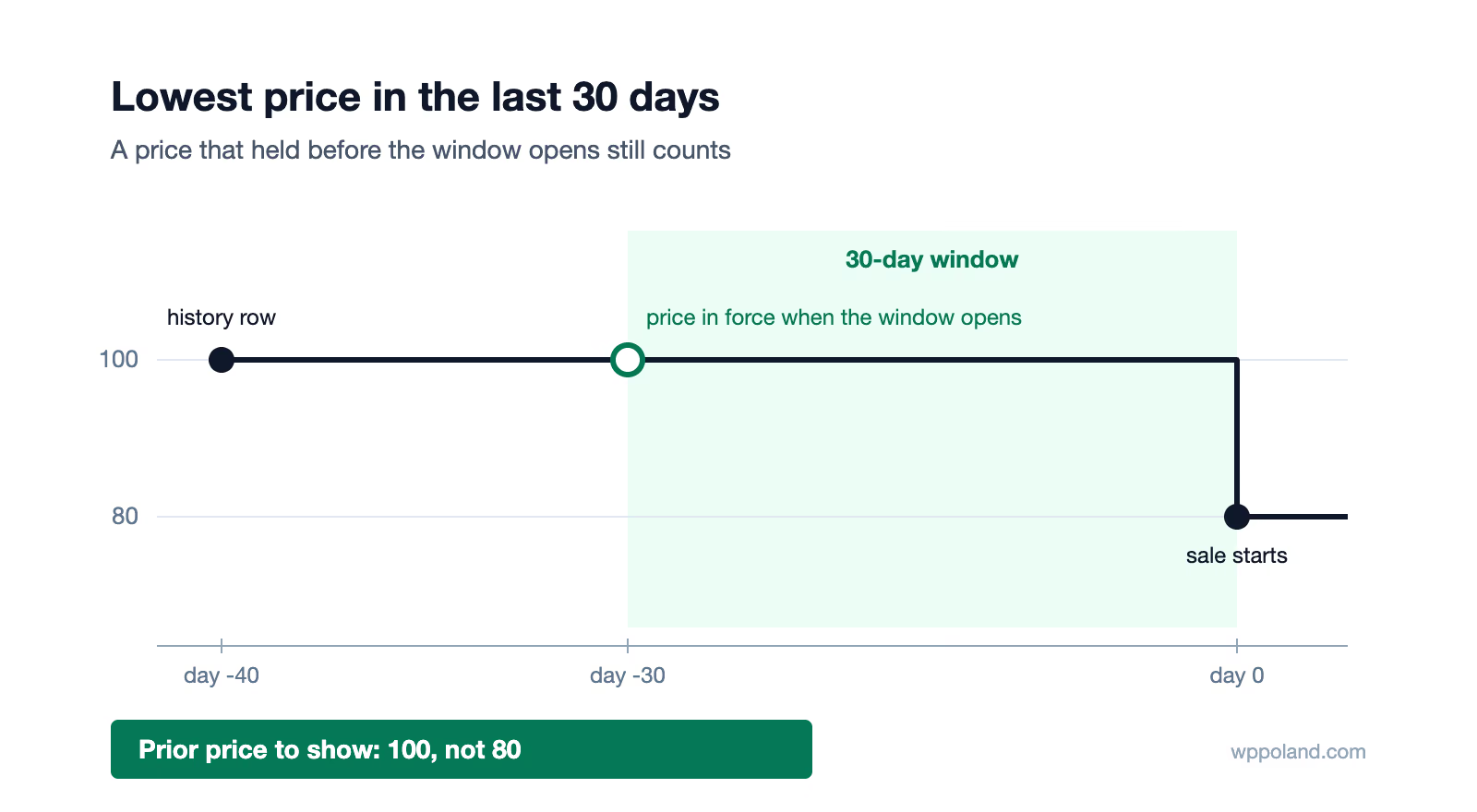
This is where most simple implementations stumble. Records are created only when the price changes. An illustrative example: a product costs 100 for 40 days and today goes on sale at 80. The last record with the price 100 is 40 days old, so there is no record inside the 30-day window. A query for “the minimum of records from the last 30 days” returns nothing or just 80.
The correct logic takes the minimum from two sources: the records inside the window and the last record before the window opens, because that price was still in force when the window began. In this example the result is 100. The same condition applies to cleanup: a job that deletes records older than 30 days must not delete the last record before the window, because it is the only proof of the price 100.
Currency stored with every record
A shop that changed its base currency, or one running a multi-currency plugin, has prices in several currencies in its history. Every record needs its currency, and the minimum query has to filter by the currency the customer is viewing. Otherwise a lowest price in sterling appears next to a selling price in euro, or the minimum is taken from numbers that cannot be compared.
Tax displayed like the price next to it
WooCommerce lets you enter prices with or without tax and set separately how they are displayed in the shop and in the cart. The prior price has to pass through the same display settings as the price beside it, for example through wc_get_price_to_display(). If the shop enters prices without VAT and shows them with VAT, the raw figure from the history will be lower by the tax and mislead the customer.
Variable products counted per variation
A variable product in WooCommerce has no price of its own. The variations have prices, and the product page shows a range. The history has to be kept for each variation separately, and the prior price should appear when a variation is selected, together with its price. On product lists that show a range, the shop needs a considered rule, for example showing the notice for the variation that sets the bottom of the range.
Cleanup keeps the record from before the window
The history grows with every price change, so the plugin trims it. The cleanup job removes old records but keeps, for each product, the last record before the window. That job also has to keep running after a plugin update, without reactivation.
How do you calculate the 30-day lowest price for a scheduled sale?
A scheduled sale is the most common source of wrong figures, because in the WooCommerce admin the sale price exists before it applies. An illustrative example, step by step:
- A product has cost 100 for a long time. The history has one record: 100, from 60 days ago.
- On 20 October you set a sale price of 80 starting on 1 November and save the product.
- Until 31 October the customer pays 100. The history must not contain a record of 80, because that price did not apply.
- On 1 November WooCommerce starts the sale. At that moment the history gets a record of 80.
- The window is 2 to 31 October. There are no records inside it, so the record from before the window counts: 100.
- The shop shows the price 80, the struck-through 100 and the notice “lowest price in the 30 days before the reduction: 100”.
- On 15 November the result is the same, because the window is anchored to 1 November.
If at step 2 the plugin writes 80 to the history straight away, at step 6 it shows a lowest price of 80. If at step 5 it ignores the record from before the window, it shows nothing or 80. If at step 7 it counts the window from today, it shows 80. Each of these is a different bug, and all three look the same in the shop.
What breaks in practice when calculating the lowest price?
Any price history implementation, an off-the-shelf plugin or custom code, can fall into the same traps. For each one below: where it comes from, how to detect it in your own shop and what a correct implementation does.
Scheduled sale recorded before it starts
Where it comes from. The implementation writes the history when the product is saved in the admin. If that save sets up a sale for next week, the sale price enters the history before it applies and can become the lowest price of the last 30 days.
How to detect it. Schedule a sale for tomorrow and check the product page after it starts. If the prior price equals the sale price, the history recorded the sale too early.
What a correct implementation does. It records only a running sale, at the moment WooCommerce starts it.
Sale price shown as the lowest price
Where it comes from. The 30-day window is counted from today’s date. After a few days of the sale, its price falls into the window and becomes the minimum. A history that stores one price per day and loses changes within the day produces the same effect.
How to detect it. On a product on sale, compare the sale price with the “lowest price in 30 days”. If they are equal and the product cost more before the sale, the calculation is wrong.
What a correct implementation does. It ends the window when the reduction starts and records every change of the active price, including several changes on one day.
No record in the window for a product with a stable price
Where it comes from. Records are created only when the price changes, so a product whose price has not moved for more than 30 days has no record inside the window. A query that takes the minimum only from records inside the window finds nothing. Cleanup that deletes everything older than 30 days removes the only proof of the price before the reduction.
How to detect it. Take a product whose price has not changed for over a month and reduce it. The notice must show the old price.
What a correct implementation does. It takes the minimum from the records in the window plus the last record before the window, and cleanup always keeps that record.
Lowest price in a different currency
Where it comes from. The history stores amounts without a currency, or stores the currency but the minimum query ignores it. A shop that changed its base currency, or one with a multi-currency plugin that switches currency per request, then shows a lowest price in one currency next to a selling price in another.
How to detect it. Switch the currency in the shop and look at a product on sale. The prior price must be in the same currency as the selling price.
What a correct implementation does. It stores the currency with every record and filters the minimum by the currency of the current request.
Settings that produce a non-compliant result
Where it comes from. Plugins usually have settings for the window length and for edge cases. Some of them lead to a result that does not meet the rule: a window shorter than 30 days, a “today” option as the source of the lowest price, or showing the current price as the lowest.
How to detect it. Review the settings of the Omnibus plugin in your shop: window length and behaviour when there is no history.
What a correct implementation does. Its defaults match the rule, and it warns when someone changes them to non-compliant values.
No notice in block theme product grids
Where it comes from. In block themes, product lists are built by the Product Collection block. WooCommerce fires the classic product loop hooks only in the shop grid, so an implementation built on those hooks shows no notice on the home page, in related products or in cart cross-sells. With two display sources the same notice can also appear twice.
How to detect it. Put a Product Collection block with a product on sale on the home page and check that the prior price sits next to the struck-through price, once.
What a correct implementation does. It adds the notice in every grid that shows a struck-through price, regardless of block or template.
No notice on an Elementor Pro product template
Where it comes from. An Elementor Pro single product template replaces the woocommerce_single_product_summary hook. An implementation that attaches the notice only to that hook shows nothing on such a page.
How to detect it. Open a product on sale on a page built in Elementor and check that the notice sits next to the price.
What a correct implementation does. It supports builder templates or adds the notice at the level of the price display.
History import counting a sale that was only scheduled
Where it comes from. An import from an old plugin reads the raw sale price field. That field also holds sales that were only scheduled, so a price nobody bought at enters the history as a selling price.
How to detect it. After an import, compare the prior price for a product that had a scheduled but never started sale with the price it actually sold at.
What a correct implementation does. It carries over only prices that applied, with their dates and currency.
Structured data overwritten with the history figure
Where it comes from. The implementation writes the 30-day lowest price into the product JSON-LD in place of the WooCommerce sale or list price. Search engines then see a different price from the one the customer pays.
How to detect it. Open the page source of a product on sale and find the application/ld+json block. The price field in the offer must equal the price the customer pays.
What a correct implementation does. It adds the lowest price next to the sale and list prices, which stay unchanged.
Technical prefix in the cart
Where it comes from. WooCommerce renders cart item data as “label: value”. If the prior price notice goes in with a technical key, the customer sees something like the prefix “Omnibus:”.
How to detect it. Add a product on sale to the cart and read what appears under the item name.
What a correct implementation does. It shows a sentence a customer understands without knowing the plugin.
Cleanup that stops running after an update
Where it comes from. The daily job that trims the history is scheduled only when the plugin is activated. An update without reactivation leaves it unscheduled.
How to detect it. Open WooCommerce > Status > Scheduled Actions (or a WP-Cron list) and check that the Omnibus plugin’s job is scheduled.
What a correct implementation does. It checks the schedule after every update and schedules the job again if it is missing.
Summary
| Trap | Symptom in the shop | How to check |
|---|---|---|
| Scheduled sale recorded at once | Prior price equals the sale price from day one | Sale for tomorrow, check after it starts |
| Window counted from today | After a few days of the sale the prior price drops to the sale price | Same product on day 1 and day 10 of the sale |
| No price from before the window | No notice, or the sale price as the lowest | Reduce a product with a stable price for over 30 days |
| Currency ignored in the query | Prior price in a different currency from the selling price | Switch currency on a product on sale |
| Tax ignored | Prior price lower by the VAT | Shop entering prices without tax and showing them with tax |
| No variations | No notice after selecting a variation | Variable product with a sale on one variation |
| Product Collection grids | No notice on the home page and in related products | Product Collection block with a product on sale |
| Elementor Pro template | No notice on the product page | Product on sale on an Elementor page |
| Import from an old plugin | Lowest price from a sale that never started | Compare history before and after import |
| JSON-LD overwritten | Different price in structured data from the page | Page source, price field |
| Cleanup not scheduled | History grows without limit | Scheduled actions list |
| Consecutive reduction read as new | Prior price drops to the first step’s price | Second step of a staircase sale |
How our plugins handle it
We develop two WooCommerce plugins with Omnibus support. Shoplex is our EU compliance plugin for shops selling across the EU; Polski for WooCommerce is built for Polish shops. Both record a scheduled sale only when WooCommerce starts it, and both warn when you set the window below 30 days. They label the “Today” and “Show the current price as the lowest” options as not compliant with Article 6a(2) of Directive 98/6/EC.
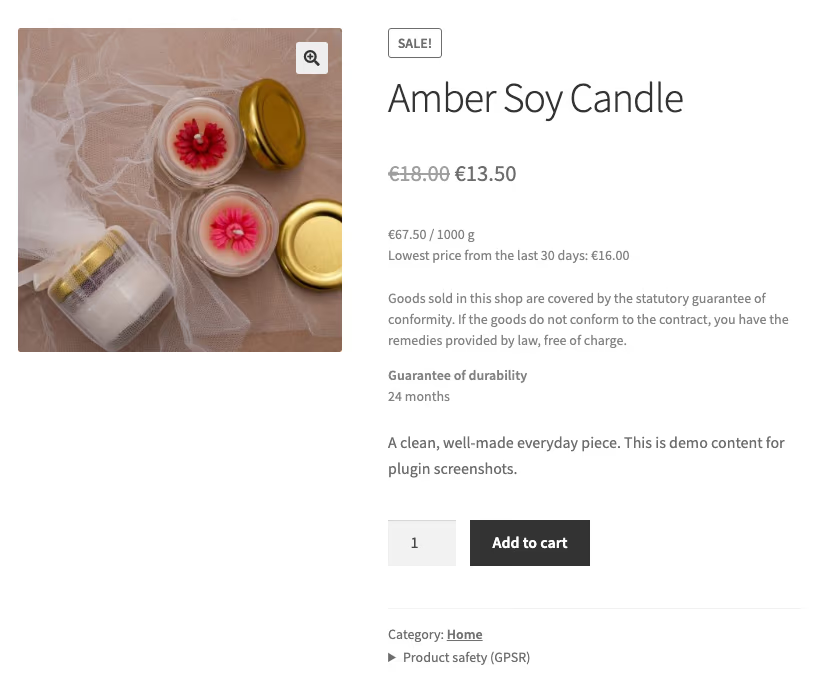
Product page in a Shoplex test shop (English interface). The lowest price of the last 30 days (EUR 16.00) sits under the sale price, in the same currency, together with the unit price. The example also shows a rule from this article: the lowest price in the window does not have to equal the struck-through price.
Polski also stores the currency with every history record and calculates the minimum in the currency the customer is viewing. It takes into account the price in force when the window opens and price changes within a single day. It shows the notice according to the WooCommerce tax settings, on the variations of variable products, in Product Collection grids of block themes and on product pages built with Elementor Pro templates. In structured data it adds the lowest price next to the sale and list prices. It has a separate setting for products without history and can import the price history recorded by the Omnibus plugin by iworks.
Where else does a shop announce a reduction?
Regulation 5A applies to every announcement of a reduction, and regulation 6(2A) asks for the announcement to be clearly visible and identifiable as referring to the product. In WooCommerce a struck-through price appears in many places, and each one is rendered by different code.
Block themes. The shop archive, the home page, related products and cart cross-sells are separate blocks in a block theme. A plugin written for the classic hooks covers the archive and leaves the other grids without a notice. If you are moving the shop to a block theme, check each of them separately. We explain the differences between classic and block themes in our classic vs block themes guide.
Page builders. Elementor Pro, and other builders with their own product page templates, replace the standard WooCommerce hooks. The notice has to be attached to the place the builder uses, or to the price itself.
Cart and order summary. If the cart shows a struck-through price, it announces a reduction. The notice has to read clearly for the customer, without technical names.
Structured data. Search engines read the product JSON-LD and build price results from it. The price field in the offer should stay the selling price the customer pays. The 30-day lowest price replaces neither the sale price nor the list price.
Tiered and group pricing. A shop with prices that depend on quantity or on the customer’s role has several prices at once for the same product. Before choosing an Omnibus plugin, check which price it treats as the active price and whether a customer group price enters the history. Regulation 5A also covers the unit price, which matters for shops that show price per kilogram or per piece next to quantity tiers. We describe how to structure such prices in the article on tiered and unit pricing in WooCommerce B2B.
Advertising with a price. Irish law defines an announcement as “a promotional statement by a trader”. A promotional banner with a reduced price and a newsletter quoting a sale price are content you prepare outside the product page, so the figure from the history has to be carried over there by hand or through an integration.
How do you switch Omnibus plugins without losing price history?
The price history is the only record of which price applied before a reduction. Switching plugins without an import wipes it, and for 30 days the shop is back to “no history”.
Before you switch, check three things:
- Whether the new plugin imports the history from the current one. Polski for WooCommerce imports the history from the Omnibus plugin by iworks. For other pairs of plugins, check the documentation or ask a developer for a migration script.
- What exactly is imported. The import has to carry over prices that applied, with dates and currency. The raw sale price field is not enough, because it also holds sales that were only scheduled.
- How the new plugin behaves without history. For products the import did not cover, the plugin uses its “no history” setting. Check what it shows before you start any reductions.
The safest order is: database backup, the new plugin installed next to the old one, import, a comparison of prior prices on a few products in both plugins, and only then deactivating the old one. If the two plugins give different figures for the same product, find the cause before deactivating the old one, because afterwards there is nothing left to compare against.
How do you check that your shop shows the correct prior price?
The test below takes about an hour on a copy of the shop (staging). The figures are illustrative, and each step states the correct result.
- Scheduled sale. Pick a product priced at 100 that has not changed for more than 30 days. Schedule a sale at 80 starting tomorrow. Today the product page must show neither the price 80 nor a prior price notice. Tomorrow, after the sale starts, the notice must show 100.
- Product with a stable price. If you do not want to wait until tomorrow, take another product with a price unchanged for 40 days and reduce it right away. The prior price is the old price. The sale price or a missing notice here is a bug.
- Window anchored to the start. A few days into the sale, go back to the product from step 1. The notice must still show 100.
- Change within a day. On a test product, cut the price for an hour and restore it. Then start a new sale. The prior price must take the one-hour reduction into account.
- Consecutive reduction. On the product from step 2, deepen the sale a second time a few days later. Under Irish regulation 5A(3)(b) the prior price stays the price from before the first reduction. If the notice drops to the first sale price, the plugin treats each step as a new reduction.
- Variable product. Put one variation of a variable product on sale. After selecting that variation, the prior price must appear with its price. After selecting a variation without a sale, the notice must disappear.
- Currency. If the shop uses a multi-currency plugin, switch the currency on a product on sale. The prior price must be in the same currency as the selling price.
- Tax. Compare the prior price with the selling price in a setup where the shop enters prices without tax and displays them with tax. Both figures must include tax in the same way.
- Home page and other grids. Put a product on sale into a Product Collection block on the home page, then check related products and cart cross-sells. Every struck-through price needs a notice, and only one.
- Builder template. If the product page comes from Elementor Pro or another builder, check a product on sale on that page.
- Cart. Add a product on sale to the cart. The notice must be a sentence for the customer, without technical prefixes.
- Structured data. Open the page source of a product on sale, or Google’s Rich Results Test. The price in the offer must equal the sale price.
- Cleanup job and settings. Open WooCommerce > Status > Scheduled Actions and check that the Omnibus plugin’s job is scheduled. After it runs, repeat step 2: the record from before the window must survive. Then check that the window is set to 30 days and that no option shows the current price as the lowest.
Record the test result with a date and screenshots. If the shop changes its theme, builder or pricing plugin, repeat the test, because each of those changes can move a price into a place the plugin does not cover.
What should you do when the test finds a bug?
If the bug is in the settings (a window shorter than 30 days, an option showing the current price), you fix it yourself in the plugin settings. If it is in the display (no notice in a block grid, in a builder template or in the cart), a plugin update or a small theme change is usually enough. If it is in the history itself (sales recorded before they started, no price from before the window, currency ignored), the fix needs changes to the recording logic and often a cleanup of history collected wrongly.
Wrong history does not repair itself after a plugin update. Records of sales written before they started stay in the database and keep pulling the minimum down until someone deletes them or they fall out of the window. After every logic fix, review the history of products that had scheduled sales in the last 30 days.
We apply the same approach to other consumer obligations in a shop, for example the withdrawal button: the law describes the result, and the shop has to build it from data WooCommerce does not collect by itself. For an overview of other shop plugins, see our list of WooCommerce plugins.
If you want us to check the price history in your shop, move it over from another plugin, or build Omnibus support for a block theme, a page builder or customer group pricing, get in touch through the WooCommerce developer page. We start with the test from this article on a copy of your shop and agree the scope after we see the result.
Last updated: 27 October 2026.