Why an artistic agency’s site keeps past events online
Most sites with an events calendar treat a past event as waste. Something happened, the date passed, the entry drops off the list. On this project the relationship runs the other way round, and that single inversion set almost every technical decision that followed.
An artistic agency does not sell a product that a buyer can inspect before paying. It sells an evening that does not exist yet. The only evidence available to the person deciding is the list of evenings that already happened and the names that appeared at them. A page saying what the agency could do is weaker than a page showing what it has done, so the archive is the strongest surface on the site and has to be built as a first-class view rather than as a bin the calendar empties into.
That has a direct consequence for how the event date is stored, and it is worth naming the trap because it is easy to walk into. The instinctive approach is to attach the date to the entry as an extra field. In WordPress such a field lands in the metadata table, where values are stored as text, not as dates. A query for future events then stops being a comparison of dates and becomes a comparison of strings, which produces nonsense the moment a day-first format crosses a month boundary. Each such query also adds a join to the metadata table, and filtering plus sorting on the same field adds more.
There are two ways out and both have to be chosen at the start rather than a year later. Either the date is written in a format that sorts correctly as text, year first, no separators, or the entry’s own publication date carries the event date and the handling of future-dated entries is adjusted, which moves the whole selection onto an indexed column of the posts table. The difference is invisible at fifty entries and very visible once the archive has grown for a decade, which is precisely what the archive exists to do.
The second archive trap concerns addresses. An event page from three years ago tends to be linked from the library or the cultural centre that hosted it. If the address is built around whether an event is upcoming or past, then crossing the date changes the address and every one of those inbound links breaks. The address has to describe what the event is, never which tab it currently appears in.
Who hires an artistic agency in Gdynia and how they decide
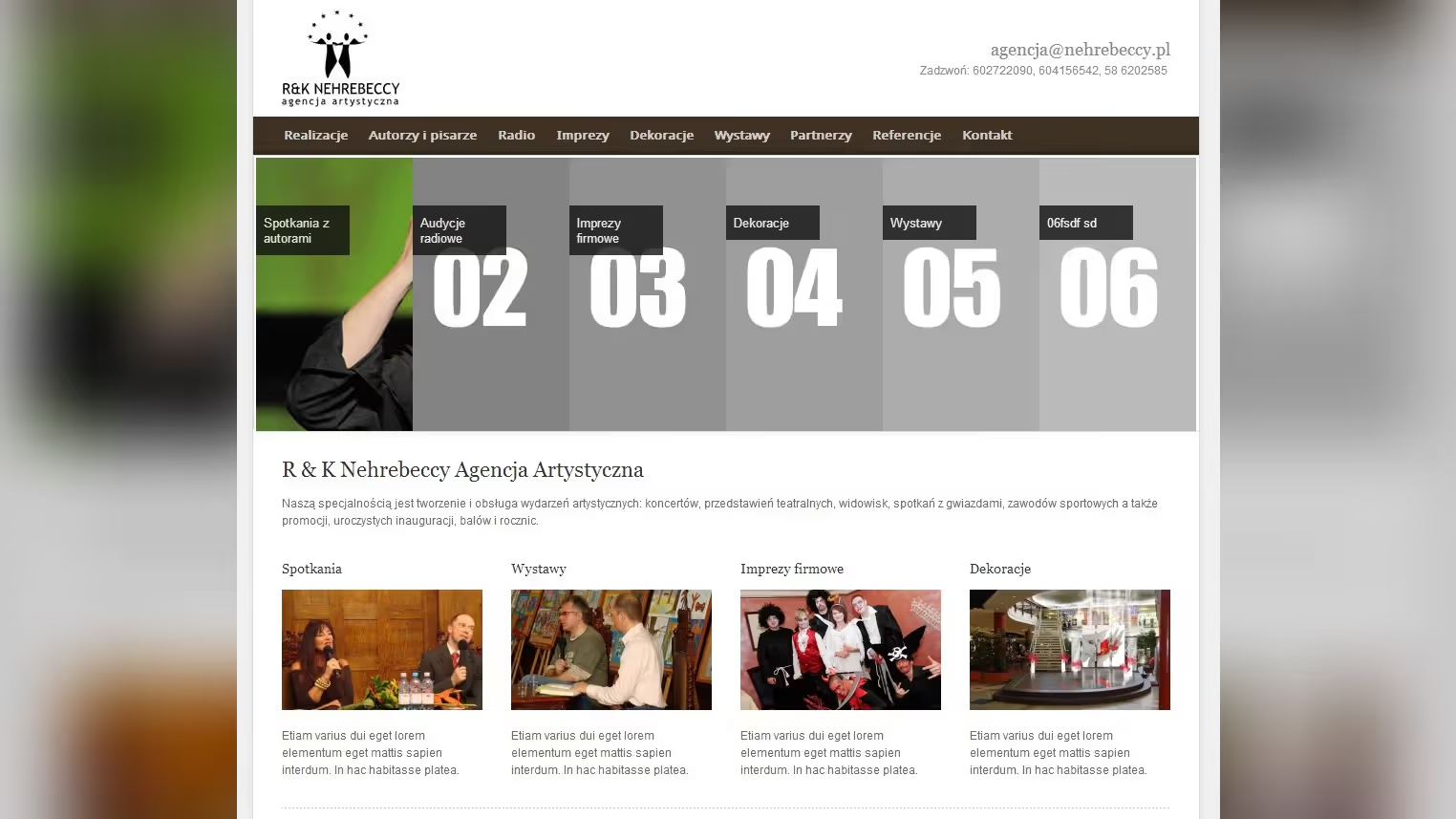
R&K Nehrebeccy is an artistic agency based in Gdynia, run by Renata and Krystian Nehrebecki, operating continuously since 1994. It creates and runs artistic events: meetings with well-known figures, concerts, staged shows, ceremonial openings, anniversaries and jubilees, covering the whole path from the idea and the script through booking the performers to stage design and projection. A separate and recognisable strand of the offer is a literary supper format built around meetings with book authors.
The people on the other side of the enquiry are not consumers. They are programme coordinators at cultural centres and libraries, or whoever inside a company has been handed the anniversary. That person arrives with a name in mind, checks whether the agency has already worked with that name, and only then writes or calls. Navigation therefore had to run from a name to an event and from an event back to a name, rather than from the home page into a services tab.
How to model artists and events as content types in WordPress
The implementation runs on WordPress, and the first decision was what an artist is in the database and what an event is. The cheapest-looking route, describing both as ordinary posts or, worse, as pages, saves an afternoon during the build and costs on every change afterwards. A plain post has nowhere to put an event date, a venue, or the role a particular performer had at that particular evening. All of it ends up inside the body text, which is one text field nothing can be read out of programmatically.
So artists and events are separate content types here, joined by a relation. One event has several performers, one performer has many events, and that structure is what allows two views to be generated from one set of data: a performer profile listing their appearances, and an event page listing who took part. Had those lists been typed by hand on both sides, every change would need editing in two places, and within a year half of them would have drifted apart quietly.
Taxonomies impose order from a third direction. Splitting performers into writers, actors and journalists, and events into concerts, author meetings, openings and jubilees, produces lists nobody has to maintain. A new entry assigned to a category appears on the right list by itself. That reads like a detail until you remember the site is run by two people alongside their actual work, where the difference between a generated list and a hand-kept one decides whether the site is still accurate three years on.
What an artist portfolio site with an event archive needs
The performer portfolio is the principal view. Each profile gathers photographs, a description of the body of work and a history of collaboration, and the layout has one job: to let someone judge within a few seconds whether this person fits the evening they are planning. Hence the ordering, with the photograph and a short description above the full biography, and the appearance list visible without scrolling to the bottom.
The calendar and the archive are the same data seen from two sides. Upcoming events are information for an audience; past ones are evidence for a buyer. An event therefore does not disappear once its date passes, it moves.
Multimedia sits inside the entry rather than being bolted on at the end. The gallery from an evening is usually what convinces the next client, so it has to be easy to add and quick to open. Those two requirements pull against each other, and the whole performance effort on this project was about reconciling them.
Editing happens in the standard WordPress admin with fields matched to the content types above. There is deliberately no page builder. Somebody adding an event between two author meetings should be filling in fields, not designing a layout, because designing a layout on every entry is the shortest route to a site whose twenty subpages look like twenty different sites.
Social sharing counts as a feature here rather than decoration. News of an author meeting travels through the participants’ own profiles and through the pages of the institutions hosting it, so every entry needs correct sharing metadata: a title, a description, and an image that is not a random crop of the background.
How to keep AJAX filtering and photo galleries fast in WordPress
Browsing a large roster without full page reloads came first. Filtering performers by category and pulling further slices of the list happens over AJAX, which in 2012 meant one specific mechanism: the request goes to WordPress’s shared entry point for asynchronous calls. It is worth knowing what that costs, because it explains the rest. Every such request boots the whole of WordPress along with its plugins, so it costs roughly what generating a full page costs, even though the response is a fragment of a list. Across a session where someone toggles filters repeatedly, that adds up.
Which is why the list is kept short, the filter narrows the set inside the query rather than in the browser, and the result of a given filter combination can be held in cache. The alternative, fetching every performer at once and sieving them client-side, is tempting because the code is simpler, and it stops working at exactly the point the roster grows large enough that shipping all of it costs more than the extra requests would have.
Performance on a media-heavy site came second. An in-memory object cache shortens the database work for everything that has to pass through PHP anyway: post sets, taxonomy terms, options. A content delivery network takes over the files, meaning photographs and recordings, and on this project that is where most of the perceptible difference comes from, because images shot in concert halls are the heaviest thing being served. Those are two different problems solved by two different tools, and it is worth saying so plainly: an object cache does not speed up fetching a photograph, and an edge network does not shorten a database query.
Responsive layout in a year when responsiveness was still a fresh practice came third. In 2012 browsers had no mechanism for picking an image variant client-side; that arrived in WordPress several years later. The decision about which version of a photograph to send was therefore made on the server, from the registered thumbnail sizes. A gallery uploaded straight off a photographer’s camera needed its own intermediate sizes defined in advance, or a phone would download the file prepared for a desktop screen.
A stylesheet preprocessor was not ornamentation in that situation but the tool that kept breakpoints in one place. Without it, width thresholds scatter across the stylesheet and any change to the grid means touching a dozen places at once. The layout also predates native grid support in browsers, so columns relied on floats and percentage widths, which takes care when a gallery has a variable number of items and rows have to close cleanly.
Ease of updating came fourth, and the answer there is organisational rather than technical: fields instead of free-form content, lists generated from relations instead of typed by hand, and defined image sizes instead of a judgement call on every upload. A site where the editor has to remember three rules to avoid breaking the layout is a site that breaks in the first week after handover.
How to roll back a WordPress change without losing content
Content, configuration and code sit apart in this implementation, and that property only becomes visible at the first change that goes wrong after launch. If the appearance of a section depends on what somebody typed into the body of an entry, then a visual fix is a content edit and cannot be reverted without undoing editorial work. If the layout depends on a setting recorded nowhere but the database, restoring the previous state depends on the memory of whoever set it.
Keeping the three apart means a rollback touches one of them. Code returns to its previous version and the content stays. Content returns and the code stays. That is not a theoretical benefit, it is the condition for a site to remain maintainable for years by somebody who was not present at the original build.
Edge cases were tested against a copy of production rather than an empty installation. On a site shaped like this one the difference is concrete: an empty install has no entry with eighty photographs in one gallery, no performer tied to events scattered across several years, and no entries where the date field was filled inconsistently because somebody once typed it by hand in another format. All three only surface on real data, and each of them can take down a list view.
How to safely update a WordPress site built on content relations
Care for the site covers core and theme updates, log review and backups. The order matters: a backup nobody has ever restored is not a backup, it is a file. Verifying the restore is part of the work rather than an addition to it.
Updates carry a particular risk on a site built around relations between content types. When the link between a performer and an event is maintained by an intermediate layer, a change there can alter how those links are stored, and the list view then looks correct right up until somebody adds a new entry. So updates go to a copy first, and the check is adding a new relation, not glancing at the home page.
Small visual and functional changes made during maintenance follow the same rule as the build: a change goes into the layer it belongs to. A new kind of event is a taxonomy term, not a new template. Different proportions in the gallery are a change to the registered image sizes and a regeneration, not a style rule glued onto one subpage.
How the six-week build of the agency site ran
The whole thing took around six weeks from agreeing the scope to publication. The layout and the placement of elements came from the client, so the stage that eats most of the calendar on other projects was absent here. The time went into the content model and into the parts a mockup does not show: the relation between performer and event, how the date is stored, image sizes, and how lists behave under filtering.
The decisive call was made early and concerned treating the archive as a full view rather than as residue from the calendar. Everything else, from the date format through the shape of the addresses to a past event keeping its own page, follows from that one decision. Projects where it is made a year after launch end with rewritten addresses and lost inbound links.
After launch the site moved into maintenance run on the agency’s side, with our support for updates and for changes beyond editing. The implementation dates from 2012 and that is worth stating plainly, because project write-ups often present today’s state as the one the project started with. Here some of the choices, such as managing image variants by hand, were a necessity in 2012 and would be a mistake now, since the platform handles it.
Summary
nehrebeccy.pl is an artistic agency site built around two entities, the performer and the event, and the relation between them. Every view comes out of that structure: a performer profile with their appearances, an event page with its participants, category listings, and an archive which in this trade is an asset rather than ballast.
Technically the implementation rests on WordPress, an in-memory object cache, a delivery network for media, and a responsive layout built when responsiveness still meant hand-managing every image variant. Organisationally it rests on something simpler: a site run by two people alongside their real work has to survive nobody remembering the rules from handover.
Frequently asked questions
Practical answers to apply the topic in real execution.
What scope did the nehrebeccy.pl project cover?
#How did delivery run for nehrebeccy.pl?
#What was the hardest technical part of nehrebeccy.pl?
#What part of nehrebeccy.pl could be reused on another build?
#Need an FAQ tailored to your industry and market? I can build one aligned with your business goals.
Let’s discuss