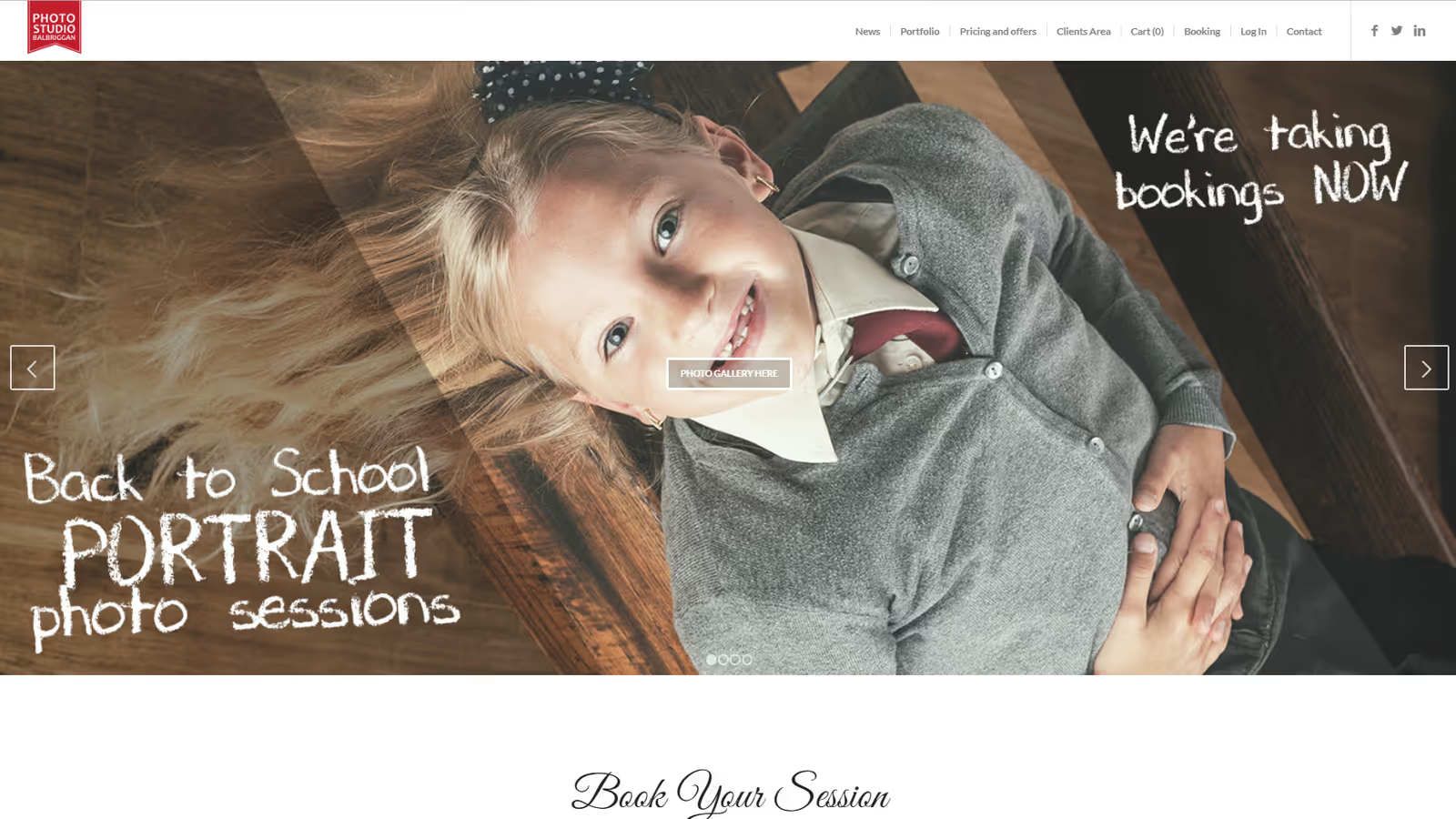
WordPress website for a photography studio in Balbriggan, Ireland
Photo Studio Balbriggan represents a business website project for a modern photography business located in Balbriggan, Ireland. The website serves as a complete business platform, enabling the studio to showcase their services, sell photography products, manage bookings, and offer educational workshops.
Who Photo Studio Balbriggan is
What a photography studio in Balbriggan sells
Photo Studio Balbriggan operates as a multi-faceted photography business offering:
- Portrait Photography: Family portraits, individual sessions, corporate headshots
- Event Photography: Weddings, corporate events, special occasions
- Product Photography: Commercial shoots for businesses
- Photo Editing Services: Professional retouching and enhancement
- Printing Services: Canvas prints, photo albums, framed prints
- Studio Rental: Fully equipped space for photographers
- Photography Workshops: One-on-one and group training sessions
What a photography studio needed from its website
The studio needed a digital platform that would:
- Attract new clients through professional online presence
- Simplify booking and appointment management
- Enable e-commerce for photo products
- Showcase portfolio with high-quality galleries
- Facilitate workshop registration and payment
- Reduce administrative overhead through automation
How the studio website is built on WordPress
How the platform splits booking, shop, galleries and courses
Content Management System: WordPress with custom functionality
- Core Theme: Custom-developed photography-focused theme
- Booking System: Integrated appointment scheduling
- E-commerce: WooCommerce for photo product sales
- Gallery Management: Advanced portfolio display system
- Workshop Management: Custom post type for courses
- Client Portal: Secure access for photo proofing and selection
Booking calendar, print shop, galleries and workshop sign-up
1. Interactive Booking System
Online Appointment Scheduling:
- Real-time availability calendar
- Service type selection (portrait, event, commercial)
- Duration and package options
- Automated email confirmations and reminders
- Integration with Google Calendar
- Deposit payment integration
Studio Rental Booking:
- Equipment checklist selection
- Hourly and daily rental options
- Insurance acknowledgment workflow
- Digital contract signing
- Automated equipment inventory management
2. E-commerce Photo Products
Product Catalog:
- Canvas prints in various sizes
- Premium photo albums
- Framed and mounted prints
- Digital download packages
- Gift cards and vouchers
Customization Features:
- Online photo upload for printing orders
- Custom sizing calculator
- Preview generation with frame options
- Batch ordering for event photos
- Subscription services for regular printing
3. Portfolio Gallery System
Advanced Gallery Display:
- Lazy-loaded high-resolution images
- Category filtering (portraits, events, products)
- Lightbox viewing with zoom
- Before/after comparison sliders
- Client proofing galleries with selection tools
- Password-protected client galleries
Performance Optimization:
- Adaptive image sizing based on device
- WebP format support with fallbacks
- CDN integration for fast global delivery
- Progressive loading for large galleries
4. Workshop Management
Course Catalog:
- One-to-one photography lessons
- Group workshops (beginner to advanced)
- Specialized courses (lighting, editing, business)
- Online webinar integration
Registration System:
- Online registration with payment
- Capacity management
- Waiting list functionality
- Automated course reminders
- Certificate generation for completions
- Student progress tracking
How to build a fast, gallery-first front end
User Experience Design:
- Clean, gallery-focused aesthetic
- Mobile-first responsive design
- Fast-loading image galleries
- Intuitive navigation structure
- Accessibility compliance (WCAG 2.1)
Technical Features:
- AJAX-powered filtering and sorting
- Smooth page transitions
- Sticky booking CTAs
- Progressive Web App capabilities
- Offline gallery browsing
Performance Enhancements:
- Critical CSS inlining
- Image lazy loading and optimization
- Browser caching strategies
- Minified and compressed assets
- Database query optimization
Invoicing, Stripe and PayPal payments and EU VAT in the back end
Content Management:
- Drag-and-drop gallery builder
- Batch image upload with metadata
- Automated watermarking
- Client gallery management
- Blog and news management
Business Operations:
- Automated invoicing system
- Payment gateway integration (Stripe, PayPal)
- Tax calculation for EU VAT
- Inventory management for prints
- Staff schedule management
Client Management:
- CRM integration for client history
- Automated follow-up emails
- Review and testimonial collection
- Marketing automation workflows
Features built specifically for a photography business
How clients pick their photos in a password-protected gallery
One of the standout features is the client photo proofing system:
- Secure Galleries: Password-protected access for each client
- Photo Selection: Clients can mark favorites for editing/printing
- Direct Communication: Comment system for specific photos
- Order Integration: Selected photos automatically populate cart
- Download Options: High-resolution downloads for purchased images
- Social Sharing: Controlled sharing with watermarked previews
How to rent out studio equipment online
For studio rental services:
- Equipment Catalog: Detailed listings of available gear
- Availability Calendar: Real-time equipment booking
- Package Builder: Create custom equipment packages
- Tutorial Integration: How-to guides for equipment use
- Insurance Management: Digital waivers and coverage info
Blog and tutorials that support photography workshops
Supporting the workshop business:
- Blog: Photography tips, tutorials, and industry news
- Video Tutorials: Embedded video content
- Resource Downloads: Free guides and presets
- Student Showcase: Featured work from workshop participants
- Course Reviews: Testimonial system for workshops
How to sell canvas prints and photo albums with WooCommerce
One-page checkout and abandoned cart emails for a photo shop
Product Discovery:
- Category-based navigation
- Search functionality with filters
- Related product suggestions
- Recently viewed products
- Wishlist functionality
Checkout Process:
- Simplified one-page checkout
- Guest checkout option
- Multiple payment methods
- Shipping calculator
- Order tracking integration
Conversion Optimization:
- Abandoned cart recovery emails
- Product review integration
- Trust badges and security indicators
- Urgency elements for limited offers
- Email marketing integration
How to send print orders straight to a print lab
For efficient fulfillment:
- Automated Order Routing: Orders sent directly to print lab
- Quality Control: Preview approval workflow
- Shipping Management: Automated label generation
- Order Tracking: Real-time updates for customers
- Returns Management: Simplified return process
How to keep a photography site fast with heavy galleries
Why no load time or performance score is quoted
Speed Optimization:
No load time or performance score is quoted here. The figures that used to sit in this spot were written for the page rather than read off a run, and one of them disagreed with the score claimed further down in the gallery section, which is how it became obvious that neither came from a measurement. What the optimisation work targeted is describable without them: keeping a gallery page’s initial payload down to the images actually in view, serving each image at the size the requesting device can use, and making sure a long gallery costs the visitor one scroll rather than one large download up front.
Scalability Solutions:
- Cloud hosting with auto-scaling
- CDN for global image delivery
- Database optimization for large galleries
- Caching strategies for high-traffic periods
Security Measures:
- SSL/TLS encryption throughout
- Regular security audits
- Client data protection compliance
- Backup systems (daily automated)
- Firewall and intrusion detection
How a Balbriggan photo studio gets found locally
Local SEO for a photography studio near Dublin
Technical SEO:
- Schema markup for local business
- Image SEO with alt tags and structured data
- XML sitemaps for galleries and products
- Clean URL structure
- Mobile-first indexing compliance
Content Strategy:
- Location-based keywords (Balbriggan, Dublin, Ireland)
- Service-specific landing pages
- Photography tips blog content
- Client testimonials and case studies
- Portfolio showcase for visual search
Local SEO:
- Google Business Profile integration
- Local directory listings
- Location pages for service areas
- Customer review management
- Local backlink building
Email and social automation for a photography studio
Email Marketing:
- Welcome series for new subscribers
- Booking confirmation workflows
- Post-session follow-ups
- Workshop promotion campaigns
- Seasonal promotion automation
Social Media Integration:
- Instagram feed embedding
- Social sharing buttons
- Pinterest-optimized images
- Facebook event integration
- Automated social posting
What the website changed for the studio
Why this case study quotes no traffic or booking figures
This section used to carry an organic traffic increase over a stated period, an average session duration, a pages-per-session figure for galleries, a mobile traffic share, a booking increase, an e-commerce conversion rate, an average order value, a workshop capacity fill rate, a reduction in manual booking work, a weekly hours saving on invoicing, a cut in revision cycles and a separate cut in administrative tasks. None of them can be traced to a source. The site launched in 2019, the analytics property and the shop reports belonged to the studio, and we hold no export, no screenshot and no mail that any of those numbers came from.
Two of them also argued with each other on the same page. Manual booking work and administrative tasks are the same working hours seen from two angles, and they were given two different reductions a few lines apart. Performance had the same problem: the technical section quoted precise mobile and desktop scores while the gallery section claimed a different threshold for the same pages. Numbers that contradict each other inside one document were not measured together, and probably not measured at all.
They are removed rather than turned into ranges or adjectives. Writing that bookings rose sharply, when nobody can say from what to what or over which months, is the same claim with the digits taken out and the appearance of caution added. What follows is what the build was meant to change in how the studio works, stated without arithmetic.
How online booking frees a photographer between shoots
The studio’s day used to be interrupted by the booking itself. A session request arrived by phone or message, someone checked a diary against the studio’s availability and the right equipment, quoted a price for that session type, and waited for a reply before the slot could be held. Every step depended on somebody being free to answer, which for a working photographer means between shoots. The booking engine moves that into rules: service type decides duration, duration and equipment decide what can sit next to it in the calendar, and a client holds their own slot without a conversation. The gain is not speed in some measurable percentage, it is that a booking no longer competes with a shoot for the same person’s attention.
Client proofing changed a different kind of interruption. Selecting photographs used to mean transferring a large set to the client somehow, then collecting their picks in a different medium, usually a mail thread that scrolls. The proofing portal puts the set, the selection and the comments in one place tied to one job, so a revision request is attached to a specific frame rather than described in prose. That matters most on the jobs that go through several rounds, where the cost is not the editing but the rebuilding of context every time the thread resumes.
The shop and the workshop registration remove the same class of manual step. A print order goes to the lab with the specification already attached instead of being re-entered by hand, and a workshop seat is held and paid at the moment someone decides to take it, rather than after an exchange about whether places are left. Both replace a person as the routing mechanism, and that is the whole argument for them.
The last change is quieter and takes longest to show: the portfolio stops being a file a visitor has to wait for. Galleries are the product for a photography studio, and a gallery that loads slowly on a phone is a portfolio nobody scrolls to the end of. Image handling, format choice and lazy loading exist for that, not for a score.
What data a results claim would need
Named access to the analytics property with a defined date range, an export of the shop and booking reports with the query that produced them, and the studio’s confirmation that both cover the same period. Without those, any figure on this page describes the project instead of measuring it.
Why the booking engine was built before the shop
Delivery ran about six weeks from scope to launch. The layout came from the client, so the calendar went into the parts a mockup does not show: the booking rules, the proofing flow and the image pipeline behind the galleries.
The booking engine was built before the shop, and that order was deliberate. A studio sells sessions first and prints second, so the rules about what can be booked against what had to be settled before anything else could depend on them. Workshops then reused the same availability model rather than getting a parallel one, which is why a workshop and a session cannot both claim the same room.
After launch the site moved into maintenance: updates, backups, periodic performance review and seasonal checks before the periods when a studio takes most of its bookings.
Problems a photography website has to solve
How to load large photo galleries fast
Problem: Displaying high-resolution photography portfolios while maintaining fast load times.
Solutions Implemented:
- Adaptive image loading (different sizes for different devices)
- Progressive JPEG loading
- WebP format with JPEG fallbacks
- Infinite scroll with lazy loading
- CDN distribution for global visitors
The list carries no PageSpeed threshold: a score means nothing without the run that produced it. The thing worth stating is the constraint the gallery had to satisfy, which is that a page showing a full shoot must not make the visitor download a full shoot.
How to book sessions with different durations and equipment
Problem: Managing multiple service types with different durations, equipment needs, and staff availability.
Solutions Implemented:
- Custom booking rules engine
- Resource conflict detection
- Automated buffer time between appointments
- Staff availability synchronization
- Equipment availability tracking
No claim is made about how often double bookings occurred before or after. The rules engine either refuses a conflicting slot or it does not, and that behaviour is in the code rather than in a statistic nobody can produce.
How to run photo proofing without long email threads
Problem: Efficiently managing photo selection and approval process with clients.
Solutions Implemented:
- Secure client portals with time-limited access
- Favorite/selection system with export
- Comment threads on specific images
- Automated reminders for pending selections
- Direct integration with editing queue
No approval speed figure is given. What the portal changes is that the selection and the comments live with the job instead of in a mail thread, so the round trip does not have to be reassembled from memory each time a client comes back to it.
How the photography site is maintained after launch
Weekly WordPress updates, backups and security monitoring
- Weekly Updates: WordPress core, theme, and plugin updates
- Security Monitoring: 24/7 threat detection and prevention
- Performance Optimization: Monthly speed audits and improvements
- Backup Management: Daily automated backups with offsite storage
- Content Updates: Regular portfolio and workshop updates
Monthly analytics review and A/B tests on booking
- Analytics Review: Monthly traffic and conversion analysis
- A/B Testing: Checkout and booking flow optimization
- SEO Monitoring: Keyword ranking tracking and optimization
- Feature Development: New tools based on business needs
- Training: Staff training on new features and workflows
What the studio site could add next
Future roadmap includes:
- AI-powered photo organization and tagging
- Virtual tour of studio space
- Online photography courses platform
- Client mobile app for proofing
- Automated print fulfillment expansion
- Multi-location support for franchise growth
Which technologies run the photography studio site
WordPress, WooCommerce and Advanced Custom Fields Pro
- WordPress (latest stable)
- Custom photography theme
- WooCommerce for e-commerce
- Advanced Custom Fields Pro
- Custom booking plugin
Which WordPress plugins a photography studio uses
- WooCommerce Bookings
- NextGEN Gallery (customized)
- Yoast SEO Premium
- WP Rocket (caching)
- Gravity Forms
- Mailchimp for WooCommerce
Stripe, Google Calendar, Printful and Zoom integrations
- Stripe and PayPal payments
- Google Calendar API
- Cloudflare CDN
- Printful (print-on-demand)
- Zoom (online workshops)
- Mailchimp (email marketing)
Imagify, Wordfence and UpdraftPlus for speed and safety
- Imagify (image optimization)
- Query Monitor (development)
- Wordfence Security
- UpdraftPlus (backups)
Conclusion
The Photo Studio Balbriggan project demonstrates how a well-executed WordPress solution can transform a traditional service business into a simplified, scalable digital operation. By combining beautiful portfolio presentation with powerful booking and e-commerce functionality, the website serves as both a marketing tool and operational backbone for the business.
The success of this project lies in understanding the unique needs of a photography business, from visual showcase requirements to complex booking logistics, and translating those needs into a tight digital experience that delights both the business owner and their clients.
Frequently asked questions
Practical answers to apply the topic in real execution.
What scope did the Photo Studio Balbriggan - Professional Photography Website & Booking Platform project cover?
#How did delivery run for Photo Studio Balbriggan - Professional Photography Website & Booking Platform?
#What was the hardest technical part of Photo Studio Balbriggan - Professional Photography Website & Booking Platform?
#What part of Photo Studio Balbriggan could be reused on another build?
#Need an FAQ tailored to your industry and market? I can build one aligned with your business goals.
Let’s discuss