Freshness is a property of the query, and an update is a change in the page, not in its date. Google does run systems that favour recent pages for some searches, and its own engineers describe a built-in bias toward old ones. The usual SEO reflex, bumping the date on a schedule, tells Google nothing it can verify. We know because our own sitemap did exactly that for months.
What query deserves freshness means
In his testimony in the US v. Google antitrust trial, Pandu Nayak gave three examples, quoted in a Hobo analysis of the transcripts from 5 October 2026. A sports fan wants pages from this morning. A laptop buyer wants reviews from the right model year, not today’s. Someone planning a turkey dinner may be better served by a recipe that is ten years old.
That third case is the one WordPress owners skip. Freshness is not a ranking bonus every page can collect. For a large share of queries the older, settled page is the correct answer, and “updating” it can only make it worse. Before touching a post, ask whether its query is one where recency is expected.
Where query deserves freshness came from
The name is older than any leak or trial. On 3 June 2007 Saul Hansell described it in The New York Times, in a profile of Amit Singhal, whom the paper called the master of Google’s ranking algorithm. According to the article, Google had until then preferred pages old enough to have attracted links, and Singhal started to worry that the balance was off when a search for Google Finance could not find Google’s own new stock quote service.
His team’s answer, as Hansell reports it, was a mathematical model that tries to determine when users want new information and when they do not. It was called QDF, for query deserves freshness. It judged whether a topic was hot from two signals: news sites and blogs actively writing about it, and Google’s own stream of search queries, which Singhal considered the better monitor. His example was a blackout in New York, where the first articles appear within 15 minutes and the queries within two seconds.
Two details from 2007 still matter. Singhal told his colleagues that simply changing formulas to show more new pages produced lower quality results much of the time, so freshness was never meant as a blanket preference for new pages. And the trigger was demand around a topic, not the age of a single page. A WordPress post cannot make its query hot by changing its own date.
Which searches Google’s freshness systems target
Google now documents the idea in its guide to ranking systems, in the plural: various “query deserves freshness” systems designed to show fresher content for queries where it would be expected. The guide gives two examples. Someone searching for a film that has just been released probably wants recent reviews rather than articles from when production began. A search for “earthquake” normally returns material about preparation, but after a recent earthquake news articles and fresher content may appear.
Both examples describe a change in what the searcher needs, caused by an event outside the page. Neither describes a page that got better by receiving a new date. That matches the turkey recipe in Nayak’s testimony: a system built to detect demand for recency has nothing to reward when that demand is absent. For a WordPress site the useful question is which of its queries ever behave like “earthquake”. For most service pages and how-to guides the answer is none, and on those pages the date is a record, not a lever.
Why old pages get more clicks in Google
The reason is mechanical. Google ranks partly on what users clicked before, and Nayak described the side effect:
The challenge with freshness and clicks is that clicks accrete over time, which means older pages, potentially stale pages, tend to have more clicks than fresh pages
Pandu Nayak, Google, Hobo Web
A new page starts with no clicks and an old page has years of them. For queries where recency matters, Google has to compensate. For every other query the accumulated clicks do what they were built to do.
Two consequences for a site owner. A freshness system exists to lift pages that are genuinely recent, so it is built to resist cheap signals. And a fresh page without clicks is competing against a handicap that a date change will not remove.
What Google says about changing post dates
Hobo cites a 5 February 2022 tweet by John Mueller, since deleted, that reads:
When you write something new, or significantly change something existing, then change the date. Changing the date without doing anything else is just noise & useless.
John Mueller, Google, Hobo Web
The tweet is gone, so treat it as reported speech, not documentation. The same article quotes a question from Google’s helpful content guidance:
Are you changing the date of pages to make them seem fresh when the content has not substantially changed?
Google, helpful content guidance, Hobo Web
Read the first sentence of Mueller’s advice again. It does not say never change the date. It says change it when something new was written or something was significantly changed. A date is a claim, and the rule is that the claim has to be true.
That question is not only reported. It still stands in Google’s own guide to creating helpful, reliable, people-first content, last updated on 5 October 2026, followed by a second question aimed at the same reflex at the scale of a whole site:
Are you adding a lot of new content or removing a lot of older content primarily because you believe it will help your search rankings overall by somehow making your site seem “fresh?” (No, it won’t)
Google Search Central, Creating helpful content
The answer in brackets is Google’s, not ours. It covers mass publishing and mass pruning done for the appearance of freshness, which is the site-wide version of bumping a date.
Does evergreen content need updating
Hobo lists further deleted tweets by Mueller, and one of them is useful for anyone with guides that do not need to change. According to Hobo it read:
If it’s evergreen, then by definition you don’t need to change it. No need to do anything special. Keep your dates, make it great.
John Mueller, Google, Hobo Web
Like the earlier tweet, it is reported and cannot be confirmed. It is consistent with what Nayak said about the turkey recipe. A stable guide keeps its original date and has no reason to lose it. The urge to “refresh” it every quarter comes from the mistaken idea that Google rewards movement. Google rewards the right answer for the query, and for many queries that answer is already written.
Content Warehouse API leak and freshness dates
Hobo goes further and maps the testimony onto field names from the leaked Content Warehouse API documentation: separate dates for the byline, for the URL pattern, and a timestamp for the last significant update. The picture is tidy, and it is the author’s inference. Nobody at Google confirmed that those fields drive freshness ranking the way the article lays them out. The trial testimony and the public guidance support the principle, and the field-level story is a reading of a leak.
The practical advice survives without it. A page whose date moved while the text barely did looks, to any system that compares versions, like a page that made a claim it did not keep. Whether that is a named field or a general comparison, the tactic does not need a leak to be a bad bet.
Same lastmod date for every URL in the sitemap
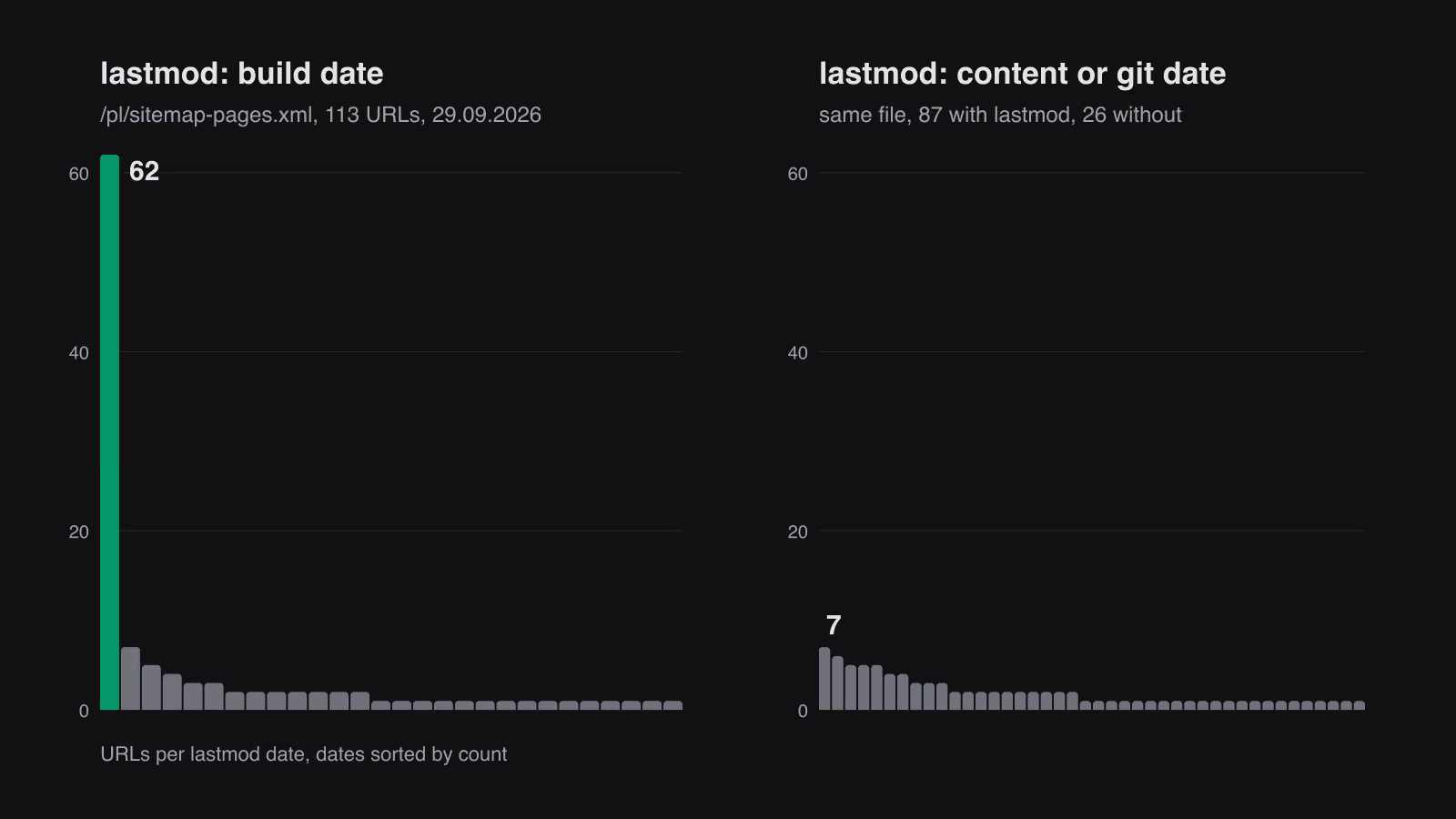
On 24 August 2026 we measured five of our sitemaps on production. Each had exactly one lastmod value for every entry, the date of the build. The sitemap integration computed the current date once and stamped it on all URLs. Google schedules revisits from lastmod only while the value stays verifiably true, so a site where every URL declares a change on every build teaches the crawler to ignore the field. The last crawl dates we sampled for individual pages ranged from three weeks to three months back.
That is the date-without-change pattern, built by us, at scale, with no human involved. The fix took the date from updatedDate, falling back to pubDate, and from 29 September a URL with no known content date gets no lastmod at all, because an absent date is better than a false one.
Measured today, the English blog sitemap lists 329 URLs with 100 distinct lastmod dates. That is the shape of a site that changes at different times. It is not a clean result. 130 of those URLs share one day, 22 September, and we have not audited whether those edits added content. If they did not, we have rebuilt the problem on a smaller scale, one editor at a time.
What Google counts as a significant change for lastmod
Google’s sitemap documentation sets the bar in two sentences. Google uses the lastmod value if it is consistently and verifiably accurate, for example by comparing it to the last modification of the page, and the value should reflect the date and time of the last significant update. The examples it gives: a change to the main content, the structured data or the links on the page is generally significant, an update to the copyright date is not. The same page says Google ignores priority and changefreq, so those two fields cannot carry a freshness signal either.
That definition is narrower than what WordPress records as a modification and wider than many editors assume. A new internal link or a corrected dateModified in the schema counts. A footer year rolled over by the theme, a re-save, or a plugin rewriting posts on activation does not. “Verifiably” is the word that does the work: Google can compare the declared date with what it fetched last time, and our build-date stamp failed that comparison on every URL at once.
How long Google takes to recrawl an updated page
At a Search Central Live event, Gary Illyes presented internal timings that Barry Schwartz reported at Search Engine Roundtable. A refresh of a known URL typically takes about 30 days, with the slowest cases at weeks or never. Sitemap processing takes about 24 hours, up to 14 days or never. Illyes added a caveat:
mind that this was an exercise to see if the audience can relate to the numbers we pulled internally and put in those slides.
Gary Illyes, Google, Search Engine Roundtable
So these are orders of magnitude, not guarantees. They still change how to judge an update. If you edit a post on Monday and look at the result on Wednesday, you have measured nothing. And if a typical refresh takes a month, an honest lastmod is the one way to tell Google that this page is worth visiting earlier than its schedule says.
What counts as an update in WordPress
WordPress records post_modified on every save. A typo fix, a bulk category change and a plugin that re-saves posts all move it, and many SEO plugins pass that value to lastmod and to the visible “last updated” line. So the platform’s default is to publish claims nobody checked.
Treat these as updates, worth a new date:
- a figure, price or version number that changed, and the sentence around it
- a section added because the topic grew
- a recommendation reversed after new evidence
- a deadline that passed, with the tense rewritten
These are not updates:
- re-saving to trigger a plugin
- reordering paragraphs or swapping an image
- a bulk edit of metadata across many posts
- re-reading the page and finding nothing to change
For the last case keep a separate field. We store lastVerified apart from updatedDate for this reason: verification is a fact worth recording, but it is not a content change. Deadline content needs the strictest handling, because a post written as advice before a date turns false on that date. A fresh lastVerified does not catch the future tense still standing in the text.
How Google picks the date shown in search results
The date under a search result is a separate matter from lastmod. Google’s guide to byline dates says it does not depend on a single date factor, because all factors can be prone to issues, and looks at several of them to estimate when a page was published or significantly updated. It does not guarantee that any date will be shown.
The guide asks for a user-visible date, featured prominently and labelled with text such as “Published” or “Last updated”. In structured data it recommends a CreativeWork subtype such as Article or BlogPosting with datePublished and/or dateModified. The visible date and the structured value should match, a timezone, if given, should be correct, and the date must describe the publication or update of the page, not a future date or the date of an event the page describes. If Google keeps picking the wrong date, the guide suggests removing some of the other dates on the page.
For WordPress this means three places carry the same claim: the visible “last updated” line, dateModified in the schema printed by the SEO plugin, and lastmod in the sitemap. If one of them moves on every save and the others do not, the page contradicts itself. If all three move on every save, the page is consistent and still false. The fix is the one we applied to the sitemap: one content date, changed only by an editor who changed the content, and every output reads that date.
When to change the updated date on a post
- Open the previous version next to the current one. If the diff is only whitespace, markup or order, stop.
- Ask whether the query expects recency. If not, an unchanged date is the honest and safe choice.
- If the change is real, say what changed in the text, near the top or bottom, so a human sees the reason as well as the date.
- Let
lastmodfollow the content date and nothing else. Check the sitemap itself, not the plugin settings, and count the distinct values.
Freshness is earned by a change a reader or a crawler can see. A date can only record that change, and a date that records nothing is the cheapest signal a site can send and the first one Google learns to ignore.
QDF is useless without a publish habit that GEO and LLMO can trust: update the facts, keep the URL, show the date.