A customer forwards you an invoice you never sent. The sender address looks like yours, except one letter is different. Or a search for your brand turns up a shop with your logo, your product photos and prices that are too good. This guide covers the response in the order that limits damage: confirm what is happening, protect your own email, warn customers, get the fake taken down, and decide whether to fight for the domain. It applies to any business site, whether it runs on WordPress, Shopify, a headless frontend or a static build, because almost every step happens in DNS, at the registrar and with the host, not in the CMS.
On 22 October 2026 someone asked r/smallbusiness how often businesses get impersonated “like a fake domain one letter off yours, or someone emailing your customers pretending to be you”. The most useful reply came from a self-described fractional CISO:
It is a semi common issue. It is often addressed by cyber/IT/MSP team, also known as typoquatting. Often used in combination with a BEC attack. Most DMARC companies offer a monitoring service in this area
(u/statico, r/smallbusiness, 22 October 2026)
BEC is business email compromise: a fake invoice or a “we changed our bank details” message sent to your customers or suppliers. This guide is practical information, not legal advice. For a trademark dispute or a fraud loss, talk to a lawyer.
Lookalike domain or spoofed email: which one is it
The two attacks look the same in an inbox and need different fixes.
Exact-domain spoofing means the From header shows your real domain, for example [email protected], but the message came from someone else’s server. This is what SPF, DKIM and DMARC are built to stop.
A lookalike domain means the attacker registered a different name: yourcornpany.com, yourcompany-invoices.com, yourcompany.co instead of .com. That domain has its own DNS, can pass SPF, DKIM and DMARC for itself, and your records do nothing about it. RFC 9989, the current DMARC specification, says DMARC “does not address the use of visually similar domain names or abuse of the RFC5322.From human-readable display name”.
To tell them apart, ask the customer to forward the suspicious message as an attachment or send you the full headers. Look at the actual address in From, not the display name, and at the Authentication-Results header. If the domain is yours and DMARC failed, someone is spoofing you. If the domain is not yours, you are dealing with a lookalike.
One reply in the same thread described how this usually surfaces:
We found out when a confused customer forwarded an email from a domain one letter off ours.
(u/AwaisMughal-SEO, r/smallbusiness, 22 October 2026)
How to check who registered a lookalike domain
Collect evidence before anything changes. Take screenshots of the fake site with the URL bar visible, save the raw emails, and write down dates. Then look up the domain.
RDAP has replaced WHOIS as the structured lookup. ICANN’s lookup tool at lookup.icann.org, or a query to https://rdap.org/domain/example.com, returns the registration date, the registrar and the registrar’s abuse email and phone. Owner details are usually redacted, which is normal. The registration date matters: a domain created last week that copies your brand is easier to argue as bad faith.
DNS tells you what the domain is set up to do:
dig +short A yourcornpany.com
dig +short MX yourcornpany.com
dig +short NS yourcornpany.com
An MX record means it can receive mail, which usually means it is being used for email fraud such as replies to fake invoices. An A record points to the server or CDN hosting the site. Run RDAP on that IP address (https://rdap.org/ip/203.0.113.10) to find the network owner and its abuse contact. If the IP belongs to a CDN, the abuse contact is the CDN’s, and the origin host is hidden behind it. Report to the CDN anyway.
How to find fake domains with certificate transparency
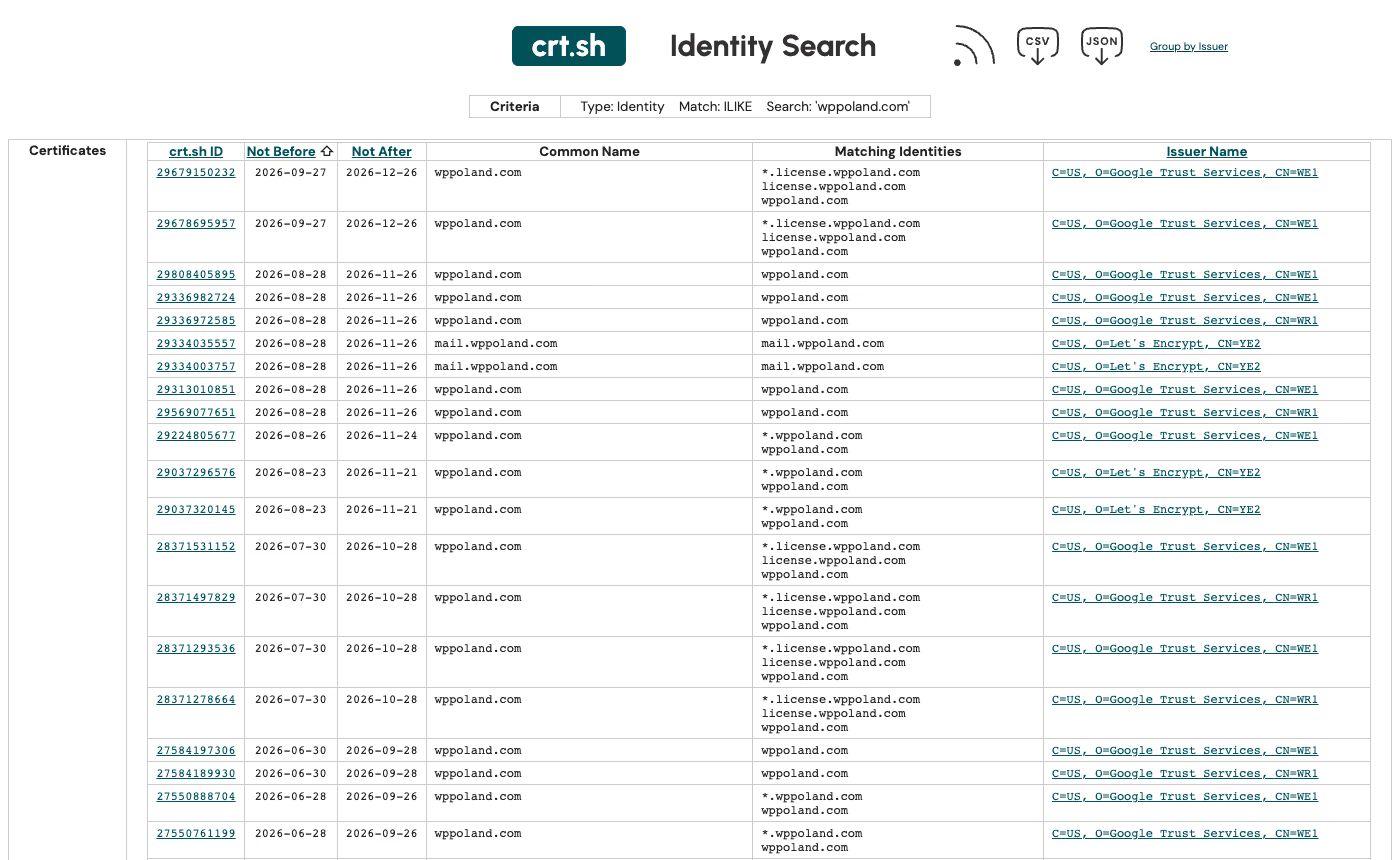
Every publicly trusted TLS certificate is logged in Certificate Transparency logs, and crt.sh lets anyone search them. The hero image of this article is a real crt.sh search for our own domain: each row shows when a certificate was issued, when it expires, the names it covers and the certificate authority. A search for your domain shows subdomains you may have forgotten, and a search for a suspected lookalike shows when the attacker got a certificate, often days before the first phishing email.
Search your exact domain first to see what is legitimately yours. Then search each lookalike you can think of: swapped letters, rn for m, hyphenated versions, your brand with words like “shop”, “pay”, “invoice” or “support”, and other endings like .co, .net or your country code. This is manual. Commercial brand monitoring and many DMARC providers automate it, as the CISO in the thread mentioned.
How to stop someone sending email as your domain
Protect your own domain first, because it is the one thing you fully control. You need three DNS records at whoever hosts your DNS, whatever runs your website.
- SPF lists the servers allowed to send mail for your domain: your mailbox provider, your newsletter tool, your shop’s transactional mail, your CRM.
- DKIM signs each message with a key published in your DNS. Each sending service gives you its own DKIM record.
- DMARC tells receivers what to do when a message claiming your domain fails both checks in alignment, and where to send reports.
DMARC was first published as RFC 7489 in 2015. In May 2026 the IETF replaced it with RFC 9989 (the protocol), RFC 9990 (aggregate reports) and RFC 9991 (failure reports), now on the standards track. Two changes matter for rollout: the pct tag is gone, and a new t=y tag signals test mode, where receivers apply one level below the published policy. RFC 9989 also adds np for subdomains that do not exist, which closes a common spoofing gap such as billing.yourcompany.com when no such host exists.
The policy values are unchanged: p=none asks for no action, p=quarantine asks receivers to treat failing mail as suspicious, and p=reject asks them to refuse it.
| Stage | Record | What you do |
|---|---|---|
| Monitor | v=DMARC1; p=none; rua=mailto:[email protected] | Read aggregate reports, list every legitimate sender, fix its SPF and DKIM |
| Test enforcement | v=DMARC1; p=reject; t=y; rua=... or p=quarantine | Watch for legitimate mail that would fail |
| Enforce | v=DMARC1; p=reject; np=reject; rua=... | Spoofed mail from your exact domain is refused |
Google and Yahoo set the floor for bulk senders. Google’s rules, in force since February 2024, require anyone sending more than 5,000 messages a day to Gmail accounts to have SPF, DKIM and DMARC, with From aligned to SPF or DKIM, and say the DMARC policy “can be set to none”. Yahoo asks bulk senders for “a valid DMARC policy with at least p=none” and strongly recommends an rua tag. Both also require one-click unsubscribe for marketing mail and a spam rate below 0.3%. Meeting those rules gets your mail delivered. Getting to p=reject is what stops impersonation, and neither provider requires it.
If your WordPress or shop mail breaks when you tighten SPF and DKIM, our SMTP, SPF and DKIM guide walks through each sender. Old API keys and forgotten integrations that still send as your domain show up in DMARC reports; the remote access and API keys audit helps you find who still has them.
How to warn customers about a fake website
Do it the same day, even before the takedown. A short notice on your homepage and in your next order or account email works better than a long statement. Include:
- the exact fake domain or domains, written so they cannot be clicked (
yourcornpany[.]com), - your real domain and the addresses you actually send from,
- what you never ask for by email, such as a change of bank details or a password,
- how to reach you to check a message, through a channel the attacker does not control.
If customers buy from you online, they are already checking signals on their own. Our article on how customers check whether an online shop is real lists what they look at, and the same signals help them spot the copy.
How to report a fake website and get it taken down
Send reports in parallel. Each recipient can act independently, and none of them waits for the others.
- Registrar. Use the abuse email from RDAP. Registrars act on phishing and fraud faster than on brand complaints, so lead with customer harm: fake invoices, collected card data, stolen logins. Attach screenshots and the email headers.
- Host or CDN. Use the abuse contact from IP RDAP. For a host in the EU, frame it as a notice under Article 16 of the Digital Services Act. Hosting providers must offer an electronic notice mechanism, and a notice should contain four things: why you consider the content illegal, the exact URL or URLs, your name and email address, and a statement that you believe in good faith the information is accurate and complete. The host must confirm receipt and tell you its decision “without undue delay”.
- Google Safe Browsing. The report form at safebrowsing.google.com takes a URL and a short description. Once Google lists a page, browsers that use Safe Browsing, Chrome among them, can warn visitors before it loads.
- National CERT or cyber security centre. In the UK, the NCSC takes suspicious emails forwarded to [email protected] and suspicious websites through its “Report a scam website” form. It says it can investigate and remove scam websites and works with hosting companies to remove malicious links. If a customer lost money, they should also report it to Report Fraud in England, Wales and Northern Ireland, or to Police Scotland.
Keep a log of every report with the date and any ticket number. If the site moves to a new host, you will send the same package again.
Can you get the lookalike domain transferred to you
Takedown removes the content. The domain stays registered, and the owner can point it somewhere else next week. To get the name itself, you need a dispute procedure.
For .com, .net, .org and new gTLDs such as .shop or .app, that is the UDRP. WIPO’s guidance says you must prove three elements: that you have rights in a trademark, that the registrant has no rights or legitimate interest in the domain, and that the domain was registered and is used in bad faith. Screenshots of the fake site and the fraudulent emails are the evidence WIPO lists for bad faith. A successful case ends with transfer or cancellation.
Country-code domains vary. WIPO lists ccTLDs that use the UDRP as is, and others with their own variation, among them .eu, .es, .fr, .nl and .pl. For .eu, disputes go through the .eu ADR procedure, administered by the Czech Arbitration Court or the WIPO centre. Check the registry’s own rules before you file. If you do not hold a registered trademark, ask a lawyer first, because the first element is where weak cases fail.
How to prevent business impersonation next time
- Register the obvious typos and endings. Your domain in your country code and in .com, plus one or two common misspellings, redirected to your real site. This is cheaper than one dispute.
- Monitor certificate logs for your brand, by hand on crt.sh every month or through a monitoring service.
- Read DMARC reports. Aggregate reports show every IP sending as your domain, including attackers testing your policy.
- Lock down the accounts that control your domain. Two-factor authentication on the registrar and DNS provider, and a registrar lock or registry lock where offered. Someone who takes over your DNS account does not need a lookalike.
- Write the response down. A one-page runbook with the registrar, the DNS host, the mail provider and who decides what, so the next incident does not start with a search for passwords.
| Situation | First action | Who does it |
|---|---|---|
| Spoofed email from your exact domain | Publish DMARC, move to p=reject after the reports are clean | Whoever manages DNS and mail |
| Lookalike domain sending email | RDAP, report to the registrar, warn customers | Owner plus IT |
| Fake shop copying your site | Screenshots, host or CDN abuse notice, Safe Browsing report | Owner plus IT |
| Repeated lookalikes of a trademark | UDRP or ccTLD procedure | Lawyer |
Our security audit includes a check of SPF, DKIM, DMARC and the accounts that control your domain, and a maintenance plan covers reading the DMARC reports and watching certificate logs every month.