Short answer: TYPO3 12 has not had a free update since 30 April 2026. If your site still runs version 12, you need either the paid Extended Long Term Support (ELTS) from TYPO3 GmbH or an upgrade. With neither, the site is missing the fixes published on 17 November 2026, one of them rated critical. I aim upgrades at TYPO3 14 LTS, which gets security updates until the end of June 2029, and I start with PHP: TYPO3 13 and 14 need at least PHP 8.2, and PHP 8.2 itself loses security support on 31 December 2026. TYPO3 13 is free only until the end of 2027, so treat it as a stop on the way to 14.
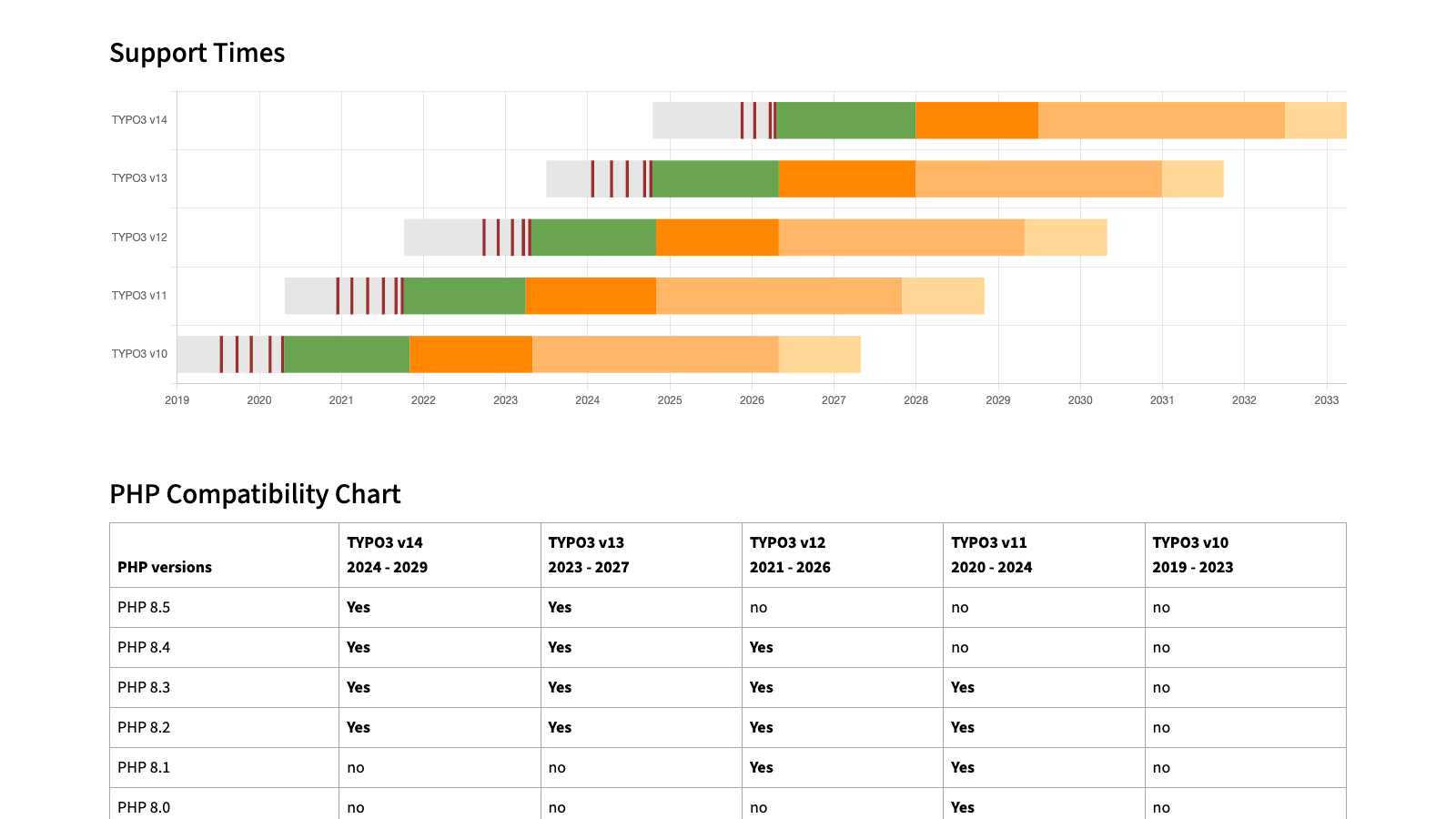 Support times and PHP compatibility from the official roadmap on typo3.org. Screenshot taken 28.11.2026.
This guide is for people in the UK and Ireland who own or run a TYPO3 website, whether you built it yourself, inherited it from an agency, or run the local site of a group that chose TYPO3 at head office. Every version date here comes from the machine-readable index at get.typo3.org, the TYPO3 roadmap and the documentation on docs.typo3.org, all read on 28 November 2026. Where two official sources disagree, I give both.
Which TYPO3 version am I running?
Log in to the backend and look at the top left corner: the TYPO3 documentation names that spot as the place where the core version is shown. The module System, Environment shows the PHP version the site runs on. Write both numbers down before reading further, because everything below depends on them.
Then compare them with this table:
| Version | LTS release | Free support until | ELTS until | PHP |
|---|---|---|---|---|
| TYPO3 11.5 | 5 October 2021 | 31 October 2024 | 31 October 2028 | 7.4 to 8.3 |
| TYPO3 12.4 | 25 April 2023 | 30 April 2026 | 30 April 2030 (partners) | 8.1 to 8.4 |
| TYPO3 13.4 | 15 October 2024 | end of December 2027 | 31 December 2030 | 8.2 to 8.5 |
| TYPO3 14.3 | 21 April 2026 | 30 June 2029 | 30 June 2032 | 8.2 to 8.5 |
Source: get.typo3.org, endpoint /api/v1/major/, and the PHP table of the TYPO3 roadmap, as of 28.11.2026.
A number starting with 11 means your site has been without free fixes for more than two years. One starting with 12 means seven months. One starting with 13 means you have time, but not much.
Why did TYPO3 12 stop getting updates?
Because its three free years ran out. Every TYPO3 LTS release gets roughly eighteen months of regular bug fixing and another eighteen months of priority bug fixing that includes security updates. That is three years at no cost, as the announcement on the end of TYPO3 12 explains. Version 12.4 came out on 25 April 2023, and free support ended on 30 April 2026.
The index on get.typo3.org shows the switch release by release. The last freely downloadable version is 12.4.45 of 14 April 2026. From 12.4.46 on 9 June 2026, every release carries the ELTS flag. By 28 November 2026 there were seven of them, the latest being 12.4.52 of 17 November. Run composer update on a version 12 project without ELTS access and Composer stops at 12.4.45, which can look like you are up to date when you are not.
The same thing happened earlier to older lines. TYPO3 11.5 lost free support on 31 October 2024, with 11.5.41 as its last free release, and TYPO3 10.4 on 30 April 2023.
Security holes in old TYPO3 versions
On 17 November 2026 the TYPO3 Security Team published ten advisories in one go, TYPO3-CORE-SA-2026-025 to 034, alongside releases 12.4.52 ELTS, 13.4.40 and 14.3.12. Two of them hit old sites directly.
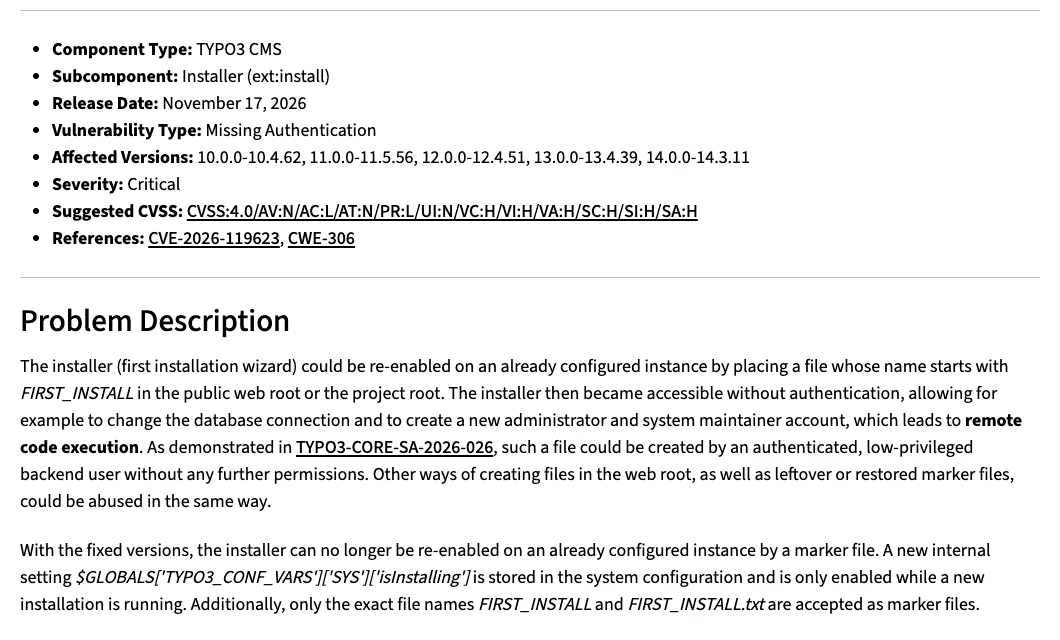 Security advisory TYPO3-CORE-SA-2026-027 on news.typo3.com: affected versions and severity. Screenshot taken 28.11.2026.
TYPO3-CORE-SA-2026-027 is rated critical. The installer, the wizard used once for a fresh install, could be switched back on for a long-configured site if a file whose name starts with FIRST_INSTALL appeared in the public web root or the project root. The installer was then reachable without logging in, so an attacker could change the database connection and create a new administrator account. The advisory adds that a low-privileged backend user could create such a file through another flaw disclosed the same day. Every version from 10.0.0 to 14.3.11 is affected. The fix is in 10.4.63 ELTS, 11.5.57 ELTS, 12.4.52 ELTS, 13.4.40 and 14.3.12. The Security Team also advises checking both directories for unexpected files with that name and reviewing backend accounts with admin rights.
A site on 12.4.45 without ELTS does not have that fix and will not get it. The same goes for any version 11 site without ELTS.
TYPO3-CORE-SA-2026-032 is rated medium but changes behaviour. Upload fields in the Form Framework with no allowed MIME types used to accept almost any file. After the update they refuse every upload until at least one MIME type is configured. In other words, a contact form with an attachment field may stop working after a security patch. On a site nobody maintains, that surfaces when a customer complains. When I apply a security release I therefore test the forms and read the “Breaking Change Notice” in each advisory, not just whether the home page loads.
What does TYPO3 ELTS cover?
ELTS is a paid service of TYPO3 GmbH, the company behind the product, based in Duesseldorf. It ships security and compatibility updates for versions whose free support has ended. For TYPO3 12.4, the ELTS page for v12.4 lists three contract years up to 30 April 2029, plus a fourth year to 30 April 2030 that only official TYPO3 partners can book. You buy one year at a time, or two or three years up front. TYPO3 GmbH publishes its own pricing there; I do not repeat it.
Three limits sit further down the same page:
- PHP 8.1 to 8.4 only. ELTS 12.4 officially supports just these PHP versions. According to php.net, PHP 8.4 gets security support until 31 December 2028. The third ELTS year ends on 30 April 2029, so for its last four months the core runs on a PHP version that no longer gets security fixes.
- The page promises security and compatibility updates for the TYPO3 CMS and more time to update your own extensions. I read that as: extensions from the TER and your own site package get no updates from ELTS. An extension whose author stopped maintaining version 12 stays unmaintained.
- The fourth year needs a partner. More on that below, because it matters more in the UK and Ireland than in Germany.
ELTS makes sense when an upgrade is already planned and needs time: a relaunch is on the way, a tender is running, or the budget year has not started. As a permanent state it costs more than it needs to. You pay every year to stand still, and the upgrade still has to happen.
Is there a TYPO3 partner in the UK?
Not an official one, as of today. TYPO3 GmbH keeps a list of official partners at typo3.com/partners. On 28 November 2026 it had 65 entries: 56 in Germany, three in Switzerland, two in France and one each in the Netherlands, Spain, Hungary and the United States. None were in the United Kingdom or Ireland. The closest options on that list are the Swiss partners and Plexus Tech in Santiago de Compostela, Spain.
That has one concrete effect on the end of support. The fourth ELTS year for TYPO3 12, up to April 2030, is only available through a partner. If your site is looked after by an agency in Manchester, Leeds or Dublin without partner status, your ELTS horizon is April 2029. For most projects that is enough, as long as the upgrade happens before then. It only matters if you were counting on ELTS as a long-term answer.
Partner status says little about the quality of a single upgrade. Whoever you ask, check that they want to see your extension list and the Extension Scanner results before they quote. A figure without that look is a guess.
How to upgrade TYPO3 to version 14
The official guide on docs.typo3.org splits a major upgrade into three stages: preparation, the core update and the post-upgrade tasks. I follow that order and add a few measurements up front.
Preparation on the old version. First a full backup of files and database. Then update the reference index, on Composer installs with vendor/bin/typo3 referenceindex:update, because the backend tool can time out on large sites. Then run every upgrade wizard of your current version. The pre-upgrade tasks page requires that before any jump to the next major version. Switch on the deprecation log and let it collect for a while, and run the Extension Scanner under System, Upgrade, “Scan Extension Files” over all your own extensions. It does not catch everything, but each finding links to the changelog entry that explains how to migrate the code.
PHP before TYPO3. The guide to upgrading the core recommends moving PHP first, to the highest version your current TYPO3 supports, testing everything, and only then upgrading TYPO3 with PHP unchanged. If something breaks, you know whether PHP or the core caused it. For a version 12 site that means PHP 8.4 first, then TYPO3 13, then TYPO3 14.
Extensions to their highest compatible release. Many extensions support two TYPO3 major versions. The guide advises bringing each one to the highest release that still runs on your current TYPO3 before touching the core. For each extension I check the TER, Packagist and the code repository for a release that supports the target. If an extension has been abandoned, the guide lists the options: an alternative, a maintained fork, or updating it yourself or paying someone to.
The core update with Composer. The core moves with composer require and every typo3/cms-* package at the target version. The Composer Helper on get.typo3.org generates the command. The documentation itself names a typical snag: going from 13 to 14, Composer reports that helhum/typo3-console at 8.2 only supports version 13, and requiring 8.3 resolves it. Every project hits messages like that; the only question is how many.
Post-upgrade tasks. Flush caches, create missing tables and columns in the Database Analyzer, run all upgrade wizards of the new version, then remove columns and tables that are no longer needed, flush caches again, update language packs and check the .htaccess. In version 14 the reference index tool moved to System, Maintenance, while up to 13.4 it sat under System, DB check.
Sites in classic mode, meaning without Composer, I move to Composer before the upgrade. The documentation recommends the same, and every later security release becomes one command: composer update --with-all-dependencies "typo3/*".
PHP versions for TYPO3 14
TYPO3 14.3 LTS came out on 21 April 2026, after the interim releases 14.0 (25 November 2025), 14.1 and 14.2. It gets bug fixes until December 2027, security updates until the end of June 2029 and ELTS until 30 June 2032. According to get.typo3.org it needs PHP 8.2 to 8.5, MySQL from 8.0.17 or MariaDB from 10.4.3, and Composer from 2.1.
PHP is where most projects get stuck first:
- PHP 8.2 gets security support from php.net only until 31 December 2026. An upgrade to TYPO3 14 that lands on PHP 8.2 needs another PHP move within weeks.
- PHP 8.3 runs until 31 December 2027, PHP 8.4 until 31 December 2028 and PHP 8.5 until 31 December 2029.
- PHP 8.6 was released on 19 November 2026. get.typo3.org does not yet list it for TYPO3 14. A host that switches you to 8.6 automatically is a risk for TYPO3 right now.
Check what your host lets you choose. Krystal, a UK host, documents the switch under cPanel, Software, Select PHP Version on its help page about PHP versions, and says it also offers hardened older PHP versions that it keeps patched for sites that need them. That buys time for an old site, but it does not change what TYPO3 itself supports. A TYPO3 12 core on a patched old PHP still lacks the November 2026 core fixes. Set the PHP version of a TYPO3 site explicitly in the panel rather than leaving it on the host default, and plan the next step before the host plans it for you.
WordPress sites face the same PHP calendar. If you run both, the checks in PHP 8.6 and WordPress: what to check before updating carry over to the shared hosting account.
Why TYPO3 upgrades take longer than expected
No prices here; they depend on the project and live on the pricing page. The effort, though, can be read in advance from these points:
| Driver | How you spot it | Why it matters |
|---|---|---|
| Custom extensions | Folders under packages/ or typo3conf/ext/ that are not from the TER | Each one has to be adapted to the changes of every major version you skip |
| Abandoned TER extensions | Latest TER release does not support the target version | Replacement, fork or rewrite |
| Classic mode install | No composer.json in the project | Composer migration before the actual upgrade |
| Version distance | Version number top left in the backend | From 11 to 14 you work through three major versions and their wizards |
| PHP at the host | System, Environment in the backend | A host without PHP 8.3 or 8.4 makes an upgrade to 14 pointless |
| TypoScript and templates | Old Fluid and TypoScript in the site package | Breaking changes often land exactly in this layer |
| Forms with uploads | Forms with file fields | See SA-2026-032: behaviour changes |
For custom extensions, TYPO3 Rector, an MIT-licensed tool that the official documentation also points to, refactors much of the PHP code automatically. It does not replace testing, but it removes the mechanical part.
The first row usually makes the biggest difference. A site built from standard content elements plus a handful of maintained TER extensions is a different job from one with ten custom Extbase extensions written in the TYPO3 8 era. That is why I look at the composer.json, the extension list and the Extension Scanner results before I put a number on anything.
TYPO3 maintenance after the upgrade
The work that defuses the next end of support starts once the upgrade is live. For me, ongoing TYPO3 maintenance covers:
- Patch releases on the core’s schedule. TYPO3 publishes maintenance releases to a fixed plan, usually on a Tuesday, and security releases without notice when needed. On Composer that is
composer outdated -m "typo3/*"to check andcomposer updateto apply, followed by a cache flush and a database compare. - Reading the advisories. Subscribe to the security advisory feed and read each advisory for a “Breaking Change Notice” and affected extensions.
- Extensions. Update TER extensions and keep an eye on whether their authors still support the next major version.
- A PHP plan. Pin the PHP version and schedule the move to the next supported one before the host does it.
- Backups with a restore test: run a test restore, not only the backup job.
- The date of the next end of support. For TYPO3 14 that is 30 June 2029. I start planning the move to 15 a year ahead.
The TYPO3 development and maintenance page describes how I take this on for existing sites.
Does an unpatched TYPO3 site breach GDPR?
Neither the UK GDPR nor the EU GDPR names a TYPO3 version, and neither says software must have vendor support. The ELTS page of TYPO3 GmbH suggests that GDPR requires officially supported software. That is the vendor’s reading, not the text.
In the UK, Article 32 of the UK GDPR requires controllers and processors to implement appropriate technical and organisational measures to ensure a level of security appropriate to the risk, taking into account the state of the art. Point (d) adds a process for regularly testing, assessing and evaluating how effective those measures are. The regulator is the Information Commissioner’s Office (ICO).
In Ireland the EU GDPR applies directly, with the same Article 32. The Data Protection Act 2018 supplements it, and section 10 of that Act establishes the Data Protection Commission, the Irish supervisory authority.
In practice that means a site whose forms collect personal data, and whose core contains a publicly known critical flaw for which a fix exists, is hard to defend as state of the art. That is my assessment, not legal advice. If there is ever a breach, this is the question the regulator will ask, and “free support had ended” is not an answer that helps. A documented maintenance routine with an upgrade date is the evidence that point (d) asks for.
If your organisation is a public body or a university, it usually has its own information security requirements on top. I check those with the responsible IT team rather than guessing at them here.
Should I stay on TYPO3 at all?
The end of support forces a decision about the version. It does not force a decision about the platform, and mixing the two under deadline pressure is the expensive option. Whether TYPO3 remains right for you depends on editors, multilingual structure and the permissions model, not on a support date. If you do want to weigh it, my view is in migrating TYPO3 to WordPress, including the cases where staying on TYPO3 is the better call.
Two facts specific to the UK and Ireland belong in that decision. First, with no official TYPO3 partner in either country, you will most likely work with a team abroad or with an independent developer whichever way you go. Second, the ELTS ceiling for version 12 without a partner is April 2029. Together they argue for planning the upgrade now rather than in 2027.
What to send for a TYPO3 upgrade quote
Four things are enough for a solid assessment, and you can collect them without a developer:
- The TYPO3 version from the top left of the backend and the PHP version from System, Environment.
- The
composer.jsonfile from the project directory, or a note that there is none. - The list of installed extensions from the Extensions module, as a screenshot or an export.
- The name of your host and whether you can change the PHP version yourself in its panel.
With these I can tell you whether you need ELTS for the transition, which versions the upgrade passes through and where the effort sits. I work remotely and by email, so there are no calls or meetings to schedule. Send the four items through the contact form. On working days you get an email reply within 24 hours.
Last updated: 28.11.2026. Version data from get.typo3.org and typo3.org, advisories from news.typo3.com, PHP dates from php.net, host details from Krystal and the partner list from typo3.com, all as of 28.11.2026.