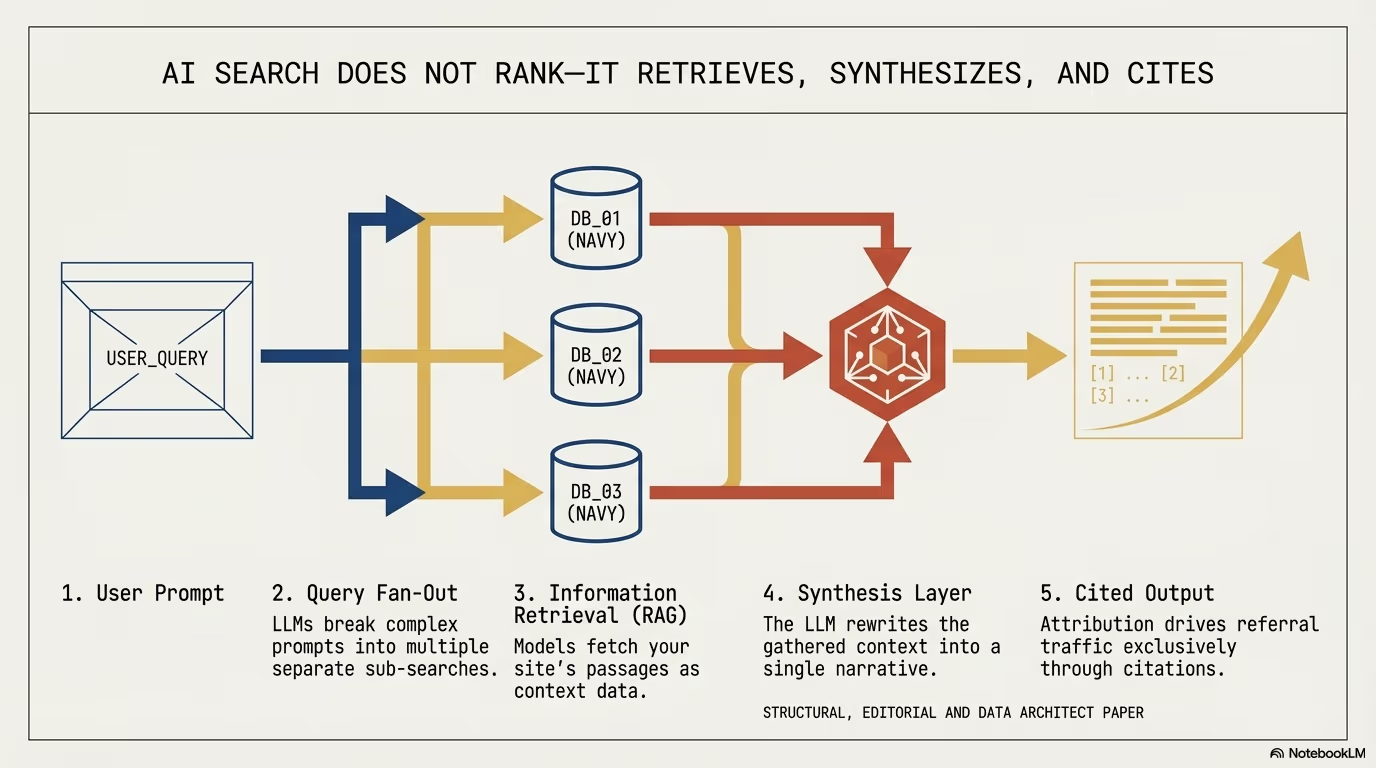
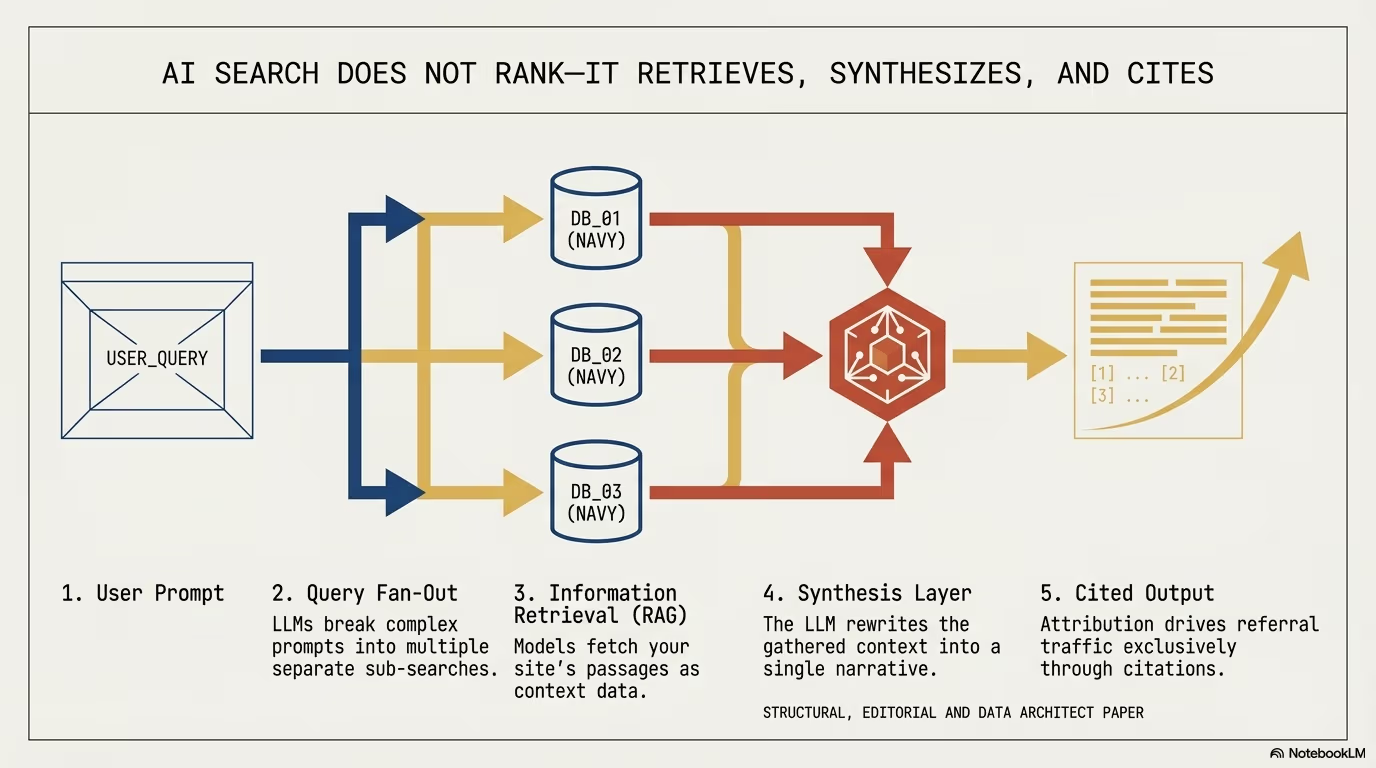
why chatgpt traffic gets grouped into direct in ga4
In the second week of October 2026, e-commerce managers and analytics engineers saw referral visits from chatgpt.com fall in their acquisition reports while visits in the Direct channel rose. Cedric Huesler of Adobe analysed about 500 pages where ChatGPT drove at least 5 percent of visits and compared 9 to 13 October with the week before. ChatGPT visits fell by about 31,000 per day, Direct visits to the same pages rose by about 26,000 per day, and search traffic fell 7 percent, in line with other sources (Search Engine Roundtable, 14 October 2026).
Huesler traced the cause to the way ChatGPT opened links after the GPT-6 release. On 15 October he reported that it was a bug and that ChatGPT was tagging its links with utm_source=chatgpt.com again. OpenAI published no statement about it. The mechanism below is still worth knowing, because it shows what happens to attribution whenever a click loses both its campaign parameter and its referrer header.
OpenAI’s publisher FAQ states that ChatGPT automatically includes utm_source=chatgpt.com in referral URLs so publishers can track the traffic in tools such as Google Analytics (OpenAI, Publishers and developers FAQ). A cited link then looks like this:
https://yourdomain.com/product-item/?utm_source=chatgpt.comWith this parameter intact, analytics engines (including Google Analytics 4, Adobe Analytics, Matomo, and server-side pipelines) immediately resolved the session origin as chatgpt.com under the referral or ai_search medium. Standard user clicks passed the browser’s HTTP request header:
Referer: https://chatgpt.com/Huesler reported that during the bug, GPT-6 opened cited sources through JavaScript, with no parameter in the URL:
window.open(targetUrl, "_blank", "noopener,noreferrer");The technical implications of this single adjustment are substantial:
- Suppression of the HTTP Referer header: According to MDN, the
noreferrerfeature ofwindow.openomits theRefererheader and also setsnoopener(MDN, Window.open()). Instructing the rendering engine (Blink in Chromium, WebKit in Safari, Gecko in Firefox) withnoreferrerforces the browser to omit theRefererfield entirely. The DOM propertydocument.referreron the target landing page resolves to an empty string (""). - Elimination of UTM tags: Target destinations are loaded on their pure canonical paths without
?utm_source=chatgpt.com. - Forced fallback to Direct in GA4 Default Channel Grouping: In the GA4 default channel group, Direct means the source exactly matches
(direct)and the medium is(not set)or(none)(Google Analytics Help, default channel group). When an incoming hit arrives without campaign query parameters (utm_source,utm_medium,gclid) and without a validRefererheader, the processing engine assigns the session toDirect / (none).
Consequently, high-value generative search traffic has transformed into dark AI traffic. The diagram below illustrates the path with the parameter and during the GPT-6 bug:
+-----------------------------------------------------------------------------------+
| Behavior with the UTM parameter:                                                  |
| User clicks citation -> URL with ?utm_source=chatgpt.com -> Referer: chatgpt.com  |
| -> GA4 evaluates: Source: chatgpt.com / Medium: referral                          |
+-----------------------------------------------------------------------------------+
                                          |
                                          v
+-----------------------------------------------------------------------------------+
| GPT-6 bug window, 9 to 15 October 2026:                                           |
| User clicks citation -> window.open(url, "_blank", "noreferrer") -> Canonical URL |
| -> Referer: [EMPTY]                                                               |
| -> GA4 evaluates: Source: (direct) / Medium: (none)                               |
+-----------------------------------------------------------------------------------+
Without updated tracking protocols, executive teams and engineering leads risk concluding that generative engine optimization (GEO) initiatives have lost momentum, when in reality user sessions are actively converting under the disguise of direct traffic.
how to tell dark chatgpt traffic apart from real direct visitors
True direct traffic consists of individuals who manually input a domain into the browser address bar, access stored bookmarks, or click hyperlinks inside desktop software that does not pass web referrers.
Genuine direct sessions display a distinct behavioral fingerprint:
- Many genuine direct entries land on the domain root (
/). - A high percentage of sessions involve returning visitors who already possess established browser storage and session identifiers.
- Low consent banner interaction rates, because returning visitors have already recorded their privacy choices during prior visits.
In contrast, traffic arriving from ChatGPT masked as Direct exhibits completely different structural and behavioral traits:
1. Landings on deep product and technical documentation URLs
Conversational assistants rarely recommend generic homepages. When a prospect asks an LLM for an exact comparison (such as best enterprise ERP integration plugins for WooCommerce or how to fix REST API timeout errors in WordPress), the assistant supplies links directly to:
- Granular e-commerce product pages (
/shop/specialized-sensor-kit/). - Deep architectural guides, whitepapers, and technical case studies.
- Specification sheets and interactive pricing calculators.
If your web property records an overnight jump in Direct visits to a niche technical article with no active campaigns, check the server logs for OpenAI crawlers on that URL.
2. Cookie consent banner anomalies on mobile devices
In Cedric Huesler’s analysis, 55 percent of visitors arriving from ChatGPT saw the consent banner on mobile. During the bug, the share of new mobile Direct visitors who saw the banner rose from 36 to 44 percent (Search Engine Roundtable). A rising share of first-time banner views in Direct contradicts the hypothesis of loyal visitors returning via browser bookmarks.
3. Accelerated funnel velocity
AI search visitors arrive with high purchase intent. Because the background research, feature evaluation, and pricing review took place inside the conversational interface, the user visits your site to verify stock, validate checkout terms, and complete the order.
correlating server logs between oai searchbot and user visits
Conversational search engines cannot link to content they have not ingested. To cite an address during a real-time prompt, OpenAI infrastructure issues HTTP requests through two primary user agents:
OAI-SearchBot: the crawler OpenAI uses to surface websites in ChatGPT search results. Pages disallowed for it inrobots.txtdo not appear in search answers, although they can still show up as navigational links.ChatGPT-User: the agent behind certain user-initiated actions in ChatGPT and Custom GPTs. OpenAI states that it is not used to crawl the web automatically and thatrobots.txtrules may not apply, because a user starts the action (OpenAI, Overview of OpenAI Crawlers).
Detecting masked ChatGPT visits is achievable by measuring the time delta in web server access logs (Nginx, Caddy, Apache, or Cloudflare logs). A representative log pair demonstrates this sequence:
[14/Oct/2026:14:22:01 +0200] GET /en/blog/headless-architecture/ HTTP/2.0 200
User-Agent: Mozilla/5.0 AppleWebKit/537.36 (KHTML, like Gecko; compatible; OAI-SearchBot/1.4; +https://openai.com/searchbot
IP: 20.171.206.x (openai.com/searchbot.json)

... (12-second interval) ...

[14/Oct/2026:14:22:13 +0200] GET /en/blog/headless-architecture/ HTTP/2.0 200
Referer: -
User-Agent: Mozilla/5.0 (iPhone; CPU iPhone OS 18_1 like Mac OS X) AppleWebKit/605.1.15 (KHTML, like Gecko) Version/18.1 Mobile/15E148 Safari/604.1
IP: 72.14.x.x (Consumer ISP gateway)
When an access log registers a document fetch by OAI-SearchBot or ChatGPT-User, followed within a 10 to 180-second window by an unreferred human browser request for that identical URL, the visit is a candidate for ChatGPT attribution. Timing alone does not prove the source, and the 180-second window is an assumption to calibrate against your own logs.
The following Node.js script processes server access logs in Combined Log Format to detect and export these correlated visit pairs:
import fs from "node:fs";
import readline from "node:readline";

// Regular expression matching OpenAI automated crawlers
const AI_BOT_REGEX = /OAI-SearchBot|ChatGPT-User/i;

// Maximum acceptable delta for correlation (in seconds)
const CORRELATION_WINDOW_SEC = 180;

async function analyzeAccessLogs(logFilePath) {
  const fileStream = fs.createReadStream(logFilePath);
  const rl = readline.createInterface({ input: fileStream, crlfDelay: Infinity });

  const botEvents = new Map(); // path -> Array of epoch timestamps
  const correlatedVisits = [];

  const logRegex = /^(\S+) \S+ \S+ \[([^\]]+)\] "(\S+) (\S+) \S+" (\d{3}) \S+ "([^"]*)" "([^"]*)"/;

  for await (const line of rl) {
    const match = line.match(logRegex);
    if (!match) continue;

    const [_, ip, dateStr, method, url, status, referer, userAgent] = match;
    const timestamp = Math.floor(new Date(dateStr.replace(":", " ")).getTime() / 1000);

    if (method !== "GET" || status !== "200") continue;

    // Record bot retrieval event
    if (AI_BOT_REGEX.test(userAgent)) {
      if (!botEvents.has(url)) botEvents.set(url, []);
      botEvents.get(url).push(timestamp);
      continue;
    }

    // Evaluate candidate direct human visits
    const isDirect = referer === "-" || referer === "";
    const isHumanUser = !userAgent.includes("bot") && !userAgent.includes("spider");

    if (isDirect && isHumanUser && botEvents.has(url)) {
      const timestamps = botEvents.get(url);
      const recentBotHit = timestamps.find(t => timestamp >= t && (timestamp - t) <= CORRELATION_WINDOW_SEC);

      if (recentBotHit) {
        correlatedVisits.push({
          url,
          userTimestamp: timestamp,
          botTimestamp: recentBotHit,
          delaySeconds: timestamp - recentBotHit,
          userIp: ip,
          userAgent: userAgent.slice(0, 80)
        });
      }
    }
  }

  console.log(`Discovered ${correlatedVisits.length} sessions correlated with ChatGPT live citations.`);
  return correlatedVisits;
}

// Execution: node scripts/analyze-ai-traffic.mjs /var/log/nginx/access.logimplementing edge detection in cloudflare and wordpress
To recover conversion tracking without relying on external referrer headers, development teams should execute heuristic tagging at the edge via Cloudflare Workers and ingest the metadata directly into the WordPress application layer.
Step 1: Cloudflare Worker heuristic tagging
When your infrastructure sits behind Cloudflare, an edge worker can intercept incoming requests, monitor bot ingestion timestamps using Workers KV, and append identifying headers or first-party cookies for subsequent visits:
export default {
  async fetch(request, env) {
    const url = new URL(request.url);
    const referer = request.headers.get("referer");
    const userAgent = request.headers.get("user-agent") || "";

    // 1. Intercept OpenAI retrieval crawlers
    if (/OAI-SearchBot|ChatGPT-User/i.test(userAgent)) {
      // Store timestamp in KV with 5-minute time-to-live
      await env.AI_CACHE.put(`bot:${url.pathname}`, Date.now().toString(), { expirationTtl: 300 }).catch(() => {});
      return fetch(request);
    }

    // 2. Evaluate unreferred visitor requests
    const isDirect = !referer || referer === "";
    const isDeepPage = url.pathname !== "/" && !url.pathname.startsWith("/wp-admin");

    if (isDirect && isDeepPage) {
      const lastBotHit = await env.AI_CACHE.get(`bot:${url.pathname}`);

      if (lastBotHit) {
        const timeDiff = (Date.now() - parseInt(lastBotHit, 10)) / 1000;

        // If crawler fetched this document within 180 seconds, tag the session
        if (timeDiff <= 180) {
          const modifiedRequest = new Request(request, {
            headers: new Headers(request.headers)
          });
          modifiedRequest.headers.set("X-Probable-AI-Source", "chatgpt");

          const response = await fetch(modifiedRequest);
          const modifiedResponse = new Response(response.body, response);

          // Set short-lived first-party cookie for browser measurement scripts
          modifiedResponse.headers.append(
            "Set-Cookie",
            `ai_inferred_source=chatgpt; Path=/; Max-Age=1800; SameSite=Lax; Secure`
          );

          return modifiedResponse;
        }
      }
    }

    return fetch(request);
  }
};Step 2: WordPress MU-Plugin and dataLayer integration
In WordPress, deploy a Must-Use plugin under wp-content/mu-plugins/ai-traffic-detector.php to parse the edge header and populate the client-side dataLayer:
<?php
/**
 * Plugin Name: AI Search Traffic Heuristic Detector
 * Description: Detects masked AI search visits after UTM suppression and forwards attribution parameters to dataLayer.
 * Author: WPPoland
 * Version: 1.0.0
 */

if (!defined('ABSPATH')) {
    exit;
}

add_action('wp_head', function () {
    $is_ai_traffic = false;
    $ai_source = 'none';

    // 1. Inspect edge header from Cloudflare Worker
    if (isset($_SERVER['HTTP_X_PROBABLE_AI_SOURCE'])) {
        $is_ai_traffic = true;
        $ai_source = sanitize_text_field($_SERVER['HTTP_X_PROBABLE_AI_SOURCE']);
    }
    // 2. Check session cookie
    elseif (isset($_COOKIE['ai_inferred_source'])) {
        $is_ai_traffic = true;
        $ai_source = sanitize_text_field($_COOKIE['ai_inferred_source']);
    }
    // 3. Capture mobile native webview referrers
    elseif (isset($_SERVER['HTTP_REFERER'])) {
        $ref = $_SERVER['HTTP_REFERER'];
        if (strpos($ref, 'chatgpt.com') !== false || strpos($ref, 'com.openai.chatgpt') !== false) {
            $is_ai_traffic = true;
            $ai_source = 'chatgpt_direct_ref';
        } elseif (strpos($ref, 'perplexity.ai') !== false) {
            $is_ai_traffic = true;
            $ai_source = 'perplexity';
        } elseif (strpos($ref, 'claude.ai') !== false) {
            $is_ai_traffic = true;
            $ai_source = 'claude';
        }
    }

    if ($is_ai_traffic) {
        ?>
        <script>
            window.dataLayer = window.dataLayer || [];
            window.dataLayer.push({
                'event': 'ai_traffic_detected',
                'ai_traffic_source': '<?php echo esc_js($ai_source); ?>',
                'ai_traffic_inferred': true
            });
        </script>
        <?php
    }
}, 1);
In Google Tag Manager, trigger a GA4 configuration modification upon the ai_traffic_detected custom event, appending custom parameters traffic_type: "ai_search" and inferred_source: "chatgpt".
what limits cloudflare workers kv puts on ai traffic detection
The Step 1 worker stores timestamps in Workers KV. Cloudflare documents three limits that affect this heuristic (Cloudflare, Write key-value pairs):
- The minimum
expirationTtlis 60 seconds. The 300-second lifetime in the example is valid, and the shorter window is enforced by thetimeDiff <= 180check in code. - KV accepts at most one write to the same key per second, and faster writes return a 429 error. Several crawler requests for the same URL within one second would break request handling, which is why the write in the example ends with
.catch(() => {}). - A write is visible immediately in the same network location, but can take up to 60 seconds to appear elsewhere in the world. The OpenAI crawler and the visitor usually reach different Cloudflare data centers, so some visits in the first minute after a crawler fetch will not be flagged.
A User-Agent header is easy to fake. OpenAI publishes the IP ranges of its crawlers at https://openai.com/searchbot.json and https://openai.com/chatgpt-user.json (OpenAI, Overview of OpenAI Crawlers). Write the crawler timestamp to KV only when the address in the CF-Connecting-IP header falls inside those ranges. Without that check, any script sending an OAI-SearchBot header can mark any page as visited by ChatGPT and inflate the report.
how ga4 classifies chatgpt traffic in the ai assistant channel
The GA4 default channel group has a separate AI Assistant channel. Google describes it as the channel by which users arrive from sources like ChatGPT, Gemini, Deepseek, Copilot or Grok, excluding Google’s AI Overviews and AI Mode (Google Analytics Help, default channel group). The rule has two branches: the medium exactly matches ai-assistant, or the referrer matches a list of AI assistants, in which case GA4 sets the medium to ai-assistant and the campaign to (ai-assistant).
Three practical consequences follow from that definition:
- The AI Assistant channel depends on a referrer or a medium. A visit with no
Refererheader and no campaign parameters meets the Direct rule, so no default channel can recover it. That is exactly what ChatGPT clicks looked like during the bug. - Google’s campaign URL documentation says you should always use
utm_source,utm_mediumandutm_campaign, and reports missing parameters as(not set)(Google Analytics Help, campaign data with custom URLs). Tag the links you publish yourself, for example in the description of your own GPT, with the full set andutm_medium=ai-assistant, because that is the medium the channel rule matches. - Before building a custom channel group, check how much traffic GA4 already assigns to AI Assistant. A custom group makes sense when you want to split individual assistants or include sources outside Google’s list.
configuring custom channel grouping in google analytics 4
To restore reporting clarity in GA4, create a custom channel group that segregates AI-driven traffic from generic direct visits.
Step-by-step configuration:
- Open Google Analytics 4, go to Admin, select Data Display, and open Channel Groups.
- Click Create new channel group (e.g. Enterprise Channels with AI).
- Add a new channel entry titled AI Search & Chatbots.
- Configure matching conditions using the following rules:
Condition 1 (Explicit text referrers):
Source matches regex:
.*(chatgpt|openai|perplexity|claude|copilot|gemini|anthropic|mistral|deepseek).*

OR

Condition 2 (Native mobile app schemes):
Source matches regex:
.*(android-app:\/\/com\.openai\.chatgpt|android-app:\/\/ai\.perplexity|ios-app).*- Order the AI Search & Chatbots channel above Organic Search, Referral, and Direct.
- Save the rule.
A standard GA4 property allows 2 custom channel groups (a 360 property allows 5), each with up to 50 channels. A group can be applied retroactively in reports, segments and explorations, and traffic goes to the first channel whose definition it matches, in the current channel order (Google Analytics Help, custom channel groups). That is why the order in step 5 matters. Google lists traffic-source fields for these rules: source, medium, campaign name and ID, source platform, manual ad content and default channel group. The event parameter from the detection script is not among them, so analyse the ai_traffic_inferred signal as a custom dimension in explorations and segments.
Following this change, your standard monetization and user acquisition reports will cleanly display sessions, conversion rates, and revenue attributed to generative AI tools.
measuring ai search conversions in woocommerce stores
Because client-side tracking remains vulnerable to browser privacy controls, e-commerce stores running on WooCommerce should employ three complementary first-party attribution methods:
1. Semantic discount codes in structured data
When optimizing products for generative engine discovery, include unique promotional incentives within the machine-readable JSON-LD entity graph:
{
  "@context": "https://schema.org",
  "@type": "Product",
  "name": "Enterprise High Performance Pump Assembly",
  "offers": {
    "@type": "Offer",
    "price": "1450.00",
    "priceCurrency": "USD",
    "description": "Redeem coupon code AIASSIST at checkout for an exclusive 5 percent savings for conversational search users."
  }
}
If a model repeats the code in its answer, every redemption of AIASSIST in the WooCommerce database is verifiable evidence of an AI-driven transaction. Nothing guarantees that a model will repeat it, and a published coupon can spread elsewhere, so treat the count as a lower bound rather than the full picture.
2. Post-purchase survey on order confirmation
Placing a single question on the WooCommerce order received endpoint (order-received) captures attribution data regardless of browser referrer stripping:
add_action('woocommerce_thankyou', function ($order_id) {
    if (!$order_id) return;
    $order = wc_get_order($order_id);
    if ($order->get_meta('_attribution_survey_answered')) return;

    ?>
    <div class="ai-survey-box" style="margin: 24px 0; padding: 20px; border: 1px solid #cbd5e1; border-radius: 8px; background: #f8fafc;">
        <h3 style="margin-top: 0; font-size: 18px;">Quick question: How did you discover our store today?</h3>
        <form id="ai-attribution-form">
            <input type="hidden" name="order_id" value="<?php echo esc_attr($order_id); ?>">
            <label style="display: block; margin-bottom: 8px; cursor: pointer;">
                <input type="radio" name="source_channel" value="chatgpt_ai"> Recommendation from ChatGPT or an AI Assistant
            </label>
            <label style="display: block; margin-bottom: 8px; cursor: pointer;">
                <input type="radio" name="source_channel" value="google_search"> Standard Google Search
            </label>
            <label style="display: block; margin-bottom: 8px; cursor: pointer;">
                <input type="radio" name="source_channel" value="social_media"> Social Media or Paid Advertisement
            </label>
            <label style="display: block; margin-bottom: 12px; cursor: pointer;">
                <input type="radio" name="source_channel" value="friend_recommendation"> Professional Colleague or Friend
            </label>
            <button type="submit" class="button" style="padding: 8px 16px;">Submit Response</button>
        </form>
    </div>
    <script>
        document.getElementById('ai-attribution-form').addEventListener('submit', function(e) {
            e.preventDefault();
            const formData = new FormData(this);
            fetch('/wp-json/wppoland/v1/save-attribution', {
                method: 'POST',
                body: formData
            }).then(() => {
                document.querySelector('.ai-survey-box').innerHTML = '<p style="color: #16a34a; font-weight: bold; margin: 0;">Thank you for your feedback.</p>';
            });
        });
    </script>
    <?php
});
The snippet posts to /wp-json/wppoland/v1/save-attribution, so that endpoint has to be registered with register_rest_route() and its own permission_callback that checks the order belongs to the current customer. Compare the answers with the order origin WooCommerce records, described in the next section.
3. Incrementality testing
In mature e-commerce setups, incrementality tests provide causal proof of generative search impact. By selectively disallowing OAI-SearchBot via robots.txt on a designated sub-category for 30 days while leaving organic search unrestricted, you can calculate the net conversion differential and measure the real economic contribution of AI search.
OpenAI notes that a robots.txt change can take about 24 hours to reach search results, and that a disallowed page can still appear as a bare link and title if OpenAI learns its URL elsewhere. Excluding that requires a noindex meta tag, and the crawler must be allowed to fetch the page to read it (OpenAI, Publishers and developers FAQ). Start counting the test period the day after the change.
how woocommerce order attribution records orders from chatgpt
Since version 8.5.0, released on 9 January 2024, WooCommerce ships a built-in Order Attribution feature, enabled by default for new and existing stores (WooCommerce Developer Blog, WooCommerce 8.5.0). When an order is placed, it stores the referring URL, the UTM parameters (source, medium, campaign, content, term), the device type and the number of session page views before the order (WooCommerce documentation, Order Attribution Tracking). The data appears in the Order attribution and Customer history boxes on the order edit screen and in the origin column of the WooCommerce > Orders table.
For ChatGPT traffic, the precedence rules in the documentation matter:
- UTM and organic sources override earlier sources,
- a type-in visit never overrides an identified source,
- a referral overrides the previous source only when no session is active,
- an order with no referral and no source has the origin Direct.
An order from a link carrying utm_source=chatgpt.com is therefore recorded with the UTM source chatgpt.com, and an order from a click with no parameter and no referrer as Direct. The second rule works in the store’s favour: a customer who arrived from a tagged link and later came back by typing the address keeps the ChatGPT source for as long as the browser holds the attribution cookies.
The feature sets seven sbjs_ cookies in the browser, including sbjs_session with a 30-minute lifetime, and reads the data only when an order is placed. It is compatible with the WP Consent API, so it works with consent management plugins. Disable it under WooCommerce > Settings > Advanced > Features or with WP-CLI:
wp option update woocommerce_feature_order_attribution_enabled "no"Orders placed while the feature is disabled carry no attribution data, so before analysing AI traffic, confirm the feature was active during the period you study. Comparing Direct-origin orders with post-purchase survey answers shows how many AI assistant sales your analytics missed.
summary and engineering checklist
A week without utm_source=chatgpt.com showed how much AI traffic reporting depends on one parameter and one header, both controlled by the chat vendor. The bug was fixed on 15 October, but the same dependency returns with every future change to the ChatGPT interface.
Essential action items:
- Parse server access logs to track time deltas between
OAI-SearchBotfetches and unreferred user landings. - Check the default AI Assistant channel in GA4, and build custom channel definitions when you need a finer split of AI sources.
- Deploy edge correlation in Cloudflare Workers to flag probable AI traffic in the client
dataLayer. - Implement semantic discount codes in structured data and post-checkout attribution surveys in WooCommerce, and compare the answers with the order origin in Order Attribution.
- Review content architecture and internal link graphs so conversational crawlers can parse authoritative facts, as detailed in our WordPress security audit, WooCommerce ERP integration, and Google Universal Cart and UCP guide. For specialized implementations, explore our services or contact our engineering team.