Since 19 June 2026, EU law expects every online shop that sells to consumers to offer a function that lets them withdraw from a purchase as easily as they made it. The rule is Article 11a of the Consumer Rights Directive (2011/83/EU), inserted by Directive (EU) 2023/2673. A directive binds Member States, not shops, so the button becomes your legal duty through national law, and on 24 October 2026 that law still differs by country: Germany has the provision in its civil code, Poland has nothing yet. This guide sets out what Article 11a requires line by line, how to tell whether it binds your shop today, and how to build it on WooCommerce, Shopify or a custom stack.
This article describes the legislation and the state of transposition on the date of publication. It is not legal advice for your particular shop.
What is the EU withdrawal button
Directive (EU) 2023/2673 of 22 November 2023 (EUR-Lex) is mostly about financial services sold at a distance, which is why many shop owners missed it. Its Article 1(3) inserts a new Article 11a into the general Consumer Rights Directive, and that article covers every distance contract concluded through an online interface where a right of withdrawal exists. Recital 37 says so explicitly: the obligation is laid down for financial services and also for other goods and services, so that consumers can withdraw “just as easily as they can conclude” the contract.
The timeline is in Article 2(1) and 2(3):
| Step | Date | Provision |
|---|---|---|
| National rules adopted and published | by 19 December 2025 | Art. 2(1), first subparagraph |
| National rules applied | from 19 June 2026 | Art. 2(1), first subparagraph |
| Commission report on the directive, including the withdrawal function | by 31 July 2030 | Art. 2(3) |
The label “withdrawal button” is shorthand. The directive speaks of a “withdrawal function”, which can be a button, a link or another control, as long as it carries the required wording.
What Article 11a requires, paragraph by paragraph
Five paragraphs, each translated into shop behaviour:
| Paragraph | Requirement | What it means in the shop |
|---|---|---|
| 11a(1) | Function labelled “withdraw from contract here” or an unambiguous corresponding formulation, easily legible | a button or link with that wording, not “Help” or “Returns centre” |
| 11a(1) | Continuously available throughout the withdrawal period, prominently displayed, easily accessible | visible from order to end of period, not buried in the terms |
| 11a(2) | Online withdrawal statement lets the consumer easily provide or confirm name, contract details, and the electronic means for the confirmation | form with order number and email, pre-filled for signed-in customers |
| 11a(3) | Submission through a confirmation function labelled only “confirm withdrawal” or an unambiguous equivalent | a second step with its own button; nothing is sent before it |
| 11a(4) | Acknowledgement of receipt on a durable medium, without undue delay, with content and date and time of submission | automatic email repeating the statement with a timestamp |
| 11a(5) | Withdrawal counts as made in time if the statement was submitted before the period expired | the click time counts, not the time staff read the request |
Recital 37 adds the reading guide. Consumers should not have to go through procedures to find or reach the function, for example downloading an app when the contract was not concluded in that app. Traders may use hyperlinks to lead to it. A consumer who has already identified themselves, for instance by logging in, should not have to identify again. If several items were ordered, the trader can allow withdrawal from part of the contract. The confirmation step exists to prevent accidental withdrawals.
Two details from that table get lost most often. The label matters: “Return an item” describes a consequence of withdrawal, the physical return, not the declaration itself. And paragraph 5 makes the submission time legally relevant, so it has to be recorded server side at the moment of the click, even if the email goes out from a queue later.
Which shops have to offer a withdrawal function
Article 11a applies to distance contracts concluded “by the means of an online interface”: websites, shop front ends, apps. The platform is irrelevant. A WooCommerce shop, a Shopify store, a Magento or PrestaShop install, a headless storefront on Astro or Next.js and a native app are all in scope. What sets the boundary is the right of withdrawal itself.
- B2B sales are outside, because Directive 2011/83 protects consumers. A shop that sells to both needs the function for consumer orders.
- The exceptions in Article 16 of Directive 2011/83 (EUR-Lex) still apply: goods made to the consumer’s specifications or clearly personalised, goods that deteriorate rapidly, sealed goods unsealed after delivery that cannot be returned for hygiene reasons, digital content once supply started with the consumer’s express consent and acknowledgement, services fully performed with consent, dated leisure and transport bookings, and a few more.
- Mixed catalogues need the function, but may keep excepted items out of the selectable list.
- Subscriptions and digital services sold online are covered during the withdrawal period. Cancelling a subscription after that period is a separate matter that Article 11a does not regulate.
Which countries have transposed Article 11a
We checked three national texts at the source on 24 October 2026. Other countries we did not verify, and we do not list them.
Germany: transposed. Section 356a of the Civil Code (BGB), “Elektronische Widerrufsfunktion bei Fernabsatzverträgen” (gesetze-im-internet.de), mirrors Article 11a closely: label “Vertrag widerrufen”, confirmation “Widerruf bestätigen”, acknowledgement on a durable medium with content, date and time. Article 246e section 1(2) point 14a of the Introductory Act to the Civil Code (EGBGB) lists a missing or deficient withdrawal function among prohibited infringements of consumer interests when the infringement is widespread under Regulation (EU) 2017/2394, and section 2 of that article makes it an administrative offence subject to a fine.
Poland: not transposed. The consolidated Consumer Rights Act published by notice of 4 September 2026 (Dz.U. 2026 item 1244) contains no withdrawal function. The only later amending act (Dz.U. 2026 item 1353) transposes Directive 2024/825 and does not add one, and no bill in the Sejm’s list up to 22 October 2026 names the Consumer Rights Act or distance contracts in its title apart from the one that became item 1353.
Norway (EEA): adopted, not in force. Act of 19 June 2026 no. 34 adds section 20 a to the Norwegian Cancellation Act with Norwegian labels that follow the directive’s wording (Lovdata). Lovdata shows the act entering into force on a date the King decides, and no such date yet.
If you sell into other markets, check the national consumer code of each one. The European Commission’s EUR-Lex lists national transposition measures per directive, and a national ministry or consumer authority usually publishes the amending act.
Selling cross-border: when the button binds you before your home country acts
The home country’s delay does not protect a shop that sells to consumers in a country that has transposed. Article 6 of the Rome I Regulation (EC) No 593/2008 (EUR-Lex) decides which law governs a consumer contract. When a trader pursues activities in, or “by any means” directs them to, the consumer’s country of habitual residence, the contract is governed by that country’s law (Article 6(1)). The parties may choose another law, but the choice cannot deprive the consumer of the protection of provisions that cannot be derogated from by agreement under the law that would otherwise apply (Article 6(2)).
In practice: a Polish shop with a German storefront that ships to Germany is very likely directing its activity there, and section 356a BGB applies to its German consumer contracts today, whatever its terms say about governing law. The same logic runs in every direction, for any shop based anywhere that targets consumers in a transposing country, including shops outside the EU.
The simplest operational answer is one withdrawal function for all markets, with localised labels. It costs the same to build once, and the shop does not need rework each time another country’s act enters into force.
What happens if a shop has no withdrawal button
Sanctions are set nationally, so the answer depends on the consumer’s country. In Germany the basis is Article 246e EGBGB, quoted above. In a country that has not transposed, there is no national provision to breach yet.
One consequence comes from the directive itself. Article 6(1)(h) of Directive 2011/83, as amended, requires the pre-contract information on withdrawal to include, “where applicable”, information about the existence and placement of the withdrawal function. Article 10 extends the withdrawal period by 12 months where the trader has not provided the information required by Article 6(1)(h). Whether a national court would apply that extension to a shop that never mentioned a withdrawal function is not settled by the text. A shop that gives the information and runs a working function never has to find out.
That is why the withdrawal information in your terms should be updated together with the button: one sentence saying the consumer can withdraw online, with a link to the function.
How to add a withdrawal button in WooCommerce
There are three routes: the core feature since WooCommerce 11.1, a plugin, or custom code. All three have to answer the same questions: where the customer sees the button, whether guests find it, what is stored and which email goes out.
Core feature. WooCommerce 11.1, released on 3 September 2026 (GitHub), added Order withdrawal. According to the WooCommerce documentation and the 11.2.1 source we read:
- it is off by default and enabled under WooCommerce > Settings > Advanced > Features,
- the form works without signing in at /my-account/withdraw-order/, and the endpoint slug can be changed under Page setup,
- it asks for first and last name, email twice and order number, then whether the customer withdraws from the full order or specific items, described in a text field,
- a review step carries a “Confirm withdrawal” button, and the customer gets an acknowledgement with the submitted details and the date and time,
- a matched request adds an order note and an inbox notification; each order accepts one request, and repeat submissions are rate limited to one per 30 seconds per email and IP,
- the 14-day warning uses the order creation date, because WooCommerce has no delivery date, and it is informational only.
What it does not do: place a link anywhere. The 11.2.1 code adds no My Account menu entry, no button next to orders, no link in order emails and none in the footer. Without one, the form exists but customers cannot find it, while Article 11a(1) wants the function prominently displayed. Adding the label and the entry points is the merchant’s job.
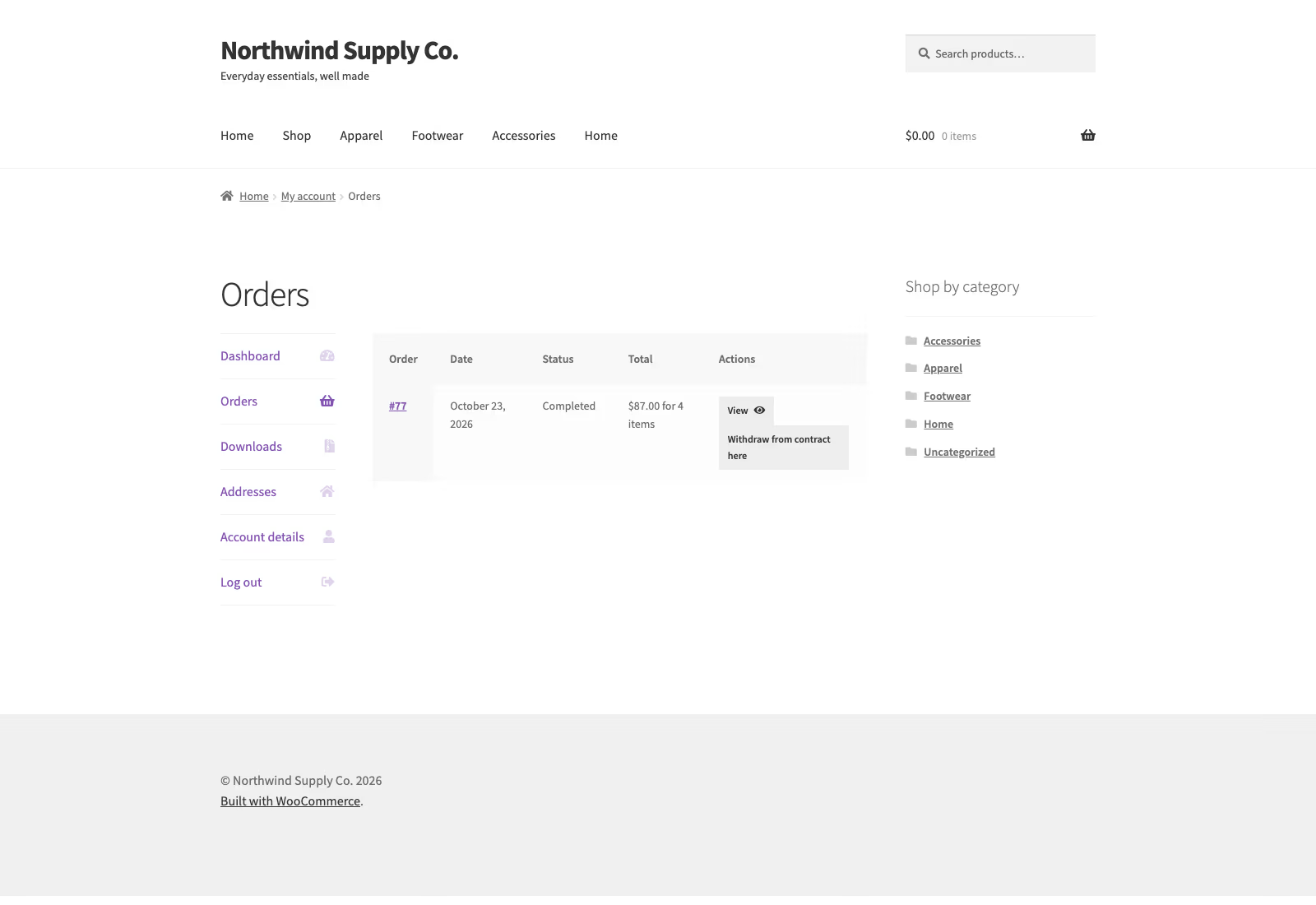
Plugin. One option is Withdraw, a WooCommerce plugin we develop at WPPoland, listed on WordPress.org at version 1.7.0. Its readme describes a “Withdraw from contract here” button under the order details and on the orders list in My Account, the link in processing and completed order emails, per-item quantities for partial withdrawal, a withdrawal period counted from order completion, and a request log with statuses where a rejection needs a stated reason. It does not move money: refunds stay in the normal order screen. The hero image of this article is a screenshot of its My Account orders view.
Custom code makes sense for non-standard returns processes, ERP-driven refunds or headless front ends. The paragraph table above then becomes the specification.
Whichever route, put the entry point in four places:
| Placement | Audience | Notes |
|---|---|---|
| Orders list and order detail in My Account | customers with an account | hide after the period ends |
| Order confirmation and shipped or completed emails | everyone, guests included | link carries the order reference, no forced login |
| Shop footer | guests who lost the email | form with lookup by order number and email |
| Withdrawal information in the terms | everyone | existence and placement of the function |
Guests are the weak spot. Both the core feature and Withdraw handle them through order number and email. A form that requires an account would make a guest buyer register first, which is hard to square with recital 37’s line about not having to go through procedures to reach the function.
How to set up EU withdrawal in Shopify
Shopify covers the topic on two help pages. The EU right of withdrawal page summarises the directive: an easy-to-find button or link, for example from the customer account or order status page, a two-step confirmation and an automatic confirmation on a durable medium. The return rules page gives the configuration:
- turn on self-serve returns and cancellations, with both return and cancel requests,
- set the cancellation window to “Until item is fulfilled”, so customers can cancel before shipping,
- set the return window to at least 14 days starting from delivery of the last item, and extend it over weekends and holidays,
- add a visible link to customer accounts, or a menu item to the orders page, per market if you use market-specific menus.
Shopify states that these tools do not make a store compliant on their own. Two points are worth checking against Article 11a. The menu item can carry any label, so name it “Withdraw from contract here”, not “My orders”. Shopify customer accounts require signing in with an emailed code, so judge whether that is an extra procedure for guest buyers, and consider a separate no-login form page.
Headless and custom shops: what the backend must record
On Astro, Next.js or a custom framework, everything above is yours to build. A minimal record that lets you show compliance with paragraphs 4 and 5:
- order ID and, for partial withdrawal, the items and quantities,
- name and the email address the acknowledgement went to,
- the exact statement text the customer saw on the confirmation step, stored at submission, not re-rendered later from a template,
- a server timestamp in UTC, shown in the shop’s time zone in the email,
- the message ID and delivery status from your email provider.
The last item ties compliance to email delivery. The durable medium is normally an email, and a shop whose mail lands in spam or never leaves the server fails paragraph 4 even though the form works. Our guide to SMTP, SPF and DKIM for WordPress covers how to check that.
A public form is also an attack surface: someone holding an order number and an email address can withdraw on another person’s behalf or see what they bought. Rate limiting, identical responses for existing and non-existing orders, and showing order items only after verification are a sensible minimum. Withdraw ships an optional single-use link sent to the order’s email address for this case, off by default because it makes withdrawal depend on working mail.
How to test a withdrawal button before launch
Use staging, a fictional order and an inbox you control. WooCommerce’s documentation suggests a similar procedure for its core feature. Checklist:
- Open the shop in a private window, signed out. Reach the function from the home page in two clicks or fewer.
- Place a guest order. Check that the order confirmation email links to the function.
- Fill in the form. Check that step two has its own button labelled “Confirm withdrawal” and that nothing was sent before you click it.
- Confirm. Check that the acknowledgement arrives at once, repeats the full statement with date and time, and does not land in spam.
- In the admin, check that the request is attached to the order and that payment status did not change.
- Submit a request with a non-existent order number. Check that it is still accepted and flagged for manual review.
- Move a test order’s completion date past the period. Check that the button disappears from the account.
- Run the form with keyboard only and a screen reader. A function that cannot be used without a mouse is hardly “easily accessible”; shop accessibility duties are covered in our WCAG 2.2 and EAA guide.
After launch, check that analytics scripts do not load on the form page without consent. The form handles personal data, and the usual consent banner mistakes are in our article on tracking that loads after a decline.
Where to start in your shop
Start with the market list: the countries where you direct your offer to consumers, and which of them have transposed Article 11a. Then pick the technical route and placements from the table, update the withdrawal information in your terms, and run the test list. The order matters, because the market list decides whether the button is urgent today or only after your home country acts.
If you want a review of this and the other EU duties a shop carries (accessibility, consent, GPSR, Omnibus pricing), that is what our EU compliance audit for WordPress covers. WooCommerce implementation, from enabling the core feature to wiring withdrawals into an ERP refund flow, is part of our WooCommerce developer services.