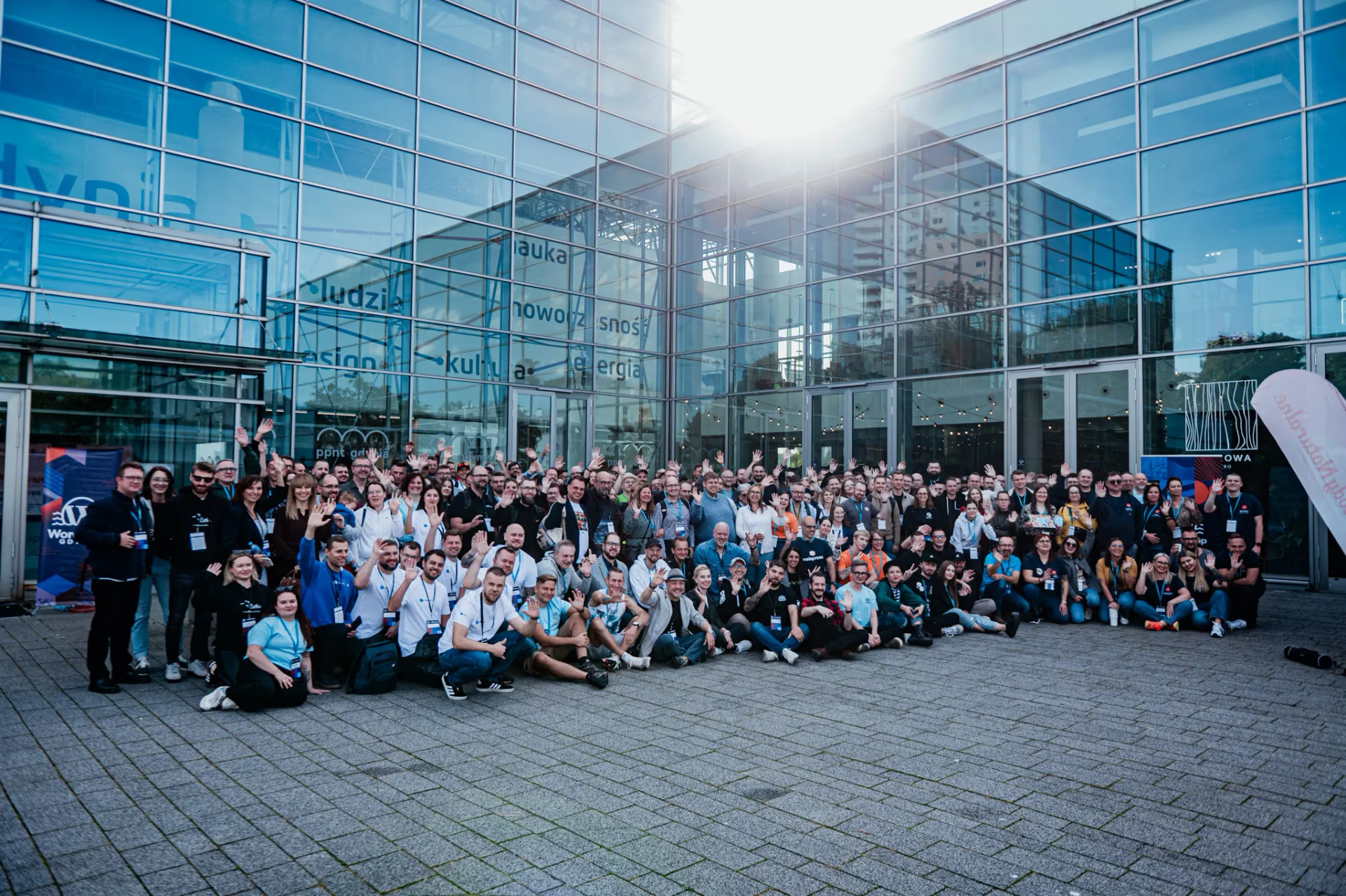
WordCamp Warsaw 2022 was a special event. After years of pandemic break, webinars and Zoom calls finally gave way to handshakes, corridor conversations and coffee from the machine in the real world.
The energy of the 200 attendees in Warsaw was hard to miss. Long-standing community members, freelance consultants and agency founders who had kept the ecosystem running remotely needed this direct contact to debate architectural choices and compare notes with practice.
If you are planning an architectural overhaul or looking for seasoned engineering support on block-first builds, explore our services as a WordPress developer at WPPoland.
WordCamp Warsaw 2022 dates, venue and attendance
The conference ran on 11-12 June 2022 at CIC (Cambridge Innovation Center), Chmielna 73, Warsaw, next to Warszawa Centralna station, according to the WordCamp location page. On the event home page the organisers described it as WordCamp’s return to the Polish scene after three long years of absence and published the numbers: 200 attendees, 35 speakers, 10 volunteers.
The organisers were Arek Stęplowski, Kamil Kawałko and Michał Strześniewski, together with the WordUp Warszawa community and the WWW Foundation (Fundacja WWW), as listed on the organisers page. Kamil Kawałko also designed the conference visuals.
The two days, according to the official programme:
| Day | Format | What happened |
|---|---|---|
| Friday, 10 June | Before Party | Evening meet-up before the conference |
| Saturday, 11 June | Single track of talks | From the 9:50 opening to the end of day one at 18:00, then the Middle Party |
| Sunday, 12 June | Talks, two workshop tracks and Contributor Day | From 9:50 to the closing session at 17:00 |
A single track on Saturday meant the whole room heard the same talks. That made break conversations easier, because everyone shared the same reference points.
Container queries and theme.json in WordPress themes
I spoke on Saturday at 11:15 with a talk titled Ko-do-ma-so-chizm. Dlaczego robisz to naokoło? (roughly: code-masochism, why do you take the long way round). The session description calls it a review of frontend techniques that are rarely used for improving UX and accessibility: native tags, styles, shortcuts and functions, plus code refactoring. The talk sat at the intersection of design and development and focused on the browser-native tools that change how themes for the Gutenberg block editor are built.
The recording is part of the day one stream on the WWW Foundation YouTube channel. According to the chapter list in the video description, the talk runs from 1:37:50 to 2:14:36:
How to use CSS Grid, container queries and theme.json
THE EVOLUTION OF LAYOUT ARCHITECTURE IN WORDPRESS:
+-------------------------------------------------------------+
| Legacy Era (2010-2018):                                     |
| Floats, clearfix hacks, 12-column Bootstrap grids, !important|
+-------------------------------------------------------------+
                              v
+-------------------------------------------------------------+
| Flexbox & CSS Grid Era (2018-2022):                         |
| Two-dimensional grid-template-areas, auto-fit, minmax()     |
+-------------------------------------------------------------+
                              v
+-------------------------------------------------------------+
| Component-First Modern Era (2022+):                         |
| Container Queries (@container), theme.json and CSS Variables|
+-------------------------------------------------------------+- Flexbox and CSS Grid are baseline standards: In production builds there is no longer any reason to use floats, table-display hacks or utility CSS libraries that ship thousands of unused rules. Two-dimensional CSS Grid builds an editorial template with a handful of native declarations, which keeps the stylesheet small and the DOM simple.
/* Legacy float and clearfix pattern (deprecated) */
.legacy-archive-grid::after {
  content: "";
  display: table;
  clear: both;
}
.legacy-archive-card {
  float: left;
  width: 33.333%;
  padding: 15px;
  box-sizing: border-box;
}

/* Modern responsive CSS Grid without requiring media query overrides */
.modern-archive-grid {
  display: grid;
  grid-template-columns: repeat(auto-fit, minmax(320px, 1fr));
  gap: var(--wp--preset--spacing--40, 2rem);
  align-items: stretch;
}- Container queries (@container) as the direction of travel: Traditional
@mediaqueries only evaluate the viewport width. In Gutenberg’s block model, a single card component (thumbnail, headline, excerpt) might live in a narrow sidebar, in a three-column archive grid or in a full-width header. Container queries let a block adapt its layout to the width of its parent container rather than the screen.
/* Registering a contextual query container on the block wrapper */
.wp-block-custom-card-wrapper {
  container-type: inline-size;
  container-name: post-card-container;
}

/* Default vertical stack for narrow contexts (e.g. sidebars) */
.wp-block-custom-card {
  display: flex;
  flex-direction: column;
  gap: 1rem;
}

/* When the container width exceeds 520px, switch to a horizontal card */
@container post-card-container (min-width: 520px) {
  .wp-block-custom-card {
    flex-direction: row;
    align-items: center;
  }
  .wp-block-custom-card__image {
    width: 38%;
    flex-shrink: 0;
  }
  .wp-block-custom-card__body {
    width: 62%;
  }
}- theme.json as the single source of truth: With Full Site Editing (FSE), long
style.cssfiles matter less. A declarativetheme.jsonfile defines design tokens: colour palettes, typography and spacing. WordPress turns them into CSS custom properties (--wp--preset--*), so the editor and the front end use the same values.
{
  "$schema": "https://schemas.wp.org/trunk/theme.json",
  "version": 2,
  "settings": {
    "typography": {
      "fluid": true,
      "fontSizes": [
        {
          "name": "Medium",
          "size": "clamp(1.125rem, 1rem + 0.5vw, 1.35rem)",
          "slug": "medium"
        },
        {
          "name": "Large",
          "size": "clamp(1.5rem, 1.25rem + 1vw, 2.25rem)",
          "slug": "large"
        }
      ]
    },
    "spacing": {
      "spacingSizes": [
        { "name": "Small", "size": "1rem", "slug": "30" },
        { "name": "Medium", "size": "2rem", "slug": "40" },
        { "name": "Large", "size": "3.5rem", "slug": "50" }
      ]
    }
  }
}When container queries shipped in browsers
In June 2022 container queries were a preview, not a production tool. No stable browser supported them yet. The release order, from each vendor’s release notes:
| Browser | Version | Release date | Source |
|---|---|---|---|
| Chrome | 105 | 30 August 2022 | New in Chrome 105 |
| Safari | 16.0 | 12 September 2022 | WebKit Features in Safari 16.0 |
| Firefox | 110 | 14 February 2023 | Firefox 110 release notes |
Only from February 2023 did all three engines support container size queries. Safari 16 also added container query units (cqi, cqw and related). For a theme that has to work for every visitor, the safe line is 2023, not the conference date. The card example above now works without a fallback in current versions of all three engines.
How theme.json changed after 2022
The example uses "version": 2. That schema version arrived in WordPress 5.9, six months before the conference, as the dev note of 8 January 2022 describes. Version 1 files from WordPress 5.8 still work, because WordPress converts them to version 2 at runtime.
Two later changes affect the example directly:
- Fluid typography (
"fluid": true) debuted in WordPress 6.1, according to the dev note of 3 October 2022. In June 2022 the setting did nothing in stable WordPress, so theclamp()values had to be written by hand, as in the example. - Schema version 3 arrived in WordPress 6.6. The dev note of 19 June 2024 recommends moving to it only once the theme’s minimum supported WordPress version is 6.6. Older schema versions stay supported.
Page builders vs Gutenberg and plugin security
The programme was a good indicator of what the Polish WordPress community cared about in 2022.
Why agencies are leaving visual page builders
On Sunday Izabela Karkocha showed that an interesting site can be built on a default theme, with no extra plugins and no page builders, and when that approach pays off. Piotr Całka discussed, from a software house perspective, whether ready-made themes are worth using. Both talks fit the move away from traditional visual builders (such as Elementor, Divi and WPBakery) on projects where performance matters. Tuning builder-based sites for Core Web Vitals is expensive, so more teams build custom Gutenberg blocks and lean block themes instead. In 2022 the Core Web Vitals were LCP, FID and CLS. On 12 March 2024 INP replaced FID, so interaction responsiveness is measured differently today than at the time of the conference.
WordPress security at WordCamp Warsaw 2022
Three talks dealt with security. Bartek Nowak presented File Locker, access control for sensitive files when WordPress’s basic permissions are not enough. Artur Pajkert covered phishing, typosquatting, homograph attacks, SSL certificates and the threats a WAF blocks before WordPress even runs. On Sunday Krzysztof Dróżdż walked through the case of a site that is restored from backup, cleaned, and infected again shortly after.
These topics lead to practices worth having in every project: locking direct file edits in production (DISALLOW_FILE_MODS), automated dependency scanning in CI/CD, and verifying WordPress checksums with WP-CLI. After a reinfection, checksums are what show which core and plugin files differ from the originals:
# Automated verification of WordPress core files and all active plugins
wp core verify-checksums
wp plugin verify-checksums --allSlow WooCommerce and wp_options autoload bloat
Conversations in the sponsor zone gave me more insight into the hosting market than hundreds of articles. The sponsors included hosting providers: cyber_Folks, Bluehost and Nexcess (platinum) plus SmartHost and LH.pl (gold), according to the event home page. The table below sums up the typical differences between older and newer infrastructure setups:
| Infrastructure layer | Legacy hosting pattern | Newer standard (as of 2022) |
|---|---|---|
| Runtime environment | PHP 7.4 (end of life 28 November 2022) | PHP 8.0/8.1 with strict typing |
| Caching architecture | File-based HTML page caching | Persistent Redis/Memcached object cache + OPcache |
| Database layer | Unoptimised wp_postmeta queries | Table indexing, autoload clean-up, read replicas |
| Delivery and scaling | Single VPS with manual restarts | Containers, stateless instances, edge caching and CDN |
Read the PHP row with today’s dates. According to the end-of-life table on php.net, PHP 7.4 lost support on 28 November 2022, PHP 8.0 on 26 November 2023 and PHP 8.1 on 31 December 2025. The versions that were the target in 2022 now need upgrading themselves.
A frequent bottleneck in large WooCommerce deployments is not CPU but runaway wp_options growth (especially transients stored with autoload = yes) and no separation of reads from writes in the database. A standard diagnostic query finds the culprits in seconds:
-- Identify the heaviest autoloaded database options loaded on every HTTP request
SELECT option_name, length(option_value) AS byte_size
FROM wp_options
WHERE autoload = 'yes'
ORDER BY byte_size DESC
LIMIT 15;WordCamp Warsaw 2022 day one programme
Saturday had a single track. After the opening, Kasia Aleszczyk talked about community projects anyone can join. The rest of the day, in the order of the official schedule, fell into several blocks:
- Typography and accessibility: Dr Mateusz Machalski on the role of typography in communication, Jacek Zadrożny on ten ways to break a website’s accessibility, and a panel on the state of WordPress accessibility with Marcin Andrzejewski, Jacek Zadrożny, Arek Stęplowski and Marcin Pietrzak.
- Frontend: my Ko-do-ma-so-chizm talk, described above.
- Security: Bartek Nowak (File Locker) and Artur Pajkert (a WordPress that survives a nuclear attack).
- SEO: Paweł Gontarek on what SEO dislikes in WordPress, and Roman Rozenberger on the most common SEO mistakes in WordPress e-commerce, based on a case study.
- Testing: Jakub Rosiński on how much value tests deliver before production, and Oskar Sajdak on the five kinds of tests in his project: unit, integration, functional, acceptance and visual regression.
- Developer craft: Piotr Niewiadomski on automating deployments and updates with Composer, Maciej Kuchnik on using native WordPress functions instead of hundreds of lines of custom code.
- Career: Sebastian Kurzynowski on freelancer pay and how it affects the quality of work.
Two blocks on accessibility and testing in a single day showed that the community conversation had moved from how to build things to how to keep them running. My talk on native tags and styles sat between the talk on breaking accessibility and the WCAG panel, which suited its content.
WordCamp Warsaw 2022 workshops and day two talks
Sunday ran three tracks at once, with Contributor Day in parallel. The workshops, according to the programme descriptions:
| Workshop (English rendering of the Polish title) | Led by | Scope from the session description |
|---|---|---|
| Fast WordPress migrations over SSH | Maciej Kuchnik | Automating moves between servers |
| TypeScript for beginners | Sebastian Napora, Sebastian Kurzynowski | Basics, usage and production bundles |
| The block editor in a custom theme | Magdalena Paciorek | Native editor features adapted to a project |
| Introduction to wp-cli | Marcin Krzemiński | Core modules and commands for daily work |
| Workflow, Osom OpenSource boilerplate: Juniper | Bartek Nowak, Tomek Zieliński | Standardising projects across a team |
| WooCommerce: importing and updating products from MS Excel | Piotr Misztal | Preparing the spreadsheet and the built-in importer |
The main Sunday track was more business-oriented. Tomasz Lach described two years of work on his own WordPress product that was not yet making money. Łukasz Zegarek talked about GDPR-compliant WordPress sites. Tomasz Kołkiewicz covered contracts, client service, billing and reducing the risk of not getting paid, and Aneta Rutkowska covered client education before a budget is set. Roman Maria Koidl presented VAT and customs in cross-border e-commerce. Piotr Jabłonowski told how a simple plugin grew into a global business. Michał Kaźmierczak looked back on years of building a WordPress-focused company. A panel on WordCamp’s return to Poland after the pandemic, with Michał Strześniewski, Piotr Całka and Kamil Kawałko, closed the day.
Networking at WordCamp after the pandemic
Two years of screen-only meetings wore out the whole IT industry. WordCamp Warsaw showed that a face-to-face conversation cannot be replicated in a chat window.
Meeting people you only knew remotely
In the hallways I met people I had worked with remotely for five years but had never seen in person. A single-track Saturday with shared breaks made these meetings easy, because everyone was in the same place at the same time.
WordPress agency rates and contracts
Topics that rarely get written about in public were on the programme. Sebastian Kurzynowski talked about negotiating rates and spotting a good job offer, and Tomasz Kołkiewicz about structuring contracts, getting paid on time and limiting the risk of non-payment. After talks like these, break conversations turned to concrete practices.
How to migrate a classic theme to a block theme
One of the most frequent questions after my talk was how to migrate a long-running site from a classic theme to a block-first setup without downtime and without losing search rankings. On Sunday, Magdalena Paciorek’s workshop on the block editor in a custom theme covered the hands-on side. My approach looks like this:
- Audit and extract design tokens: Rather than rewriting stylesheets wholesale, inventory brand colours, typography and spacing from the existing CSS and move them into
theme.json. This unifies the variables across the whole system. - Implement a hybrid theme model: You do not have to adopt Full Site Editing overnight. Keep the classic PHP header and footer while post and page content moves to blocks.
- Convert legacy shortcodes into dynamic blocks: Old shortcodes create technical debt and make editor previews hard. Turning them into native blocks (for example with
register_block_typeand a render template) makes the editorial team’s work easier. - Run staging performance audits: Before switching production, test Core Web Vitals on staging and track LCP, CLS and INP with tools such as Lighthouse CI.
Where to watch WordCamp Warsaw 2022 recordings
On the WordCamp home page the organisers wrote that the talks are available on the WWW Foundation YouTube channel and would also go to WordPress.tv. I could not find recordings of this edition on WordPress.tv, so YouTube remains the reference.
The day one stream runs almost nine hours (8:56:16). The video description has a chapter list with timestamps for every talk, from Kasia Aleszczyk (20:35) to Sebastian Kurzynowski (8:13:20). My talk starts at 1:37:50, which is where the embedded player above begins. The full programme with session descriptions is at warsaw.wordcamp.org/2022/program.
Conclusion
WordCamp Warsaw 2022 ended a three-year gap in Polish WordCamps. 35 speakers, a single-track day of talks and a day of workshops with Contributor Day gave the community a strong push, and topics such as accessibility, testing and native frontend techniques have not lost relevance.
Some techniques from my talk only matured after the conference: container queries work in all engines since February 2023, and fluid typography in theme.json since WordPress 6.1. If you are wondering whether to buy a ticket to the next WordCamp, buy it. Attending is a chance to check your own engineering standards and to build relationships that pay off for years.
If your organisation is planning a move to block themes, needs to fix Core Web Vitals, or wants senior architectural guidance, learn more about our WordPress development services.