A 504 Gateway Timeout means the server in front of PHP (nginx, a CDN or the host’s proxy) did not get a response in time. WordPress is usually not the culprit here but the victim: the request either waits in a queue for a free PHP worker or simply takes too long. Start with the PHP-FPM logs from the time of the failure, then check whether the error affects the whole site or one address.
What does a 504 error mean in WordPress
MDN, citing RFC 9110, defines 504 as a situation in which a server acting as a gateway or proxy “did not get a response in time from the upstream server”. This differs from 502 Bad Gateway: there a response arrived, but it was invalid. With 504 nothing arrived.
Before scoping a fix, run the free WordPress site check on the public URL.
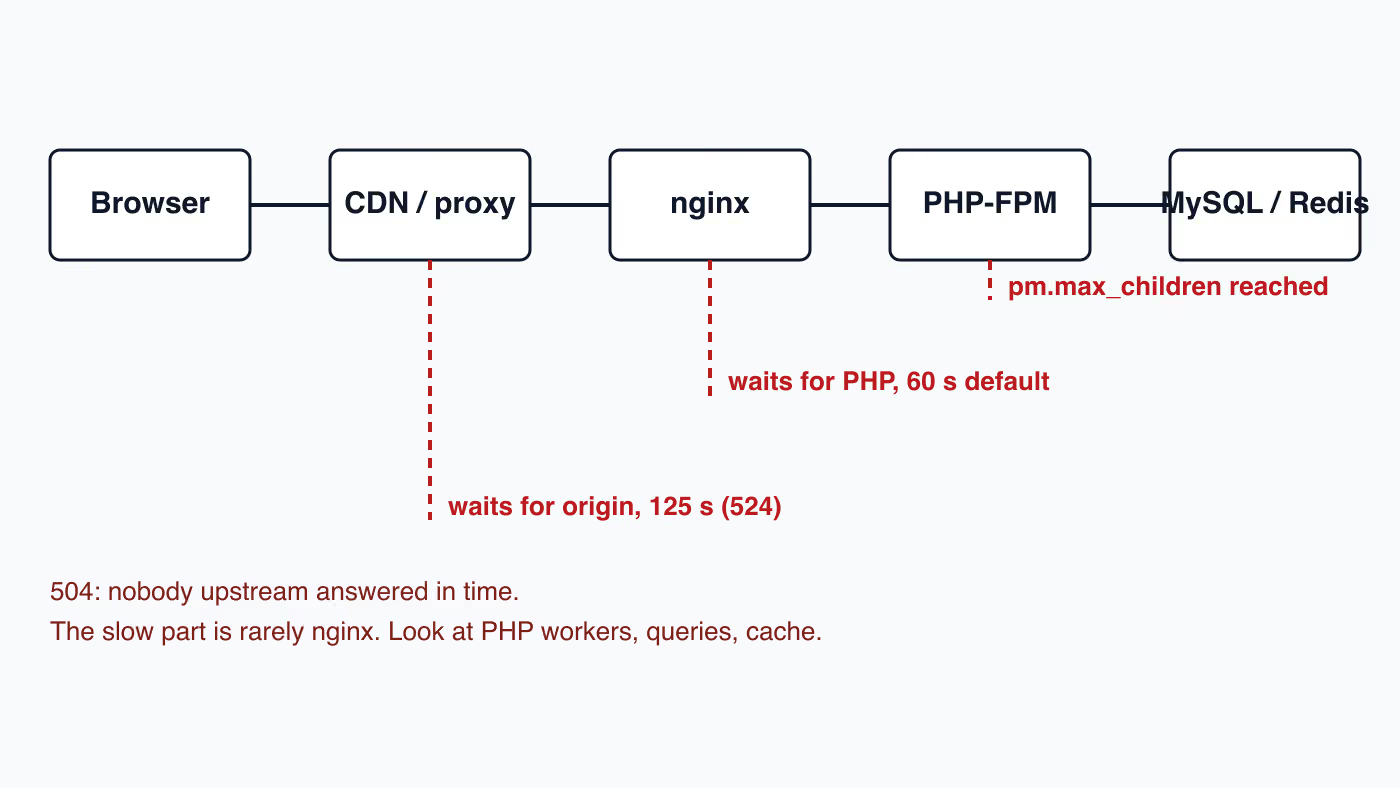
On typical WordPress hosting the chain looks like this: browser, optionally a CDN, nginx, PHP-FPM, the database and possibly an object cache. The 504 is generated by the link that was waiting. That alone tells you where to look. If nginx is waiting for PHP, the problem lies in PHP, the database or the queue for PHP. If the CDN is waiting, the problem lies in the origin server.
The MDN documentation also notes that the causes are many and that fixing the problem usually requires analysis on the server administrator’s side. That is why there is no single magic fix below, only an order of checks.
Is a 504 the hosting’s fault or the site’s
The scope of the error decides it. The table below is a decision shortcut, not a verdict.
| Symptom | Most likely direction |
|---|---|
| 504 on the whole site, including simple subpages | Too few PHP workers or an overloaded server: hosting or traffic |
| 504 on one address only | A slow query, a plugin or an external API called by that address |
| 504 in wp-admin and when saving, front end works from cache | Heavy requests from logged-in users that bypass the cache |
| 504 sporadically, at the same hours | Scheduled tasks, backups or a traffic peak |
| 504 after a plugin change or update | A plugin conflict or a database migration that takes too long |
The hosting’s responsibility begins where the limits (number of workers, memory, CPU) are too small for the site’s normal traffic. The site’s responsibility begins where a single request does so much work that it blocks a worker for tens of seconds. In practice both often apply at once: slow requests occupy the workers, and a small pool has no slack.
Why does my WordPress site go down every few weeks
In November 2025, on the r/webdev forum, the owner of two WordPress sites looked after by the same developer asked whether this was normal:
Every few weeks, they suddenly go down or stop working properly, either the site won’t load, or something breaks. The developer always says something like it’s a hosting issue or you need to renew/backup/update, and then offers a yearly maintenance or backup plan for an extra cost.
The thread drew dozens of replies. Below are the questions it raises and what you can check on your own.
Is it the hosting’s fault or the developer’s
The replies split into two camps. One developer, who runs uptime monitors for all his clients, writes about the sites left on cheaper hosts that cannot cope with bot traffic: “they’re out at least once a week” (tomhermans, r/webdev). Another answers that “a properly configured WordPress site on good hosting should almost NEVER ‘go down’” (redlotusaustin, r/webdev).
Both can be true at the same time, and the table above helps tell them apart. If every outage shows a 502 or 504 across the whole site, resources are usually to blame: a PHP-FPM pool that is too small or an overloaded shared server. If the site breaks in one place while the rest works, the cause is in the code, a plugin or the theme.
Can bots take down a WordPress site on cheap hosting
They can. A bot that crawls uncached addresses starts PHP on every request. On shared hosting with only a few PHP workers, the queue fills quickly and further requests end in the 504 error described in the sections below. What helps is a page cache in front of PHP (on the server or in a CDN) and a limit on requests from a single client. When you block bots in Cloudflare, watch out for the option that also cuts off Googlebot, which we covered in does Cloudflare block Googlebot.
Do plugin updates break a WordPress site
One participant in the thread points to plugin updates as a frequent cause of outages when they go straight onto the live site without a test on staging (technomalist, r/webdev). If the outages line up with updates, compare the outage dates with the update history. Our WordPress staging guide shows how to work with a test copy.
Can repeated outages mean the site was hacked
They can. The thread describes a typical cycle: a site infected through a vulnerable plugin is restored from a backup, but the hole stays open, so a few days later it all happens again (30thnight, r/webdev). Restoring a backup without removing the cause does not end the problem. The cleanup steps are in our WordPress malware removal guide.
How to check why your WordPress site went down
The shortest reply in the thread reads: “What do your logs say?” (chmod777, r/webdev). A site owner can do this without a developer:
- Turn on external uptime monitoring that records the time and duration of every outage.
- Have your own access to the hosting control panel, not only to the WordPress dashboard.
- After an outage, open the PHP error log and the web server error log for the same time. PHP fatal errors point to the code or a plugin; exceeded process limits and timeouts point to hosting resources.
- Compare the outage times with the update dates of plugins, the theme and WordPress.
Is a paid WordPress maintenance plan worth it
A maintenance plan pays for regular work: updates tested before release, monitoring, backups and a response to outages. It should not, however, be the answer to outages whose cause nobody has named. An outage every few weeks is not normal, with or without a plan. After every outage you should get the cause in writing and what was changed so it does not happen again. That is how we work in WordPress website maintenance.
How do you check where the request got stuck
Start with three places, in this order.
- The web server error log from the time of the failure. In nginx, an
upstream timed outentry confirms that the server was waiting for PHP. - The PHP-FPM log. A message about reaching
pm.max_childrenmeans the pool was full and later requests stood in the queue. Thepm.max_childrenoption, as the PHP documentation describes it, sets the limit of simultaneous requests handled by the pool. - The WordPress log. In
wp-config.php, setWP_DEBUGtotrue,WP_DEBUG_LOGtotrueandWP_DEBUG_DISPLAYtofalse. Errors go towp-content/debug.loginstead of the screen. This is how the WordPress documentation describes it. Turn debug off after the diagnosis.
If your host gives access to the PHP-FPM slow log, set request_slowlog_timeout, and PHP will write a backtrace of requests that last longer than the limit. By default the option is off (value 0). The backtrace shows in which plugin or theme function PHP was waiting.
On shared hosting you often have no access to these logs. In that case, access to them and to the PHP pool metrics is the first thing to ask support for, together with the time of the failure and the address that returned the 504.
Why does a PHP-FPM pool that is too small cause a 504
Every dynamic request occupies one PHP-FPM worker until the response is finished. When all workers are busy, new requests wait. If they wait longer than the proxy limit, the visitor sees a 504.
The default fastcgi_read_timeout in nginx is 60 seconds, and the nginx documentation notes that the limit is counted between two successive reads from the FastCGI server, not for the whole response. On managed hosting the value can differ, so do not assume that yours is exactly 60 seconds.
Raising pm.max_children helps only if the server has the memory for it. Each WordPress worker with a few plugins takes a noticeable chunk of it, so a value that is too high ends in exhausted RAM and killed processes, a worse state than a queue. Pool configuration is a job for an administrator who can see memory usage.
How do slow queries and autoloaded options cause a 504
When the 504 affects the whole site and the pool is not full from traffic, check the database. The WordPress documentation points out that WordPress repeats many queries on every request, and options flagged as autoload are loaded on every visit. It recommends keeping them below 800 KB, and the full recommendations are in the optimization guide. A plugin that stores large data in wp_options with autoload pushes it into every request. You can check the autoload size with an SQL query on the autoload column of the options table.
To track down slow queries, use the SAVEQUERIES constant. It records every query, its execution time and the function that called it in $wpdb->queries. It costs performance, so turn it on briefly and, if possible, on staging.
When do the object cache and Redis cause a 504
A persistent object cache reduces the number of database queries and usually speeds the site up. It does require a working cache server and the drop-in file wp-content/object-cache.php.
Failure works the other way round when that file exists but the Redis server does not respond. Every request then tries to connect to the cache, waits for the connection timeout and only then moves on or gives up. The symptom is a 504 right after a restart or a failure of the cache service on the host’s side, even though the site’s code has not changed.
The test is simple: rename object-cache.php to something else. If the 504 disappears, the cache is to blame, not WordPress. Restore the file only after the service is repaired.
How do WP-Cron, admin-ajax and external APIs cause a 504
Three sources of single, slow requests are worth checking separately.
- WP-Cron. The WordPress documentation explains that WP-Cron runs when a page is visited, not as a permanent process. Overdue, heavy tasks (backups, imports, mailings) can therefore load an ordinary visitor request. Moving the calls to the host’s system cron relieves the front end.
- admin-ajax.php. Plugins send requests here from the dashboard and from the front end. If the 504 appears exactly here, look for a plugin that performs a heavy operation in the background.
- External APIs. A plugin waiting for a slow external system (payments, ERP, shipping) holds a worker for as long as that system takes to respond. A missing short timeout of its own in that plugin turns someone else’s outage into your 504.
How does a 504 differ from 502 and 524
- 502 Bad Gateway: the server behind the proxy answered, but the response was invalid. Often a crashed PHP-FPM process.
- 504 Gateway Timeout: no response in time. Most often overload or a slow request.
- 524: a Cloudflare code. The Cloudflare documentation states that it appears when the origin server does not respond within the default 125 seconds. Cloudflare advises asking the host to check for long-running processes and overload, and moving large operations to a channel that bypasses the proxy.
Behind a CDN you may therefore see two different codes for the same cause, depending on which link lost patience first.
When should you raise the timeout, and when not
Raising fastcgi_read_timeout or the PHP time limit is justified for a single, deliberately long operation, for example a manual import. For a site that shows 504 to visitors, it is masking: the slow request still occupies a worker, only for longer, and the pool fills up faster.
PHP-FPM has a separate safeguard, request_terminate_timeout. The documentation describes it as the limit after which the process handling the request is killed, and gives the default value 0, meaning disabled. Set sensibly, it protects the pool from a single hung script.
Update, . Long admin jobs such as a backup or a database export are a classic cause of 504 on shared hosting. On that kind of plan you usually cannot change the proxy limit, and the proxy closes the request before PHP finishes, whatever max_execution_time says. The way out is to split the job into short requests that can resume. Our plugin Migrator shows the pattern. Since version 1.6.0, a backup started from wp-admin exports the database in steps, a slice of rows per request, so a large database finishes without a 504 Gateway Timeout on shared hosting. An interrupted step resumes where the last one stopped, and the migrator_step_seconds filter sets how long one step may work, for hosts whose proxy cuts requests short. If a plugin’s export or import dies with a 504 at roughly the same point every time, look for a mode that works in chunks and can resume, or for WP-CLI commands (Migrator has wp migrator commands since version 1.5.0). Higher PHP limits will not help, because the proxy ignores them.
Which nginx timeouts end in a 504
The nginx FastCGI module has three separate timers, and each defaults to 60 seconds according to the ngx_http_fastcgi_module documentation.
| Directive | What it measures | Default |
|---|---|---|
fastcgi_connect_timeout | establishing the connection to PHP-FPM | 60 s, usually cannot exceed 75 s |
fastcgi_send_timeout | the gap between two successive writes of the request to PHP-FPM | 60 s |
fastcgi_read_timeout | the gap between two successive reads of the response | 60 s |
The last two timers reset with every chunk of data. A script that sends something every so often can therefore run past a minute without an error, while a script that stays silent because it is waiting on the database or an external API gets a 504 at 60 seconds. fastcgi_send_timeout matters mostly for large POST requests, such as file uploads or imports.
When nginx sits in front of Apache rather than directly in front of PHP-FPM, the one that counts is proxy_read_timeout from the ngx_http_proxy_module. It is also 60 seconds and also measures the gap between reads, not the whole response.
All of these directives are valid in the http, server and location contexts, so you can raise the limit for the one path that needs it instead of the whole server:
location = /wp-admin/admin-ajax.php {
    # higher limit here only, the rest of the server stays at 60 s
    fastcgi_read_timeout 120s;
    include fastcgi_params;
    fastcgi_param SCRIPT_FILENAME $document_root$fastcgi_script_name;
    fastcgi_pass unix:/run/php/php-fpm.sock;
}
The PHP-FPM socket path differs between distributions and hosts, so copy it from your existing configuration, not from this example.
Apache timeout with PHP-FPM and mod_proxy_fcgi
Apache hands PHP over to PHP-FPM through mod_proxy_fcgi, usually with SetHandler "proxy:unix:/path/to/socket.sock|fcgi://localhost/". Three settings set the waiting time here, and each inherits its default from the next:
Timeoutfrom the Apache core, 60 seconds by default. The Apache documentation says that inmod_proxythis is the default value whenProxyTimeoutis not set.ProxyTimeoutfrom mod_proxy, which defaults to the value ofTimeout. The documentation describes it as a way to return a timeout and fail gracefully when an application server hangs, instead of waiting however long it takes.- the
timeoutparameter onProxyPassor a worker definition, which defaults toProxyTimeout. It is the number of seconds Apache waits for data sent to or from the backend.
All three have the server config and virtual host context, so they do not work in .htaccess. On shared hosting only the server administrator can change them.
Why max_execution_time does not prevent a 504
PHP’s max_execution_time defaults to 30 seconds, which is less than nginx’s 60. It looks as if PHP will always stop a script before the proxy returns a 504. It does not. The PHP documentation states that on non-Windows systems the limit is not affected by system calls and stream operations, and the page for set_time_limit() adds that time spent on database queries is not counted either.
In practice, a WordPress request that waits 70 seconds on a locked MySQL table or on a payment gateway never reaches the PHP limit. The worker stays busy, and nginx returns a 504 after 60 seconds of silence. The exception is PHP built with --enable-zend-max-execution-timers (the default for ZTS builds since PHP 8.3.0), where the limit tracks elapsed time, including time spent waiting on I/O.
That is why, with external APIs, the connection’s own timeout is what matters. The WordPress HTTP functions (WP_Http::request) default to a timeout of 5 seconds, adjustable with the http_request_timeout filter. A plugin that raises it to a minute removes that safeguard, and it is the plugin that turns a slow API into a 504.
These numbers suggest an order that makes diagnosis easier: each inner limit shorter than the outer one. The plugin’s HTTP timeout (5 s) below the PHP limit (30 s), that below fastcgi_read_timeout (60 s), and that below Cloudflare’s 125 seconds. When an inner limit fires first, the error lands in debug.log with the name of the function that was waiting. When an outer one fires first, all you get is a generic 504 page with no trace in the WordPress logs.
How to read the PHP-FPM status page
The fastest evidence of whether a 504 comes from a queue or from a single slow request is the PHP-FPM status page. The pm.status_path option in the pool configuration enables it, and it is unset by default. The PHP documentation warns that the page reveals request URLs and resource information, so restrict it to internal requests or known IP addresses. The ?json parameter returns JSON, and ?full adds per-process detail.
| Field | What it means |
|---|---|
listen queue | requests currently waiting for a free process |
max listen queue | the largest queue since the pool started |
active processes / idle processes | busy and free processes |
max children reached | 1 or more if the pool has ever hit pm.max_children |
slow requests | requests that exceeded request_slowlog_timeout |
Reading it during an outage is simple. A queue above zero and no idle processes mean a full pool: too few workers, or slow requests holding them. An empty queue and idle processes alongside a 504 mean the time is lost inside the request itself, in the database, the cache or an external API. The queue’s upper bound is listen.backlog, 511 by default on Linux according to the FPM configuration reference.
How do you fix a 504 step by step
- Establish the scope: the whole site, one address or only wp-admin.
- Read the server and PHP-FPM logs from the time of the failure.
- Turn on
debug.logand reproduce the error. - Deactivate plugins (with WP-CLI or by renaming the directory), then reactivate them one at a time and measure the response time.
- If
object-cache.phpexists, disable it as a test. - Check autoloaded options and overdue WP-Cron tasks.
- Only at the end consider enlarging the pool or the timeouts, together with the hosting administrator.
If the 504 appeared right after an update, also see the guide on recovering WordPress after a failed update.
When is this a job for a specialist
When the logs point to the PHP-FPM pool but the host gives no access to its configuration. When the 504 returns after every fix. When a shop loses orders during the outage. For an audit meant to separate the cost of hosting from the cost of code, WordPress performance optimization helps. When the site is down right now and the cause is unknown, the rescue is WordPress repair and technical support.