In October 2026 WordPress.com changed two things that are easy to mix up. On 15 October it updated WordPress Agent, the assistant built into the dashboard that builds a site and edits it from a chat. A day later it updated the March announcement about write capabilities in its MCP server, through which an external AI assistant, such as Claude or Cursor, can create and change content on the site. The first is a product for the site owner. The second is a way in for the tools a developer or an editorial team already uses.
This article covers what each of them does according to the WordPress.com documentation, what safeguards apply to writes made by AI, how this differs from the Abilities API on self-hosted WordPress, and where the scope of both tools ends.
What’s new in WordPress Agent after the 15 October 2026 update?
Ronnie Burt described the changes in a post on the WordPress.com blog. The most important one is about time:
“Generating a site now takes less than half the time it used to. Most sites are ready in under four minutes.”
Source: WordPress.com, 15 October 2026
The second change concerns the theme. The Agent asks what you are building and what your goals are, then designs a custom theme based on the answers instead of dropping in a ready-made template from the catalogue. WordPress.com points out that the content can be exported and the theme is built for WordPress, so the site is not locked into one tool.
Other new features from the same post:
- The AI Editor, a simplified editor with two tabs: Preview shows the site as a visitor sees it, and Edit lets you change text directly on the page.
- Annotation mode (Annotate), where you mark several places on the page and send all the notes to the Agent at once.
- Installing, activating and updating plugins with a request in the chat.
- Site guidelines, which the Agent creates while building the site and remembers in later conversations.
- Talking to the Agent in Slack direct messages, after connecting the account in the settings.
The Agent works on every paid WordPress.com plan. On an existing site you first have to enable it following the instructions in the support docs.
How do you enable the AI Editor on an existing WordPress.com site?
If WordPress Agent built the site, the AI Editor is enabled from the start. For a site created earlier, the WordPress.com support guide (checked on 14 October 2026) lists three conditions:
- The site uses a block theme. With a classic theme the AI Editor menu item does not appear at all.
- WordPress Agent is enabled for the site.
- Under Settings > Writing, in the AI Features section, the “Enable AI-powered site building experience” box is checked.
Once the conditions are met, the editor opens from Appearance > AI Editor. The full Site Editor stays available under Appearance > Editor, so the AI Editor does not replace it.
For many older sites the first condition decides the matter. A site on a classic theme with widgets and menus in PHP has to move to a block theme first, which means moving the header, footer and templates into the Site Editor. On a site with custom page templates and custom post types that is a separate project, best prepared on a test copy of the site.
According to the support guide, annotations work like this: a button with a speech bubble and a plus sign next to Preview and Edit turns the mode on, clicking part of the page opens the “Add a comment…” field, each note gets a number, and the Send button shows how many notes you have collected. The Agent makes all the changes, but nothing is saved until you click Save. That last step matters, because it gives you a moment to review the changes before they are saved.
Can WordPress Agent install plugins on its own?
Yes. According to the 15 October post, you just write what you need, for example a contact form, better SEO or payments. The Agent recommends plugins that fit the goal, then installs and activates them in the chat. On request it also updates plugins that are already on the site.
The convenience has a price that anyone who maintains WordPress sites knows. Every plugin is extra code that has to be updated, that can conflict with the theme or with another plugin, and that widens the attack surface. The Agent picks a plugin based on a description of the need. It does not know the plans for the site, does not know that an English version will be added in six months, and does not compare licence costs over several years.
The MCP tools documentation shows what these operations look like technically. Search covers the WordPress.org directory and the WordPress.com commercial catalogue. A paid plugin installs only if the site has an active purchase. Without one, the operation returns a message that a purchase is required. Jetpack and Akismet are pinned by WordPress.com and cannot be deactivated. Installing plugins requires a plan that includes them.
The sensible practice is simple. Agree in advance on a list of plugins allowed on the site, and check in the Activity Log what the Agent has installed. The log has a filter for plugin events, so a weekly review takes a few minutes.
What does WordPress Agent remember between conversations?
While building the site, the Agent creates guidelines: the site’s purpose, audience, tone and style of writing, image style and a few other settings. From then on every conversation starts with this knowledge, so you do not have to explain what the business does every time.
The guidelines live under Settings > Guidelines. You can edit them when the brand changes and export them to use elsewhere. The Agent uses them to create content and images whether the conversation happens in the WordPress.com dashboard, in Telegram, by email or in Slack.
For a business, the guidelines are only as good as the information the Agent got at the start. If the first conversation was superficial, every later text inherits its gaps. Read the generated guidelines right after the site is built and correct them by hand before the Agent starts writing the first blog posts.
What is MCP on WordPress.com, and what can an AI assistant write to a site?
MCP (Model Context Protocol) is an open protocol through which an AI assistant discovers the available tools and uses them. WordPress.com launched its MCP server in October 2025 with read-only access to content, stats and settings. On 20 March 2026 Jonathan Bossenger announced write capabilities, and the post was updated on 16 October.
In March this meant 19 new write operations across six content types: posts, pages, comments, categories, tags and media. Among other things, the assistant can:
- create a post from text you provide or from a description,
- build or change a page using block patterns from the theme,
- approve comments, reply to them or delete them,
- create categories and tags and change their structure,
- fix alt text, captions and file titles in the media library.
Before creating content, the assistant can read the theme’s colours, fonts, spacing and block patterns so the new page matches the rest of the site. The documentation recommends checking the _content_warnings field after every write, because WordPress can strip some blocks or HTML on save.
The catalogue has grown since March. The MCP tools documentation dated 13 October 2026 already describes separate groups of operations for plugins, templates and template parts, navigation, global styles, widgets, users, backups, security scans and domain DNS records. The number 19 therefore describes the state in March, not today’s scope. The documentation also notes that the set of tools a given user sees depends on the plan, permissions and account settings.
Setup takes four steps: enable MCP on the account at wordpress.com/me/mcp, select the write operations you need, connect the AI client and start working. Write capabilities stay on all paid WordPress.com plans year-round. Free-plan sites can use the same MCP connection through the end of November 2026 (WordPress.com changelog, 31 October 2026); after that window, free sites lose agent access unless they move to a paid plan.
Update, . WordPress.com’s post of 3 November simplifies the connection: an official ChatGPT plugin and a Claude connector listed in each app’s directory, with the same server still open to any other MCP-compatible client. For each site you choose what the agent may do and whether it asks before every change or goes ahead on its own. Start in ask-first mode: an unapproved change on a live site is harder to undo than a rejected proposal. The deadline is unchanged: the free plan keeps access through November 2026.
How does WordPress.com protect changes made by an AI assistant?
The March announcement describes several layers of protection. The most important one reads:
“Before creating, updating, or deleting anything, your AI agent describes exactly what it plans to do and asks for your explicit confirmation. Nothing happens without approval from you.”
Source: WordPress.com, 20 March 2026
The technical documentation shows how this is enforced. Every write operation must include the parameter user_confirmed: true. The server accepts a boolean or one of the strings “true”, “yes”, “on”, “1”. Loose phrasing such as “yes do it” is rejected, so the assistant has to turn the person’s approval into one of the allowed values. Before a deletion, the assistant must first fetch and show the item that will disappear.
The other safeguards:
- New posts and pages are created as drafts. A change to a published post goes live immediately, and the assistant is supposed to warn you about it.
- All changes go to the site’s Activity Log. Reading the log through MCP returns the last six months by default.
- WordPress role permissions apply. An Editor creates and edits posts but does not change site settings. A Contributor writes drafts but does not publish.
- Each operation has its own toggle in the MCP settings, so you can enable only what you really need, and only on selected sites.
The trash needs a closer look. The March announcement says that deleted posts, pages, comments and media go to the trash for 30 days, while categories and tags are deleted permanently after an additional confirmation. The current tools documentation describes media differently:
“Permanently delete a media item. WordPress.com does not trash attachments, so the file cannot be recovered and any content using it loses the image.”
Source: WordPress.com MCP tools documentation, 13 October 2026
It is safer to go with the documentation: 30 days in the trash for posts, pages and comments, permanent deletion for categories, tags and media files. Deleting a category moves its posts to the Uncategorized category, and changing its slug immediately changes the archive URLs and can break links. These are two operations you should not hand to an assistant without checking the SEO consequences.
Does WordPress.com MCP work with a self-hosted site?
Partly. The tools documentation states plainly that the same catalogue serves sites hosted on WordPress.com and self-hosted sites connected through Jetpack. The user’s site list includes both kinds, and Jetpack features such as backups, scans and uptime monitoring are operations in the site tool group.
Access to content has limits, though. Content operations cover post types registered with show_in_rest in the standard wp/v2 REST API namespace. Post types outside it, as well as internal WordPress and Jetpack types, are not available. If a shop or booking plugin keeps its data in its own tables or its own REST namespace, an assistant connected through WordPress.com MCP will not see it.
WordPress Agent itself and the AI Editor are described as features of paid WordPress.com plans. On a self-hosted site the AI assistant gets what can be done through Jetpack and the standard REST API. Anything beyond that you have to build yourself.
Update, 24 October 2026: self-hosted WordPress is moving towards MCP, but it is not where WordPress.com is yet. On 21 October the WordPress AI team recorded approval to make MCP part of the default WordPress experience, with WordPress 7.3 discussed as a possible target and no release commitment (AI Contributor Weekly Summary). The gap is in abilities. In Andy Peatling’s Building with WordPress benchmark, Opus 5.5 in Claude Code and GPT-6.1-Sol in Codex finished 0 of 42 site-owner jobs on a self-hosted site when the MCP Adapter was their only way in, and 33 of 42 with an application password for the REST API. WordPress.com ships its 19 write operations ready to use; with the MCP Adapter on your own hosting, someone first has to register the write abilities.
Update, : the AI team published the proposal WordPress for the Agentic Web with four workstreams. The MCP Adapter plugin is to stabilise alongside WordPress 7.2, and the proposal is to bring MCP into core for 7.3, by a direct merge or a bundled plugin. A baseline set of Abilities for site management should partly land in 7.2, with a broader set in 7.3. OAuth is meant to let users authorise their own agent by signing in: the flows are mapped during 7.2, core implementation targets 7.3, and the author calls Application Passwords a poor fit for most users. The fourth workstream is end-to-end prototypes during 7.2. Core inclusion depends on technical readiness, security and normal core review. Until then a self-hosted site needs the MCP Adapter plugin and deliberately scoped permissions; how I set that up is on the MCP and AI integration page.
Update, : on 28 October Google opened a preview of the Connected Apps Platform. A service connects to Google Search and the Gemini app through a cloud-hosted MCP server or, on Android, through AppFunctions. Developers register, test and submit the app in the Google Connected Console, and choose before review whether it goes live in Search, in Gemini or in both (Google blog). The developer docs require OAuth 2.1 so a user can authorise Gemini once to act on their behalf (Google for Developers). Google is opening access in phases and does not list markets. For a site owner it is the same pair the WordPress AI team proposal describes: a remote MCP server and sign-in through OAuth. A site that already has well-described tools and safe authorisation will be ready sooner. I design those servers as part of MCP server development.
Update, : the WordPress.com changelog for 16-29 October (published 31 October) opens MCP site management to free-plan sites through the end of November 2026. Paid plans keep access. The same post adds store setup through the WordPress Agent on paid plans: it installs WooCommerce, lays out a store and adds example products. For a self-hosted shop that needs ERP stock, custom checkout or scoped MCP abilities, I still build that as WooCommerce integrations with ERP systems and MCP and AI integration, not as a hosted agent prompt.
WordPress.com changelog featured image, 31 October 2026. Source: wordpress.com/blog/2026/10/31/changelog-site-store-ai/.
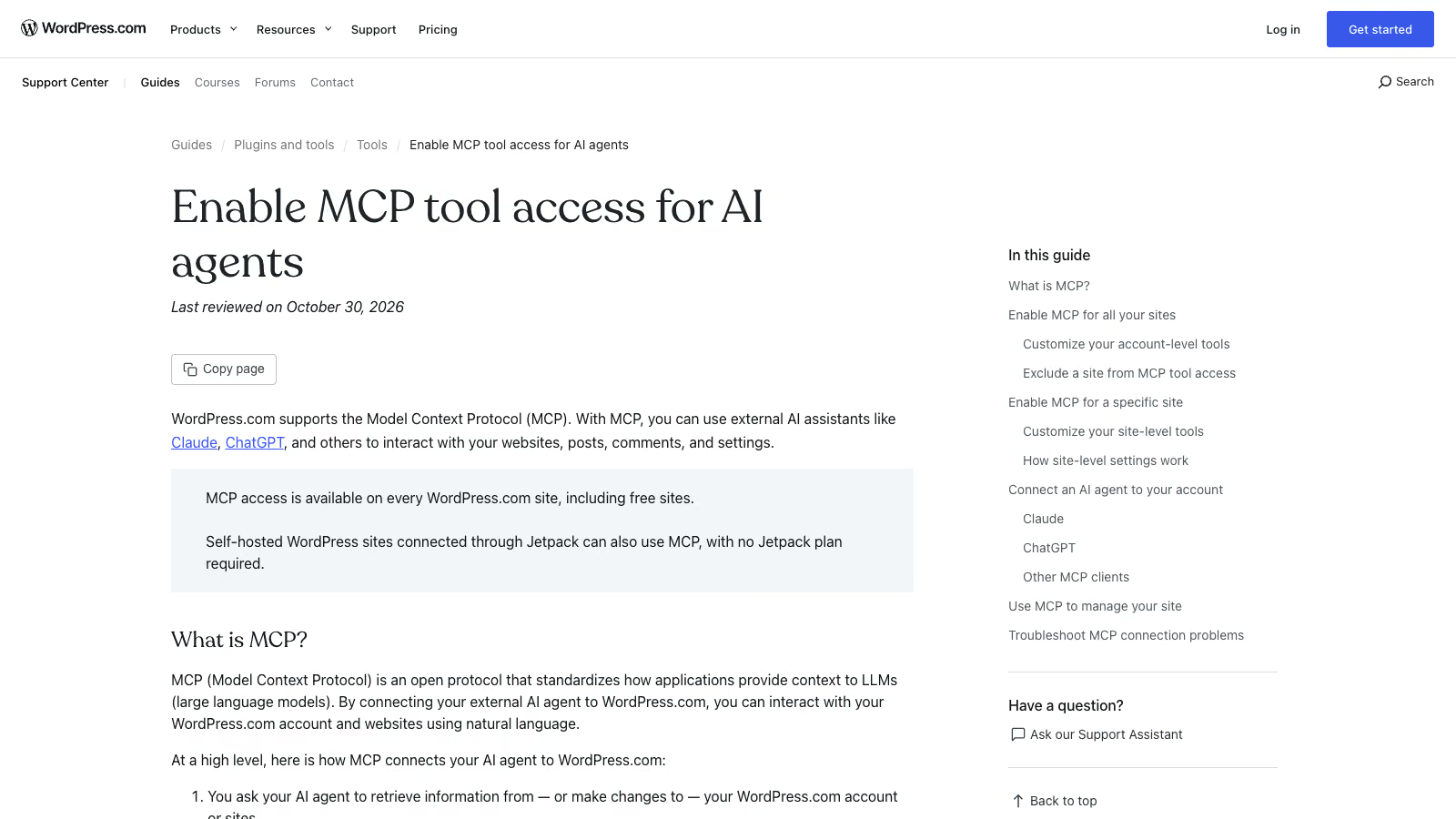
WordPress.com Support: Enable MCP tool access for AI agents, last reviewed 30 October 2026. The callout states MCP is available on every WordPress.com site, including free sites. Source: wordpress.com/support/mcp/.
How is the Abilities API different from MCP on WordPress.com?
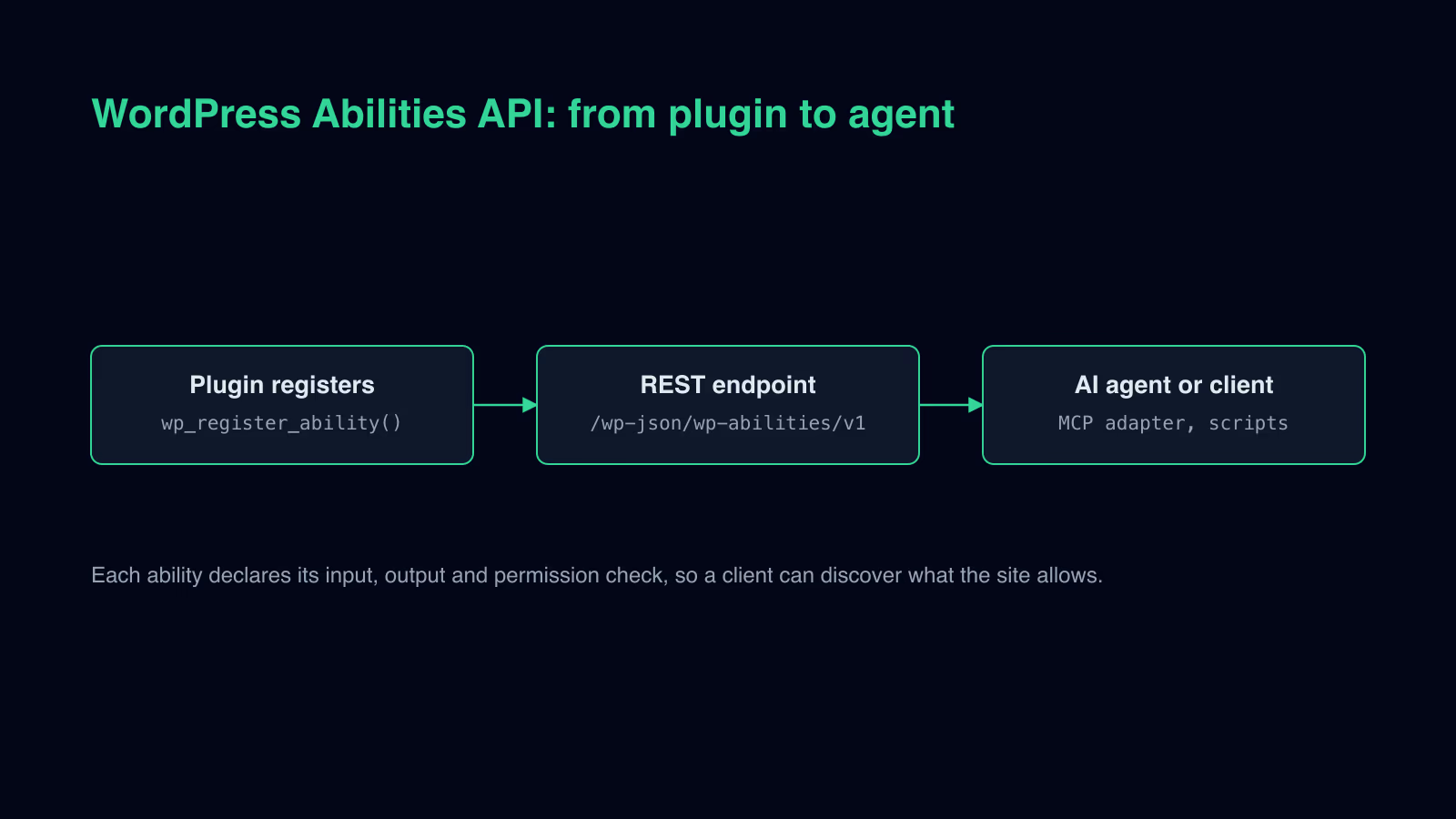
The Abilities API has been in WordPress core since version 6.9. It is a registry of operations that a site makes available to other parts of the system, to plugins and to external tools, including AI assistants. Each operation, called an ability in the documentation, has a unique name in the namespace/name format, a description, an input and output schema in JSON Schema, a category, an execute callback and an optional permission callback.
An example from the documentation, cut down to the most important fields:
add_action( 'wp_abilities_api_init', function () {
    wp_register_ability(
        'my-plugin/site-info',
        array(
            'label'               => __( 'Site Info', 'textdomain' ),
            'description'         => __( 'Returns information about this WordPress site', 'textdomain' ),
            'category'            => 'site-information',
            'input_schema'        => array(),
            'output_schema'       => array( 'type' => 'object' ),
            'execute_callback'    => 'wporg_get_siteinfo',
            'permission_callback' => function () {
                return current_user_can( 'manage_options' );
            },
            'meta'                => array( 'show_in_rest' => true ),
        )
    );
} );
The Abilities API does not speak MCP on its own. That is the job of the official MCP Adapter package, which turns registered abilities into MCP tools, resources and prompts. It supports HTTP and STDIO transport, lets you run several MCP servers with different sets of operations, and checks permissions at two levels: for the transport and for each operation.
An important difference from WordPress.com is in the defaults. In the MCP Adapter, abilities are private by default. For an AI assistant to use them, you have to set meta.public (or meta.mcp.public) to true. Public operations are available through three tools on the default server: mcp-adapter/discover-abilities, mcp-adapter/get-ability-info and mcp-adapter/execute-ability. The client connects through WP-CLI or over HTTP at /wp-json/mcp/mcp-adapter-default-server.
In practice the choice looks like this. On WordPress.com you get a ready catalogue of operations, confirmations enforced by the server and an Activity Log, but you cannot add an operation of your own. On your own hosting you decide what the assistant can do, including operations on shop data or an external system. You also write the permission check, the confirmations before a change and the log entry yourself. The permission_callback field with current_user_can() in the example above is the minimum, not full protection: an operation that changes data should also validate and sanitise the input in the execute callback. I cover the API itself in the guide to the Abilities API.
What can’t an AI assistant on WordPress.com do?
The limits follow directly from the documented operations. Neither the WordPress Agent post, nor the write capabilities announcement, nor the tools documentation describes an operation that writes or edits PHP code, runs queries directly against the database, or connects the site to an external system such as accounting software or a wholesaler.
The Agent and an assistant connected through MCP can install a plugin written by someone else. The documentation even describes uploading a plugin from a ZIP file. Installing a plugin is not the same as writing, testing and maintaining it, though. If a shop has to pull stock levels from the company’s system every fifteen minutes, someone has to write that integration, handle connection errors and check what happens when the warehouse system does not respond. For the same reason clients order WooCommerce integrations with ERP systems from developers, not from an AI assistant.
The second limit is about responsibility. The Agent will update a plugin when asked in the chat, but it will not then walk through the checkout in the shop or check that the contact form still sends messages. The Activity Log shows what changed. It does not tell you whether the site still works the way it should after the change.
The third limit is the scope of data. The assistant sees only the post types available in the standard REST API. Content that plugins keep in their own tables, plugin settings stored outside the standard options, and shop data stay out of its reach unless the plugin exposes them itself.
WordPress.com with the Agent or self-hosted WordPress: how do you choose?
WordPress.com with the Agent makes sense when the site uses only ready-made plugins and the owner wants to change content and design without a developer. WordPress.com takes care of hosting, security and WordPress updates, and the Agent and MCP speed up day-to-day work with content. This usually covers a company site, a blog, a service site with a form and a simple shop.
Your own hosting is the better choice in a few situations:
- the site has to exchange data with a warehouse, accounting or CRM system,
- you need custom PHP code, custom blocks or custom post types with custom fields,
- the data has to be stored in a specific place, for example because of a client contract or company policy,
- the AI assistant has to perform operations that are not in the WordPress.com catalogue, for example on shop orders.
Before deciding, go through three questions. Does any current or planned feature need code that is not in any plugin in the directory? Will the site run on a block theme, without which the AI Editor will not work? Who will check what the AI assistant changed on the site, and how often? If the answer to the first question is “yes” and nobody can answer the third, the Agent will speed up the start, but problems will show up with the first integration.
A site on WordPress.com is not a choice for life. The content can be exported, and the theme built by the Agent is a WordPress theme. When moving, though, you have to plan for paid plugin licences and URL redirects.
When should you hire a developer for the build?
The Agent shortens the road to the first version of a site and handles everyday content changes well. A developer is needed where code, integrations and responsibility for the site working after a change come in. I write about how agencies combine AI-assisted work with human code review in the article on hiring WordPress developers who work with AI.
Ask for a quote when:
- you need a WordPress developer to move the site from a classic theme to a block theme, or from WordPress.com to your own hosting,
- you want to give an AI assistant your own operations through the Abilities API and MCP Adapter, with permission checks and a change log, which is an MCP and AI integration,
- the Agent has already installed several plugins and you want to know which ones you actually need.
In your request, describe where the site is hosted today, whether it has a shop, how many language versions it has and which systems it needs to connect to. The quote is individual, based on scope. The form is on the contact page.