After a WordPress site is hacked, the first hour is for documenting, not cleaning. I preserve the evidence first, then find the attack vector, and only then remove the malware, on a copy of the site, away from the live one. Files deleted blindly wipe out the traces of the vector, and an old backup restored without checking the infection date can bring the malicious code straight back.
This page covers the signs of a break-in, the order I work in after an incident, hacked WooCommerce shops and sites on other systems, and the data protection duties that start running from the moment of discovery under the UK GDPR, the EU GDPR and the rules of the ICO and the Irish Data Protection Commission. If you want to work through the cleanup yourself, the full instructions with commands are in the guide to cleaning a hacked WordPress site.
Signs your WordPress site has been hacked
Symptoms that usually mean a break-in, and the first move I make.
- What you see: Google shows a warning next to your site, or Search Console reports a security issue
- What I doI open the Security issues report in Search Console and the list of affected URLs. That is the starting point for diagnosis and for the review request later.
- What you see: Search Console lists an owner you never added
- What I doI record it as evidence and remove the access. Checking Search Console owners is one of the first steps after a break-in.
- What you see: The user list has an administrator account nobody recognises
- What I doI review every administrator account and every cron job. Accounts nobody created are removed after their details are saved as evidence.
- What you see: Core files do not match the originals
- What I doI run wp core verify-checksums and compare plugin and theme files with the versions from official sources.
- What you see: The site redirects visitors to unknown addresses or serves malicious code
- What I doI switch on maintenance mode so the site stops infecting visitors, and copy the files and database as evidence.
- What you see: Shop customers report odd behaviour on the checkout or payment page
- What I doI treat it as a possible personal data breach. I preserve evidence, record the time of the report and tell you, because the regulator's clock starts now.
- What you see: The infection returns a few days after cleanup
- What I doI look for the vector that was left open: a backdoor in the database, a cron job, an old account. Cleanup without closing the vector does not hold.
Hacked WordPress site: what you can do in the first hour
Before you write to me or anyone else, do five things. Do not delete any files. Copy the files and the database, even infected, because they are evidence. Write down the date and time you noticed the break-in. Check Search Console for owners you do not know. If the site is serving malware or redirecting visitors, switch on maintenance mode.
Then change the passwords for the WordPress dashboard, SFTP and the database. Do not restore an old backup until you know when the infection started. A backup from last week will not help if the malicious code has been on the site for a month.
Cleanup goes faster when I get access straight away to the hosting control panel, server logs, SFTP, the database and Search Console. If the logins are spread across several people or companies, collect them in one place before we start.
How I remove malware from WordPress
Each step ends with something you can check: a copy, a report, a list of changes.
Data processing agreement before access
Before I get access to the site, we sign a data processing agreement under Article 28 of the GDPR, or the UK GDPR for UK clients. The infected site holds your customers' data.
First hour: preserve evidence
A copy of the files and database as evidence, the time of discovery recorded, maintenance mode if the site serves malware, and a check of Search Console owners. The 72-hour clock runs from the moment you become aware of a breach.
Diagnosis as a separate stage
Diagnosis has its own price and a fixed scope. Its result is the cause, the scope of the repair and the cost, in writing. Cleanup starts once you confirm that scope.
The attack vector, found on a copy
I work on a copy, never on the live site. I find the vector from the server logs, wp core verify-checksums and a comparison of plugin and theme files with clean versions.
Cleaning files and database
I remove malware and backdoors from the files and the database, check administrator accounts and cron jobs, and restore core and plugins from clean sources.
New passwords and access
I change the passwords for the WordPress dashboard, SFTP and the database. I treat the old credentials as known to the attacker.
One deployment that can be reverted
I deploy the cleaned version in a single step that can be rolled back. I add protection against the vector that was found and set out the cause and prevention in writing.
Google review request
Once the site is clean, I request a review in the Security issues report in Search Console.
I have no influence over the last step. According to Google’s help, a review can take from a few days to a few weeks, and Google sends an email when it is complete. That is why I do not promise a date for the warning to disappear from search results.
How much WordPress malware removal costs
I do not give a cleanup price up front, because it depends on what the diagnosis finds: whether the infection affects a few files or the database and accounts too, whether the backups are older than the infection, and whether the vector is a plugin that can simply be updated. Diagnosis is a separate, fixed stage with its own price. Its result is the cause, the scope of the repair and the cost, in writing. Cleanup starts once you confirm that scope.
A site without a maintenance contract goes through WordPress repair, where I price the work after you describe the incident. What ongoing maintenance with malware scans and daily backups costs is on the WordPress maintenance cost page. Outages after updates and weak Core Web Vitals that do not come from an infection are covered on the WordPress specialist page.
Hacked WooCommerce shop
A break-in at a shop differs from one at a company site because it almost always involves personal data. The shop database holds customer accounts, delivery addresses, phone numbers and order history. So in a shop I assume from the first hour that this may be a personal data breach, and I record the time of discovery at once and pass it to you as the controller.
The order of work is the same as for a company site, but the checks go wider. Besides files, database, accounts and cron jobs, I check the payment, shipping and connector plugins, because each of them holds its own API keys. Keys that may have leaked have to be replaced on the side of the payment gateway, the ERP or the accounting package as well, not only in WordPress. Replacing them needs access to those services’ dashboards, so we do it together.
After cleanup I test the basket, details, delivery and payment path, without placing a real order, before the shop goes back to trading. A shop where that test should run all the time is a fit for the Store Reliability Plan. When checkout or payment no longer works after a break-in and sales need to come back, the right service is the WooCommerce rescue sprint.
Typical case: a shop with customer accounts and an outdated plugin
A typical case shop owners bring to me: the shop has traded for a few years, has customer accounts and a dozen or so plugins, some not updated for months. Someone notices an unknown administrator account or strange behaviour on the order page. In a shop like this I preserve the evidence and record the time of discovery first, then check whether customer data could have been read and which data. I give that description to you, because you decide whether and when to notify the ICO or the DPC.
Typical case: a company site that redirects visitors on phones
Another typical case: the owner of a company site hears from a customer that the site, opened on a phone, jumps to a foreign website, while on a desktop it looks normal. That symptom usually means malicious code in the files or the database that fires only for selected visitors. Here too I start with a copy as evidence and maintenance mode, and look for the vector in the server logs and in a comparison of files with clean versions. If the site has a contact form, I also check whether the malicious code had access to the submissions, because they are personal data.
A hacked Drupal, TYPO3, Laravel or Symfony site
The same order of work (evidence, vector, cleanup on a copy, new credentials, one revertible deployment) applies to systems other than WordPress. The tools differ: in Drupal and TYPO3 I restore core and modules from clean sources through Composer, and in a Laravel or Symfony application I compare the code on the server with the repository.
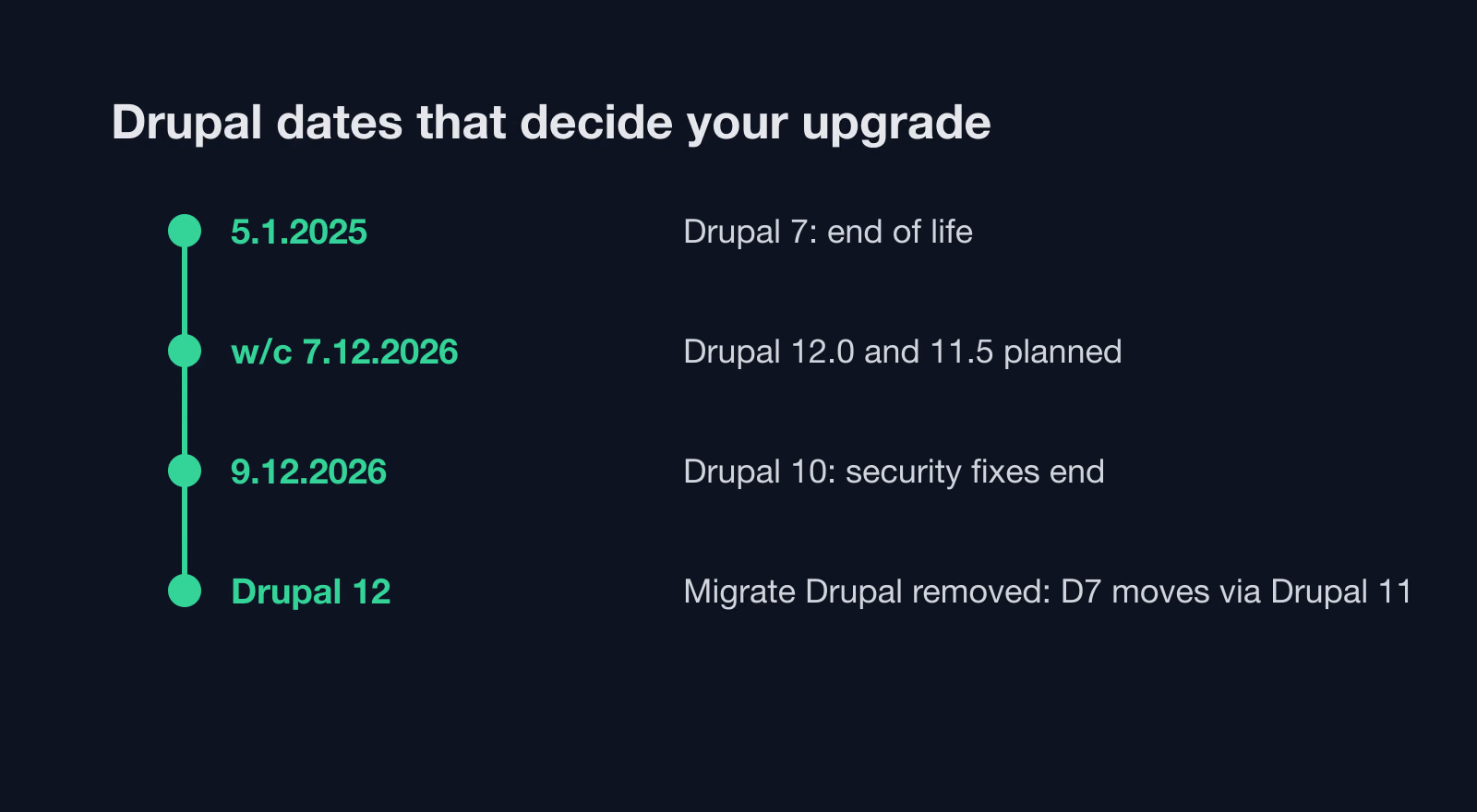
A version without security support gets no fixes for new vulnerabilities. Drupal 7 has had no security support since 5 January 2025, and Drupal 10 loses it on 9 December 2026. Free support for TYPO3 12.4 ended on 30 April 2026. After cleaning a site on such a version, removing the malicious code is not enough on its own: the site needs an upgrade plan or a migration to WordPress. For Drupal 10 I set out the options in Drupal 10 end of life: upgrade or migrate.
Hacked website and data protection law: the ICO, the DPC and 72 hours
If the break-in may have exposed personal data (customer accounts, orders, form submissions), the data protection clock starts. Article 33(1) of the GDPR says the controller notifies the supervisory authority without undue delay and, where feasible, not later than 72 hours after becoming aware of the breach, unless the breach is unlikely to result in a risk to people’s rights and freedoms. A late notification must give the reasons for the delay. Where the risk is high, Article 34(1) also requires telling the people whose data it is, without undue delay.
For UK businesses the same duty sits in the UK GDPR, and the regulator is the Information Commissioner’s Office. Its guidance on personal data breaches puts it this way: “If a risk is likely, you must notify us, as soon as possible, and where feasible within 72 hours.” The security incident itself can go to the National Cyber Security Centre through its reporting service; the NCSC asks you to report “if you have been a victim of a cyber crime or your cyber security has been compromised.”
In Ireland the regulator is the Data Protection Commission. Its breach notification guidance states: “Organisations must do this within 72 hours of becoming aware of the breach.” The DPC takes reports through an online breach form. For the incident itself, NCSC Ireland asks you to contact it by email at [email protected].
Who does what in a data breach
The split follows the GDPR and the data processing agreement we sign before I get access to the site.
You, as the controller
- You decide whether the breach must be reported to the ICO or the DPC (Article 33)
- You decide whether to tell the people whose data it is (Article 34)
- You file the report and track the 72 hours from becoming aware of the breach
- You handle contact with customers whose data may have leaked
Me, as the processor
- I tell you about the breach without undue delay after I become aware of it (Article 33(2))
- I give you the facts for the report: time of discovery, files and data affected, the vector found
- I do not notify the regulator on your behalf unless the contract says so
- I remove the effects of the break-in and close the vector within the scope of the contract
Liability between us, including for the effects of a break-in, is set by the contract. That is why we sign the data processing agreement before my first access to the site and not on the day of an incident. The report needs what my first steps produce: the time of discovery, the files and tables the infection touched and the vector found. You get the full written report with the cause.
If your business falls under NIS2 or DORA, the reporting duties may go further than data protection law. Preparing a WordPress setup for those requirements is covered by the NIS2 and DORA readiness audit.
Clean, restore or replace
The choice depends on when the infection started and what caused it.
You have a backup that is definitely older than the infection, and the vector is known.
I restore that backup on a working copy, close the vector and only then deploy. Content and orders added since the backup date have to be carried over separately.
You do not know when the infection started, or every backup is newer than it.
I clean the site on a copy: files, database, accounts, cron jobs, core and plugins from clean sources.
The source is a theme or plugin nobody develops any more.
I remove it or propose a replacement. If the replacement needs new code, it gets its own quote.
The site runs a CMS version without security support.
After cleanup it needs an upgrade or migration plan. Without one the vector stays open.
The site is down after the break-in and you have no maintenance contract.
Nothing points to a break-in, but you want to know whether the site is clean.
A security audit: report within 5 working days, ordered by priority.
How to spot a break-in before Google does
A warning in Google results is a late symptom. A break-in leaves traces in the files and the database well before that. In maintenance I compare core, plugin and theme files with the checksums from official sources (wp checksum core, wp checksum plugin --all), so a changed file shows up within a day. The malware scan looks for known patterns of malicious code, and the monthly review of administrator accounts catches accounts nobody created.
The second source is vulnerability databases, including the Patchstack database and WPScan. When a flaw appears in a plugin you run, I update it outside the weekly cycle. That closes the vector before anyone uses it.
Code fixes after a hack
When the vector was the site’s own code, for example a form in a plugin written for the business or a theme function that did not check its input, I fix it as part of the protection against that vector. The fix goes into version control, and I check the code with PHP_CodeSniffer and the WordPress Coding Standards rules, which include security rules, and with PHPStan static analysis. On sites outside WordPress I follow PSR-12. Before deploying I review the change again, separately from writing it. If the fix means rebuilding a larger part of the code, I describe it and quote it separately.
What you get after the cleanup
After cleanup you get a written account: how the break-in happened, what changed in the files and the database, which credentials were replaced and what protection I added against the vector. That account helps with a report to the ICO or the DPC, if you file one, and with any conversation with your host. The cleaned version is deployed in one step that can be reverted, and a copy of the infected version stays as evidence.
If you want someone to keep watching the site after the cleanup, it moves into ordinary monthly maintenance.
What I do not promise after a hack
I do not guarantee that the site will never be hacked again. Cleanup removes the malicious code and closes the vector that was found, but new plugin vulnerabilities appear all the time. I do not guarantee a repair time either: it depends on how far the infection spread, on access to the hosting and on whether the backups are older than the infection. I do not promise a date for Google to lift the warning, because Google runs the review.
I do promise the order of work described above, the diagnosis result in writing before cleanup, and a report with the cause and prevention after it.
How maintenance lowers the risk of another break-in
As part of WordPress website maintenance I take daily backups and keep them for at least 30 days, scan the files for malware and check file integrity, and review administrator accounts once a month. Monitoring checks that the site is up every 1 to 5 minutes and alerts me when it stops responding. When a scan finds something, I isolate the infected parts, restore a clean version from backup, add protection against the vector and record the incident in the monthly report.
Thirty days of backups matter when a break-in is found late. If the infection is two weeks old, the backup history still holds a version from before it. I still check the infection date before restoring anything.
An outdated plugin with a published vulnerability is an open door. A regular update cycle, described on the WordPress update service page, closes it. What maintenance with scans and backups costs is on the WordPress maintenance cost page.
Next step, if the site is infected right now: delete nothing, copy the files and database, note the time you found it and write to me with the site address and a description of the symptoms.