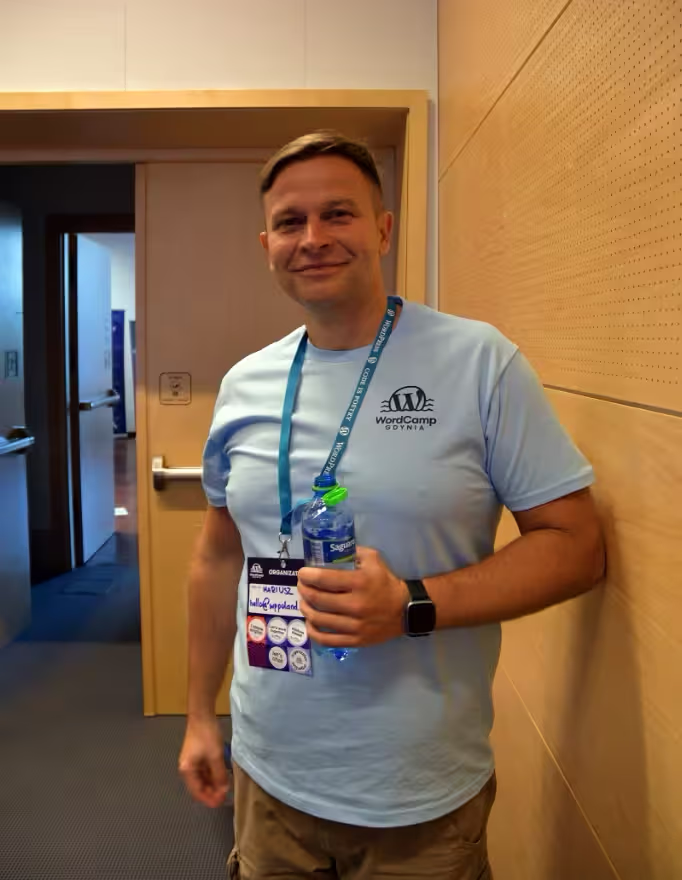
What is a WordPress developer? At WPPoland that engineer is Mariusz Szatkowski. The work is PHP, JavaScript (React for Gutenberg), MySQL and the WordPress core APIs: custom themes and plugins, Core Web Vitals, security hardening, third-party integrations. Patches land on Trac with tests; the arguments about those patches happen in Make WordPress Slack, not in a page-builder Facebook group. Distinct from someone who configures Divi, Elementor or Avada. I have been shipping, tuning and repairing WordPress sites and stores for nearly two decades. If the brief is already clear, service scope and pricing is below.
Key facts (short version)
A WordPress developer writes dedicated PHP 8.x and React (Gutenberg), ships custom FSE themes and plugins, wires CRM/ERP APIs, and builds WooCommerce stores under PSR-12 and WPCS. On this site that person is Mariusz Szatkowski at WPPoland.
A WordPress specialist handles the fire: failed updates, malware recovery, Core Web Vitals (LCP under 2.5 s), and Redis plus database scaling when traffic spikes.
Who: Mariusz Szatkowski, Senior WordPress developer with over 20 years of experience (WordPress since 2006). Based in Gdynia, serving clients across Europe, the United Kingdom, Germany, Norway, and North America.
What: Custom WordPress and WooCommerce, Headless CMS architectures, Core Web Vitals optimisation (90+ scores), PSR-12/WPCS code quality, multilingual sites, API integrations, and performance engineering.
Pricing: scope and budget are defined individually. Typical timeline: simple site 1-2 weeks, business site 3-6 weeks, WooCommerce store 6-10 weeks, enterprise scope 8-12+ weeks.
Who you are hiring
- Shipping commercial WordPress since 2006, before Gutenberg and the REST API
- Senior-led: the engineer at discovery is the engineer at the keyboard at week six
- No offshore handoff, no PM layer billed back to you
- WordCamp Europe organiser, WordPress Foundation Credits mentor
- Shopify Academy: CRO learning path plus Partner Marketing (Credly, 2025)
Shopify Academy credentials





WordPress developer skills 2026
A WordPress developer in 2026 combines proficiency in PHP 8.x, JavaScript (React), and database architecture, responsible for secure and scalable web solutions. The table below organises the stack by layer:
Broader stack work beyond WordPress (APIs, integrations, greenfield apps) is scoped as software developer work.
| Layer | Mandatory technologies | Complementary technologies |
|---|---|---|
| Backend | PHP 8.x (OOP, typed properties, enums), WordPress Core API, WooCommerce REST | Laravel, Symfony, Composer |
| Frontend | React, JavaScript ES6+, Gutenberg blocks, Full Site Editing, Tailwind | Next.js, Astro, Vue.js |
| Databases | MySQL / MariaDB, WP_Query optimisation, custom tables | Redis, PostgreSQL, ElasticSearch |
| DevOps | Git, Composer, NPM, CI/CD, Docker, staging + production | Cloudflare Workers, AWS, GCP |
| Security | WP hardening, OWASP Top 10, SQL Injection and XSS protection | WAF, CSP, security headers |
Sites maintained by a professional developer differ from page-builder assemblies primarily in technical debt, security exposure, and cost of ownership over a three-year horizon. The difference is between an engineering project and an assembly job.
Technical proof and open-source contributions
My open-source record and the behaviour of the systems I run:
- WordPress core contributor: patches with unit tests submitted to core via Trac across query classes, the REST API, and internationalisation (including #51811 -
sas an alias forsearchinWP_Term_Query, #43502 - reset postdata in the REST posts controller, #64986 - gettext in preview), plus general translation editor for Polish (1,400+ strings) credited in the WordPress 7.0 release (profiles.wordpress.org/motylanogha). - Published WordPress.org plugin: author of the “Polski for WooCommerce” plugin (Polish invoicing and compliance for WooCommerce), maintained under WPCS and PSR-12 coding standards.
- Open-source tools on GitHub: creator and maintainer of open-source integration bridges, including the
woocommerce-mcpserver adapter, a read-only Model Context Protocol server that exposes WooCommerce data to AI agents. - WordPress community organizer: organizer of WordCamp Gdynia (since 2015), co-organizer of WordCamp Poland (since 2016) and WordCamp Europe (since 2024), conference speaker, and WordPress Foundation Credits Mentor (since 2025).
- Solved technical edge cases: engineered solutions for complex enterprise bottlenecks, including multi-locale hybrid routing pipelines, real-time SQLite Content Layer synchronization adapters in Astro 5 managing over 2,800 content nodes, and custom inline stylesheet hash compilation generators supporting strict Content Security Policies (CSP) without build performance degradation.
- Performance and headless integrations: documented cases cutting server response time (TTFB) from about 1.8s to under 150ms via SQL and query refactoring and Redis caching, plus WordPress-to-CRM integrations (HubSpot, Salesforce) over WPGraphQL and the REST API for Astro/Next.js headless frontends, with Core Web Vitals measured before and after (Lighthouse CI, Cloudflare RUM).
WordPress developer code examples
The difference shows up in the code that ships to production. Four patterns that off-the-shelf plugins and page builders get wrong, covering security, performance, the API, and caching.
1. A secure custom post type: dedicated capabilities, nonce, sanitisation
Dedicated capabilities instead of the administrator role, a nonce on save, per-post permission checks, and input sanitisation kept separate from output escaping. The full WordPress security model, not a shortcut.
What this means for you: only the people who should be able to change a record can change it, and no outside page can trigger that write on their behalf. Without this chain, a single author login is enough to quietly rewrite data nobody keeps a separate backup of.
Show PHP code (44 lines)
declare( strict_types=1 );

add_action( 'init', 'wppl_register_projekt_meta' );
add_action( 'save_post_wppl_projekt', 'wppl_save_projekt_meta', 10, 2 );

// Meta with typing, sanitisation, and a capability-based auth_callback.
function wppl_register_projekt_meta(): void {
	register_post_meta(
		'wppl_projekt',
		'wppl_budzet_pln',
		array(
			'type'              => 'integer',
			'single'            => true,
			'show_in_rest'      => true,
			'sanitize_callback' => 'absint', // Integer, no negatives.
			'auth_callback'     => static function ( bool $allowed, string $meta_key, int $post_id ): bool {
				return current_user_can( 'edit_post', $post_id );
			},
		)
	);
}

// Saving meta with the full security chain.
function wppl_save_projekt_meta( int $post_id, WP_Post $post ): void {
	// 1. Nonce - CSRF protection.
	if ( ! isset( $_POST['wppl_budzet_nonce'] )
		|| ! wp_verify_nonce( sanitize_key( wp_unslash( $_POST['wppl_budzet_nonce'] ) ), 'wppl_save_budzet' )
	) {
		return;
	}
	// 2. Skip autosave and revisions.
	if ( ( defined( 'DOING_AUTOSAVE' ) && DOING_AUTOSAVE ) || wp_is_post_revision( $post_id ) ) {
		return;
	}
	// 3. Permission for the specific post, not the generic 'edit_posts'.
	if ( ! current_user_can( 'edit_post', $post_id ) ) {
		return;
	}
	// 4. Sanitise input before saving.
	$budzet = isset( $_POST['wppl_budzet_pln'] )
		? absint( wp_unslash( $_POST['wppl_budzet_pln'] ) )
		: 0;
	update_post_meta( $post_id, 'wppl_budzet_pln', $budzet );
}
The clicker: stores the data in a page-builder field with no dedicated capabilities or nonce, so any author (and often CSRF) can overwrite the value, and the data is frequently saved raw and echoed back without esc_attr().
2. An efficient WP_Query with no N+1 problem
Where N+1 comes from in WordPress, and how a single update_meta_cache() call after fetching the IDs eliminates it, instead of N separate database queries inside the loop.
What this means for you: a listing of fifty items hits the database a handful of times instead of dozens. Under real traffic that is the difference between a server that holds up during a campaign and one that falls over.
Show PHP code (31 lines)
function wppl_get_projekty( int $limit = 12 ): array {
	$query = new WP_Query(
		array(
			'post_type'              => 'wppl_projekt',
			'post_status'            => 'publish',
			'posts_per_page'         => $limit,
			'no_found_rows'          => true,  // No SQL_CALC_FOUND_ROWS - we do not count pagination.
			'fields'                 => 'ids', // Only IDs, not full objects.
			'update_post_term_cache' => false, // Taxonomies not needed here.
		)
	);

	$ids = $query->posts;
	if ( empty( $ids ) ) {
		return array();
	}

	// The key to avoiding N+1: prime meta for all IDs in a single query.
	update_meta_cache( 'post', $ids );

	$projekty = array();
	foreach ( $ids as $post_id ) {
		$projekty[] = array(
			'id'     => (int) $post_id,
			'tytul'  => get_the_title( $post_id ),
			'budzet' => (int) get_post_meta( $post_id, 'wppl_budzet_pln', true ), // Cache hit.
		);
	}

	return $projekty;
}
The clicker: the page-builder widget loops over full post objects and calls get_post_meta on every iteration, generating dozens of SQL queries per view, while the default SQL_CALC_FOUND_ROWS adds an expensive row count the page never even uses.
3. A REST API endpoint with a real permission_callback and schema
Per-object authorisation in permission_callback, declarative validation and sanitisation of arguments, and a formal schema describing the contract for API consumers.
What this means for you: a CRM or ERP integration does not hand your data to anyone who finds the URL, and it does not break the first time the vendor changes something on their side.
Show PHP code (25 lines)
add_action( 'rest_api_init', 'wppl_register_rest_routes' );

function wppl_register_rest_routes(): void {
	register_rest_route(
		'wppoland/v1',
		'/projekty/(?P<id>\d+)/budzet',
		array(
			'methods'             => WP_REST_Server::EDITABLE, // POST, PUT, PATCH.
			'callback'            => 'wppl_rest_update_budzet',
			// Real authorisation: permission for the SPECIFIC post.
			'permission_callback' => static function ( WP_REST_Request $request ): bool {
				return current_user_can( 'edit_post', (int) $request['id'] );
			},
			'args'                => array(
				'budzet' => array(
					'type'              => 'integer',
					'required'          => true,
					'minimum'           => 0,
					'sanitize_callback' => 'absint',
					'validate_callback' => 'rest_validate_request_arg',
				),
			),
		)
	);
}
The clicker: plugin forms often expose data through admin-ajax or a route with permission_callback set to __return_true, with no type validation or schema, which opens the door to unauthorised writes and breaks the predictability of integrations.
4. Cache invalidation via last_changed
WordPress core’s last_changed pattern: a single write invalidates a whole family of cache keys, with the correct distinction between the before_delete_post and deleted_post hooks.
What this means for you: after an edit the site shows the new version straight away, with nobody having to ask somebody else to clear a cache first.
Show PHP code (18 lines)
// Cache key based on the last_changed marker - one invalidation
// clears every variant (different $limit values) without deleting them one by one.
function wppl_projekty_cache_key( int $limit ): string {
	$last_changed = wp_cache_get_last_changed( 'wppl_projekty' );
	return sprintf( 'wppl_projekty_%d_%s', $limit, $last_changed );
}

add_action( 'save_post_wppl_projekt', 'wppl_flush_projekty_cache' );
add_action( 'before_delete_post', 'wppl_flush_projekty_cache' );

// We use before_delete_post because deleted_post fires AFTER the post is gone,
// when get_post_type() already returns false and the type cannot be checked.
function wppl_flush_projekty_cache( int $post_id ): void {
	if ( 'wppl_projekt' !== get_post_type( $post_id ) ) {
		return;
	}
	wp_cache_set_last_changed( 'wppl_projekty' ); // New marker = new keys.
}
The clicker: page-builder cache plugins either hold stale data until a manual purge or try to delete individual keys and miss variants; wiring invalidation to deleted_post instead of before_delete_post silently stops working, because the post type can no longer be checked.
Four questions worth putting to anyone you shortlist
Ask how they check permissions before writing data, what a listing page costs in database queries, how they expose an integration without opening it to everyone, and what happens to their work when WordPress updates. Ask us too. Send the address of your current site and you will get those four answers about that specific site, not a capability deck. Scope and pricing come later and are individual.
Get the four answersHow a WordPress developer differs from an implementer
The main difference is the approach to code: the implementer relies on ready-made plugins and themes, while the developer builds lightweight, dedicated solutions that minimise technical debt. Practically anyone who rents cheap hosting can click through a WordPress auto-installer, but that is administration, not development. There is even a common belief in the community that “even a middle schooler can set up a website”, and for a brochure page that is true. It stops being true the moment the site has to carry a real WooCommerce checkout or survive a traffic spike.
The implementer (clicker)
Relies on mass-uploading heavy, popular templates (themes). They make up for missing functionality by installing dozens of external plugins and using resource-heavy page builders like Elementor or Divi. The client receives a website that weighs gigabytes, loads at a snail’s pace, and is exposed to hacker attacks.
The WordPress developer
Relies on craftsmanship and clean code. Uses WP as a flexible database frame (Core API). Builds the infrastructure from scratch, minimises plugins, and codes business logic in PHP with blocks in React. The difference is typically LCP 4 s+ and shaky CLS in the builder version versus LCP under 2.5 s in dedicated code, which translates directly into conversion.
The autonomous future: UCP Agent Mesh
An interactive demo of the Universal Commerce Protocol agent mesh.
AI agents transact autonomously without intermediaries, with sub-1ms latency.
Every WordPress site becomes a node in the global UCP commerce network.
Automatic settlements & escrow - zero manual work, zero risk of unauthorized access.
Real-world use cases
AI agent picks the cheapest payment gateway per transaction, in real-time.
AI negotiates pricing and delivery terms with wholesalers based on live stock data.
Sell individual articles, courses, or PDFs for fractions of a cent - no subscription needed.
Funds held in smart contract - auto-released once buyer confirms delivery.
Product prices updated every minute based on demand, competitors, and live costs.
Smart contract pays affiliate commission within milliseconds of a confirmed purchase.
UCP Node v4.0
Core Vitality
Mesh Sync
Protocol Controls
"The Universal Commerce Protocol enables AI agents to transact autonomously, removing friction from the global economy."
What is a WordPress developer
As a Senior Web Developer I build custom themes and plugins, integrate APIs with CRM and ERP systems, run security audits and optimise Core Web Vitals. I write code compliant with PSR-12 and WPCS, minimise the number of plugins, and deliver architectures that survive production traffic and a security audit.
Custom WordPress themes
Dedicated block themes (FSE) from scratch, compliant with PSR-12 and WPCS, fully responsive, accessible (WCAG 2.2 AA) and optimised for Core Web Vitals.
WooCommerce stores
Scalable e-commerce: payment integrations (Stripe, PayPal, Klarna, Mollie), logistics (DHL, UPS, local carriers), B2B pricing tiers, multi-currency and multilingual stores.
Dedicated plugins and legacy code
When a ready tool does not meet requirements, I program a tailor-made business plugin. I also analyse and repair inherited code.
Performance and Core Web Vitals
Server-side caching (Redis), CDN, WebP/AVIF compression, database and query optimisation. PageSpeed 90+ on mobile, LCP under 2.5 s.
API integrations and headless
WordPress as an operational hub exchanging data with CRM (HubSpot, Salesforce), ERP, and invoicing. Frontend in Next.js or Astro, WP and GraphQL on the backend.
Security audits and hardening
Blocking critical vulnerabilities, testing WP_Query requests, protection against XSS, SQL Injection and DDoS, security headers and a backup strategy.
When WordPress itself is not enough, or the application needs super-fast client-server logic, I use a Headless architecture: the frontend in Next.js or Astro, with WordPress and GraphQL as the operational CMS panel for editors on the backend. We then serve that dynamic content statically from a CDN (TTFB under 150 ms), keeping the full convenience of editing content in the WordPress panel.

How much a WordPress developer earns
When AI shows up in hiring, real code still decides the hire: WordPress AI hiring and real code, October 2026.
In 2026, a senior WordPress developer in the European market earns roughly 4 800 to 7 500 EUR/month on a B2B contract, depending on headless knowledge and e-commerce experience. The table below organises the ranges by level and engagement model:
| Level | Experience | Salary (EUR/month) | B2B day rate | Hourly rate |
|---|---|---|---|---|
| Junior | 0-2 years | 1 800 - 2 800 | 200 - 320 | 25 - 40 |
| Mid | 2-5 years | 3 000 - 4 800 | 350 - 550 | 45 - 70 |
| Senior | 5+ years | 4 800 - 7 500 | 550 - 850 | 70 - 110 |
| Expert / Lead | 8+ years | 7 000 - 11 000 | 800 - 1 300 | 100 - 160 |
Ranges reflect senior contractors in Poland, Czechia, and Romania working remotely with EU and US clients. Nordic and DACH market rates run 30-60% higher. Three billing models are common: hourly (typical for freelancers), day rate, and fixed-price project quotes for a defined scope. The price rises with integration complexity, performance requirements, and the number of language versions.
Total cost of a WordPress site over three years
When a client asks “how much does a WordPress developer cost”, they are really asking about the total cost of owning the site over the next three years, not the rate on the first invoice. The cheapest offer from a classifieds portal almost always generates hidden technical debt that you pay for later, usually at the worst moment: during a sales campaign or a GDPR audit.
| Area | Cheapest offer (clicker) | Individual quote (senior) |
|---|---|---|
| Starting point | ready theme + Elementor/Divi, dozens of plugins | dedicated block theme (FSE), minimum plugins |
| Core Web Vitals | LCP often above 4 s, INP and CLS out of range | LCP below 2.5 s, INP below 200 ms, CLS near zero |
| Security | no hardening, attacks via outdated plugins | OWASP audit, security headers, WP_Query control |
| Integrations | no payment, shipping, or proper invoicing flows | local payments and WooCommerce logistics implemented |
| 3-year cost | rebuild from scratch after a year, same scope twice | one solid build with room to extend |
I keep seeing the same pattern when a project reaches me after someone else built it. One WooCommerce store had crept to 30+ plugins and a 1.8 s TTFB, and its checkout quietly dropped payments at peak hours. Another was an Elementor build that no one could submit for a WCAG 2.2 audit until every template had been rewritten. Rescuing each one cost more than a proper build would have from the start, because the work was paid for twice: once for the original, once for the rebuild.
WordPress freelancer or agency
The choice depends on project scale: a freelancer offers direct contact and lower cost on focused tasks, while an agency provides broader support for large rollouts. Agencies that already sell WordPress and need overflow under their own brand use the agency development desk.
| Criterion | Freelancer / solo developer | Agency |
|---|---|---|
| Best fit | dedicated plugin, audit, refactor, migration | large rollout with design, copy, marketing |
| Communication | direct with the person writing the code | through a project manager |
| Hourly rate | 70-110 EUR/h (senior) | 100-180 EUR/h (senior) |
| Overhead | none (no PM, sales, leadership layer) | 30-50% mark-up |
| Bus factor | higher risk (single person) | low (back-up capacity) |
| Decision speed | fast technical calls | slower (approval chains) |
In practice many businesses pick a third path: a senior freelancer leading the project, with trusted specialists (designer, copywriter) brought in for specific phases. You get technical depth and flexibility without paying for full agency overhead. That is the model I work in most often.
How to become a WordPress developer
Learning the WordPress basics takes 3 to 6 months, but reaching the level of a professional developer requires at least 2 years of hands-on work with PHP, databases, and modern frontend tooling. Installing a theme and configuring plugins is administration, not development.
A realistic path covers four stages: junior (3-6 months) means HTML5, CSS, JavaScript fundamentals, and the WordPress loop; mid (6-18 months) requires PHP 8.x, hooks and filters, the REST API, and React for Gutenberg blocks; senior (18-36 months) is application architecture, headless, OOP and SOLID patterns, integrations, performance, and security; expert (3+ years) is audits, enterprise projects, and contributions to WordPress core.
The fastest path to competence is real client work, not tutorials in isolation. The WordPress Developer Handbook is a better starting point than any bootcamp, but the real lift comes from reading core trac tickets, watching how senior contributors argue patch trade-offs in Make WordPress Slack and the Advanced WordPress group, and shipping work that survives a Black Friday traffic spike. I learned WP_Query not from the documentation, but from reading what Otto and Mark Jaquith answered on trac.wordpress.org back in 2009. None of that is on a curriculum, and that is the point.
Hire a WordPress developer
Dutch searches for WordPress ontwikkelaar or gecertificeerde wordpress ontwikkelaar map to the same hire brief: PHP, WooCommerce, written scope before code.
Looking for a WordPress developer for hire? You work with me directly: a senior engineer, written scope before coding starts, staging for review, and no junior handoff mid-project. The quote follows that agreed scope. With 20+ years of practice I ship performance-focused WordPress work for companies across Europe. I also run WooCommerce stores as a dedicated WooCommerce developer.
Developer support makes sense once the project moves beyond a simple brochure page. The most common cases are:
- you need custom integrations with CRM, ERP, payments, or internal tools,
- WooCommerce is slow, unstable, or difficult to scale,
- you want to rebuild a site trapped in Elementor, Divi, or another heavy builder,
- legacy code needs to be repaired and brought under control,
- you are planning a migration, multilingual rollout, member area, or headless setup.
Cooperation process
Engagement follows fixed written steps so you know what happens next:
- Discovery and planning - requirements gathering, technical specification, realistic milestones, and a transparent quote with no hidden costs.
- Layout implementation - you mark which elements belong on each view in a spreadsheet template I send; graphic design and mockups stay on your side; I code the responsive theme from that layout.
- Development - sprints with progress updates, version control (Git), code reviews, and unit, integration, and acceptance testing.
- Launch and support - zero-downtime deployment, final Core Web Vitals check, SEO setup, and 30-90 days of post-launch support.
Industries I serve
I have experience with WordPress solutions across many industries: e-commerce (WooCommerce stores, conversion optimisation), healthcare (patient portals, appointment scheduling, secure data), education (LMS platforms like LearnDash and TutorLMS), real estate (listings, search, map integrations), finance (secure portals, calculators, compliance), and media and publishing (content-heavy sites, subscriptions).
Types of WordPress projects and timelines
| Service type | Price | Timeline | Best for | Key features |
|---|---|---|---|---|
| Simple website | individual quote | 1-2 weeks | small businesses, portfolios | responsive design, basic SEO, 5-10 pages |
| Business website | individual quote | 3-6 weeks | growing companies | custom features, advanced SEO, 15-30 pages |
| E-commerce store | individual quote | 6-10 weeks | online retailers | WooCommerce, payments, inventory management |
| Enterprise solution | individual quote | 8-12+ weeks | large organisations | custom architecture, API integrations, multisite |
| Maintenance plan | individual quote | ongoing | all clients | updates, security monitoring, backups |
Recommendations and reviews of working with WPPoland
Selected recommendations from WordPress, WordCamp and e-commerce leaders - with a focus on delivery on time, technical depth, and a business-driven approach to WordPress development.

Karolina Czapla
Marketing Strategist, Performance & Digital Strategy
“Working with Mariusz on WordCamp has shown me how rare it is to combine deep technical skill with genuine leadership. He plans, coordinates and delivers with precision, while giving the team space to grow and contribute....”
Co‑organiser, WordCamp Gdynia 2024 & 2025

Anna Kamińska
Talent Acquisition Specialist / HR People Partner
“Mariusz's portfolio speaks for itself. It reflects his precision, versatility and sense of responsibility. You can trust him to guide a project from idea to delivery, keep stakeholders informed and make sure things are d...”
Worked on the same team

Sarah‑Luisa Kwolek
IT Project Management & Product Owner, Web/App
“For over two years I could always rely on Mariusz to handle WordPress tasks calmly and professionally, from styling and templating to third‑party integrations. He brings steadiness to the team and keeps the frontend side...”
Mariusz was her client for WordPress work

Argert Boja
Senior Full‑Stack Developer
“Mariusz is the teammate everyone hopes for: strong full‑stack WordPress skills, clear explanations and a positive attitude even under pressure. He moves easily between custom plugins, performance work and Gutenberg layou...”
Worked alongside Mariusz on WordPress projects

Varun Patil
Growth & CRM Lead
“Beyond development, Mariusz understands SEO, analytics and growth. He talks directly with stakeholders, asks the right questions and ships solutions that move business metrics, from AMP to tracking to performance.”
Managed Mariusz on growth initiatives

Rafał Osiński
Founder @ EasyTrips.pl, Senior WordPress Dev
“I've known Mariusz through the WordPress community for many years. He's reliable, deeply involved and consistently shows up, at meetups, WordCamps and in projects. If you care about long‑term collaboration and someone wh...”
WordPress community co‑organiser

Daniel Blossfeld
Process Optimization & Digitalization Consultant
“I had the pleasure of working with Mariusz for almost three years. During that time, his WordPress development skills proved invaluable across a range of projects, from website builds to online member areas and even Shop...”
Mariusz was his client for WordPress work

Natalie Wiszczor
CRM & E-Mail Marketing Manager
“I had the great pleasure of working with Mariusz for over 4 years in the technical field. During this time, he proved to be a competent and reliable colleague. What stood out in particular was his friendly nature and his...”
Worked with Mariusz on different teams

Mark Chalklen
Head of Design & Build at Itineris Limited
“Mariusz is a great member of the team, always happy to get stuck into any task and happy to learn new things. A great communicator and all round nice guy to work with. Hard to beat on our weekly Strava leader board thoug...”
Managed Mariusz directly

Jessica Di Pasquale
Leading SEO initiatives with data-driven growth strategies.
“Mariusz is a very skilled, patient and expert guy. Always ready to help and to fix errors, I really appreciated working with him. He is such a great colleague!”
Managed Mariusz directly

Biki John
Content Marketing Aficionado & SEO Enthusiast
“It was great to work with Mariusz. I really appreciated his extensive knowledge of WordPress and how that came in handy whenever I needed support navigating the CMS. I commend Mariusz totally for his patience, good natur...”
Worked with Mariusz on different teams

Rafal Borowiec
Software Developer, Consultant, Manager and Lecturer
“I had an opportunity to work with Mariusz for 7 months. He excels in technical optimization for search engines (SEO). Mariusz has also strong expertise in AMP development, GTM, and GA. Mariusz feels very comfortable with...”
Managed Mariusz directly

Belinda Koch
Web-Tracking Analyst at TUI
“Mariusz is a great person to work with. He is extremely motivated to learn new things and share his knowledge, and is very knowledgeable on a wide range of topics. We worked together on digital analytics and tracking top...”
Worked with Mariusz on digital analytics and tracking topics

Ali Nezamolmaleki
Growth, SEO, Analytical thinking, AMP
“Mariusz is an extremely talented person in his field of work. He is always capable of giving a new perspective to solve problems and to think out of the box in situations where everything seems to be locked. Working with...”
Worked with Mariusz on the same team

Karol Jakubcewicz
Front-end / JavaScript Developer
“Mariusz is an incredibly experienced WordPress developer and SEO/SEM specialist I've had the pleasure to work with for almost two years. As a pilot of the team responsible for AirHelp's website development, he's been one...”
Worked with Mariusz on the same team

Paweł Lewczuk
Front-end developer, WordPress developer
“I collaborated with Mariusz on several projects and our cooperation was always exemplary. I believe there are many more joint projects ahead of us. Highly recommended!”
Mariusz was Paweł's client

Przemek Wroblewski
Software Developer with 20+ years of experience
“I found Mariusz as someone with great expertise and profound knowledge of frontend solutions. Powerful, knowledgeable and accountable WordPress developer. Has an easiness to build interpersonal relations with others. He ...”
Worked with Mariusz on different teams
WordPress in numbers
WordPress (as the most popular open-source CMS, built on PHP and MySQL) sets the standard in many markets and has evolved from a blogging platform into a full-fledged framework, used in Headless CMS architectures and in AI implementation for companies.
Global market significance of WordPress (2025/2026)
Market data clearly shows why WordPress developer skills are so highly demanded globally.
Should you build a WordPress site with a page builder
A page builder can be useful at the start, but on a demanding project it quickly becomes a constraint. The site gets heavy, hard to maintain, and dependent on more add-ons, while performance and SEO drop. A dedicated implementation works differently: the code matches real needs, there is no redundant intermediate layer, and the site is easier to extend while staying fast, secure, and tidy in the editorial panel. If WordPress is to run stably today and still be extensible in a year or two, a well-designed build beats another layer of workarounds.
Describe your WordPress project
The best start is a short brief of your requirements, current site state, and the problem to solve. On that basis I will prepare a sensible scope and offer. Every quote is individual.
Send the brief, reply within one business dayRelated services
- WooCommerce development - professional e-commerce solutions
- WordPress maintenance - ongoing support and security
- Performance optimization - Core Web Vitals
- WPPoland rebuild - public process and architecture case study
Regional pages
- WordPress Developer Warsaw
- WordPress Developer Krakow
- WordPress Developer Gdansk
- WordPress Developer Poznan
- WordPress Developer Wroclaw
- WordPress Developer Lodz
- WordPress Developer Berlin
- WordPress Developer London
- WordPress Developer Dublin
About the author. Mariusz Szatkowski - Senior WordPress Developer with experience in the IT industry since 2006. Founder of the WPPoland brand (2007), active member of the WordCamp Poland community, specialist in performance optimisation (Core Web Vitals) and CMS security. Delivers custom solutions for e-commerce and corporate publishing platforms.
Disclaimer. Content is based on 2026 market data and the author’s professional practice. Salary information is indicative and may vary depending on region and project requirements.
Sources. WordPress CMS market share data comes from W3Techs and BuiltWith (2026) reports. Core Web Vitals standards align with current Google Search Console guidelines.
Last updated: 25 June 2026.